
When it comes to building a dual GPU setup, choosing the right case is essential for maintaining ideal cooling and performance. You need a case that not only supports multiple GPUs but also enhances airflow to prevent overheating. With so many options available, it’s important to know which models stand out regarding design and functionality. Let’s explore the top contenders that could elevate your gaming experience.
NZXT H6 Flow Compact Mid-Tower Airflow Case (CC-H61FW-01)

If you’re a gamer or content creator looking for a compact yet powerful case for your dual GPU setup, the NZXT H6 Flow Compact Mid-Tower Airflow Case (CC-H61FW-01) is an excellent choice. Its sleek design features wraparound glass panels that showcase your components beautifully. The dual-chamber layout enhances thermal performance while keeping aesthetics sharp. With three pre-installed 120mm fans and optimized airflow panels, you’ll enjoy superior cooling efficiency. Plus, the intuitive cable management system makes building a clean setup easy. Overall, the NZXT H6 Flow is built to keep your system cool, efficient, and looking great.
Best For: Gamers and content creators seeking a compact, stylish case with excellent cooling performance for dual GPU setups.
Pros:
- Stylish wraparound glass panels provide a clear view of internal components.
- Efficient dual-chamber design enhances thermal performance and aesthetics.
- Comes with three pre-installed 120mm fans for optimal cooling out of the box.
Cons:
- Limited space may restrict larger GPU or cooling solutions.
- Additional fans may need to be purchased for maximum airflow customization.
- The compact design may complicate upgrades or expansions.
NZXT H9 Flow Large Dual-Chamber ATX Mid-Tower PC Case

The NZXT H9 Flow Large Dual-Chamber ATX Mid-Tower PC Case is an ideal choice for gamers and content creators who prioritize high-performance cooling in dual GPU setups. Weighing 27.5 pounds and measuring 20.08 x 19.29 x 12.6 inches, this case features a unique dual-chamber design for improved thermal performance and cable management. With optimized airflow through perforated steel panels and pre-installed fans, it keeps your components cool. It supports up to nine fans and accommodates large radiators, ensuring your rig runs smoothly. Plus, the panoramic tempered glass paneling beautifully showcases your build, making it a standout choice.
Best For: Gamers and content creators seeking a high-performance PC case with excellent cooling capabilities and aesthetic appeal.
Pros:
- Dual-chamber design enhances thermal performance and simplifies cable management.
- Optimized airflow with pre-installed fans and perforated steel panels for efficient cooling.
- Panoramic tempered glass paneling provides a stunning showcase of your build.
Cons:
- Heavier weight at 27.5 pounds may be cumbersome for frequent transport.
- Limited color options available, as it only comes in white.
- Potentially higher price point compared to basic PC cases on the market.
MONTECH XR-B ATX Mid-Tower PC Gaming Case

For serious gamers and professionals looking to optimize their dual GPU setups, the MONTECH XR-B ATX Mid-Tower PC Gaming Case stands out with its exceptional cooling capabilities. Its compact design supports high-end GPUs, like the 4090 series, while accommodating a 360mm radiator for superior thermal management. With three pre-installed ARGB PWM fans and support for up to nine, you’ll enjoy effective airflow. The full-view dual tempered glass panel showcases your setup, while the wood-grain I/O interface adds a unique touch. Plus, high-quality filters keep dust at bay, ensuring your system runs cool and clean during intense gaming sessions.
Best For: Serious gamers and professionals seeking a high-performance mid-tower case with exceptional cooling capabilities and aesthetic appeal.
Pros:
- Superior cooling performance with three pre-installed ARGB PWM fans and the ability to support up to nine fans.
- Compact design that accommodates high-end GPUs and a 360mm radiator for effective thermal management.
- Stylish aesthetics featuring a full-view dual tempered glass panel and a unique wood-grain I/O interface.
Cons:
- Limited color options as it only comes in black or white finishes.
- May require additional fans for optimal cooling in high-performance setups, which could increase overall cost.
- Heavier than some other mid-tower cases, weighing in at 14.46 pounds, which might affect portability.
NZXT H9 Flow RGB+ Mid-Tower PC Case

Designed with serious gamers and content creators in mind, the NZXT H9 Flow RGB+ Mid-Tower PC Case excels in providing ideal airflow for dual GPU setups. Its dual-chamber design separates components from the PSU and drives, enhancing thermal performance. You’ll appreciate the panoramic tempered glass panel, showcasing your build beautifully. With optimized airflow from perforated steel panels and support for up to nine fans, cooling’s a breeze. Plus, it accommodates large radiators and high-end GPUs. Rated 4.7 out of 5 stars, this case is a popular choice for gamers seeking performance and aesthetics. Enjoy a full refund within 30 days if needed!
Best For: Serious gamers and content creators looking for a high-performance mid-tower case with excellent airflow and aesthetics.
Pros:
- Dual-chamber design enhances thermal performance and cable management.
- Panoramic tempered glass panel showcases your build beautifully.
- Supports up to nine fans and large radiators for optimal cooling.
Cons:
- Weight may be an issue for those looking for a lightweight case.
- Limited USB ports with only 2 x USB 3.0 available.
- Price may be higher compared to entry-level cases.
NZXT H9 Flow RGB Mid-Tower PC Case
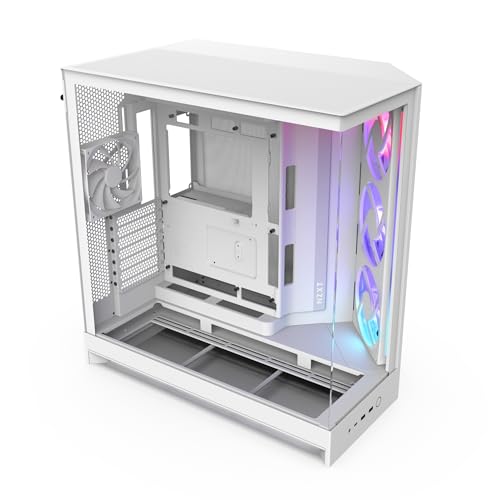
With its dual-chamber design, the NZXT H9 Flow RGB Mid-Tower PC Case stands out as an ideal choice for gamers and content creators using dual GPU setups. This case features a panoramic view through seamless tempered glass, showcasing your build beautifully. Optimized airflow with perforated steel panels keeps your components cool, while pre-installed fans and the capacity for ten additional ones guarantee efficient cooling. With ample space for a 420mm radiator and high-end graphics cards, plus excellent cable management options, you’ll enjoy both performance and aesthetics. The H9 Flow is built for those who demand the best in their gaming rig.
Best For: Gamers and content creators looking for a stylish and efficient mid-tower case that supports dual GPU setups.
Pros:
- Excellent airflow design with perforated steel panels and pre-installed fans for optimal cooling performance.
- Spacious dual-chamber layout for improved cable management and organization of components.
- Panoramic tempered glass paneling provides a stunning display of your build.
Cons:
- Limited out-of-the-box fan options may require additional purchases for maximum cooling.
- The dual-chamber design might limit compatibility with some non-standard motherboards.
- The large size may not fit well in smaller spaces or setups.
MONTECH King 45 ATX PC Case

The MONTECH King 45 ATX PC Case stands out as an exceptional choice for gamers and content creators who demand both aesthetics and performance from their setups. Its curved tempered glass panels beautifully showcase your high-end components, while the compact dual-chamber design keeps everything organized. With optimized chimney airflow and support for top-mounted 360 mm radiators, cooling is effective even under heavy loads. You’ll appreciate the spacious interior that accommodates oversized GPUs and guarantees compatibility with next-gen components. Built for durability, this case is engineered for high-performance systems and custom loop cooling, making it a reliable addition to your rig.
Best For: Gamers and content creators seeking a stylish and high-performance PC case that supports advanced cooling solutions.
Pros:
- Curved tempered glass panels enhance the aesthetic appeal while showcasing high-end components.
- Optimized chimney airflow design ensures effective cooling, even under heavy loads.
- Spacious interior supports oversized GPUs and next-gen components, providing flexibility for upgrades.
Cons:
- Compact design may limit airflow for certain configurations if not planned properly.
- The premium materials might come at a higher price point compared to basic cases.
- Installation of custom loop cooling can be complex and may require additional tools or experience.
CORSAIR AIR 5400 RS-R ARGB Mid-Tower PC Case

For gamers and content creators looking to harness the power of dual GPU setups, the CORSAIR AIR 5400 RS-R ARGB Mid-Tower PC Case stands out with its innovative triple-chamber design. This case isolates the CPU, GPU, and PSU, enhancing cooling performance. You’ll appreciate the front chamber’s 360mm radiator support, ensuring your CPU stays cool without heat interference. The central chamber promotes vertical airflow, efficiently exhausting hot air. Plus, the dedicated PSU chamber optimizes airflow with its own intake and exhaust. With pre-installed ARGB fans and an airflow duct system, your build will run cool and quiet, maximizing performance.
Best For: Gamers and content creators seeking an efficient and stylish mid-tower case for high-performance dual GPU setups.
Pros:
- Innovative triple-chamber design enhances cooling performance by isolating CPU, GPU, and PSU.
- 360mm radiator support in the front chamber ensures optimal CPU cooling without interference from other components.
- Pre-installed ARGB fans and airflow duct system provide both aesthetic appeal and improved cooling efficiency.
Cons:
- Limited space for additional cooling options may restrict customization for advanced users.
- Weight may be higher than other mid-tower cases, making it less portable.
- Price point may be on the higher side for budget-conscious consumers.
MUSETEX ATX PC Case with 7 PWM ARGB Fans

If you’re looking to maximize cooling efficiency in a dual GPU setup, the MUSETEX K2 ATX PC Case stands out with its impressive seven pre-installed PWM ARGB fans. This mid-tower case features an innovative air duct design, ensuring effective heat dissipation. You’ll appreciate the dual tempered glass panels that showcase your components while maintaining a clean aesthetic. With expandable fan support and customizable lighting via motherboard software, you can optimize cooling performance effortlessly. Plus, the ample connectivity options enhance user experience, making it a top choice for gamers who value performance and style.
Best For: Gamers and PC builders who prioritize cooling efficiency and aesthetic appeal in their setups.
Pros:
- Seven pre-installed PWM ARGB fans provide excellent cooling performance and customizable lighting effects.
- 270° panoramic dual tempered glass design enhances visibility of components while maintaining a sleek look.
- Ample connectivity options including Type-C and USB 3.0 ports for convenient access.
Cons:
- Weight of 15 pounds may make it less portable compared to lighter cases.
- Limited to a mid-tower size, which may restrict some users in terms of component space.
- Some users may find the installation process complex if they are not familiar with PC building.
darkFlash Full-Tower ATX Gaming PC Case (DY470)

Looking for a case that can handle your dual GPU setup while maintaining optimal airflow? The darkFlash Full-Tower ATX Gaming PC Case (DY470) is perfect for you. Its unique angled glass design showcases your components beautifully, while the dual-chamber layout guarantees maximum airflow and accommodates large GPUs and dual 360mm radiators. With excellent cooling performance and a bottom dust filter, your setup stays clean and efficient. Cable management is a breeze with included Velcro straps, and the back cover keeps everything tidy. Plus, enjoy a 1-year guarantee for peace of mind. It’s the ideal choice for gamers and creators alike!
Best For: Gamers and content creators seeking a spacious and aesthetically appealing PC case with excellent airflow and cable management features.
Pros:
- Unique angled glass design enhances aesthetic appeal and visibility of components.
- Dual-chamber layout supports vertical GPU mounting and allows for optimal airflow.
- Excellent cooling performance with space for large GPUs and dual 360mm radiators.
Cons:
- Full-tower size may be too large for users with limited space.
- Premium materials may contribute to a higher price point compared to standard cases.
- The complexity of cable management may be overwhelming for beginners.
Antec C8 Full-Tower E-ATX PC Case

The Antec C8 Full-Tower E-ATX PC Case stands out as an excellent choice for gamers and content creators who want to maximize airflow in dual GPU setups. Its dual-chamber design enhances cooling efficiency, while the full-view panels showcase your components beautifully. You’ll appreciate the tool-less design, making upgrades a breeze. With support for multiple 140mm and 160mm fans, plus thick 360mm radiators, you can guarantee peak cooling. The full cut-out at the bottom allows for interchangeable fan brackets, accommodating your needs. Plus, the Type-C port adds modern connectivity. Just remember, fans aren’t included, so you’ll need to grab those separately.
Best For: Gamers and content creators seeking a high airflow solution for dual GPU setups.
Pros:
- Dual-chamber design enhances cooling efficiency and organization.
- Supports thick 360mm radiators for optimal cooling performance.
- Tool-less design simplifies upgrades and component installation.
Cons:
- Fans not included, requiring additional purchases for complete setup.
- Full-tower size may not fit in smaller spaces or setups.
- Limited color options may not appeal to all aesthetic preferences.
Factors to Consider When Choosing an Airflow Case for Dual GPU
When picking an airflow case for your dual GPU setup, you’ll want to take into account several key factors. Think about the cooling system efficiency, space for your GPUs, and how you’ll manage cables. Don’t forget to check radiator compatibility and the overall design to verify it fits your style.
Cooling System Efficiency
Choosing an airflow case for dual GPU setups requires careful consideration of the cooling system’s efficiency, especially since inadequate cooling can lead to performance issues. Look for cases with multiple pre-installed fans and support for additional installations to guarantee ideal airflow. Perforated panels and optimized airflow pathways are essential, as they help cool air enter and hot air exit efficiently. Pay attention to fan configuration; utilizing front-to-back and bottom-to-top airflow strategies can dramatically enhance cooling performance. Additionally, consider cases that support large radiators, like 360mm, for liquid cooling solutions during intensive workloads. Finally, effective dust filtration systems are vital to prevent dust buildup, which can impede cooling and lead to overheating over time.
Space for Dual GPUs
Space plays an essential role in guaranteeing dual GPUs operate efficiently within your airflow case. When selecting a case, make certain there’s enough clearance for both graphics cards, typically around 410mm or more for high-end models. Opt for a dual-chamber design; it separates the GPUs from other heat-generating components, enhancing airflow and cooling. You might also want to take into account cases that support vertical GPU mounting. This not only improves airflow but also looks great while giving more space between GPUs and other parts. Additionally, check for adequate fan support, aiming for cases with room for multiple 120mm or 140mm fans, and guarantee the case can accommodate larger radiators, up to 360mm, for improved cooling efficiency.
Cable Management Solutions
Efficient airflow isn’t just about the components; it also hinges on how well you manage your cables. When choosing an airflow case for your dual GPU setup, look for effective management solutions like wide channels, built-in Velcro straps, and tie-down points. Dual-chamber designs can separate power supplies and drives from main hardware, enhancing both cooling and organization. Many cases come with pre-installed features that keep cables tidy, preventing them from blocking fans and airflow. Consider back-connect compatibility for a cable-free look, which reduces visible clutter. Finally, opting for a toolless design simplifies installation and makes rearranging cables a breeze. Good cable management will not only improve aesthetics but also maximize your system’s performance.
Radiator Compatibility Options
When setting up a dual GPU system, radiator compatibility is an important factor that can make or break your cooling efficiency. You’ll want to verify your case can support large radiators, ideally a 360mm, to handle the heat generated by high-performance GPUs. Flexibility is key, so look for cases that allow radiator placements at the top, front, and side for ideal airflow. Compatibility with radiator thickness is also vital; cases accommodating 30mm to 60mm thick radiators let you choose between slim or high-performance options. Additionally, consider how radiator placement affects airflow, as a dual-chamber layout can help separate heat sources for better cooling. Finally, dedicated mounting options simplify installation and enhance airflow alignment with fans.
Design and Aesthetics
After ensuring your case can handle the necessary cooling components, it’s time to think about design and aesthetics. A dual-chamber design can enhance thermal performance by keeping high-heat components separate from power supplies and drives. Look for seamless, wraparound tempered glass panels that provide a panoramic view of your hardware, making customization easier. Airflow-optimized perforation patterns in panels greatly improve cooling efficiency, ensuring better air circulation. Don’t forget the impact of RGB lighting; it enhances visual appeal while indicating system status and temperature. Finally, incorporate effective cable management solutions like Velcro straps and wide channels to maintain a cleaner aesthetic, improving airflow by reducing clutter. Choose wisely to blend style with function seamlessly.