
A good colorist’s monitor should help you make repeatable decisions—not just show an impressive image. The right choice depends on your delivery format, calibration workflow, viewing environment, and whether the display is for critical grading or day-to-day editing.
These 10 options span affordable SDR workspaces, high-resolution Mac-friendly displays, and more ambitious HDR monitors. Here’s how to narrow the field without paying for capabilities you won’t use.
Best 10 Reference Monitor for Colorists Picks for 2026
Best for Bright HDR Grading

- 2,304-zone 4K Mini-LED
- 1,000-nit sustained full-screen brightness
- Built-in motorized colorimeter
Best For: Bright HDR grading and repeatable calibration
Best for Rec. 709 Editing

- 32-inch 4K IPS workspace
- 100% Rec. 709 and sRGB
- 100W single-cable USB-C
Best For: Large-screen SDR and Rec. 709 editing
Best for OLED Contrast

- 31.5-inch 4K QD-OLED
- 99% DCI-P3; Delta E below 1
- Dolby Vision, HDR10, and HLG
Best For: Wide-gamut grading with OLED contrast
Best Compact Mac Desk Setup

- Compact 24-inch 4K IPS
- 98% DCI-P3 coverage
- Thunderbolt 4 with 100W charging
Best For: Space-conscious Mac editing setups
Best Budget SDR Pick

- 100% sRGB and Rec. 709
- Factory-calibrated; Delta E < 2
- 27-inch 1440p IPS panel
Best For: Calibrated SDR editing on a 1440p desktop display
Best 4K Video Workflow

- 32-inch 4K IPS display
- 100% Rec. 709; 95% P3
- 65W USB-C and ICCsync
Best For: 4K video editing with Mac-oriented workflow tools
Best HDR-Focused Option

- 32-inch 4K mini-LED display
- 1,000-nit peak; HDR10 and HLG
- Included X-rite i1 calibrator
Best For: 4K HDR work with included calibration hardware
Best for 6K Mac Workflows

- 31.5-inch 6K IPS display
- 98% DCI-P3; factory Delta E < 2
- Dual Thunderbolt 4 with up to 96W charging
Best For: Mac-based colorists seeking a spacious 6K editing display
Best Compact Wide-Gamut Pick

- 27-inch 4K IPS display
- 99% DCI-P3 and 99% Adobe RGB
- USB-C video and up to 96W charging
Best For: Mixed photo and video workflows on a 27-inch desk setup
Best for Built-In Calibration
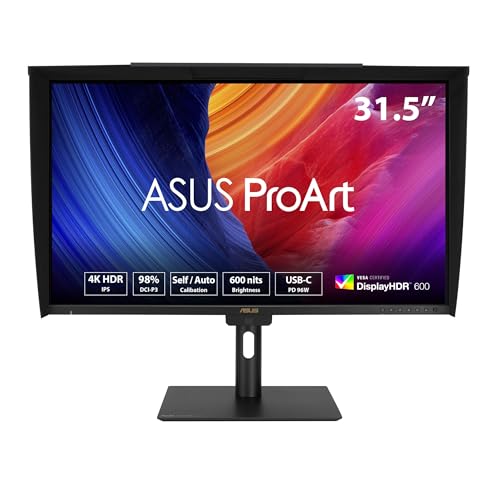
- 31.5-inch 4K IPS display
- Built-in colorimeter; self/auto calibration
- 98% DCI-P3 and stated Delta E < 1
Best For: Colorists prioritizing ongoing calibration on a large 4K display
Best for Bright HDR Grading – ASUS ProArt PA32UCXR
If you need a reference monitor for colorists working across HDR formats, the 32-inch ASUS ProArt PA32UCXR pairs a 4K Mini-LED panel with 2,304 local-dimming zones. Its specified 1,000-nit sustained full-screen brightness makes it especially compelling for bright HDR work.
Best For: Colorists who need a bright, calibration-focused display for Dolby Vision, HDR10, and HLG workflows.
Pros:
- Specified 1,600-nit peak and 1,000-nit sustained full-screen brightness.
- Built-in motorized colorimeter supports self and automatic calibration, plus Calman and ColourSpace workflows.
- True 10-bit color, 97% DCI-P3 coverage, and dual Thunderbolt 4 ports.
Cons:
- 60Hz refresh rate is not aimed at high-frame-rate display use.
- At 30.4 pounds, it is the heaviest monitor in this roundup.
Choose this model when sustained HDR brightness and repeatable calibration matter more than refresh rate. As with any grading display, verify its performance against your workflow’s targets.
Best for Rec. 709 Editing – ViewSonic VP3256A-4K
For editors seeking a reference monitor for colorists focused on SDR delivery, the 32-inch ViewSonic VP3256A-4K offers a roomy 4K IPS workspace with 100% Rec. 709 and sRGB coverage. Its factory calibration and uniformity features address two practical concerns when reviewing color across a large screen.
Best For: SDR video editors who want a large Rec. 709 display and a simple laptop connection.
Pros:
- Factory-calibrated to Delta E below 2, with uniformity functions.
- 100% Rec. 709 and sRGB coverage, plus Pantone validation.
- USB-C carries video, data, and up to 100W of laptop power.
Cons:
- Listed color-space coverage centers on Rec. 709 and sRGB rather than DCI-P3.
- 60Hz refresh rate limits high-frame-rate viewing.
This is a sensible fit for Rec. 709 editing and general creative work. If wide-gamut HDR grading is your priority, look for a display with explicitly specified HDR capabilities instead.
Best for OLED Contrast – ASUS ProArt PA32UCDM
The ASUS ProArt PA32UCDM is a reference monitor for colorists who favor OLED contrast and wide-gamut 4K viewing. Its 31.5-inch QD-OLED panel combines true 10-bit color, specified 99% DCI-P3 coverage, and support for Dolby Vision, HDR10, and HLG.
Best For: Colorists who prioritize OLED black levels, wide-gamut coverage, and multiple HDR formats.
Pros:
- QD-OLED panel with VESA DisplayHDR True Black 400 certification.
- Specified Delta E below 1 and ProArt hardware calibration with profile write-back.
- 240Hz refresh rate, Thunderbolt 4, and Calman Ready support.
Cons:
- The specified 1,000-nit brightness is a peak figure, not a stated sustained full-screen rating.
- OLED may be less appealing for workflows that leave static interface elements onscreen for long periods.
Its contrast and calibration features make it a strong choice for OLED-centered grading. For work requiring a specified sustained full-screen HDR brightness level, compare it with the Mini-LED PA32UCXR.
Best Compact Mac Desk Setup – ViewSonic VP2488-4K
If desk space is tight, the 24-inch ViewSonic VP2488-4K is a compact reference monitor for colorists building a Mac-connected editing setup. It fits 4K resolution, specified 98% DCI-P3 coverage, and Thunderbolt 4 connectivity into a smaller IPS display.
Best For: Mac-based editors who want a compact 4K wide-gamut screen with single-cable laptop connectivity.
Pros:
- 24-inch 4K IPS panel with 100% sRGB and 98% DCI-P3 coverage.
- Thunderbolt 4 supports video, up to 100W charging, and daisy-chain setups.
- Pantone validation and a stand with tilt, swivel, rotation, and height adjustment.
Cons:
- 24-inch screen offers less room for grading controls than the 32-inch options.
- HDR format support and hardware calibration are not specified in the supplied features.
Pick this model when workspace efficiency and Mac connectivity lead your checklist. Confirm that its calibration and HDR capabilities meet your delivery requirements before treating it as a dedicated grading display.
Best Budget SDR Pick – ASUS ProArt PA278QV
If you need a reference monitor for colorists working primarily in SDR, the 27-inch ASUS ProArt PA278QV offers a practical starting point. Its factory calibration, Calman verification, and stated Delta E below 2 support accurate work in its covered color spaces.
Best For: Editors and colorists working in sRGB and Rec. 709 who want an adjustable 1440p desktop display.
Pros:
- 100% sRGB and 100% Rec. 709 coverage.
- 2560 × 1440 IPS panel with wide viewing angles.
- Height, tilt, swivel, and pivot adjustments, plus multiple video inputs.
Cons:
- 1440p resolution cannot display a 4K image pixel for pixel.
- The supplied specifications do not establish HDR grading capability.
Choose this for calibrated SDR editing rather than HDR finishing; its color-space coverage is the draw, while resolution and HDR needs may call for a different display.
Best 4K Video Workflow – BenQ PV3200U
The BenQ PV3200U is a reference monitor for colorists who want a roomy 32-inch 4K editing display with factory calibration. Its stated 100% Rec. 709, 100% sRGB, and 95% P3 coverage makes it particularly relevant to video destined for different screens.
Best For: Video creators who want 4K workspace, Rec. 709 coverage, and Mac-oriented workflow tools.
Pros:
- Factory-calibrated with a stated Delta E of 2 or less.
- Mobile Color Preview and ICCsync support screen-to-screen workflow checks.
- USB-C carries video, data, and up to 65W power; the stand offers full ergonomic adjustment.
Cons:
- 95% P3 coverage is not full P3 coverage.
- The supplied specifications do not establish HDR mastering capability.
This is a convenient 4K choice for video editing and delivery checks, especially alongside a Mac. Its coverage figures and workflow features are useful, but they should not be mistaken for a specified HDR mastering setup.
Best HDR-Focused Option – ASUS ProArt PA32UCR-K
For a reference monitor for colorists tackling HDR content, the ASUS ProArt PA32UCR-K brings a 32-inch 4K mini-LED display, stated 1,000-nit peak brightness, and HDR10 and HLG support. Its supplied X-rite i1 calibrator and ProArt hardware calibration add practical tools for maintaining color accuracy.
Best For: Colorists who need a 4K display with HDR format support and included calibration hardware.
Pros:
- Mini-LED backlight with stated 1,000-nit peak brightness.
- 98% DCI-P3, 99.5% Adobe RGB, and 100% sRGB coverage.
- Stated Delta E below 1, hardware calibration, and an included X-rite i1 calibrator.
Cons:
- 98% DCI-P3 coverage is not full DCI-P3 coverage.
- At 27.1 pounds, it is substantially heavier than the other displays in this roundup.
This is the strongest specified HDR candidate of the three, with calibration tools included. Its HDR support and peak-brightness figure are compelling, though you should confirm that its full performance meets your delivery requirements.
Best for 6K Mac Workflows – ASUS ProArt PA32QCV
If you’re shopping for a reference monitor for colorists who work on a Mac, the PA32QCV pairs a 31.5-inch 6K IPS display with 98% DCI-P3 coverage and factory-calibrated Delta E < 2 accuracy. Its M Model-P3 preset is designed to match a MacBook display, making it a practical choice for a Mac-centered editing desk.
Best For: Colorists and editors who want a spacious, high-resolution Mac workstation display with one-cable connectivity.
Pros:
- 6016 × 3384 resolution provides ample room for footage, scopes, and editing controls.
- Calman Verified factory calibration and 98% DCI-P3 coverage support color-critical work.
- Dual Thunderbolt 4 connections offer up to 96W Power Delivery, with daisy-chaining support.
- Auto KVM lets two connected computers share one keyboard and mouse.
Cons:
- 60Hz refresh rate is not aimed at high-refresh work.
- 98% DCI-P3 coverage falls short of full DCI-P3 coverage.
Choose this model when 6K workspace, MacBook color matching, and Thunderbolt convenience matter most. Its strong factory specifications are useful, but they do not replace checking calibration against your own delivery requirements.
Best Compact Wide-Gamut Pick – ASUS ProArt PA279CRV
The PA279CRV is a practical reference monitor for colorists who prefer a 27-inch 4K desktop setup. Its stated 99% DCI-P3 and 99% Adobe RGB coverage makes it especially versatile for work that moves between video and still-image color spaces.
Best For: Editors and colorists who need wide gamut coverage in a smaller 4K workspace.
Pros:
- Calman Verified factory calibration targets Delta E < 2 accuracy.
- 99% coverage of both DCI-P3 and Adobe RGB suits varied creative work.
- USB-C carries DisplayPort video and delivers up to 96W of power.
- DisplayPort daisy-chaining and a fully adjustable stand add desk flexibility.
Cons:
- 27-inch screen offers less physical workspace than the 31.5-inch options here.
- 400-nit stated brightness is lower than the 600-nit figures listed for the other two models.
This is the straightforward pick when dual-gamut coverage and a manageable footprint take priority over a larger screen. As with any color-critical display, confirm its calibration for your specific workflow.
Best for Built-In Calibration – ASUS ProArt PA32UCE
For buyers prioritizing repeatable calibration in a reference monitor for colorists, the PA32UCE stands out with a built-in colorimeter supporting self and automatic calibration. Its 31.5-inch 4K IPS panel covers a stated 98% DCI-P3 and 100% sRGB, with Delta E < 1 accuracy specified in the supplied notes.
Best For: Colorists who want a large 4K workspace and built-in tools for maintaining display calibration.
Pros:
- Built-in colorimeter supports self and automatic calibration, plus Calman and Light Illusion ColourSpace CMS workflows.
- Light Sync ambient-light and backlight sensors help maintain reliable color performance.
- 600-nit stated brightness with HDR-10 and HLG support.
- USB-C offers DisplayPort video and up to 96W Power Delivery.
Cons:
- 4K resolution provides fewer pixels than the PA32QCV’s 6K panel at a similar screen size.
- 98% DCI-P3 coverage is not full DCI-P3 coverage.
The integrated calibration hardware is the clearest reason to choose this model over the other two. Its HDR format support and brightness are useful specifications, but evaluate the display against your grading and delivery needs before treating it as a final-output reference.
How We Picked the Best Reference Monitor for Colorists
We compared the listed displays as tools for color-focused work, weighing resolution, screen size, stated color-gamut support, HDR technology, calibration options, and practical connectivity. We also considered where each fits in a real workflow: an editing-room display, an SDR grading screen, or an HDR-capable monitor. Manufacturer specifications are a starting point, not proof of on-set accuracy or reference-grade performance. Check independent measurements and current documentation for the exact model before buying.
Quick Comparison: Which Type Fits Your Work?
For a lower-cost SDR workspace, the 27-inch QHD ASUS ProArt PA278QV is the straightforward option. If you want 4K in a compact footprint, look at the ViewSonic VP2488-4K or 27-inch ASUS ProArt PA279CRV. The ViewSonic VP3256A-4K, BenQ PV3200U, and ASUS ProArt PA32UCE provide larger 32-inch 4K workspaces for editing and color review. The ASUS ProArt PA32QCV trades up to 6K resolution for viewers who prioritize desktop detail.
For HDR-oriented workflows, focus first on the ASUS ProArt PA32UCXR, PA32UCR-K, and PA32UCDM, then verify that each model’s measured performance meets your delivery requirements. The PA32UCXR pairs mini-LED with a built-in motorized colorimeter; the PA32UCDM uses OLED. Those technologies have different strengths and limitations, so neither is an automatic substitute for a dedicated mastering display.
Key Buying Factors for a Reference Monitor for Colorists
Match the Display to Your Delivery Standard
Start with your actual deliverables: Rec.709 SDR, DCI-P3-oriented work, HDR, or a mix. Look beyond a broad gamut claim to the monitor’s supported color modes, transfer functions, luminance behavior, and ability to hold a calibration. A monitor suitable for SDR review is not necessarily suitable for judging HDR highlights.
Check Calibration and Signal Path
Factory calibration does not replace periodic verification. Confirm whether the display supports the calibration approach you use, whether compatible probes and software are available, and how settings are stored and recalled. For critical grading, assess the entire video signal path rather than assuming a USB-C laptop connection reproduces a calibrated reference output.
Consider Contrast, Size, and Connections
Mini-LED local dimming, OLED contrast, and conventional IPS backlighting behave differently around highlights, dark scenes, and sustained brightness. Compare tested results at the settings you will actually use. A 32-inch 4K panel gives room for an image and tools; smaller 4K panels save desk space, while 6K can add UI flexibility. Confirm the required video inputs, USB-C or Thunderbolt support, and laptop charging wattage before ordering.
Who Should Buy Which Reference Monitor for Colorists?
Choose the PA278QV if affordable SDR editing matters more than 4K resolution. Pick the VP2488-4K or PA279CRV when desk space favors a smaller 4K display; consider the VP3256A-4K, PV3200U, or PA32UCE for a larger everyday workspace. The PA32QCV suits buyers prioritizing 6K desktop detail. If HDR evaluation is central, shortlist the PA32UCXR, PA32UCR-K, and PA32UCDM—but budget for measurement and verification. For delivery-critical mastering, confirm the monitor meets your facility’s technical requirements rather than relying on its marketing category.