
EMEET C960 webcam review: this is a no-nonsense option for people who want a simple USB call camera without chasing extra software or setup.
If you need a dependable webcam for Zoom, Teams, Meet, or casual streaming, the value is in the basics done clearly.
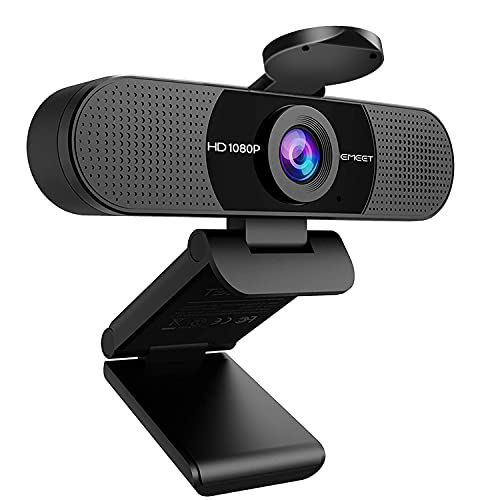
C960 Review Summary
The EMEET C960 makes sense for buyers who want a practical, broadly compatible webcam with a built-in microphone setup and a wide field of view.
It is best for home office users, students, teachers, and anyone who needs a plug-and-play camera for routine video calls rather than a feature-heavy creator camera.
Its strengths are easy to understand from the listing: 1080p video, dual noise-reduction microphones, low-light correction, a 90-degree wide-angle lens, and support for major platforms and operating systems.
Those are not flashy claims, but they line up well with what most people actually need from a work webcam.
The tradeoff is equally clear.
This is a fixed-focus, general-purpose webcam, so it is built for convenience and coverage more than deep image tuning.
If you want a camera for a desk, laptop, or shared meeting space, that is often enough.
If you want advanced controls, specialty optics, or a very cinematic look, you should look higher up the stack.
Review Scorecard
| Category | Score | Rationale |
|---|---|---|
| Video clarity | 8/10 | The listing promises Full HD 1080p with a 5-layer anti-glare lens, which is a solid baseline for calls and streaming. |
| Audio pickup | 7/10 | Dual omnidirectional noise-reduction mics are useful for everyday voice capture, though this is still a webcam mic setup. |
| Low-light handling | 8/10 | Automatic low-light correction, low-light boost, color boost, and exposure adjustment should help in mixed indoor lighting. |
| Ease of use | 9/10 | Plug-and-play design with no driver requirement keeps setup simple for nontechnical buyers. |
| Compatibility | 9/10 | Broad OS and app support makes it a safe pick for mixed Windows, Mac, Linux, Android TV, and conferencing workflows. |
| Meeting coverage | 8/10 | The 90-degree wide-angle lens is practical for showing one person or several people without constant repositioning. |
| Buyer versatility | 8/10 | It fits office, school, teaching, and casual streaming use, though it is not specialized for pro video production. |
Key Features and Specifications of C960
The EMEET C960 is positioned as a full HD 1080p USB webcam for desktop and laptop use.
According to the listing, it uses a 5-layer anti-glare lens and fixed focus, with the focus range described as 11.8 to 118.1 inches.
That points to a camera tuned for seated, arm’s-length use rather than close macro work or highly dynamic shooting.
The microphone setup is one of the most practical parts of the design.
EMEET lists two built-in omnidirectional noise-reduction microphones, which should help capture voice clearly during normal conversations.
The company also notes that microphone selection may need to be set manually in the operating system or app.
Low-light behavior is another major selling point.
The listing mentions automatic low-light correction plus low-light boost, color boost, and exposure adjustment.
For buyers who work in rooms with windows, mixed lighting, or evening desk sessions, those are the kinds of features that matter more than marketing language.
The camera also emphasizes convenience.
It is described as plug and play, with no driver required, and the foldable design plus long USB cord make it easier to move between setups.
The included cover adds a privacy-focused touch that many office buyers will appreciate.
Supported platforms include Windows 10/11, macOS 10.14 or later, Linux, and Android TV 7.0 or later.
Major calling and streaming apps listed include Zoom, Teams, FaceTime, Google Meet, and YouTube.
| Spec | What it means for buyers |
|---|---|
| 1920 x 1080 video | Standard Full HD output for calls, lessons, and basic streaming. |
| 2 built-in mics | Better convenience for everyday voice pickup without an external mic. |
| 90-degree lens | Wider framing for meetings, shared desks, or small groups. |
| Fixed focus | Less adjustment needed, but less flexibility than adjustable-focus cameras. |
| No driver required | Faster setup on typical modern systems. |
| Privacy cover | A simple physical safeguard when the camera is not in use. |
Pros and Cons of C960
Pros
- Easy setup with plug-and-play operation and no driver requirement.
- Broad compatibility across major desktop operating systems and common meeting apps.
- Useful 1080p output for routine conferencing and online teaching.
- Dual microphones reduce the need for a separate audio device in casual use.
- Wide 90-degree view helps when you need a little more room in frame.
- Privacy cover included for quick physical shutdown of the lens.
Cons
- Fixed focus limits flexibility compared with more adjustable webcams.
- Built-in microphones are convenient, but they are not a substitute for a dedicated audio setup.
- Wide-angle framing can be useful, but some users may prefer a tighter, more portrait-like look.
- No advanced creator features are listed, so this is not the right camera for users who want deep control.
Who Should Buy C960?
The C960 is a good fit for remote workers who just need a webcam that turns on quickly, stays compatible, and keeps video quality solid enough for day-to-day meetings.
It also suits teachers, tutors, and students who need a dependable USB camera for class platforms and don’t want to deal with drivers or elaborate setup steps.
It is also sensible for families or shared rooms where a wider view is useful.
The 90-degree lens gives you more flexibility when you are not sitting perfectly centered, and the privacy cover is a practical extra for households that leave gear connected all the time.
Buyers who should skip it are the ones shopping for more than routine conferencing.
If you need advanced autofocus behavior, richer creator controls, or a premium production feel, this is probably too basic.
The C960 is designed to be straightforward first and feature-rich second.
How the C960 Performs Day to Day
Video for Calls and Classes
The C960’s core job is to make you look clear enough for meetings, classes, and presentations.
The Full HD resolution and anti-glare lens suggest a camera designed to reduce the awkward softness that sometimes shows up in cheaper webcams.
For most desk setups, that should be enough to look composed and presentable.
Audio in Real Workflows
The dual noise-reduction microphones are a meaningful convenience upgrade for people who want fewer accessories on the desk.
They should be fine for normal speech in quiet to moderately noisy rooms.
If your environment is loud, or if audio quality is central to your work, a separate mic will still be the better choice.
Lighting and Framing
Low-light correction matters because many buyers use webcams in imperfect rooms, not studio spaces.
The C960 is clearly aiming to handle that reality with exposure and color adjustment.
The 90-degree field of view also helps when you want to include a second person, a whiteboard, or just more breathing room around your face.
Setup and Compatibility
Plug-and-play support is one of the strongest practical advantages here.
You do not need to build a workflow around software just to get started, and the listed support across Windows, Mac, Linux, Android TV, and common conferencing apps makes the camera easy to recommend in mixed-device environments.
Alternatives to C960
If you are comparing options, the best alternatives depend on how much you value image quality, low-light performance, or software features.
The C960 sits in the practical middle, so the most credible substitutes are other established webcam lines with similar office-friendly positioning.
- Logitech C920 for buyers who want a widely known 1080p baseline webcam.
- Logitech Brio for users who want a more premium Logitech webcam family.
- Razer Kiyo for people who want a creator-oriented webcam line.
- AnkerWork webcam for shoppers comparing modern office-focused alternatives.
Is C960 Worth It?
The EMEET C960 is worth it if you want an uncomplicated webcam for meetings, classes, or light streaming and you care more about compatibility and convenience than advanced camera control.
Its combination of 1080p video, dual mics, low-light correction, wide framing, and plug-and-play setup makes it a sensible everyday choice.
If your goal is a dependable work webcam that should fit most common setups without drama, this is easy to justify.
If you want a more specialized camera for content creation or image tuning, keep shopping.
For most buyers in the C960’s target lane, it is a practical buy rather than an aspirational one.