
Choosing the right video switcher for multi-camera production can simplify live streaming, event coverage, worship services, interviews, and studio work. The best fit depends on your camera connections, output needs, audio workflow, and production experience.
We compare 10 options across HDMI and SDI compatibility, preview and control features, recording, streaming, PTZ support, and portability so you can match your setup to the demands of your next production.
Best 10 Video Switcher for Multi Camera Production Picks for 2026
Best All-in-One Control

- Four HDMI inputs with dual HDMI outputs
- Three-platform streaming and portrait support
- Recording, graphics, audio control, and auto-switching
Best For: Feature-rich live events and PC-free production
Best Audio-First Production Hub

- Six video inputs across HDMI and USB
- Two Neutrik combo inputs with Revolution Preamps
- Scenes, ISO recording, streaming, and overlays
Best For: Video podcasts and audio-focused livestreams
Best Compact Streaming Value

- Four HDMI inputs in a compact enclosure
- Built-in streaming, multiview, and recording
- Transitions, keyers, and six-input audio mixer
Best For: Compact four-camera HDMI livestreams
Best Touchscreen HDMI/SDI Flexibility
FEELWORLD L4 Touchscreen Switcher

- Four HDMI and one SDI camera input
- 10.1-inch preview touchscreen with T-bar
- Chroma key, logo overlays, and USB output
Best For: Mixed HDMI/SDI productions needing tactile control
Best for Expansive HDMI Rigs

- Eight 10-bit HD HDMI inputs
- Input re-sync on all eight inputs
- Dual HDMI program outputs
Best For: Larger HDMI-based multi-camera productions
Best Compact Starter Switcher

- Four 1080p HDMI inputs
- USB 3.0 webcam-style streaming output
- Compact design with 2-inch LCD
Best For: Solo operators and small live streams
Best Feature-Flexible 4K Option

- Four HDMI inputs with 4K capability
- Dual 1080p HDMI outputs
- Touch screen and optional production features
Best For: Creators seeking an upgradeable compact switcher
Best Flexible I/O

- 4 SDI, 4 HDMI, USB-C, NDI HX, and playback inputs
- Keying, PIP, DSK, and MIX/DIP/WIPE transitions
- Streams to up to three platforms
Best For: Hybrid SDI/HDMI events and flexible streaming setups
Best All-in-One PTZ Control
FoMaKo KC800 4K Multi-Cam Switcher
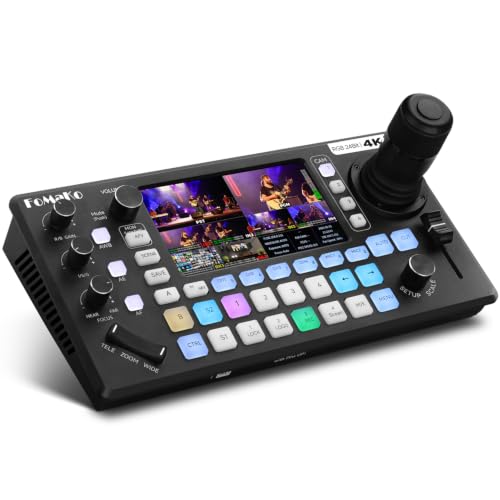
- Integrated 4D joystick for four PTZ cameras
- Six-channel audio mixer with XLR inputs
- USB/SD recording and multi-platform streaming
Best For: Solo-operated worship, wedding, and corporate productions
Best for SDI and HDMI Workflows
Tenveo PC500 Multi-Format Switcher

- Four SDI and four HDMI inputs with NDI HX3
- Supports SRT, RTMP, RTSP, NDI, and UVC streaming
- PTZ control, dual recording, and customizable outputs
Best For: Mixed-format events and networked live production
Best All-in-One Control – Osee GoStream Deck HDMI Pro
The Osee GoStream Deck is a versatile video switcher for multi camera production, combining four HDMI inputs with audio control, recording, playback, graphics, and direct streaming. Its physical controls and built-in menu make it practical for productions that need hands-on operation without a computer.
Best For: Live events, worship services, conferences, podcasts, weddings, and multi-platform streaming setups.
Pros:
- Four HDMI inputs, dual HDMI outputs, and USB-C connectivity support varied production setups.
- Streams to up to three platforms and supports landscape or portrait formats.
- Includes recording, playback, chroma key, picture-in-picture, graphics overlays, and auto-switching.
- Physical PVW/PGM buses, T-bar, macros, and audio controls support PC-free operation.
Cons:
- Its broad feature set may require more setup time than a basic switcher.
- The supplied notes do not specify recording resolution or streaming-platform limits beyond the listed examples.
Choose the GoStream Deck when you want a feature-rich centerpiece with direct streaming, recording, audio processing, and presentation graphics in one unit.
Best Audio-First Production Hub – RØDECaster Video
The RØDECaster Video is a polished video switcher for multi camera production that combines six video sources with a studio-oriented audio interface. It supports four HDMI sources, two USB sources, custom scenes, overlays, chroma keying, direct streaming, and recording, making it suited to productions managed from the front panel.
Best For: Podcasts, interviews, livestreams, and productions where clean XLR microphone audio is as important as video switching.
Pros:
- Handles up to six video sources through four HDMI and two USB inputs.
- Two Neutrik combo inputs and Revolution Preamps support XLR microphones and other audio sources.
- Offers seven customizable scenes, media playback, graphic overlays, transitions, and automatic chroma keying.
- Supports Wi-Fi or Ethernet streaming, USB streaming, external recording, and ISO recording.
Cons:
- The listed dimensions suggest a larger footprint than compact four-input switchers.
- The supplied details do not confirm the current software-update status.
This is a strong choice when a production needs flexible scene control and integrated, higher-end audio connections rather than video switching alone.
Best Compact Streaming Value – Blackmagic ATEM Mini Pro
The Blackmagic Design ATEM Mini Pro is a compact video switcher for multi camera production with four HDMI inputs, built-in streaming, multiview, recording, and audio mixing. Its small footprint makes it an accessible option for education, business presentations, esports, and online broadcasts.
Best For: Four-camera livestreams, training sessions, presentations, and users who need a compact HDMI-centered setup.
Pros:
- Four HDMI inputs support multi-camera switching with 10-bit 4:2:2 video input.
- Includes multiview, multiple transitions, upstream and downstream keyers, and a six-input audio mixer.
- Built-in Ethernet streaming and USB-C webcam output simplify online production.
- Supports recording to an external drive through USB-C.
Cons:
- It provides fewer video inputs than the six-source RØDECaster Video and five-input FEELWORLD L4.
- The supplied notes do not mention direct Wi-Fi streaming.
For a straightforward four-camera workflow, the ATEM Mini Pro balances essential production tools and compact design without adding the larger source capacity of more advanced systems.
Best Touchscreen HDMI/SDI Flexibility – FEELWORLD L4 Touchscreen Switcher
The FEELWORLD L4 is a touchscreen video switcher for multi camera production designed for mixed HDMI and SDI workflows. Its 10.1-inch display provides real-time preview and an operating interface, while five camera inputs, chroma keying, logo overlays, and USB 3.0 output support live streaming and presentation production.
Best For: Multi-camera crews that need both HDMI and SDI connectivity, large on-device previews, and touchscreen control.
Pros:
- Supports four HDMI inputs plus one SDI input for five-camera live production.
- A 10.1-inch touchscreen provides real-time preview and menu control alongside buttons and a T-bar.
- Includes chroma keying, logo overlays, and HDMI, SDI, and USB 3.0 outputs.
- Supports a wide range of listed HD video formats, including 1080p up to 60 fps on supported connections.
Cons:
- Its larger touchscreen-oriented design may be less convenient for highly portable setups.
- The supplied notes do not list built-in direct streaming or recording to internal media.
The L4 stands out for productions that mix camera connection standards and prioritize an easy-to-see, hands-on monitoring and switching interface.
Best for Expansive HDMI Rigs – ATEM Mini Extreme ISO
Blackmagic Design ATEM Mini Extreme ISO HDMI Live Stream Switcher (SWATEMMINICEXTISO)
Check Price On AmazonThe Blackmagic Design ATEM Mini Extreme ISO is a strong video switcher for multi camera production when you need eight HDMI sources and a more substantial live-production setup. Its eight 10-bit HD HDMI inputs include input re-sync, while dual HDMI program outputs support flexible monitoring or routing.
Best For: Multi-camera productions that need eight HDMI inputs, dual program outputs, and compatibility with cameras, laptops, or computers.
Pros:
- Eight switchable 10-bit HD HDMI inputs accommodate larger camera setups.
- Input re-sync is provided on all eight HDMI inputs.
- Two HDMI program outputs offer added output flexibility.
- Supports embedded two-channel audio.
Cons:
- It is larger and heavier than the compact alternatives in this roundup.
- The supplied notes identify HDMI connectivity rather than SDI input support.
Choose this model when input capacity is the priority. With eight HDMI sources and two program outputs, it is better suited to a growing multi-camera workflow than a small, four-camera setup.
Best Compact Starter Switcher – FEELWORLD LIVEPRO L1 V1
The FEELWORLD LIVEPRO L1 V1 is a compact video switcher for multi camera production built around four HDMI inputs and real-time switching. Its USB 3.0 output presents the unit to a computer like a webcam, making it a practical choice for a single operator handling live streams.
Best For: Solo creators who need four 1080p HDMI inputs, simple live switching, and direct computer connectivity for streaming.
Pros:
- Four HDMI inputs and one HDMI output support 1080p signals.
- USB 3.0 output works with computer-based streaming software as a webcam-style source.
- Compact design includes a 2-inch LCD preview display.
- LAN-based XPOSE operation enables remote control without extra software installation.
Cons:
- It offers fewer inputs and outputs than the larger switcher in this roundup.
- The supplied notes specify one HDMI output, limiting output flexibility.
- Advanced remote operation requires a computer and LAN connection.
This is the straightforward option for small productions. It combines four-camera switching, basic previewing, effects, and USB streaming in a lightweight chassis that is easy for one person to manage.
Best Feature-Flexible 4K Option – RGBlink Mini V3
The RGBlink Mini V3 is a versatile video switcher for multi camera production with four HDMI inputs, a 2.1-inch touch screen, and dual 1080p HDMI outputs. It also supports UVC webcam mode, while recording and selected creative tools such as chroma key and logo overlays are available through optional TAO Cloud activation.
Best For: Creators who want a compact HDMI switcher with 4K input capability, preview and program outputs, touch control, and upgradeable production features.
Pros:
- Four HDMI inputs support a compact multi-camera setup with 4K switching capability.
- Dual 1080p HDMI outputs can carry program and preview feeds.
- UVC mode provides direct webcam recognition for streaming platforms.
- Includes a 2.1-inch touch screen and professional T-bar control.
Cons:
- Recording and selected advanced features require optional TAO Cloud licensing.
- Stable UVC streaming with OBS requires the included USB 3.0 cable.
- A 35W or higher USB-C power adapter is recommended for stable performance.
The Mini V3 is appealing when you want more than basic switching without moving to a large production console. Its dual outputs and touch interface are useful immediately, while optional activation lets you add capabilities as your workflow develops.
Best Flexible I/O – Osee GoStream Duet
Osee GoStream Duet Multiple Camera SDI and HDMI Live Stream Video Mixer Switcher
Check Price On AmazonThe Osee GoStream Duet is a versatile video switcher for multi camera production, combining SDI, HDMI, USB-C, NDI HX, and media playback in a compact unit. It suits creators who need flexible source selection, layered effects, and direct streaming without assembling several separate converters.
Best For: Hybrid SDI/HDMI productions, portrait-orientation streams, and live events using multiple streaming platforms.
Pros:
- Accepts 4 SDI, 4 HDMI, USB-C, NDI HX, and playback sources.
- Supports chroma key, luma key, pattern key, PIP, DSK, and multiple transitions.
- Can stream to up to three platforms through Ethernet or a smartphone hotspot.
- Offers built-in GUI, Mac/Windows software, and Bitfocus Companion control.
Cons:
- NDI HX requires the latest firmware to unlock the included license.
- Its 1 kg compact design may provide fewer hands-on controls than a larger production console.
The GoStream Duet is a strong value-oriented choice when input flexibility and streaming options matter more than a traditional hardware control surface. Its combination of effects, software control, and SDI/HDMI connectivity makes it adaptable for varied live setups.
Best All-in-One PTZ Control – FoMaKo KC800 4K Multi-Cam Switcher
The FoMaKo KC800 is a video switcher for multi camera production designed for solo operators who also need PTZ control and audio mixing. Its integrated joystick, AI tracking support, LCD screen, recording, and streaming functions reduce the amount of additional equipment required for a live setup.
Best For: Church services, weddings, corporate events, and other productions managed by one operator.
Pros:
- Controls up to four PTZ cameras with VISCA or VISCA-over-IP and includes a 4D joystick.
- Provides four 4K HDMI inputs, three HDMI outputs, and a UVC output.
- Includes six-channel audio mixing with XLR inputs, 48V phantom power, and HDMI audio channels.
- Records to USB or SD without a computer and streams to three platforms plus one UVC feed.
Cons:
- Output is specified at up to 1080p60, despite 4K HDMI input support.
- The feature-rich control system may require setup time for PTZ, audio, and streaming workflows.
The KC800 stands out for combining switching, PTZ operation, audio, recording, and streaming in one chassis. It is especially practical when minimizing crew size and external gear is a priority.
Best for SDI and HDMI Workflows – Tenveo PC500 Multi-Format Switcher
The Tenveo PC500 is a video switcher for multi camera production built around a mix of SDI and HDMI connectivity, PTZ control, monitoring, recording, and streaming. It is a good fit for productions that need professional network protocols and flexible routing while keeping the main workflow in a standalone switcher.
Best For: Churches, studios, conferences, stage shows, and other events using both SDI and HDMI cameras.
Pros:
- Offers four SDI inputs, four HDMI inputs, USB input, NDI HX3 support, and 4K60 input capability.
- Provides SDI, HDMI, AUX, and USB 3.0 outputs with customizable routing.
- Supports RTMP, RTSP, SRT, NDI HX3, and UVC streaming, with up to two simultaneous platforms.
- Controls up to four PTZ cameras and supports presets, cruise tracks, and camera adjustments.
Cons:
- Program output is specified at up to 1080p60 rather than 4K.
- Its broader broadcast feature set may be more than needed for simple HDMI-only streams.
The PC500 is the most connectivity-focused option here, particularly for teams mixing SDI, HDMI, PTZ, and IP sources. Its dual recording and AUX playback features also suit productions that need backup media or replay-style functionality.
How We Picked the Best Video Switcher for Multi Camera Production
We focused on the features that most affect real-world multi-camera work: input type and count, maximum resolution and frame rate, multiview monitoring, live streaming or capture options, audio connectivity, recording functions, and control ergonomics. We also considered whether each model suits a compact mobile setup, a permanent studio, or a more advanced live-production environment.
HDMI-focused switchers are often the simplest choice for mirrorless cameras, camcorders, and consumer production gear. SDI models are better suited to longer cable runs and professional installations. Some units add ISO recording, PTZ control, onboard displays, or integrated audio tools that can reduce the need for extra equipment.
Quick Comparison
- Best for compact HDMI streaming: Look for a small switcher with direct USB or network streaming and straightforward scene control.
- Best for recording and post-production: Choose a model with ISO recording or separate input capture when you need to edit individual camera feeds later.
- Best for larger installations: Prioritize SDI connectivity, multiple outputs, reliable multiview, and professional audio integration.
- Best for PTZ workflows: Consider a switcher with joystick control, camera control, or AI tracking support.
- Best for mixed systems: A switcher with both HDMI and SDI inputs can accommodate existing cameras and future upgrades.
Key Buying Factors for a Video Switcher for Multi-Camera Production
Inputs, Resolution, and Frame Rates
Count your cameras and leave room for expansion. Confirm that the switcher supports your cameras’ connection types, resolution, and frame rates. A 4K input specification does not always mean every output, streaming mode, or recording function operates in 4K.
Monitoring and Switching Control
A built-in screen can help with portable productions, while a full multiview output is more practical for a dedicated monitor. Physical buttons are fast during live work; touchscreens, joysticks, and software control can make advanced layouts or PTZ operation easier.
Streaming, Recording, and Audio
Check whether streaming is handled through USB, Ethernet, Wi-Fi, or a separate computer. If you need backups or editing flexibility, verify the supported recording media and whether ISO files are created. Also check for balanced audio, microphone inputs, embedded audio, mixing controls, and headphone monitoring.
Reliability and Workflow Fit
For paid events, favor stable power, clear status monitoring, responsive controls, and the connections already used by your crew. A feature-rich switcher is not automatically better if it slows down setup or requires accessories you do not have.
Who Should Buy Which Video Switcher for Multi Camera Production?
Beginners and mobile creators should prioritize a compact HDMI switcher with simple controls, USB capture, and built-in streaming. Small event and worship teams may benefit from multiview, multiple outputs, audio mixing, and reliable HDMI expansion. Professional producers should look toward ISO recording, SDI support, 4K capability, extensive monitoring, and dedicated control options. PTZ operators should choose a model with joystick or camera-control features, while hybrid studios should favor flexible HDMI/SDI connectivity and upgrade capacity.