
A good USB power meter makes computer repair faster, safer, and much less guesswork-heavy. It helps you verify voltage, current draw, cable quality, charger output, and device power behavior before you swap parts.
Below, we’ve focused on practical meters for real troubleshooting work, from simple USB-A checks to advanced USB-C and PD-capable testers.
Best 10 USB Power Meter for Computer Repair Picks for 2026
Professional USB Power Meter
Klein Tools ET920 USB Power Meter

- Measures voltage, current, capacity, energy, and resistance
- Supports USB-A and USB-C, including QC ports
- Stores up to 10 readings and detects overloads
Best For: Technicians who want a rugged all-in-one meter for USB-A and USB-C testing
Simple USB Charger Tester
USB Meter Tester Voltage Current Tester
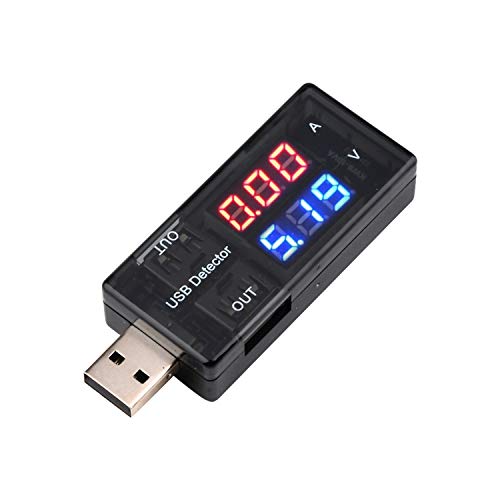
- Reads voltage and current on a clear color display
- Compact plug-in tester for quick checks
- Works with chargers, phones, disks, and USB devices
Best For: Basic charger and cable checks with a portable plug-in meter
Feature-Rich USB Diagnostic Meter

- Seven modes for voltage, current, power, and capacity
- Supports PD and QC 3.0 output protocols
- Adds over-voltage, under-voltage, over-current, and short alarms
Best For: Repairs and bench testing that need fast-charge support and multiple display views
Dual-Pack USB Port Tester
2Pcs USB Tester USB Power Meter
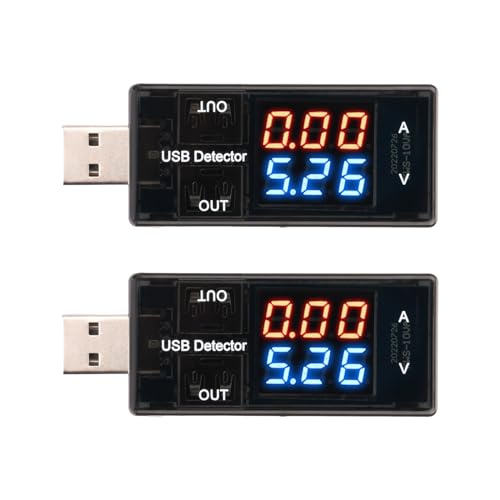
- Displays voltage and current at the same time
- 4V to 30V range with 0.01V and 0.01A resolution
- Includes two meters for multiple setups
Best For: Buyers who want two basic meters for quick voltage and current checks
USB-C Fast Charge Monitor

- Measures 4V-30V and up to 12A
- Supports many fast-charging protocols
- Color display with curve tracking
Best For: USB-C repair and fast-charge diagnostics
Compact Basic Tester

- Measures 3V-9V and up to 5A
- Backlit LCD shows live readings
- Plug-and-play design for quick checks
Best For: Simple USB diagnostics and quick voltage checks
Multi-Function Analyzer

- Measures voltage, current, capacity, and more
- Supports USB-A/USB-C and PD/QC protocols
- IPS color screen with safety protections
Best For: Deeper USB-C analysis and power-bank testing
Compact USB-C Diagnostics
Eversame 2-in-1 Color Screen Tester

- 3.6V–30V, up to 5.1A measurement range
- Supports QC and PD charging checks
- Color screen shows voltage, current, capacity, and more
Best For: Technicians who want a compact USB-C tester for charger and cable checks
Higher-Current Bench Tester

- Measures up to 32V and 8.0A
- Supports PD and QC fast-charging protocols
- IPS display with eight screen layouts
Best For: Bench users who want more current range for USB-C charger testing
Detailed Readout Tester

- Measures temperature, resistance, and charging time too
- Supports QC and Super VOOC protocol detection
- Stores energy and capacity data after power-off
Best For: Users who want deeper USB-C diagnostics and extra measurement fields
Professional USB Power Meter – Klein Tools ET920 USB Power Meter
If you need a USB power meter for computer repair, the Klein Tools ET920 is built for thorough port and charger testing. It measures voltage, current, capacity, energy, and calculated resistance, and it supports both USB-A and USB-C connections, including Qualcomm Quick Charge ports.
Best For: Technicians who want a rugged, all-in-one meter for checking USB-A and USB-C charging behavior.
Pros:
- Measures voltage, current, capacity, energy, and calculated resistance.
- Supports USB-A up to 3A and USB-C up to 5A.
- Includes overload detection for safer testing.
- Stores and recalls up to 10 readings for comparison.
Cons:
- More feature-rich than a simple quick-check tester.
- Designed for inline testing, so it is not a standalone meter.
For repair work that calls for more than just a voltage readout, this model offers broad coverage and long monitoring time in a pocket-sized, jobsite-ready package.
Simple USB Charger Tester – USB Meter Tester Voltage Current Tester
This USB power meter for computer repair is a straightforward plug-in tester for checking charger output, cable behavior, and device charging current. It measures voltage from 3.0V to 7.5V and current up to 2.5A, with a color display that separates voltage and current for quick reading.
Best For: Basic USB charger and cable checks when you want a simple, portable meter.
Pros:
- Easy-to-read color display with voltage and current shown separately.
- Small, portable design that plugs in directly.
- Useful for checking USB chargers, phones, disks, and other USB-powered gear.
- Measures common 5V-class USB output ranges.
Cons:
- Limited to 3.0V to 7.5V and up to 2.5A.
- Does not list advanced logging or storage features.
It is a practical option when you mainly need fast visibility into voltage and current without extra setup or complexity.
Feature-Rich USB Diagnostic Meter – DROK USB Tester with 7 Modes
For computer repair work that needs a more capable USB power meter, the DROK USB Tester adds multiple display modes and broader measurement coverage. It can show voltage, current, power, and capacity in seven modes, and it supports USB-A input with dual USB 2.0 output ports.
Best For: Repairs and bench testing where you want fast-charge support plus multiple display views.
Pros:
- Seven display modes for voltage, current, power, and capacity.
- Supports PD and QC 3.0 fast charge protocols on the output ports.
- Includes over-voltage, under-voltage, over-current, and short-circuit alarms.
- Works across a wide 3.2V to 30V and 0 to 5A range.
Cons:
- Battery powered, so it is not purely bus-powered like some inline meters.
- More modes may be more than needed for simple spot checks.
If you want a meter that can do more than the basics, this model offers useful diagnostics for chargers, cables, power banks, and solar-panel-style voltage ranges.
Dual-Pack USB Port Tester – 2Pcs USB Tester USB Power Meter
If you want a straightforward USB power meter for computer repair, this 2-pack gives you a simple way to check voltage and current on USB-C testers, chargers, and other USB-powered devices. It displays voltage and current at the same time and covers a 4V to 30V input and output range, with fine 0.01V and 0.01A resolution.
Best For: Buyers who want two basic meters for quick voltage and current verification.
Pros:
- Shows voltage and current together on a single display.
- Wide 4V to 30V voltage range.
- Fine 0.01V and 0.01A resolution for detailed readings.
- Comes as a 2-pack for multiple workstations or backups.
Cons:
- Only measures voltage and current, with no extra analysis features listed.
- Current range tops out at 3A.
For shops that want a simple two-unit set for everyday port checks, this is an easy, no-frills option focused on core measurements.
USB-C Fast Charge Monitor – USB C Tester Power Meter
If you want a USB power meter for computer repair that can also keep up with modern USB-C charging gear, this tester covers a wide range of voltages and currents. It measures 4V to 30V and up to 12A, while also showing power, capacity, energy, time, max readings, current direction, and CPU temperature.
Best For: Repair work on USB-C chargers, power banks, and fast-charging devices where you want broader protocol support and a detailed color display.
Pros:
- Supports PD2.0/3.0, QC2.0/3.0, FCP, SCP, AFC, PE, DASH VOOC, and Super VOOC.
- 1.06-inch color display shows multiple useful measurement screens.
- Curve function helps track real-time voltage and current over time.
- Wide 4V-30V, 0-12A range suits many 3C digital devices.
Cons:
- Designed around USB-C use, so it is less suited to older USB-only setups.
- Feature-rich interface may be more than you need for simple checks.
This is the most feature-packed option in the group, especially if your bench work involves modern USB-C gear and fast-charge protocol testing. It trades simplicity for more data and better monitoring tools.
Compact Basic Tester – Black USB Power Meter
For a straightforward USB power meter for computer repair, this compact tester focuses on the basics: voltage, current, and power. It covers 3V to 9V and up to 5A, and the backlit LCD makes quick readings easier when you’re checking USB devices or power supplies.
Best For: Fast, simple diagnostic checks when you mainly need a small plug-and-play USB tester.
Pros:
- Easy plug-and-play operation with no setup required.
- Clear LCD display shows real-time voltage, current, and power.
- Compact design fits easily between power source and device.
- Good choice for quick checks on USB-powered devices and supplies.
Cons:
- Limited to 3V-9V and 0-5A, so it is less versatile than higher-range testers.
- Does not list advanced protocol detection or extra data features.
This is the simplest option here, which can be a plus if you want a basic bench tool without extra menus or modes. It is best when speed and convenience matter more than advanced analysis.
Multi-Function Analyzer – YOJOCK USB C Tester
If you need a USB power meter for computer repair that does more than show voltage and current, this YOJOCK model adds capacity, energy, temperature, resistance, charging time, and load impedance readings. It supports USB-A and USB-C devices, works with PD and QC fast charging, and includes an OTG adapter for broader compatibility.
Best For: Repair and test setups where you want a more complete USB-C analyzer with capacity and safety data.
Pros:
- Measures voltage, current, capacity, power, temperature, resistance, and charging time.
- Supports PD3.0/PD2.0, QC3.0/QC2.0, BC1.2, plus USB-A and USB-C.
- IPS color display offers multiple interfaces and larger-font viewing modes.
- Includes protection features for over-voltage, over-current, under-voltage, and low energy.
Cons:
- More complex than a basic inline meter.
- Capacity testing requires the right discharge setup and procedure.
This model is the strongest pick if you want a more diagnostic-focused tool for charger, cable, and power-bank testing. It offers the broadest set of readings in this group, making it useful for deeper troubleshooting.
Compact USB-C Diagnostics – Eversame 2-in-1 Color Screen Tester
If you need a USB power meter for computer repair that can quickly verify charger, cable, and device behavior, this Eversame tester covers the basics well. It measures voltage, current, power, capacity, and more, while also supporting QC and PD charging checks across USB-C and USB-A use cases.
Best For: Repair work that needs a compact, color-screen tester for USB-C and fast-charging diagnostics.
Pros:
- Measures 3.6V to 30V and up to 5.1A for common USB charging tests
- Supports QC3.0, QC2.0, BC1.2, and PD protocol measurement
- Displays multiple data views, including voltage, current, capacity, power, and load impedance
- Includes over-voltage, over-current, under-voltage, and low-energy protection
Cons:
- Maximum current is lower than some higher-amp alternatives
- Requires the included small adapter to trigger PD charging on some setups
This is a practical pick if your main goal is fast, clear USB-C diagnostics in a small form factor. It is especially useful for checking charging performance and identifying weak cables or questionable chargers during everyday repair tasks.
Higher-Current Bench Tester – YEREADW 8A USB C Tester
For a USB power meter for computer repair that needs broader current headroom, this YEREADW tester stands out with support up to 8.0A. It monitors voltage, current, power, capacity, and impedance across USB and Type-C devices, making it a handy bench tool for charger and power bank testing.
Best For: Repair benches that need a higher-current USB-C tester with a clear IPS display.
Pros:
- Measures 3.6V to 32V and 0 to 8.0A for wider testing coverage
- Supports PD3.0/2.0, QC3.0/2.0, and BC1.2 fast-charging protocols
- Eight color-screen interfaces make it easy to switch between data views
- Includes over-voltage, over-current, under-voltage, and low-energy protection
Cons:
- Best suited to USB and Type-C testing rather than broader non-USB diagnostics
- Capacity testing still depends on interpreting Wh and battery-voltage calculations
This model is a strong choice if you want more current range than many basic testers provide. Its combination of fast-charge support, safety protections, and higher-amperage measurement makes it a solid fit for practical troubleshooting on modern devices.
Detailed Readout Tester – YOJOCK Classic USB-C Tester
If you want a USB power meter for computer repair that goes beyond basic voltage and current readings, this YOJOCK tester adds temperature, resistance, charging time, and data storage. It is designed for USB-C device testing and is aimed at quality inspection work where extra measurement detail is useful.
Best For: Detailed USB-C diagnostics where extra readouts like temperature and charging time matter.
Pros:
- Measures voltage, current, capacity, power, temperature, resistance, and charging time
- Supports QC2.0/3.0/4.0 and Super VOOC protocol detection
- Stores capacity and energy data when power is turned off
- Button controls allow screen switching, content rotation, and data clearing
Cons:
- Voltage and current range is narrower than some competing models at 4V to 30V and up to 6.5A
- Fast-charge protocol names are not displayed on the tester
This is a good choice if your repair workflow benefits from more than just basic amperage checks. The extra readouts and power-off storage make it useful for documenting results and comparing charging behavior over time.
How We Picked the Best USB Power Meter for Computer Repair
We prioritized meters that are useful for everyday USB Power Meter for Computer Repair tasks: stable readings, clear displays, broad voltage/current support, and enough functionality to diagnose chargers, cables, hubs, ports, and small devices. We also favored models that balance ease of use with the features techs actually need, such as capacity, energy, resistance, and working-time tracking.
Quick Comparison
For basic USB-A troubleshooting, simpler meters are often enough. For laptops, phones, tablets, and modern peripherals, USB-C testers with PD support are more versatile. If you need a single tool for bench work, choose a model with a wider input range, current logging, and a screen that is easy to read at a glance.
Key Buying Factors for USB Power Meter for Computer Repair
Port Type and Protocol Support
Match the meter to the ports you repair most often. USB-A testers work well for legacy chargers and accessories, while USB-C testers are better for newer devices, power banks, and PD-enabled equipment. If you troubleshoot both, a dual-purpose model is usually the smartest buy.
Voltage and Current Range
Check the supported range before buying. A wider voltage window helps when testing standard 5V USB devices as well as higher-voltage USB-C or PD sources. Current range matters too, especially if you test fast chargers, portable SSDs, hubs, or devices with higher startup draw.
Readability and Data Visibility
A bright, legible display matters more than many buyers expect. Color screens, dual readouts, and clear unit labels reduce errors during fast diagnostics. If you work in dim shops or move between benches, an easy-to-read display is a major advantage.
Measurement Functions
Basic voltage and current are enough for many jobs, but capacity, energy, resistance, and timing functions can reveal failing batteries, weak adapters, or unstable cables. The more you rely on one meter for many tasks, the more valuable these extras become.
Build Quality and Everyday Use
For repair work, you want something compact, durable, and simple to connect repeatedly. A meter that feels solid and resets cleanly between tests will save time and reduce frustration during busy troubleshooting sessions.
Who Should Buy Which USB Power Meter for Computer Repair?
If you only need quick pass/fail checks on USB-A chargers and cables, buy a straightforward meter with an uncluttered display. If you regularly repair modern laptops, tablets, or phone accessories, choose a USB-C tester with PD support and a wider input range. For bench technicians who want one do-it-all tool, a feature-rich model with capacity, power, and working-time measurements is the most flexible option.
For most buyers, the best choice is the meter that matches the ports you repair most often, not the one with the longest feature list. In USB Power Meter for Computer Repair work, clarity and compatibility usually beat gimmicks.