
Choosing the right USB microphone for voice-over recording can make a huge difference in clarity, noise control, and overall polish. The best option depends on your room, voice, and how much editing you want to do later.
In this roundup, we focus on practical picks that balance sound quality, ease of use, and real-world value for home studios, creators, and remote recording setups.
Best 10 USB Microphone for Voice-Over Recording Picks for 2026
Studio-Grade USB Voice-Over Mic
RØDE NT-USB+ Professional USB Condenser

- Condenser capsule with low-noise Revolution Preamp
- APHEX processing via RØDE Central software
- USB-C with zero-latency headphone monitoring
Best For: Creators who want a polished desktop mic for voice-over, podcasts, and streaming
Flexible USB/XLR Narration Mic
Samson Q2U Recording and Podcasting Pack

- USB-C plus XLR support for easy upgrades
- Dynamic handheld mic with focused unidirectional pickup
- Includes stand, cables, clip, and windscreen
Best For: Beginners and voice actors who want a durable mic that can grow with their setup
Budget Voice-Over Desktop Mic

- Plug-and-play USB setup with included cable
- Cardioid condenser pattern reduces background noise
- Metal body, tripod stand, and volume knob
Best For: Budget-conscious users who need a simple desktop mic for voice-overs and meetings
Compact Broadcast Voice Mic

- Two capsules for detailed vocal capture
- Cardioid and omni pickup patterns
- Zero-latency monitoring with Blue VO!CE software
Best For: Creators who want a compact desktop mic with flexible pickup and broadcast-style sound
Clean, Controlled Vocal Pickup
FIFINE AmpliTank K688 Dynamic Microphone

- Cardioid pickup cuts down room noise
- USB plug-and-play with Mac and Windows
- Mute, gain, and monitoring controls built in
Best For: Voice-over creators wanting simple USB recording with noise control
Flexible Studio Classic
Logitech Creators Blue Yeti USB Microphone

- Four pickup patterns for varied recording needs
- Blue VO!CE software adds vocal enhancement options
- Onboard controls and no-latency monitoring
Best For: Creators who need a versatile USB desktop mic for voice work
All-in-One Voice Booth Kit
FIFINE AmpliTank K688CT Podcast Microphone Kit

- Bundled boom arm kit simplifies setup
- USB/XLR support adds workflow flexibility
- Built-in mute, gain, and monitoring controls
Best For: Users wanting a bundled voice-over kit with easy desktop mounting
Noise-Canceling Multi-Device Pick

- Cardioid condenser for focused vocal capture
- Noise Reduction Mode cuts common room noise
- Includes monitoring, gain, and echo controls
Best For: Voice-over creators who need simple plug-and-play recording across multiple devices
Full Kit Studio Starter

- Complete kit includes boom arm, shock mount, and pop filter
- USB plug-and-play setup for PC and laptop
- Cardioid capsule helps reduce ambient noise
Best For: Beginners who want a full voice-over recording setup in one box
Desktop Control Pick
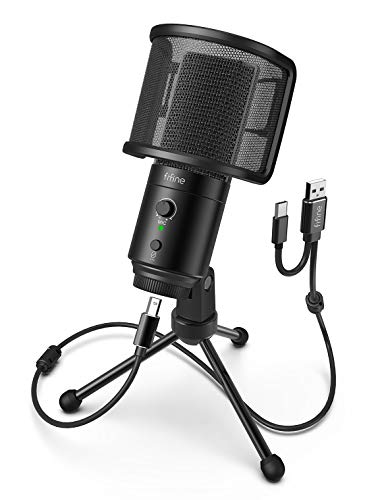
- Gain knob, mute button, and headphone jack included
- USB-A and USB-C plug-and-play compatibility
- Cardioid capsule helps keep vocals clear
Best For: Desk-based voice-over recording with simple hands-on controls
Studio-Grade USB Voice-Over Mic – RØDE NT-USB+ Professional USB Condenser
If you want a USB microphone for voice-over recording that feels close to a small studio setup, the RØDE NT-USB+ is built for that job. Its condenser capsule, low-noise preamp, and APHEX processing are aimed at clean, polished vocal capture, while USB-C compatibility keeps setup simple across computers, tablets, and smartphones.
Best For: Creators who want a polished, all-in-one desktop USB mic for voice-over work, podcasting, and streaming.
Pros:
- Studio-grade condenser capsule with a high-gain Revolution Preamp for cleaner vocal capture
- APHEX processing in RØDE Central adds Aural Exciter and Big Bottom options
- Zero-latency headphone monitoring helps you hear yourself while recording
- Includes a detachable pop filter and desktop stand for an all-in-one setup
Cons:
- Designed as a desktop solution rather than a handheld mic
- Requires software for full access to the APHEX processing features
This is a strong pick if you want a straightforward voice-over mic with more refined onboard features than a basic plug-and-play model. It balances ease of use with studio-style controls, making it a flexible option for narration and content creation.
Flexible USB/XLR Narration Mic – Samson Q2U Recording and Podcasting Pack
The Samson Q2U is a practical USB microphone for voice-over recording if you want a dynamic mic that can also grow with your setup. It plugs directly into a computer over USB-C, but it also includes XLR support, so you can start simple and later move into a more advanced audio chain.
Best For: Voice actors and beginners who want a durable mic that can use USB now and XLR later.
Pros:
- Dynamic handheld design helps it stand apart from typical condenser desktop mics
- USB-C and XLR connectivity give you two upgrade paths
- Includes tripod desktop stand, extension, mic clip, windscreen, USB-C cable, and XLR cable
- Unidirectional pattern and 70 dB signal-to-noise ratio support focused capture
Cons:
- Handheld form factor may be less convenient than a dedicated desk mic for some voice-over setups
- Frequency range is listed at 50Hz–15kHz, which is narrower than some condenser options
For buyers who want a no-fuss voice-over microphone with room to expand, the Q2U is one of the most versatile options here. Its bundled accessories make it especially easy to get started right away.
Budget Voice-Over Desktop Mic – FIFINE K669B USB Condenser
The FIFINE K669B is a straightforward USB microphone for voice-over recording when you want something affordable and easy to use. It connects directly by USB, uses a cardioid condenser design to focus on your voice, and includes a tripod stand plus a volume knob for quick control.
Best For: Budget-conscious users who need a simple desktop mic for voice-overs, meetings, and basic content creation.
Pros:
- Plug-and-play USB setup with a 5.9-foot cable
- Cardioid condenser pattern helps reduce background noise
- Metal construction and tripod stand add practicality for desktop use
- Built-in volume knob makes level adjustments easy during recording
Cons:
- Not compatible with Xbox or phones
- Uses USB-A connectivity by default, so some setups may need an adapter
This model makes sense if you want a clean, simple way to record voice work without extra gear or complicated setup. It is not the most feature-rich option, but it covers the essentials well for everyday narration tasks.
Compact Broadcast Voice Mic – Blue Yeti Nano USB Condenser
The Blue Yeti Nano is a compact USB microphone for voice-over recording that keeps the brand’s broadcast-style sound in a smaller desktop footprint. It offers cardioid and omni pickup patterns, onboard headphone monitoring, and Blue VO!CE software, which gives you more control over how your voice sounds on recordings and streams.
Best For: Creators who want a compact desktop mic with strong vocal presence and flexible pickup options.
Pros:
- Two custom mic capsules are designed for detailed, professional-level voice capture
- Cardioid and omni patterns support different recording setups
- Onboard headphone output and volume control allow zero-latency monitoring
- Blue VO!CE software adds broadcast-style effects and vocal shaping options
Cons:
- Requires a desktop space setup rather than being a portable handheld mic
- Some advanced sound shaping depends on software use
If you want a small mic that still feels serious for narration, the Yeti Nano is a well-rounded choice. It is especially appealing when you want clean voice capture with quick controls and a compact look on camera.
Clean, Controlled Vocal Pickup – FIFINE AmpliTank K688 Dynamic Microphone
If you want a USB microphone for voice-over recording that keeps background noise in check, the FIFINE K688 is built for focused vocal capture. Its cardioid pattern helps reduce computer fan noise and other room distractions, while the included windscreen and shock mount add extra protection against plosives and desk vibration.
Best For: Voice-over creators who want a simple USB setup with strong noise rejection and onboard monitoring.
Pros:
- Cardioid pickup helps isolate voice from background noise
- USB connection is plug-and-play on Windows and Mac
- Tap-to-mute, gain knob, headphone jack, and monitoring volume are built in
- Includes windscreen and shock mount for cleaner vocal takes
Cons:
- XLR cable, boom arm, and mic stand are not included
- Function keys work only over USB, not XLR
- Needs close speaking distance for best input level
For solo narration and home voice-over work, this mic gives you practical controls without forcing you into software settings. It is a good fit if you want a straightforward recording path with useful monitoring tools and a more controlled vocal sound.
Flexible Studio Classic – Logitech Creators Blue Yeti USB Microphone
The Blue Yeti is a well-known USB microphone for voice-over recording when you want flexibility beyond a basic single-pattern mic. Its three-capsule array and four pickup patterns make it easy to adapt to vocals, instruments, podcasting, and streaming, while the onboard controls and no-latency monitoring help you manage sessions efficiently.
Best For: Users who want a versatile desktop USB mic with multiple pickup patterns and easy onboard control.
Pros:
- Four pickup patterns support different recording setups
- Blue VO!CE software adds vocal effects and HD audio samples
- Onboard controls include mute, gain, pattern selection, and headphone volume
- Plug-and-play setup works on Mac or PC
Cons:
- Large desktop design may take up more space
- USB-only connection offers less expansion than XLR options
- Best results depend on proper positioning with the adjustable stand
If your voice-over workflow may expand into podcasting, streaming, or multi-pattern recording, this model offers a lot of flexibility in one mic. It is especially appealing if you want a straightforward desktop setup with built-in controls and software-based vocal enhancement.
All-in-One Voice Booth Kit – FIFINE AmpliTank K688CT Podcast Microphone Kit
If you want a USB microphone for voice-over recording with a ready-made boom arm setup, the FIFINE K688CT is designed to get you speaking quickly. The dynamic cardioid mic helps reduce ambient noise, and the included boom arm, shock mount, and windscreen work together to limit vibration and harsh plosives.
Best For: Voice-over users who want a bundled mic-and-boom-arm kit with onboard controls.
Pros:
- USB and XLR connectivity for flexible workflows
- Includes a sturdy metal boom arm, shock mount, and windscreen
- Tap-to-mute, gain knob, headphone jack, and volume control are built in for USB use
- Cardioid pickup helps keep vocals front and center
Cons:
- Function buttons do not work in XLR mode
- C-clamp fits desks under 2 inches thick
- Best input level still depends on close mic placement
This kit is a strong choice if you want fewer separate purchases and a cleaner desk setup right away. It is practical for narration, streaming, and gaming voice work when you want both simple USB use and the option to move into XLR later.
Noise-Canceling Multi-Device Pick – ZealSound K66 USB Mic
If you want a USB microphone for voice-over recording that can also handle streaming and everyday calls, the ZealSound K66 is built around simple plug-and-play use. Its cardioid condenser capsule, noise reduction mode, and onboard controls make it easy to shape a clean vocal recording without extra software or drivers.
Best For: Creators who want an easy-to-use USB mic with monitoring and broad device compatibility for voice-over, podcasting, and content creation.
Pros:
- Cardioid condenser design focuses on your voice while reducing background noise.
- Noise Reduction Mode helps cut keyboard clicks, fan hum, and room chatter.
- Zero-latency monitoring with a 3.5mm headphone jack makes it easier to catch issues as you record.
- USB-C and Lightning adapters expand compatibility with iPhone, iPad, and USB-C devices.
Cons:
- The built-in controls may be more than you need if you only want a basic mic.
- Default mode is tuned for a warm tone, so the sound profile may need minor adjustment for some voice-over styles.
Overall, this is a practical pick if you want one microphone that can move between desktop and mobile setups while still giving you hands-on control over gain, monitoring, and echo.
Full Kit Studio Starter – FIFINE T669 Boom Arm Bundle
For buyers shopping for a USB microphone for voice-over recording with a full setup included, the FIFINE T669 stands out because it arrives as a complete studio-style bundle. The cardioid condenser mic, boom arm, shock mount, and dual pop filter make it easier to position the mic close and keep plosives under control.
Best For: Voice-over beginners and home-studio users who want a ready-to-go mic kit with arm, shock mount, and pop filtering.
Pros:
- USB plug-and-play connection keeps setup simple on PC and laptop.
- Cardioid condenser capsule is designed to capture speech from the front and reduce ambient noise.
- Includes a sturdy boom arm, shock mount, and double pop filter for cleaner recordings.
- Long 8.2-foot cable and adjustable arm make desktop placement flexible.
Cons:
- It is not compatible with Xbox.
- The bundle is larger than a basic desktop mic, so it may take up more space.
This is a strong value option if you want the extras that usually get bought separately, especially when building a simple voice-over or podcasting workspace.
Desktop Control Pick – FIFINE K683A USB Mic
The FIFINE K683A is a straightforward USB microphone for voice-over recording if you want desktop-friendly controls without committing to a full boom-arm setup. It offers plug-and-play use, a cardioid condenser capsule, a gain knob, mute button, headphone jack, and a detachable pop filter for more controlled vocal sessions.
Best For: Solo creators who want a compact desktop mic with useful recording controls for voice-over, streaming, and meetings.
Pros:
- Plug-and-play compatibility with USB-A and USB-C devices keeps setup simple.
- Gain knob, mute button, and headphone jack make it easier to monitor and manage takes.
- Cardioid condenser design helps reduce background noise and capture voice detail.
- Includes a pop filter and stable tripod stand, so you do not need extra accessories right away.
Cons:
- It is a desktop microphone, so it is less flexible than an arm-mounted setup.
- As with cardioid mics, speaking directly into the front is important for best results.
If you want a compact mic that still gives you real-time monitoring and on-the-fly level control, this model is an easy fit for voice-over work at a desk.
How We Picked the Best USB Microphone for Voice-Over Recording
We prioritized microphones that are easy to set up, consistent in everyday use, and suited to spoken-word capture. That means strong vocal clarity, manageable background noise, useful onboard controls, and dependable build quality. We also gave credit to models that offer flexible connectivity, since many buyers want a USB Microphone for Voice-Over Recording that can later fit into a more advanced setup.
Quick Comparison
Dynamic models are usually better if your room is not treated and you want less ambient pickup. Condenser models tend to sound more detailed and open, which can be great in quieter spaces. Kits with stands, boom arms, or headphone monitoring are especially convenient for beginners and solo creators who want to start recording immediately.
Key Buying Factors for USB Microphone for Voice-Over Recording
Pickup Pattern and Mic Type
Cardioid mics are the safest choice for voice-over because they focus on your voice and reduce sound from the sides and rear. Dynamic mics generally handle imperfect rooms better, while condensers often capture more brightness and detail.
Monitoring and Controls
A headphone jack, gain knob, and mute button can make recording much easier. These features help you catch clipping, plosives, and background issues before they become editing problems.
Room Noise and Placement
If your space has computer fans, HVAC, or echo, choose a microphone with good rejection and plan to speak close to the mic. If your room is quiet, you can prioritize tonal detail and sensitivity instead.
Connectivity and Future Upgrades
USB is the fastest route for most users, but USB/XLR hybrid models offer more flexibility. They are a smart choice if you want a simple desktop mic now and a path to an interface later.
Who Should Buy Which USB Microphone for Voice-Over Recording?
Beginners should look for a plug-and-play USB microphone with monitoring and basic controls. Voice actors working in untreated spaces may prefer a dynamic model for cleaner results with less room noise. Creators who also stream, podcast, or game may want a mic with a boom arm kit or hybrid USB/XLR support for a more flexible workflow.
If you want the most straightforward setup, choose a compact cardioid USB mic. If you want the best long-term versatility, choose a hybrid model. And if your main goal is dependable narration with minimal hassle, focus on models that are known for stable levels, clear mids, and easy gain control.