
If you’re looking to boost your audio experience without cluttering your workspace, under monitor soundbars might just be the solution you need. These sleek devices not only enhance sound quality but also blend seamlessly into your setup. With options that cater to gamers, movie lovers, and content creators alike, the right soundbar can transform your listening experience. So, what are the top picks that can elevate your audio game? Let’s explore.
BlueAnt Soundblade Under-Monitor Soundbar (120W 2.1 Channel)

If you’re a gamer or a movie buff looking to enhance your audio experience, the BlueAnt Soundblade Under-Monitor Soundbar is a top contender. With 120 watts of powerful audio, it delivers deep bass and crystal-clear dialogue, thanks to its advanced neodymium drivers and subwoofer. You’ll feel immersed in virtual worlds and enjoy a mini-cinema experience right at your desk. Its sleek, low-profile design fits seamlessly under your monitor, elevating your setup’s aesthetics. Plus, with versatile connectivity options like USB-C and Bluetooth 5.3, it easily connects to your devices, making it a perfect choice for music, gaming, and streaming.
Best For: Gamers and movie enthusiasts seeking an immersive audio experience with high-quality sound performance.
Pros:
- Delivers powerful 120 watts of audio with deep bass and clear dialogue.
- Sleek, low-profile design that fits seamlessly under monitors, enhancing desktop aesthetics.
- Versatile connectivity options including USB-C, Bluetooth 5.3, and 3.5mm auxiliary input for easy device pairing.
Cons:
- May not be suitable for larger rooms due to its desktop design and size.
- Limited to a 2.1 channel setup, which might not satisfy audiophiles seeking surround sound.
- Requires adequate space under the monitor for proper installation and positioning.
Razer Leviathan V2 X PC Soundbar with Bluetooth 5.0

The Razer Leviathan V2 X PC Soundbar with Bluetooth 5.0 is ideal for gamers and content creators seeking a powerful audio upgrade without sacrificing desk space. This compact soundbar features two full-range drivers and passive radiators, delivering dynamic audio with a volume output of up to 90dB. Its sleek design fits neatly beneath your monitor, keeping your workspace clutter-free. Setup is a breeze with a single USB Type-C cable for power and audio. With Bluetooth 5.0, you enjoy a smooth, low-latency sound experience, while Razer Chroma RGB customization adds flair to your setup. Personalize your audio and lighting effortlessly!
Best For: Gamers and content creators looking for a powerful, space-saving audio solution for their desktop setup.
Pros:
- Compact design fits neatly under monitors, maintaining a clutter-free workspace.
- High-quality audio performance with a volume output of up to 90dB, enhancing gaming and multimedia experiences.
- Bluetooth 5.0 connectivity allows for seamless device switching and low-latency audio.
Cons:
- Limited to a single USB Type-C connection, which may not suit all setups.
- RGB customization may not appeal to users who prefer a more minimalist aesthetic.
- Passive radiators may not produce as deep bass compared to larger sound systems.
Nylavee Hi-Fi Stereo Computer Speakers with Bluetooth & 3.5mm Aux

For those seeking a compact audio solution that delivers rich sound without cluttering your workspace, the Nylavee Hi-Fi Stereo Computer Speakers stand out as a top choice. Featuring four speaker units and dual independent bass diaphragms, they provide powerful bass and clear highs. You can easily connect using Bluetooth 5.0 or a 3.5mm AUX cable. With a sleek design made from durable materials, these speakers fit perfectly under your monitor. Weighing just 2 pounds, they’re lightweight and portable. Enjoy an immersive audio experience for gaming or streaming, all while maintaining a tidy setup.
Best For: Those looking for a compact and high-quality audio solution for their desktop setup, ideal for gaming, streaming, and general use.
Pros:
- Powerful sound quality with rich bass and clear highs thanks to the four speaker units and dual bass diaphragms.
- Versatile connectivity options including Bluetooth 5.0 and 3.5mm AUX for easy pairing with various devices.
- Sleek and lightweight design that fits neatly under monitors and is easy to transport.
Cons:
- Audio latency of 40 milliseconds may not be ideal for professional gaming.
- Limited Bluetooth range of 33 feet may restrict placement options if the source device is far away.
- Single control knob may not offer the granularity some users prefer for volume and sound adjustments.
Cyber Acoustics USB Speaker Bar (CA-2890)

Looking for an easy way to enhance your desktop audio? The Cyber Acoustics USB Speaker Bar (CA-2890) is a fantastic choice. This stereo USB-powered speaker conveniently clamps to your monitor and connects to your PC, Mac, or Chromebook with a single USB cable—no extra connections needed. You’ll enjoy surprisingly loud and crisp sound, perfect for music or videos, thanks to its speaker bar design that projects sound forward. With user-friendly volume controls and a mute feature, it’s easy to manage. Plus, the plug-and-play design means you can set it up in seconds, backed by a 1-year warranty for peace of mind.
Best For: Those seeking an affordable and easy-to-install audio solution for their desktop setup, especially for music and video playback.
Pros:
- Convenient clamp design allows for easy attachment to monitors, saving desk space.
- Single USB connection simplifies setup with no need for additional audio cables.
- User-friendly controls with volume adjustment and mute functionality enhance usability.
Cons:
- Limited bass response compared to larger speakers, which may not satisfy audiophiles.
- Dependent on USB power, which may restrict placement options if ports are limited.
- Sound projection may not be suitable for larger spaces, as it is designed for desktop use.
Dell Stereo SoundBar- AC511M

Compact and efficient, the Dell Stereo SoundBar – AC511M is perfect for those who want an unobtrusive audio solution that enhances their workspace. It delivers clear stereo sound without the hassle of large speakers or tangled cables. Simply plug it into an available USB port on your monitor or laptop—no extra software, power cords, or batteries needed. Its compact design minimizes desk space, and the included mount makes attaching it to your monitor effortless. With quick installation, you’ll enjoy an enhanced audio experience without clutter, making it an ideal choice for those seeking simplicity and efficiency in sound solutions.
Best For: Those seeking a compact and efficient audio solution to enhance their workspace without the clutter of large speakers.
Pros:
- Clear stereo sound enhances the audio experience without the need for additional speakers.
- USB powered design eliminates the need for extra software, power cords, or batteries.
- Space-saving compact design and included mount allow for easy attachment to monitors, minimizing desk clutter.
Cons:
- Limited audio range compared to larger speaker systems, which may not satisfy audiophiles.
- Single USB port usage may limit connection options for users with multiple devices.
- No wireless connectivity, which may be a drawback for those preferring Bluetooth or other wireless audio solutions.
Dell SP3022 USB Computer Speaker for PC and Laptop

The Dell SP3022 USB Computer Speaker is an ideal choice for professionals who need clear audio during virtual meetings. Weighing only 0.72 pounds, this compact soundbar fits seamlessly on your desk or monitor. With full duplex audio and AI noise cancellation, you’ll enjoy enhanced voice clarity while minimizing distractions. Its dual USB-A and USB-C connections guarantee easy compatibility with your PC or laptop. The 2 x 1.8W speaker output delivers crisp sound, while LED indicators help you manage call statuses effortlessly. Rated 4.4 stars, it’s a reliable option to elevate your audio experience during important calls.
Best For: Professionals seeking clear audio and efficient communication during virtual meetings.
Pros:
- Compact design makes it easy to fit on desktops or monitors without taking up much space.
- AI noise cancellation enhances voice clarity and reduces background distractions.
- Dual USB-A and USB-C connectivity ensures compatibility with a wide range of devices.
Cons:
- Limited to corded electric power, which may restrict placement options.
- Speaker output of 2 x 1.8W may not be sufficient for larger rooms or environments.
- Warranty support may require contact with customer service, which could be inconvenient for some users.
Computer Speakers for Desktop PC Monitor

If you’re seeking an audio upgrade for your workspace without cluttering your desk, under monitor soundbars are a top choice. These speakers are compatible with various operating systems like Windows, macOS, and Linux, but not with monitors or TVs. With dual ultra-magnetic drivers and passive radiators, you’ll enjoy high-quality stereo sound, deep bass, and powerful volume. Their clip-on design saves space and offers easy attachment to your monitor. Plus, intuitive touch buttons make volume adjustments and muting a breeze. Just verify your audio driver and USB interface are working well for the best performance.
Best For: Users looking for a compact audio solution that enhances their desktop experience without taking up additional space.
Pros:
- High-quality stereo sound with deep bass and powerful volume for an exceptional audio experience.
- Space-saving clip-on design allows easy attachment to various monitor positions.
- Intuitive touch controls for quick and convenient volume adjustments and muting.
Cons:
- Incompatible with monitors, TVs, and projectors, limiting usage options.
- Requires functioning audio driver and USB interface for optimal performance.
- May not satisfy audiophiles seeking more advanced sound systems.
Nylavee 2.1 Computer Speakers with Subwoofer

For gamers and movie lovers seeking immersive audio without sacrificing desk space, the Nylavee 2.1 Computer Speakers with Subwoofer stand out as a top choice. With Bluetooth 5.4 and 3.5mm AUX connectivity, you can easily connect your desktop, laptop, or gaming console. Enjoy crisp highs and deep bass from the 5.25” subwoofer and dual soft-dome silk tweeters, delivering a powerful 60W peak sound. The user-friendly side knob allows for easy volume control and mode switching. Weighing just 7.85 pounds, these speakers fit seamlessly on your desk, enhancing your entertainment experience with rich, surround sound.
Best For: Gamers and movie lovers who want an immersive audio experience without taking up too much desk space.
Pros:
- Bluetooth 5.4 and 3.5mm AUX connectivity for versatile device compatibility.
- Powerful sound output with 60W peak power, delivering crisp highs and deep bass.
- User-friendly side knob for easy volume control and mode switching.
Cons:
- Wired subwoofer may require additional space for setup.
- Limited to 60W peak power, which may not satisfy audiophiles seeking higher output.
- The design may not appeal to those preferring minimalist aesthetics.
Soundbar Mount Bracket for TV (No Drilling, Universal Fit)
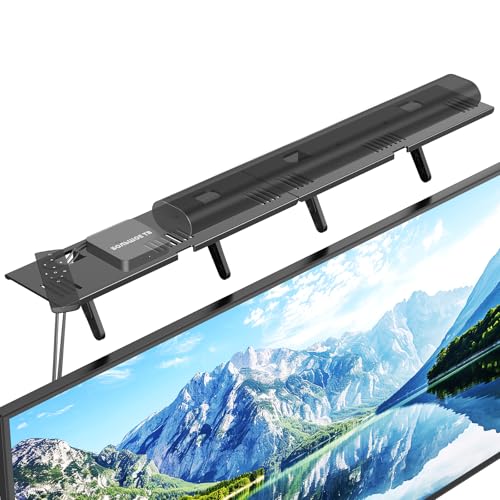
Looking for a hassle-free way to mount your soundbar? The Soundbar Mount Bracket is perfect for you. It supports most soundbars up to 15 lbs and fits brands like Samsung, Sony, and Bose. Installation takes less than 30 seconds—simply place it on top of your TV and adjust the support feet. With its durable steel construction and padded protection strip, it guarantees stability without damaging your monitor. Plus, it maximizes your entertainment space by reducing clutter and improving airflow. Rated 4.7 out of 5 stars, this mount is a smart choice for any setup!
Best For: Those looking for a quick, no-drill solution to mount their soundbar while maximizing entertainment space.
Pros:
- No drilling required: Installs in under 30 seconds, making it ideal for renters or quick setups.
- Universal compatibility: Fits most soundbars and brands like Samsung, Sony, and Bose.
- Space-saving design: Reduces clutter and improves airflow by utilizing vertical space above the TV.
Cons:
- Limited weight capacity: Supports a maximum of 15 lbs, which may not accommodate larger soundbars.
- Installation restrictions: Requires at least 4.72 inches of space between the TV and wall and is not compatible with curved or sloped TVs.
- Not suitable for all devices: Primarily designed for soundbars, limiting its versatility for other mounting needs.
Redragon GS560 RGB Desktop Soundbar

The Redragon GS560 RGB Desktop Soundbar stands out as an excellent choice for gamers and music enthusiasts alike, thanks to its vibrant RGB lighting and impressive audio quality. This 2.0 channel soundbar features upgraded drivers that deliver clear sound and rich bass, enhancing your audio experience during gaming and music playback. With four backlit modes, including dynamic and static, the lighting syncs with your music, creating an engaging atmosphere. Its compact design fits easily under monitors or laptops, while the touch-control volume knob offers convenient adjustments. Plus, it’s plug-and-play compatible with various devices, ensuring hassle-free setup.
Best For: Gamers and music enthusiasts seeking an engaging audio experience with vibrant RGB lighting.
Pros:
- Clear sound quality with rich bass enhances music and gaming enjoyment.
- Dynamic RGB lighting syncs with audio for an immersive atmosphere.
- Compact design allows for easy placement under monitors or laptops.
Cons:
- Limited to USB power, which may restrict placement options.
- No Bluetooth connectivity, requiring a wired connection for audio.
- May lack advanced sound features found in higher-end audio systems.
Factors to Consider When Choosing an Under Monitor Soundbar
When choosing an under monitor soundbar, you’ll want to take into account several key factors. Think about audio quality, design, and how well it connects with your devices. Don’t forget to check its size and compatibility with your setup to guarantee it fits seamlessly into your space.
Audio Quality Performance
Audio quality performance is a critical factor in selecting an under-monitor soundbar that meets your needs. Start by considering the wattage output; higher wattage typically means louder, clearer sound. Look for advanced driver configurations, like dual neodymium drivers and passive radiators, which enhance audio dynamics and clarity. A low distortion level is essential for precise sound delivery, especially in dialogue-heavy movies and games. If you crave deep bass, a soundbar with a dedicated subwoofer will elevate your listening experience. Finally, check the signal-to-noise ratio (SNR); a higher SNR indicates cleaner audio output with minimal background noise. By focusing on these elements, you can guarantee a superior audio experience that truly complements your setup.
Design and Aesthetics
Choosing an under-monitor soundbar isn’t just about audio quality; design and aesthetics play an essential role in enhancing your workspace. Look for a sleek, low-profile design that blends seamlessly with your desktop setup, keeping the area looking clean and organized. The soundbar’s color and finish should complement your monitor and surroundings, boosting the overall visual appeal. A compact design is vital, allowing you to maximize desk space without obstructing your monitor view. Unique features like a mount or clamp system can simplify attachment and reduce clutter. Finally, consider soundbars with award-winning designs, as they often reflect innovation and style, marrying functionality with aesthetic charm for a more engaging workspace.
Connectivity Options Available
Connectivity options play an essential role in your choice of an under-monitor soundbar. Look for soundbars that offer multiple connections like USB-C, Bluetooth, and 3.5mm AUX inputs to guarantee compatibility with your devices, including PCs, laptops, and tablets. Opt for Bluetooth technology, especially versions 5.0 or higher, for a stable, low-latency wireless connection that allows seamless audio streaming from multiple paired devices. USB-powered soundbars simplify your setup by requiring just one connection for both power and audio, reducing cable clutter. Additionally, consider adaptive features such as auto-switching capabilities that detect and switch to the active audio source automatically. Finally, verify the soundbar includes necessary adapters, like USB-A to USB-C converters, for newer devices without traditional USB ports.
Size and Space Efficiency
When it comes to under-monitor soundbars, size matters considerably. You’ll want to check the dimensions to guarantee it fits comfortably beneath your monitor without blocking the screen or overwhelming your desk space. Compact designs are ideal for maintaining space efficiency, allowing you to keep your workspace tidy. Additionally, consider the soundbar’s weight, as lighter models might need extra support or secure mounting to prevent sliding or tipping. Look for options with clip-on or mounting features for a more stable and space-saving setup. Finally, verify the soundbar’s height doesn’t obstruct your monitor’s line of sight, so you can maintain an ergonomic viewing angle while enjoying enhanced audio performance.
Compatibility With Devices
How can you guarantee that your under-monitor soundbar works seamlessly with all your devices? First, check its compatibility with PCs, laptops, smartphones, and gaming consoles to maximize usability. Look for soundbars that offer multiple connection options, like USB-C, Bluetooth, and 3.5mm AUX, making sure you can easily set it up with various devices. Pay attention to the soundbar’s power requirements; it should either be powered through available USB ports or come with an external power source to avoid any compatibility issues. Additionally, consider the design and dimensions to make certain it fits comfortably under your monitor without obstructing ports or cables. Finally, verify that it supports the latest wireless technologies, like Bluetooth 5.0 or 5.3, for seamless, low-latency audio performance.
Usability and Control Features
While choosing an under-monitor soundbar, usability and control features play an essential role in guaranteeing a satisfying audio experience. Look for soundbars with intuitive control options, like one-knob operation, so you can easily adjust the volume or functionality. Models with physical buttons for mute and volume enhance usability, eliminating the need for additional software. LED indicators are also beneficial, providing visual feedback on settings such as volume levels, making quick adjustments effortless. Opt for plug-and-play designs for straightforward setup, allowing you to connect without complex installation. Finally, verify compatibility with various devices through multiple connection methods, including USB Type-C, Bluetooth, and auxiliary inputs, to maximize versatility and convenience in your audio setup.