
Finding a comfortable trackball for small hands can be harder than choosing a conventional mouse. A compact shell, reachable buttons, and a ball that does not require excessive finger or thumb movement can make a meaningful difference during long work sessions.
This roundup compares 10 options across wireless, wired, ambidextrous, left-handed, thumb-operated, and handheld designs. Use the guide below to match the right size, control style, connectivity, and comfort features to your setup.
Best 10 Trackballs for Small Hands Picks for 2026
Best Adjustable Fit

- Flat or 15° adjustable angle
- 2.4GHz and Bluetooth connectivity
- Quiet clicks with USB-C charging
Best For: Personalized positioning in compact workspaces
Best Wired Ambidextrous Option
Kensington Orbit with Scroll Ring

- Ambidextrous two-button design
- Dedicated scroll ring
- Detachable wrist rest
Best For: Simple USB control for either hand
Best Everyday Ergonomic Choice

- Space-saving thumb control
- Bluetooth and Logi Bolt wireless
- Up to 18 months from one AA battery
Best For: Right-handed everyday work in compact setups
Best Wireless Ambidextrous Pick
- 2.4GHz and Bluetooth connectivity
- Ambidextrous design with scroll ring
- Four adjustable DPI settings
Best For: Flexible wireless use by either hand
Best Compact Wireless Pick

- Compact 25mm thumb ball for smaller hands
- Bluetooth and 2.4GHz wireless switching
- Silent buttons with travel pouch included
Best For: Small-handed right-handed users seeking a quiet portable trackball
Best Simple Ambidextrous Option

- Ambidextrous design for either hand
- Wired USB connection needs no batteries
- Compact footprint with programmable two-button layout
Best For: Desktop users wanting a dependable, uncomplicated trackball
Best Left-Handed Choice
ELECOM EX-G Left-Handed Trackball

- Ergonomic left-handed thumb-control layout
- Six programmable buttons and two DPI levels
- Wireless 2.4GHz connection with AA battery
Best For: Left-handed users wanting adjustable sensitivity and extra controls
Compact Handheld Pick

- Thumb-controlled trackball with 4D scrolling
- Compact 3.52-ounce handheld design
- Wired USB 2.0 connection
Best For: Small desks, travel, and presentations
Ergonomic Wireless Choice

- Bluetooth and Logi Bolt connectivity
- Thumb control saves desk space
- Ergonomic shape with customizable buttons
Best For: Wireless office and space-saving setups
Smallest Portable Option

- 3.14-inch compact handheld design
- Plug-and-play USB 2.0 operation
- Supports older Windows systems
Best For: Portable use and legacy Windows computers
Best Adjustable Fit – ProtoArc EM02
The ProtoArc EM02 is a practical pick among trackballs for small hands when you want to experiment with hand angle and keep wrist movement minimal. Its adjustable 0° or 15° hinge, compact-workspace-friendly control, and five DPI settings make it easier to personalize cursor handling.
Best For: Users who want an adjustable angle, quiet clicks, and wireless multi-device connectivity.
Pros:
- Switches between flat and 15° tilted positions for a more personalized posture.
- Supports both 2.4GHz wireless and Bluetooth connections.
- Offers quiet-touch buttons, five DPI settings, and USB-C recharging.
- Minimizes desk movement and includes a stated 90-day standby time.
Cons:
- Right-handed design may not suit left-handed users.
- Forward and backward buttons are not compatible with Mac OS.
- Trackball use requires a short adjustment period and occasional cleaning.
The EM02 stands out for flexible positioning and connectivity rather than a one-size-fits-all shape. It is especially appealing if your small workspace benefits from stable wrist positioning and a quiet, rechargeable design.
Best Wired Ambidextrous Option – Kensington Orbit with Scroll Ring
The wired Kensington Orbit is worth considering among trackballs for small hands if you prefer a simple USB setup and a symmetrical design. Its optical tracking, scroll ring, and detachable wrist rest provide useful control and support without requiring the mouse itself to move around the desk.
Best For: Right- or left-handed users who want a straightforward wired trackball with easy scrolling.
Pros:
- Ambidextrous design accommodates either hand.
- Dedicated scroll ring simplifies navigation through pages and documents.
- Detachable wrist rest cushions the hand and wrist.
- Software allows button assignments and cursor or scrolling-speed adjustments.
Cons:
- USB wired operation offers less flexibility than wireless models.
- Only two buttons are included.
- Compatibility is listed for personal computers and Mac OS.
The Orbit keeps the feature set focused and easy to understand. Choose it when reliable wired connectivity, ambidextrous use, and a scroll ring matter more than wireless convenience or extensive buttons.
Best Everyday Ergonomic Choice – Logitech ERGO M575S
The Logitech ERGO M575S is a strong everyday choice among trackballs for small hands, particularly for users who want thumb control in a space-saving wireless mouse. Its sculpted right-handed shape, quiet clicks, and Bluetooth or Logi Bolt connectivity are designed for extended computer use.
Best For: Right-handed users seeking a comfortable wireless trackball for compact setups and long work sessions.
Pros:
- Thumb-controlled cursor movement works well on limited desk space.
- Bluetooth and included Logi Bolt receiver provide connection flexibility.
- Offers quiet clicks, customizable controls, and adjustable cursor speed through Logi Options+.
- Uses one included AA battery with a stated life of up to 18 months.
Cons:
- Right-handed design is not ambidextrous.
- Only two buttons are listed, although controls can be customized.
- Requires a short learning period for users new to thumb-operated trackballs.
The M575S emphasizes a familiar, relaxed hand position and low desk-space requirements. It is a sensible fit for workstations where wireless convenience and long battery life are higher priorities than a larger button layout.
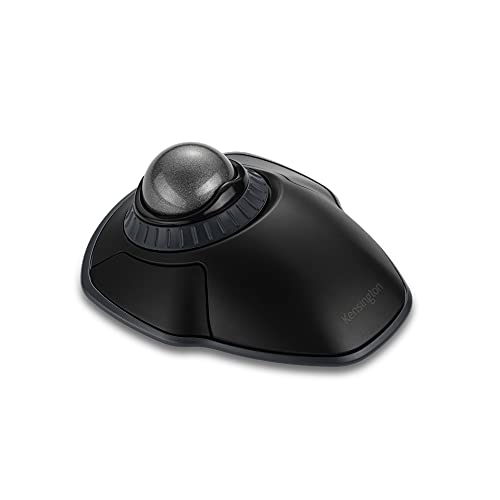
Best Wireless Ambidextrous Pick – Kensington Orbit Wireless
Kensington Orbit Wireless Trackball with Scroll Ring - Space Gray (K72675WW),Black/Grey
Check Price On AmazonThe Kensington Orbit Wireless combines an ambidextrous layout with a scroll ring, making it a flexible option among trackballs for small hands. Its 2.4GHz and Bluetooth connectivity, four DPI levels, and detachable wrist rest let you tailor both setup and cursor response.
Best For: Users who want wireless flexibility, symmetrical handling, and dedicated scrolling controls.
Pros:
- Works for both right- and left-handed users.
- Supports 2.4GHz and Bluetooth wireless connections.
- Scroll ring and 40mm spherical ball support controlled navigation.
- Four DPI settings and KensingtonKonnect software provide customization.
Cons:
- Only two buttons are listed.
- Requires two AA batteries rather than USB-C charging.
- May require adjustment for users unfamiliar with trackball control.
This model is a good match when shared workstations or changing hand preferences make an ambidextrous design valuable. Its scroll ring and DPI presets also make it more adaptable than a basic wireless trackball.
Best Compact Wireless Pick – ELECOM BITRA Trackball
If you are comparing trackballs for small hands, the ELECOM BITRA stands out for its compact, right-handed thumb-operated shape. It is about 30 percent smaller than the previous generation and combines Bluetooth and 2.4GHz wireless connectivity, making it practical for travel, shared workspaces, and multi-device setups.
Best For: Small-handed right-handed users who want a quiet, portable wireless trackball.
Pros:
- Compact design with a 25mm ball suited to smaller hands
- Bluetooth and USB 2.4GHz connectivity can be switched without re-pairing
- Silent switches, customizable buttons, receiver storage, and included travel pouch
Cons:
- Right-hand orientation limits use for left-handed users
- Runs on a replaceable AAA battery rather than a rechargeable battery
The BITRA is the most directly targeted option here for small hands, especially if you value quiet operation and portability. Its five-button layout and 750 DPI sensitivity are suited to everyday work rather than high-sensitivity gaming.
Best Simple Ambidextrous Option – Kensington Orbit Trackball
The Kensington Orbit is worth considering among trackballs for small hands if you prefer a compact, straightforward wired design. Its ambidextrous body uses a medium 40mm finger-operated ball, requires no batteries, and connects through USB for a dependable desktop setup.
Best For: Users who want a simple ambidextrous trackball with wired USB reliability.
Pros:
- Ambidextrous design accommodates either hand
- Compact footprint uses less desk space than a conventional mouse
- USB connection needs no batteries and supports Windows, macOS, and Chrome
Cons:
- Wired-only connectivity limits portability and workspace flexibility
- Only two buttons and no scroll ring
- The 40mm ball may feel less compact than the BITRA’s 25mm ball
The Orbit is a practical choice when simplicity matters more than wireless convenience or extensive controls. Its ambidextrous shape broadens compatibility, but users specifically seeking the smallest possible trackball may prefer the more compact BITRA.
Best Left-Handed Choice – ELECOM EX-G Left-Handed Trackball
Left-handed shoppers comparing trackballs for small hands may find the ELECOM EX-G especially appealing. It has a left-handed ergonomic thumb-control layout, wireless 2.4GHz connectivity, six programmable buttons, and switchable 750/1500 DPI sensitivity for adjusting cursor speed.
Best For: Left-handed users who want wireless control, programmable buttons, and adjustable sensitivity.
Pros:
- Purpose-built left-handed thumb-operated design
- Six programmable buttons and switchable 750/1500 DPI settings
- Wireless USB connection, battery indicator, and included AA battery
Cons:
- Its 4.9-inch length is larger than the compact BITRA
- Designed specifically for left-handed use rather than ambidextrous use
- Requires a USB wireless receiver and replaceable AA battery
The EX-G offers more controls and sensitivity adjustment than the other two models, making it useful for users who want customization. However, its larger dimensions mean it is not the most compact option for particularly small hands; its strongest advantage is serving left-handed users.
Compact Handheld Pick – Mini Finger Trackball Mouse
For shoppers comparing trackballs for small hands, this compact wired model offers thumb-controlled navigation in a handheld design. Its small 4.33-by-2.36-by-1.97-inch body stays in your hand instead of requiring desk or mouse-pad movement.
Best For: Small workspaces, travel, presentations, and users who prefer an ambidextrous handheld mouse.
Pros:
- Compact, lightweight design weighs about 3.52 ounces.
- Thumb-controlled rollerball with 3-button layout and 4D scrolling.
- Wired USB 2.0 connection avoids battery or wireless setup.
- Works with compatible laptops and desktop computers.
Cons:
- Requires a wired USB connection.
- Supplied details list no warranty.
- Handheld operation may not suit users seeking a conventional desktop mouse shape.
This OATIPHO model emphasizes portability and minimal desk-space requirements. It is a practical option when a small, ambidextrous, wired trackball matters more than wireless convenience.
Ergonomic Wireless Choice – Logitech ERGO M575S
Logitech Ergo M575S Wireless Ergonomic Trackball Mouse, Black/Blue (910-007026)
Check Price On AmazonThe Logitech ERGO M575S is a strong consideration among trackballs for small hands, especially for users who want thumb control without moving the mouse across a desk. Its ergonomic shape is designed to support the hand and suit most hand sizes while conserving workspace.
Best For: Space-saving home or office setups, wireless users, and those wanting Bluetooth or Logi Bolt connectivity.
Pros:
- Cursor movement works without moving the mouse, making it useful on any surface.
- Connects through Bluetooth or the included Logi Bolt USB receiver.
- Includes an AA battery and offers up to a 32.81-foot listed range.
- Three customizable buttons, shortcuts, and Smart Actions add flexibility.
Cons:
- Its 6-by-4.2-inch dimensions are larger than the mini handheld models in this roundup.
- Requires Windows 10 or later for the listed minimum operating system requirement.
- Thumb-controlled designs may not match every user’s preferred grip.
With wireless connectivity, ergonomic shaping, and configurable controls, the M575S is the most feature-rich option here. It is worth considering when compact desk use matters but you still want a fuller ergonomic mouse design.
Smallest Portable Option – Mobestech Mini Trackball
For shoppers seeking trackballs for small hands, the Mobestech Mini Trackball combines a compact 3.14-by-2.04-by-1.96-inch body with handheld operation. Its thumb trackball, 3-button layout, and 4D scrolling are suited to basic computer navigation where portability is a priority.
Best For: Portable wired use, compact laptop setups, and users who need broad compatibility with older Windows systems.
Pros:
- Small 3.53-ounce design is easy to carry.
- Thumb trackball supports precise cursor movement and 4D page scrolling.
- Plug-and-play USB 2.0 connection requires no additional software or drivers.
- Listed compatibility includes Windows 95/98/2000/ME/XP and newer compatible environments.
Cons:
- Wired operation limits cable-free flexibility.
- Listed sensitivity is 800 dpi.
- Its hard plastic construction may feel less premium than an ergonomic office mouse.
The Mobestech stands out for its particularly small footprint and legacy-system compatibility. Choose it when a lightweight, plug-and-play handheld trackball is more important than wireless operation or advanced customization.
How We Picked the Best Trackballs for Small Hands
We focused on models that can suit smaller reaches without sacrificing everyday control. Our comparison considered overall footprint, ball placement, button access, scrolling method, hand orientation, connection options, and portability. We also included several design categories because “small hands” does not mean the same thing for every user: some people prefer a compact thumb trackball, while others find a finger-operated or handheld model easier to control.
Wireless flexibility, silent clicking, adjustable angles, and compatibility were treated as practical advantages rather than automatic requirements. A smaller device is only useful if it remains stable, responsive, and comfortable for the way you work.
Quick Comparison
- Best for adjustable comfort: ProtoArc EM02, with a 0/15-degree angle adjustment.
- Best for scrolling: Kensington Orbit models, which use a dedicated scroll ring.
- Best familiar ergonomic option: Logitech Ergo M575S, a wireless thumb-operated design.
- Best compact travel choice: ELECOM BITRA, with a small 25mm ball and dual wireless modes.
- Best left-handed option: ELECOM EX-G Left Handed.
- Best for specialized handheld control: the mini finger and 4D USB trackball designs.
Key Buying Factors for Trackballs for Small Hands
Size, Reach, and Button Placement
Check the device width and the distance between the ball, primary buttons, and scroll control. A compact body is helpful, but buttons should still be large enough to locate without shifting your palm. Thumb-operated models may feel natural if your thumb can rest on the ball without stretching.
Ball Position and Control Style
Finger-operated balls can reduce thumb fatigue and may offer more precise movement, while thumb balls often feel closer to a traditional mouse. Ambidextrous designs can work well when hand position or shared use matters, but they may provide less palm support than contoured ergonomic models.
Connectivity and Desk Setup
Bluetooth is convenient for laptops and tablets, while a 2.4GHz receiver can provide straightforward desktop pairing. Dual-mode models offer more flexibility. Wired options eliminate battery concerns and can be useful for fixed workstations or travel kits.
Scrolling, Clicking, and Portability
A dedicated scroll ring is particularly useful for documents and long webpages. Silent switches can reduce distractions in shared spaces. For travel, consider not only the shell size but also whether the ball is protected and whether the receiver has a convenient storage location.
Who Should Buy Which Trackballs for Small Hands?
Choose the ProtoArc EM02 if adjustable wrist positioning is a priority. Pick a Kensington Orbit if a scroll ring and ambidextrous control are more important than the smallest possible footprint. The Logitech M575S is a sensible general-purpose choice for users who want a familiar wireless thumb-trackball layout.
For commuters or users with limited desk space, the ELECOM BITRA is the most directly compact-focused option. Left-handed users should start with the ELECOM EX-G Left Handed, while shoppers seeking a highly portable specialty device may prefer one of the handheld mini trackballs. Before buying, compare the listed dimensions with your palm width and confirm operating-system and connection compatibility.