
A good racing simulator button box can make a sim rig feel far more realistic and a lot easier to use. Instead of reaching for the keyboard, you get quick access to pit controls, lights, wipers, traction settings, and more.
Below, we’ve rounded up 10 of the best options for PC sim racers, truck sim fans, and multi-sim setups, with a focus on layout, programmability, and mounting flexibility.
Best 10 Racing Simulator Button Box Picks for 2026
RGB Control Hub
30-Button PC Racing Button Box
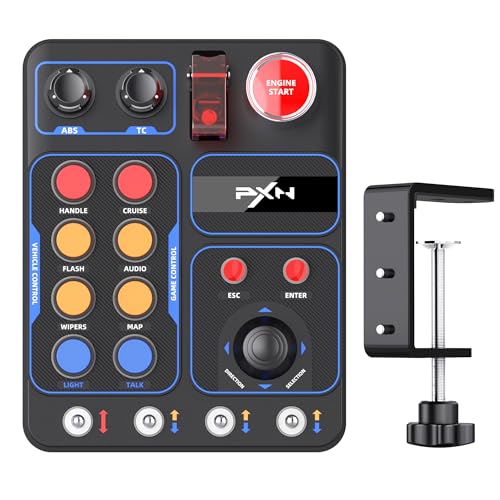
- 30 programmable buttons
- PC and popular sim support
- Adjustable RGB lighting
Best For: PC sim racers and truck sim players
Ergonomic Horizontal Panel
Ergonomic PC Racing Button Box
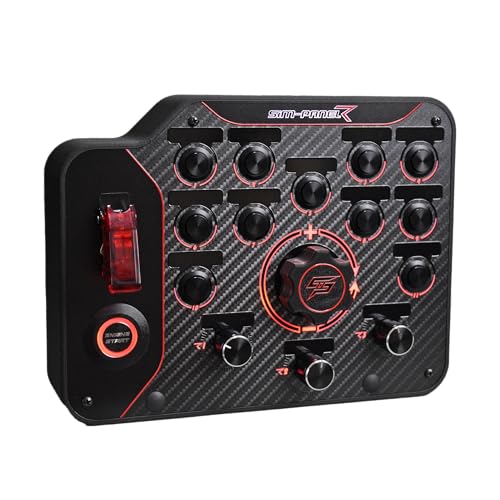
- Individually programmable modes
- Horizontal layout for fast access
- Desk clamp and VESA mounting
Best For: PC racers who want an organized horizontal control panel
Truck Sim Control Panel

- 16 customizable buttons
- PTT microphone support
- Ignition-style truck sim controls
Best For: Truck sim players who want immersive, map-friendly controls
Compact Vertical Panel

- Individually programmable modes
- Compact vertical footprint
- Desk clamp and 75mm VESA support
Best For: PC sim racers who need a space-conscious control panel
Truck Immersion Panel
European Truck Switch Panel Simulator

- 5-in-1 switch panel with start button and toggle switches
- Includes brake knob, game mount, and USB connection
- Windows 10+ auto-recognition for easy setup
Best For: ATS and ETS2 players who want a themed physical control panel
Best for Everyday Use

- 30 programmable inputs for engine, lights, wipers, and menus
- Plug-and-play USB setup with no extra drivers
- RGB lighting and desk clamp or VESA mounting
Best For: PC sim racers who want a flexible, easy-to-mount control box
Programmable Sim Hub
26-Button Truck Racing Control Box

- 26 programmable buttons for ATS, ETS2, and sim racing
- Supports several major wheel bases and PC setups
- Desk clamp and 75 mm VESA mounting options
Best For: PC truck and sim racing users who want broad compatibility
Most Versatile Layout
PXN CB1 Sim Racing Button Box for Racing, Truck & Farming Sims

- 30 programmable functions with joystick and switches
- USB plug-and-play on Windows PC
- 7 RGB lighting effects and flexible mounting
Best For: Players who want one box for racing, truck, and farming sims
Premium Build Pick
MiYee Programmable Sim Racing Button Box

- Genuine carbon-fiber face plate and full-metal housing
- 32-key customizable profile with buttons, toggles, and encoders
- Driver-free plug-and-play for PC
Best For: PC sim racers who want a sturdier, more premium-feeling control box
RGB Control Panel
PXN CB1 PC Button Box for Racing, Truck & Farming Sims

- 19 physical inputs with up to 30 programmable functions
- Driver-free USB on PC and select PXN wheel bases
- RGB backlighting plus desk and VESA mounting options
Best For: PC sim racers who want RGB styling and flexible mounting
RGB Control Hub – 30-Button PC Racing Button Box
If you want a racing simulator button box with broad PC compatibility and lots of control inputs, the PXN CB1 is built for exactly that. It gives you 30 programmable buttons, plug-in support for popular sims, and adjustable RGB lighting, making it a practical add-on for racing and truck sim setups.
Best For: PC sim racers and truck sim players who want a highly configurable control hub with RGB lighting.
Pros:
- 30 programmable buttons offer plenty of custom control for menus, gear functions, and in-game commands.
- Compatible with PC and supported by titles like Assetto Corsa, iRacing, Project Cars, ETS2, and ATS.
- Adjustable RGB effects add atmosphere and can be customized for brightness and color.
- Simple mounting design supports desk or compatible surface installation.
Cons:
- PC-focused compatibility means it is not a universal console solution.
- Best results depend on setting up the programmable buttons to match your sim workflow.
The CB1 stands out as a flexible, feature-rich option for players who want more than a basic switch panel. Its combination of button count, lighting control, and straightforward installation makes it a strong choice for a dedicated sim rig.
Ergonomic Horizontal Panel – Ergonomic PC Racing Button Box
This racing simulator button box is aimed at sim racers who want a clean, organized control panel on PC. The horizontal layout is designed for quick visibility and easy reach, while the individually programmable buttons let you tailor the panel to your racing style.
Best For: PC sim racers who prefer an ergonomic horizontal layout with customizable button behavior.
Pros:
- Individually programmable button modes make it easy to map functions for different disciplines.
- Horizontal layout improves recognition speed and keeps controls easy to reach.
- Includes customizable backlighting for a more polished rig setup.
- Integrated desk clamp and 75mm VESA mounting compatibility improve placement flexibility.
Cons:
- PC compatible only, so it is not suited for console users.
- Its performance focus may be more than casual users need.
The SIM-PANEL horizontal edition is a solid pick if layout and control clarity matter as much as button count. It is especially appealing for players building a tidy, purpose-driven sim racing rig on PC.
Truck Sim Control Panel – 16-Button ATS/ETS2 Panel
For truck sim fans shopping for a racing simulator button box, this model leans into immersion and practical controls. It combines 16 customizable buttons with a microphone PTT function, plus ignition-style switching and lighting options for ATS and ETS2 setups.
Best For: Truck sim players who want ignition-style controls, microphone PTT, and customizable buttons.
Pros:
- 16 customizable buttons give you room to map key truck sim functions.
- PTT microphone support adds a useful communication feature for compatible games.
- Designed to mimic real vehicle actions with power activation and ignition control.
- Supports customizable lighting effects through sim hub software.
Cons:
- Customization may require some setup and mapping time.
- The 3D-printed PLA construction may show small print lines.
This is a strong fit if you want a truck-focused panel that goes beyond basic buttons and into more immersive controls. It is especially practical for ETS2 and ATS players who want fewer keyboard touches during gameplay.
Compact Vertical Panel – Compact PC Racing Button Box
If you need a racing simulator button box that fits tighter spaces without giving up customization, the vertical SIM-PANEL Gen 2 is worth a look. It keeps the same PC-only, individually programmable control approach as the horizontal version, but with a taller layout that may suit certain rigs better.
Best For: PC sim racers who want a compact vertical layout with flexible mounting options.
Pros:
- Individually programmable button modes support tailored control setups.
- Vertical layout can work well on compact desks or specific rig placements.
- Includes customizable backlighting and high-precision input response.
- Desk clamp and 75mm VESA mounting compatibility make installation flexible.
Cons:
- PC compatible only, so it will not work as a console accessory.
- Vertical layout may not be as comfortable for every cockpit setup.
The vertical Gen 2 is a sensible option if you want the same core SIM-PANEL features in a different footprint. It is best suited to sim racers who care about clean mounting options and a more space-conscious control panel.
Truck Immersion Panel – European Truck Switch Panel Simulator
If you want a racing simulator button box that leans hard into truck sim immersion, this panel focuses on physical switches rather than a huge control count. It includes a covered lighted toggle switch, a red engine start button, and three 2-pin toggle switches, plus a dedicated brake knob and game mount for a more hands-on cockpit feel.
Best For: ATS and ETS2 players who want a simple, truck-style control panel with ignition-style inputs.
Pros:
- 5-in-1 layout with a covered toggle, start button, and three additional toggle switches
- Includes a dedicated brake knob and a game mount for cockpit-style setup
- USB connection with Windows 10 and above auto-recognition
- Carbon fiber face plate and illuminated engine start button
Cons:
- Limited input count compared with larger programmable button boxes
- Designed more around truck and immersion controls than broad customization
- Product notes emphasize compatibility on Windows 10+, not earlier systems
This is a good pick if your priority is tactile truck sim controls over a packed control grid. It should appeal most to players who want a themed panel that fits ATS, ETS2, and similar immersion-focused games.
Best for Everyday Use – PXN CB1 PC Racing Button Box
The PXN CB1 is a racing simulator button box built for players who want lots of mapped controls in one compact unit. With 30 programmable inputs, RGB lighting, a joystick, rotary controls, and plug-and-play USB setup, it is aimed at sims where you want quick access to engine start, lights, wipers, horn, and menus.
Best For: PC sim racers who want a feature-rich button box with easy setup and flexible mounting.
Pros:
- 30 programmable inputs for broad control mapping
- Plug-and-play USB connection with no extra drivers required
- RGB lighting with 7 effects plus color and brightness options
- Desk clamp support and 100 x 100 mm VESA mounting holes
Cons:
- PC-only compatibility, so it is not a console option
- Best suited to users who will take advantage of the full programmable layout
- ABS housing may not feel as premium as metal-bodied alternatives
For a racing simulator button box that balances control count, lighting, and mounting flexibility, this one is easy to place in a sim rig or on a desk. It stands out if you want a single USB device that covers many sim functions without a driver-heavy setup.
Programmable Sim Hub – 26-Button Truck Racing Control Box
This racing simulator button box is built around 26 programmable buttons and a layout tuned for ATS and ETS2-style driving. It adds desk clamps, 75 mm VESA compatibility, and support for common wheel bases, making it a practical add-on for players who want truck-sim controls close at hand.
Best For: Sim racers and truck sim players who want a customizable control hub with flexible mounting options.
Pros:
- 26 programmable buttons for mapping common sim functions
- Compatible with Logitech, Thrustmaster, Fanatec, MOZA, and PXN wheel bases listed in the notes
- Desk clamps plus 75 mm VESA compatibility for mounting options
- LED backlighting and SimHub-based lighting customization
Cons:
- 3D-printed construction may show small print lines
- Primarily focused on PC truck and sim racing use
- Setup is straightforward, but the customizable lighting depends on SimHub software
If you want a button box that slots naturally into a truck or sim racing setup, this model offers a strong mix of inputs and mounting flexibility. Its appeal is in the practical layout and broad wheel-base compatibility rather than flashy extras.
Most Versatile Layout – PXN CB1 Sim Racing Button Box for Racing, Truck & Farming Sims
If you want a racing simulator button box that can handle more than just lap timing, the PXN CB1 is built for broad sim use. It offers 30 programmable functions across buttons, switches, encoders, and an 8-way joystick, so you can map common driving and utility commands without leaning on your keyboard.
Best For: Sim racers who also play truck or farming titles and want lots of mapped controls in one panel.
Pros:
- 30 programmable functions with an 8-way joystick, toggle switches, and encoders
- USB plug-and-play on Windows PC with no extra drivers or software required
- 7 RGB lighting effects for a more customized cockpit look
- Desk clamp and rear mounting holes make setup flexible on different rigs
Cons:
- Mapping is required to get the most out of its controls
- Designed for Windows PC use rather than broad platform support
- Heavier feature set may be more than casual users need
Overall, this PXN CB1 is a practical choice if you want a feature-rich control panel that can cover racing, trucking, and farming sim tasks from one compact box.
Premium Build Pick – MiYee Programmable Sim Racing Button Box
The MiYee racing simulator button box is aimed at users who want a more premium-feeling control panel for PC sims. Its genuine carbon-fiber face plate, full-metal housing, and mix of buttons, toggles, and encoders give you a sturdy setup for mapping key simulator functions.
Best For: PC sim racers who value a durable metal-and-carbon-fiber build with lots of programmable inputs.
Pros:
- Genuine carbon-fiber face plate with full-metal unibody housing
- 32-key customizable profile with 10 buttons, 3 toggles, 1 start button, and 6 encoders
- Driver-free plug-and-play compatibility for PC use
- Included bracket is designed for easy, secure, adjustable installation
Cons:
- Fewer physical buttons than its 32-key profile may suggest, since encoders are doing part of the work
- Primarily positioned for PC use
- May be more panel than some casual players need
If you want a control box that feels solid and offers plenty of remapping flexibility, the MiYee stands out as a durable, straightforward option for simulator setups.
RGB Control Panel – PXN CB1 PC Button Box for Racing, Truck & Farming Sims
The PXN CB1 PC button box is a compact way to add dedicated controls to a sim setup without relying on your keyboard. As a racing simulator button box, it combines 19 physical inputs with up to 30 programmable functions, plus RGB backlighting and flexible mounting options for a cockpit-style install.
Best For: Sim players who want a driver-free PC control panel with RGB lighting and easy rig mounting.
Pros:
- 19 buttons and switches across 9 input types, with up to 30 programmable functions
- Driver-free USB connection for PC, plus direct compatibility with select PXN wheel bases
- Adjustable RGB halo lighting with a rear switch for quick on/off control
- Back mounting holes, desk clamps, and VESA-style mounting support
Cons:
- Initial in-game mapping is required for best accuracy
- Not every input has RGB lighting, since the joystick is excluded
- Most useful when paired with a dedicated sim rig or wheel setup
For PC sim racers who want a flexible control panel with strong mounting options, the CB1 delivers a well-rounded blend of convenience, customization, and cockpit-ready features.
How We Picked the Best Racing Simulator Button Box Options
We focused on controls that add genuine utility to a cockpit: programmable inputs, dependable USB connectivity, sensible ergonomics, and compatibility with popular PC sim titles and wheel ecosystems. We also considered whether a unit suits racing only or works better as a broader sim control panel for trucking and farming games.
Build quality, button feel, mounting options, and the overall ease of use mattered too. A strong Racing Simulator Button Box should be easy to reach mid-session, simple to configure, and durable enough for repeated use.
Quick Comparison: What Matters Most
For pure racing, prioritize a compact layout with clearly separated buttons, rotary encoders, and toggle switches for pit and car functions. For truck sim or mixed-use rigs, larger panels with more labeled controls can be easier to manage. If you share a desk space, look for clamp mounts, VESA compatibility, or a footprint that won’t crowd your wheel base and shifter.
Key Buying Factors for a Racing Simulator Button Box
Button Count and Function Mapping
More buttons are not always better, but they do help if you want separate controls for headlights, wipers, ignition, pit limiter, brake bias, or camera views. Look for programmable inputs so you can tailor the panel to your favorite games.
Layout and Ergonomics
Horizontal panels may feel more natural for general racing, while vertical layouts can work well in tight cockpits or when you want controls stacked closer to your wheel. The best layout is the one you can reach without breaking your driving posture.
Compatibility and Software
Most buyers will want plug-and-play USB operation on PC. Check for driver-free support, easy mapping, and compatibility with your steering wheel ecosystem if you are building around Logitech, PXN, or a similar setup.
Mounting and Space
Desk clamps, VESA mounting, and compact housings can make a big difference. A well-mounted button box stays stable under fast inputs and keeps your cockpit organized.
Who Should Buy Which Racing Simulator Button Box?
If you want a focused racing cockpit, choose a smaller, more streamlined panel with clearly assigned controls and strong mounting options. If you also play ETS2, ATS, or farming sims, a larger multi-function box with extra switches may be the better fit. For beginners, simple plug-and-play models are easiest; for advanced users, more programmable inputs and rotary controls offer the most flexibility.
In the end, the best Racing Simulator Button Box is the one that matches your sim mix, your desk or rig layout, and how often you need quick-access controls during a session.