
Powered USB switch boxes make it easier to share keyboards, mice, printers, scanners, storage devices, and other peripherals between computers—or connect more USB devices to one system.
Our 2026 roundup covers powered hubs, computer-sharing switches, multi-port USB selectors, and models with USB-A, USB-C, individual controls, or remote switching.
Best 10 Powered USB Switch Boxes Picks for 2026
Best Multi-Port Control
Atolla 8-Port Powered USB 3.0 Hub

- Seven USB 3.0 data ports
- Individual on/off switches
- Dedicated 2.4A charging port
Best For: Busy workstations needing expansion and per-port control
Best Computer Sharing Switch
Sabrent USB 3.0 Sharing Switch
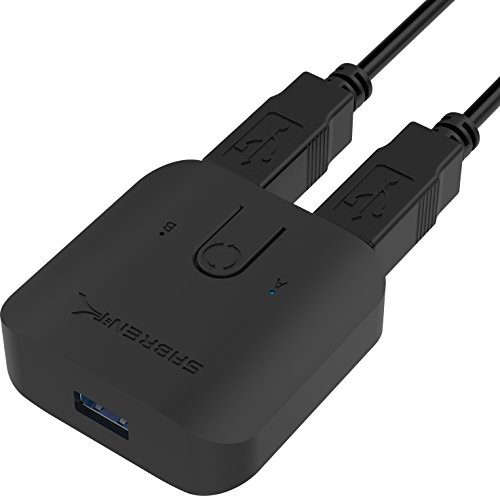
- Switches peripherals between two computers
- Single-button operation
- LED computer indicators
Best For: Two-computer keyboard and mouse sharing
Best Compact Aluminum Hub
Atolla 5-Port Powered USB 3.0 Hub

- Four 5Gbps data ports
- Individual switches with LEDs
- Aluminum housing and 2.4A charging
Best For: Compact home and office USB expansion
Best Simple Inline Control
Cable Matters USB 3.0 Switch Cable

- Controls power to one USB-A device
- Up to 5Gbps data support
- Compact 1-foot extension
Best For: Single low-power USB-A accessories
Best Individual Port Control

- Four USB 3.0 ports with up to 5Gbps transfer speeds
- Separate LED-lit power switch for every port
- Includes a 5V/2.5A power adapter
Best For: Users who want compact USB expansion with independent port control
Best Two-Computer Sharing
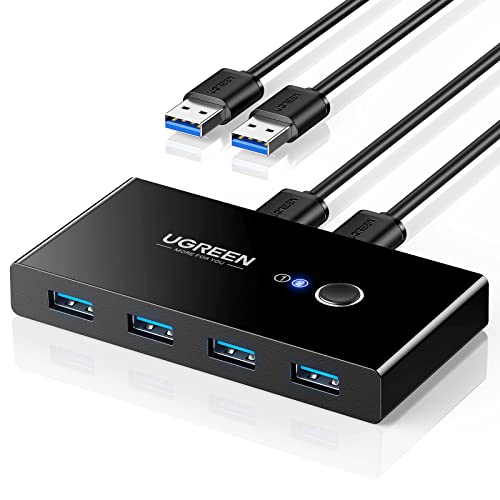
- Shares four USB devices between two computers
- One-button switching with LED status indicator
- Supports up to 5Gbps and includes two USB 3.0 cables
Best For: Dual-computer desks sharing keyboards, storage, printers, or scanners
Best High-Speed Multi-Port Option
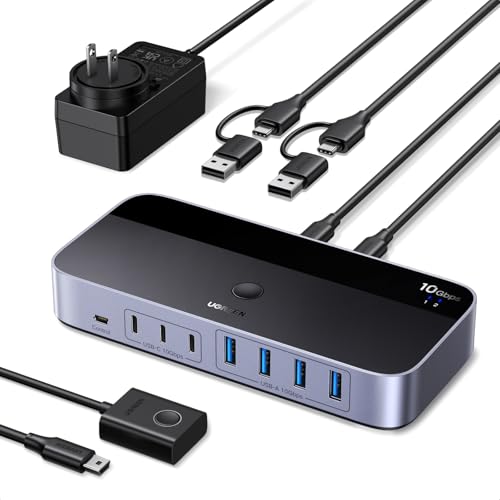
- Shares up to seven USB-A and USB-C devices
- USB 3.2 Gen 2 speeds reach up to 10Gbps
- Includes a power adapter and USB-C-to-A cable
Best For: Mixed-port workstations with multiple shared data peripherals
Best High-Speed Pick

- Four shared USB 3.0 and USB-C peripheral ports
- Up to 5Gbps data transfer
- Button and remote-control switching
Best For: Two-computer setups needing fast peripheral sharing
Best Flexible Layout

- Shares four USB devices between two computers
- Includes USB-A and USB-C peripheral ports
- Comes with a separate switching controller
Best For: Mixed-port workstations with remote switching needs
Best Budget USB 2.0 Option

- Shares four USB peripherals between two computers
- One-button switching with LED indicator
- Includes two USB-A-to-A cables
Best For: Basic office peripherals and everyday USB sharing
Best Multi-Port Control – Atolla 8-Port Powered USB 3.0 Hub
For shoppers comparing powered usb switch boxes, this Atolla hub stands out when you need several high-speed data connections plus individual power controls. It provides seven USB 3.0 data ports, a separate smart-charging port, and a 5V/4A adapter for a flexible desktop setup.
Best For: Users who need multiple USB 3.0 ports, per-port switches, and dedicated device charging.
Pros:
- Seven USB 3.0 data ports support transfer speeds up to 5Gbps.
- Individual on/off switches let you control connected devices without unplugging them.
- Dedicated smart-charging port can provide up to 2.4A with the included power adapter.
- Plug-and-play compatibility covers Windows, macOS, Linux, and hot swapping.
Cons:
- The separate charging port is not described as a data port.
- Its larger 8-port design may be more than needed for a small setup.
This is the most versatile choice here for a busy workstation that needs both high-speed expansion and convenient individual port control.
Best Computer Sharing Switch – Sabrent USB 3.0 Sharing Switch
Among powered usb switch boxes, the Sabrent USB-SW30 is designed for sharing connected peripherals between two computer systems. Its single push button, LED indicators, and plug-and-play setup make switching a straightforward option for keyboards, mice, and other hub-connected devices.
Best For: Switching one set of USB peripherals between two computers.
Pros:
- One button swaps the connected USB devices between computer systems.
- LED indicators help distinguish the selected computer.
- Supports data transfer speeds up to 5Gbps.
- Plug-and-play operation requires no additional drivers.
Cons:
- This is a sharing switch rather than a multi-port expansion hub.
- The supplied notes specifically mention compatibility with keyboards and mice, so broader peripheral support is not established.
Choose this model when the main goal is quick two-computer peripheral sharing rather than adding a bank of USB ports.
Best Compact Aluminum Hub – Atolla 5-Port Powered USB 3.0 Hub
This compact Atolla hub is a practical pick among powered usb switch boxes for users who want individual control without taking up much desk space. It combines four USB 3.0 data ports with a smart-charging port, aluminum housing, and a 5V/3A power adapter.
Best For: Home and office users who want a compact, durable-feeling hub with per-port switches.
Pros:
- Four USB 3.0 data ports support speeds up to 5Gbps and work with older USB devices.
- Individual switches and status LEDs simplify power management.
- Smart-charging port provides up to 2.4A for compatible USB-charged devices.
- Aluminum construction offers an understated design for desks and workspaces.
Cons:
- It has fewer total ports than the larger Atolla model.
- The smart-charging port is intended for charging rather than listed as a data port.
Its four-port layout is a good middle ground for everyday peripherals, while the individual switches help prevent unnecessary unplugging.
Best Simple Inline Control – Cable Matters USB 3.0 Switch Cable
If you only need to control power to one accessory, this Cable Matters cable offers a simpler alternative to powered usb switch boxes. The built-in switch turns USB power delivery on or off while the data connection remains active, making it useful for compatible USB-A accessories that you do not want to unplug repeatedly.
Best For: USB-A peripherals such as LED lights, small fans, and other low-power accessories needing convenient power control.
Pros:
- Inline switch controls power without repeatedly unplugging the device.
- USB 3.0 support enables data speeds up to 5Gbps and is backward compatible with USB 2.0 and 1.1.
- Plug-and-play compatibility works with Windows, macOS, Linux, and USB-A devices.
- Compact 1-foot extension design fits individual accessory setups.
Cons:
- It has only one connection and does not expand USB ports.
- The switch controls power only; data remains connected when switched off.
- It is not designed for USB-C ports or complete data isolation.
This is the most focused option for one USB-A device, but users needing several switched ports should choose a powered hub instead.
Best Individual Port Control – 4-Port Powered USB 3.0 Hub
For shoppers comparing powered usb switch boxes, the SABRENT HB-UMP3 is a straightforward choice when you want four additional USB 3.0 ports and separate control over each connected device. Its included 5V/2.5A adapter helps supply power, while LED-lit switches make port status easy to see.
Best For: Desktops and laptops that need individually controlled USB peripherals.
Pros:
- Four USB 3.0 ports with transfer speeds up to 5Gbps.
- Individual power switches and LED indicators for each port.
- Includes a 2.5A power adapter and supports USB 2.0 and 1.1 devices.
- Compact, lightweight, plug-and-play design.
Cons:
- Provides four ports, fewer than larger multi-device switchers.
- Designed for port expansion rather than switching peripherals between two computers.
This SABRENT hub stands out for simple, direct power control. It is a practical fit if convenience and compact size matter more than computer-to-computer device sharing.
Best Two-Computer Sharing – 2-Computer USB 3.0 Switch
Among powered usb switch boxes, the UGREEN 2-in-4-out switch is built for sharing one set of USB accessories between two computers. A single button changes the active computer, and the extra USB-C power input can help stabilize higher-power devices such as hard drives, cameras, or microphones.
Best For: Workstations where two computers share keyboards, mice, printers, scanners, or other USB peripherals.
Pros:
- Lets two computers share four USB devices.
- USB 3.0 supports transfer speeds up to 5Gbps and is backward compatible with USB 2.0.
- One-button switching with an LED status indicator.
- Includes two USB 3.0 cables and supports Windows, macOS, Chrome OS, and Linux.
Cons:
- Power adapter is not included.
- Requires additional USB-C power for some high-power setups.
- Does not support monitors or video transmission because it is not a KVM switch.
This UGREEN model is a useful peripheral-sharing solution for dual-computer desks. Its main limitation is the need to provide your own power adapter when connected devices demand more power.
Best High-Speed Multi-Port Option – 7-Port USB 3.2 Switch
For buyers seeking powered usb switch boxes with more capacity, the UGREEN 2-in-7-out USB 3.2 switch connects two computers to up to seven shared peripherals. It combines four USB-A and three USB-C device ports, reaches up to 10Gbps, and includes a power adapter for a more stable setup.
Best For: Mixed USB-A and USB-C workstations that share several data devices between two computers.
Pros:
- Supports up to seven shared devices: four USB-A and three USB-C.
- USB 3.2 Gen 2 connectivity reaches transfer speeds up to 10Gbps.
- Includes a USB-C-to-USB-A cable for mixed computer setups.
- Included power adapter supports high-power devices such as external hard drives and printers.
Cons:
- Not a KVM switch and does not provide video output.
- Audio device connections are not recommended.
- Its larger feature set may be unnecessary for simple four-port setups.
This is the most capable option here for port count and speed. Choose it when your desk includes both USB-A and USB-C peripherals and you need to switch many data devices between two computers.
Best High-Speed Pick – BENFEI USB 3.0 Switch
For shoppers comparing powered usb switch boxes, the BENFEI USB 3.0 Switch stands out for combining four shared peripheral ports with fast data transfer and convenient remote switching. It lets two computers share three USB-A devices and one USB-C device, while its optional USB-C power input can help stabilize higher-draw peripherals.
Best For: Users switching keyboards, mice, storage, printers, scanners, cameras, or headphones between two computers.
Pros:
- Shares three USB 3.0 ports and one USB-C port between two computers.
- Supports data transfer speeds up to 5Gbps and is backward compatible with USB 2.0.
- Offers both a physical button and remote control, with LED status indication.
- Works plug-and-play with Windows, macOS, Linux, and Chrome OS.
Cons:
- Requires the supplied USB-A-to-USB-A cable for connection.
- High-power devices may require an additional power supply.
- It switches USB peripherals only, not video or displays.
This is the strongest option of the three for buyers who want modern USB 3.0 performance, a USB-C peripheral port, and remote-controlled switching in one compact box.
Best Flexible Layout – UGREEN USB 3.0 Switcher
The UGREEN USB 3.0 Switcher is a practical choice among powered usb switch boxes when you need to share several accessories between two computers. Its three USB-A ports and one USB-C port handle common peripherals, while the included controller allows switching without keeping the box within easy reach.
Best For: Workstations sharing a keyboard, mouse, printer, scanner, headset, camera, or other USB peripherals between two computers.
Pros:
- Supports four shared USB devices across two computers.
- Combines three USB-A ports with one USB-C port.
- Provides up to 5Gbps USB 3.0 data transfer and plug-and-play compatibility.
- Includes both a device button and a separate controller for switching.
Cons:
- It is not a KVM switch and cannot transmit video or connect a monitor.
- The USB-C port does not support video output or display docks.
- Optional USB-C power is recommended when using multiple devices.
Choose this model if flexible control and a mixed USB-A/USB-C peripheral setup matter more than display switching. It is particularly convenient for a tidy desk where the controller can remain accessible.
Best Budget USB 2.0 Option – UGREEN USB Sharing Switch
For straightforward peripheral sharing, this UGREEN model is a dependable powered usb switch box built around USB 2.0. One button lets two computers share four accessories, making it useful for basic office or home setups where high-speed USB 3.0 transfer is not essential.
Best For: Buyers sharing standard keyboards, mice, printers, scanners, card readers, flash drives, or similar USB 2.0 devices.
Pros:
- Shares four USB peripherals between two computers with one button press.
- Includes two USB-A-to-A cables.
- Supports Windows, macOS, Linux, and Chrome OS without dedicated drivers.
- Offers optional micro-USB power for devices such as HDDs, cameras, and SSDs.
Cons:
- Uses USB 2.0 rather than the faster USB 3.0 standard.
- The power cable and charger are not included.
- It does not support monitor connections or video transmission.
This is the sensible pick for simple, low-cost peripheral switching. Its one-button operation and broad operating-system compatibility suit everyday accessories, while users moving large files should consider one of the USB 3.0 alternatives.
How We Picked These Powered USB Switch Boxes
We focused on practical differences that affect daily use: the number and type of USB ports, data-transfer speed, power delivery, computer-sharing capability, switching method, and compatibility with common peripherals. The selection includes both powered USB hubs for expanding one computer and USB switchers designed to share devices between two or more computers.
Because these products serve different purposes, a larger port count is not automatically better. A hub adds ports to a host computer, while a USB switch routes connected peripherals between computers. Check the product description carefully before buying, especially if you need to share several devices at once.
Quick Comparison
| Type | Best For | What to Check |
|---|---|---|
| Powered USB hub | Adding ports to one computer | Port count, power adapter, charging support |
| USB sharing switch | Sharing peripherals between computers | Number of host connections and switching method |
| USB 3.0 switch | Storage and faster peripherals | 5Gbps support and cable quality |
| USB 3.2 or USB-C switch | Newer computers and mixed connectors | USB-A versus USB-C compatibility |
Key Buying Factors for Powered USB Switch Boxes
Port Layout and Connector Type
Count the devices you plan to connect, then leave at least one spare port. USB-A remains common for keyboards, mice, printers, and older accessories, while USB-C is useful for newer laptops and peripherals. A USB-C port does not necessarily provide video output, charging, or every USB-C feature, so verify the specifications.
Power and Performance
Powered hubs use an external adapter to provide more stable power than a basic bus-powered hub. This matters when several devices are connected, particularly hard drives, webcams, and other higher-draw accessories. USB 3.0 generally supports speeds up to 5Gbps under suitable conditions; USB 3.2 models may offer higher throughput, but the computer, cables, and connected device must also support it.
Switching and Compatibility
Physical buttons, individual port switches, LEDs, and remote controls each suit different setups. Individual switches are convenient for controlling devices on one computer, whereas a host-selection button is intended to move shared peripherals between computers. Confirm whether the switch supports your operating systems and whether it requires separate cables for each host.
Who Should Buy Which Powered USB Switch Boxes?
- Choose a powered hub if one computer needs additional USB ports or more reliable power for several peripherals.
- Choose a computer-sharing switch if one keyboard, mouse, printer, or scanner must serve two computers.
- Choose a USB 3.0 model for external storage and other devices where transfer speed matters.
- Choose a USB-C or USB 3.2 option if your setup uses newer laptops or USB-C peripherals and you want a more current connection standard.
- Choose individual switches or a remote when you frequently disconnect devices, change workstations, or want quicker control without reaching behind the desk.
Before ordering, match the host ports, peripheral connectors, required data rate, and power needs. That simple check will help you choose the right powered USB switch box rather than paying for features your setup cannot use.