
Portable RAID enclosures are a smart way to build fast, flexible, and redundant storage without committing to a full NAS. Whether you want simple mirror protection, higher-capacity media storage, or a faster external workspace, the right enclosure can make a big difference.
In this roundup, we focus on practical options for SSD and HDD users, from compact two-bay models to larger multi-bay units designed for creators, backups, and data-heavy workflows.
Best 10 Portable Raid Enclosures Picks for 2026
Portable Speed Pick
TERRAMASTER D2-320 2-Bay RAID Enclosure

- USB 3.2 Gen 2 with up to 10Gbps transfer speed
- Supports RAID 0, RAID 1, JBOD, and Single
- Tool-free trays with temperature-controlled fan
Best For: Compact direct-attached storage with fast transfers
High-Capacity Bay Pick
CENMATE 8-Bay Aluminum RAID Enclosure

- Eight bays with up to 160TB total capacity
- 8 modes including RAID5, RAID50, RAID00, and clone
- Aluminum build with dual fans and USB A/C 3.0
Best For: Large-capacity users who want many RAID options
Flexible Mid-Range Pick
ORICO 5-Bay RAID HDD Enclosure

- Eight modes including RAID 0, 1, 3, 5, 10, JBOD, and clone
- Supports up to 110TB total capacity
- 80mm silent fan with locking, bracket-free design
Best For: Users wanting a versatile 5-bay backup enclosure
Portable SSD Clone Pick
Dual Bay M.2 NVMe RAID SSD Enclosure

- Supports RAID 0, RAID 1, JBOD, and Clone mode
- 20Gbps transfer speed for fast file handling
- Tool-free aluminum design with auxiliary USB-C input
Best For: NVMe users who need cloning and compact dual-drive RAID
High-Capacity 4-Bay RAID Enclosure

- Four-bay 3.5-inch enclosure with up to 88TB capacity
- Eight RAID modes, including CLONE and CLEAR
- Aluminum body with 80mm fan and built-in power supply
Best For: Users needing high-capacity RAID backup with active cooling
Compact Dual-Bay RAID Enclosure

- Dual-bay enclosure supports 2.5-inch and 3.5-inch SATA drives
- RAID 0, RAID 1, JBOD, and PM modes
- Aluminum body with built-in cooling fan
Best For: Simple two-drive backup and storage expansion
High-Capacity 4-Bay Pick
ORICO 4-Bay RAID Hard Drive Enclosure

- Eight RAID modes, including RAID 0/1/5/10 and JBOD
- Up to 88TB total capacity with 22TB per drive support
- 80mm fan, aluminum shell, and 150W power supply
Best For: Large-capacity backups, editing, and flexible RAID setups
Compact Dual-Bay Choice
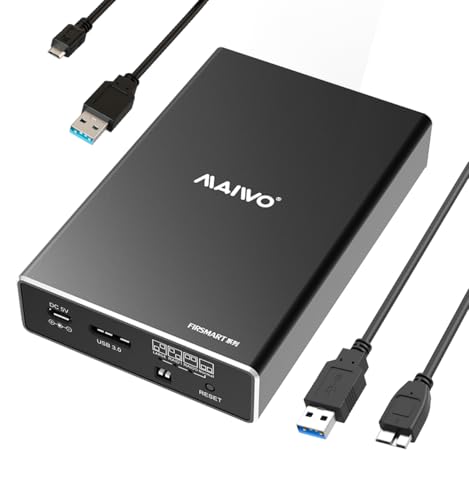
- Compact mini-size dual-bay enclosure with tool-free setup
- Supports RAID 0, RAID 1, JBOD/LARGE, and NORMAL modes
- Up to 16TB total capacity for 2.5-inch SATA drives
Best For: Portable two-drive storage and simple mirror/stripe setups
Balanced 4-Bay Storage Pick
CENMATE Aluminum 4 Bay RAID Enclosure

- Supports 2.5-inch and 3.5-inch SATA HDDs/SSDs
- Eight RAID modes plus USB A/C 3.0 and eSATA cables
- Up to 80TB capacity with aluminum build and cooling fan
Best For: Mixed-drive storage expansion with broad RAID flexibility
Portable Speed Pick – TERRAMASTER D2-320 2-Bay RAID Enclosure
If you want portable RAID enclosures that prioritize speed in a compact desktop-friendly design, the TerraMaster D2-320 is built around USB 3.2 Gen 2 and hardware RAID. It supports RAID 0, RAID 1, JBOD, and Single, so it can serve either as a fast working drive or a mirrored storage box for safer backups.
Best For: Users who want a compact 2-bay DAS with fast transfers and flexible RAID options.
Pros:
- USB 3.2 Gen 2 connection offers up to 10Gbps transfer speeds.
- Supports RAID 0, RAID 1, JBOD, and Single for different storage needs.
- Tool-free trays and push-lock design make drive installation simple.
- Intelligent temperature-controlled fan helps manage heat and noise.
Cons:
- It is a DAS, not a NAS, so it is meant for direct attachment.
- Only two drive bays, so capacity is more limited than larger enclosures.
For buyers who want a straightforward portable RAID enclosure with solid speed and easy drive handling, the D2-320 covers the essentials well. Its strongest appeal is the mix of fast USB performance, RAID flexibility, and simple setup in a small footprint.
High-Capacity Bay Pick – CENMATE 8-Bay Aluminum RAID Enclosure
Among portable RAID enclosures for heavy storage needs, this CENMATE 8-bay model is aimed at users who need a lot of drive slots and multiple RAID choices. It supports 2.5-inch and 3.5-inch SATA HDDs and SSDs, includes USB A/C 3.0 connectivity, and offers several RAID modes for different backup or performance setups.
Best For: Users who need an 8-bay external RAID enclosure for large local storage and mode flexibility.
Pros:
- Eight-bay design supports up to 160TB total capacity.
- Offers 8 modes including CLONE, LARGE, NORMAL, RAID0, RAID5, RAID50, and RAID00.
- Aluminum body and dual fans help with heat management.
- USB A/C 3.0 and eSATA support broad compatibility.
Cons:
- RAID setup requires careful mode switching and can format drives.
- Fan noise is listed around 40-50 decibels.
- Users must insert at least one drive in each specified group before use.
This is a strong fit if your priority is bay count and RAID flexibility rather than compact size. It has the storage scale to handle large personal or enterprise-style workloads, but it demands careful setup and backup discipline.
Flexible Mid-Range Pick – ORICO 5-Bay RAID HDD Enclosure
If you are comparing portable RAID enclosures for backup, shared media, or project storage, the ORICO 5-bay model offers a practical middle ground. It supports eight configuration modes, including RAID 0, 1, 3, 5, 10, JBOD, CLONE, and CLEAR, while keeping the design focused on straightforward external storage.
Best For: Users who want a 5-bay enclosure with flexible RAID modes and solid capacity.
Pros:
- Eight RAID and utility modes give you a lot of setup flexibility.
- Supports up to 110TB total capacity with 22TB single disks.
- 80mm silent fan and vents support continuous cooling.
- Bracket-free design and locking mechanism simplify drive handling.
Cons:
- USB 3.0 speeds are capped at up to 235MB/s.
- Drive mode changes require caution because switching can affect data.
The ORICO 5-bay enclosure is a sensible choice when you want a balance of capacity, RAID flexibility, and cooling in one unit. It is especially attractive for users who need a dependable external storage hub without moving up to a larger 8-bay system.
Portable SSD Clone Pick – Dual Bay M.2 NVMe RAID SSD Enclosure
This dual-bay SSD model stands out among portable RAID enclosures if your workflow centers on NVMe storage and quick duplication. It supports RAID 0, RAID 1, JBOD, and Clone mode, and its 20Gbps transfer rate makes it a strong fit for large file handling and offline disk cloning.
Best For: Users who need a compact dual M.2 enclosure for NVMe RAID and cloning tasks.
Pros:
- Supports RAID 0, RAID 1, JBOD, and Clone mode.
- 20Gbps transfer speeds suit large file and backup workflows.
- Tool-free cover makes SSD swaps and cloning setup easier.
- Auxiliary USB-C input helps stabilize use with high-capacity SSDs.
Cons:
- Built for M.2 2280 NVMe SSDs, not SATA hard drives.
- Only supports two drives, so it is not for large multi-bay storage needs.
If you want a portable RAID enclosure for SSD cloning and fast NVMe storage, this one is especially practical. It combines high-speed USB 3.2 connectivity with a compact metal build and flexible dual-drive operation.
All-Flash Portable RAID Enclosure – ORICO 2.5-inch 4-Bay RAID Storage
If you want portable RAID enclosures for fast, lightweight project storage, this ORICO all-flash model is built around 2.5-inch SSDs and HDDs rather than bulky 3.5-inch drives. It combines RAID flexibility with 10 Gbps USB 3.2 Gen 2 connectivity, so it makes more sense for editors, photographers, and mobile creators who prioritize speed and a compact carry form.
Best For: Video editors and photographers who need fast, portable all-flash RAID storage with extra card-reader and USB expansion.
Pros:
- Supports seven RAID modes, including RAID 0, 1, 3, 5, 10, JBOD, and CLEAR.
- USB 3.2 Gen 2 interface offers up to 10 Gbps with PSSD use, plus 5 Gbps via SATA.
- Includes two 10Gbps USB ports and SD/TF 3.0 card slots for workflow expansion.
- All-solid-state design is smaller and more shock-resistant than traditional 3.5-inch enclosures.
Cons:
- Does not support 3.5-inch drives.
- Total capacity depends on using 2.5-inch drives only, up to 40TB across the enclosure.
- Best speed claims depend on the drive type and connection used.
Overall, this is a strong choice if portability and workflow convenience matter as much as RAID features. It is especially appealing for on-location work where lighter weight, fast access, and multi-device connectivity are more useful than maximum drive size.
High-Capacity 4-Bay RAID Enclosure – ORICO 3.5-inch 9848RU3
For buyers comparing portable RAID enclosures that still prioritize capacity, this ORICO 4-bay unit is aimed at 3.5-inch SATA drives and larger backup jobs. It supports multiple RAID layouts, has a built-in 150W power supply, and uses an aluminum body with active cooling, making it better suited to desktop backup and direct-attached storage than ultra-light travel.
Best For: Large-capacity backups, media libraries, and project storage on Windows, Mac, or Linux.
Pros:
- Supports eight RAID modes, including RAID 0, 1, 3, 5, 10, JBOD, CLONE, and CLEAR.
- Up to 88TB total capacity with support for 22TB single disks.
- USB 3.0 with SATA 6Gbps support delivers up to 235 MB/s.
- Aluminum chassis, 80mm fan, and front/rear vents help with heat dissipation.
Cons:
- Uses 3.5-inch drives, so it is bulkier than compact all-flash enclosures.
- Rated speed is limited to USB 3.0 class performance rather than newer 10Gbps interfaces.
- Trayless design and included keys add hardware that may be unnecessary for casual users.
This enclosure stands out when storage capacity and RAID flexibility matter more than minimum size. If you need a straightforward 4-bay data expansion box for heavy-duty backups, it offers a practical mix of capacity, cooling, and mode options.
Compact Dual-Bay RAID Enclosure – MAIWO 2-Bay 3.5-inch SATA
If you need portable RAID enclosures for straightforward mirrored backup or speed-focused storage, this MAIWO dual-bay model keeps the setup simple. It supports 2.5-inch and 3.5-inch SATA drives, offers RAID 0, RAID 1, JBOD, and PM modes, and includes a cooling fan plus aluminum construction for more reliable day-to-day use.
Best For: Users who want a compact two-drive RAID box for backups, basic storage expansion, and mixed drive compatibility.
Pros:
- Works with both 2.5-inch and 3.5-inch SATA HDDs and SSDs.
- Supports RAID 0, RAID 1, JBOD/LARGE, and PM/NORMAL modes.
- USB 3.0 with UASP support can reach 5Gbps on compatible systems.
- Aluminum case and two-speed fan help with heat management.
Cons:
- 2.5-inch drive use requires an additional mounting bracket.
- Maximum speed is limited to USB 3.0-class performance.
- Includes a power adapter, so it is portable in size but not cable-free.
As a compact dual-bay option, this MAIWO enclosure is easier to place on a desk or carry between setups than larger multi-bay units. It is a sensible pick if you want RAID basics without paying for extra drive bays you do not need.
High-Capacity 4-Bay Pick – ORICO 4-Bay RAID Hard Drive Enclosure
If you need portable raid enclosures that can scale for bigger backup jobs, this ORICO 4-bay model is built around flexibility and capacity. It supports eight RAID options, takes both 2.5-inch and 3.5-inch SATA HDDs/SSDs, and is aimed at users who want a single enclosure for editing, archiving, or multi-drive storage.
Best For: Home and professional users who want a versatile 4-bay RAID enclosure for large-capacity storage, backups, and editing workflows.
Pros:
- Supports eight RAID configurations, including RAID 0, 1, 3, 5, 10, JBOD, CLONE, and CLEAR.
- Handles up to 22TB per drive and 88TB total capacity.
- USB 3.0 connectivity is rated up to 235MB/s for faster file transfers.
- Includes an 80mm silent fan, front/rear vents, aluminum casing, and a 150W power supply.
Cons:
- RAID mode changes require backing up data first.
- Its 4-bay design is more of a desktop storage solution than a lightweight carry-anywhere option.
Overall, this is a strong pick if your priority is flexible RAID management and high usable capacity. It leans toward serious storage needs rather than minimalist portability, but it does cover the key bases for dependable multi-drive use.
Compact Dual-Bay Choice – MAIWO Dual Bay RAID Enclosure
For buyers comparing portable raid enclosures, this MAIWO dual-bay unit stands out for its compact mini size and simple RAID switching. It supports 2.5-inch SATA HDDs and SSDs, offers RAID 0/1 and JBOD-style operation, and is a practical option for quick local storage expansion.
Best For: Users who want a small dual-bay enclosure for portable SSD/HDD storage, simple mirroring, or fast two-drive setups.
Pros:
- Compact mini size with tool-free installation and hot swapping.
- Supports RAID 0, RAID 1, JBOD/LARGE, and NORMAL (PM) modes.
- Uses USB 3.0 with UASP and JMS561 chip support for faster transfers on compatible systems.
- Supports up to 16TB total capacity, with 8TB per bay.
Cons:
- Requires additional power through the included Micro USB power cable.
- Only works with 2.5-inch 7mm and 9.5mm SATA drives.
This is a straightforward choice if you want dual-drive RAID flexibility without moving up to a larger 4-bay system. Its portable form factor and tool-free design make it appealing for everyday storage tasks, especially when you only need two drives.
Balanced 4-Bay Storage Pick – CENMATE Aluminum 4 Bay RAID Enclosure
If you want portable raid enclosures with broad drive support, this CENMATE 4-bay model is built for mixed 2.5-inch and 3.5-inch SATA drives. It combines RAID flexibility, a cooling fan, and both USB and eSATA connectivity, making it a practical external storage system for users who need more than a basic drive dock.
Best For: Users who want a 4-bay enclosure for Windows, Mac, or Linux storage expansion with multiple RAID options and dual interface connectivity.
Pros:
- Supports 2.5-inch and 3.5-inch HDDs/SSDs with up to 80TB total capacity.
- Offers eight RAID modes, including RAID 0, 1, 3, 5, 10, CLONE, LARGE, and NORMAL.
- Includes USB A/C 3.0 and eSATA cables for flexible connectivity.
- Built with aluminum-alloy materials, dual-inch fans, and a stable 12V power adapter.
Cons:
- Fan noise is noted at around 40–50 decibels.
- RAID mode switching requires following a specific reset-and-toggle process, and data loss is possible.
- Mac OS has no RAID software support noted.
Compared with simpler dual-bay options, this enclosure is better suited to users who need more capacity and more RAID choices. It offers a useful mix of compatibility and connectivity, but it does expect you to be comfortable with careful RAID setup.
How We Picked the Best Portable Raid Enclosures
We looked for Portable Raid Enclosures that balance performance, build quality, cooling, interface options, and ease of setup. Capacity support, drive compatibility, and RAID mode flexibility also mattered, especially for buyers choosing between SSD and HDD configurations.
Quick Comparison
Two-bay models are usually best for portability, straightforward RAID 1 backups, and smaller desktop setups. Four- and five-bay units offer more capacity and RAID flexibility, while larger 8-bay enclosures are better for archiving, shared media libraries, and heavier workstation use. SSD-focused enclosures tend to prioritize speed, while HDD-based options usually emphasize capacity and cost per terabyte.
Key Buying Factors for Portable Raid Enclosures
Drive Type and Form Factor
Make sure the enclosure matches your drives: 2.5-inch SATA SSDs and HDDs, 3.5-inch HDDs, or NVMe M.2 drives. Not all Portable Raid Enclosures support mixed drive sizes or all-flash builds.
RAID Modes
RAID 0 boosts speed, RAID 1 protects against a single-drive failure, and JBOD or PM modes offer simpler expansion or individual-drive access. More RAID modes can be helpful, but only if you actually need them.
Interface and Speed
USB 3.0 and USB-C are common, while faster connections matter most for SSD-based workflows. If you work with large media files, look for higher bandwidth and modern host connectivity.
Cooling and Noise
Multi-bay Portable Raid Enclosures generate more heat, so active cooling is important for drive longevity and stable performance. Fan design, venting, and aluminum construction can all help.
Capacity and Expansion
Check the maximum supported capacity per bay and across the full enclosure. This is especially important if you plan to scale later or use high-capacity 3.5-inch drives.
Who Should Buy Which Portable Raid Enclosures?
If you want a simple backup solution, choose a two-bay RAID 1 enclosure. If you need faster scratch storage for editing or content creation, an SSD-based model may be the better fit. If your priority is bulk storage for archives or media libraries, a four- to eight-bay HDD enclosure gives you more room and stronger expansion options.
For most buyers, the best portable RAID enclosure is the one that matches your workflow first, then your drive type, speed needs, and budget.