
If you want better thermal control without guessing, a PC cooling kit with temperature display can make it easier to spot rising temps, balance fan noise, and keep performance steady.
From AIO liquid coolers to compact sensor panels and LCD monitor kits, the best options in 2026 combine useful readouts with practical cooling for gaming, work, and compact builds.
Best 10 PC Cooling Kit with Temperature Display Picks for 2026
ARGB Liquid Cooler
T-240MM Black ARGB Liquid CPU Water Cooling

- 240mm AIO with temperature display
- ARGB sync with major motherboard software
- PWM control and broad Intel/AMD support
Best For: Mainstream builders wanting a display-equipped 240mm liquid cooler
LCD Monitoring Display
Thermalright Trofeo Vision 9.16" PC Monitor

- 9.16-inch LCD with 1920×480 resolution
- Shows temps, fan speed, and memory usage
- USB-C setup with preset themes and DIY options
Best For: Enthusiasts who want a dedicated hardware monitor in the case
360mm Performance AIO
Minorsonic AIO CPU Cooler 360mm

- 360mm radiator for strong heat dissipation
- 3000 RPM ceramic bearing pump
- PWM fans and daisy-chained cabling
Best For: High-performance builds that need a larger quiet AIO
Compact Temp Display

- 3.5-inch IPS screen with 320×480 resolution
- USB Type-C connection with no AIDA64 needed
- Supports portrait or landscape viewing
Best For: Compact builds needing a small USB hardware monitor
Temperature-Display Air Cooler
PCCOOLER RT500 Digital ARGB BK

- Built-in screen shows real-time CPU temperature
- 4/5/6 heat pipes with dense fin stack
- ARGB or non-RGB styling; wide Intel/AMD support
Best For: Quiet air-cooling builds that want CPU temperature feedback
Desktop Status Monitor

- Shows CPU, GPU, RAM, and HDD data
- 3.5-inch IPS screen with 320 x 480 resolution
- USB-only setup with customizable layouts
Best For: Windows desktops that need a compact system-data display
LCD 360mm AIO Cooler
Thermalright Peerless Vision 360 ARGB Black

- 3.95-inch IPS LCD supports custom media
- 360mm liquid cooling with three PWM fans
- Wide Intel and AMD socket compatibility
Best For: Performance builds that want an integrated LCD liquid cooler
Compact Air Cooling Pick
ALSEYE W90 for Small Size PC Case

- Temperature display shows CPU heat in real time.
- Copper base and 90mm fan support up to 140W TDP.
- ARGB lighting and quiet operation suit compact builds.
Best For: Small AMD builds needing simple cooling with a temperature readout
LCD Monitoring Upgrade
WOWNOVA 2.1" AIO Temp Display Kit

- 2.1-inch IPS LCD shows system stats and custom media.
- Compatible with any liquid CPU cooler via included 9-pin cable.
- Brightness adjustment and rotation improve mounting flexibility.
Best For: Liquid-cooled PCs that need a compact screen for stats and visuals
Internal Mini Screen Choice
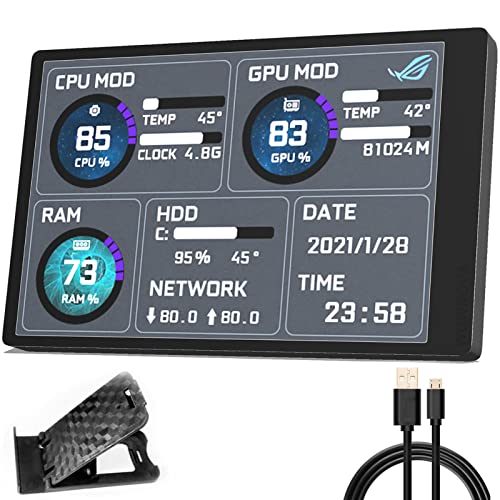
- 3.5-inch IPS screen shows CPU, GPU, RAM, and HDD data.
- Single USB-C cable keeps installation simple and clean.
- English software supports custom layouts and orientation changes.
Best For: Users who want an internal monitor with easy USB-C installation
ARGB Liquid Cooler – T-240MM Black ARGB Liquid CPU Water Cooling
If you want a PC cooling kit with temperature display that also adds lighting flair, this 240mm ARGB liquid cooler is built for straightforward CPU cooling with a built-in temp readout. It pairs PWM fan control with a copper cold plate and motherboard RGB sync, so it fits well in a desktop build that needs both practical thermals and visual polish.
Best For: Builders who want an affordable 240mm AIO with temperature display, ARGB sync, and broad socket support.
Pros:
- Built-in temperature display adds quick at-a-glance monitoring.
- ARGB lighting syncs with major motherboard software via 5V 3-pin.
- PWM fan control automatically adjusts speed with CPU temperature.
- Broad Intel and AMD compatibility, including LGA 1700 and AM5.
Cons:
- No AMD backplate is included, so the original motherboard bracket is needed.
- Maximum fan speed is listed at 1800 RPM, which may be less aggressive than larger high-end coolers.
This is a solid pick if your priority is a simple liquid cooling setup with a temperature display and synchronized RGB rather than advanced software-driven monitoring. The specs point to a practical, midrange cooling kit that should suit most mainstream gaming or general-purpose desktops.
LCD Monitoring Display – Thermalright Trofeo Vision 9.16" PC Monitor
This is less of a traditional cooler and more of a PC cooling kit with temperature display companion for builders who want real-time system monitoring. The 9.16-inch LCD shows CPU, GPU, fan speed, memory usage, and other hardware data, making it useful when you want a dedicated screen for tracking performance at a glance.
Best For: Modders and enthusiasts who want a large internal monitor for real-time hardware stats and custom visuals.
Pros:
- Large 9.16-inch LCD with sharp 1920×480 resolution.
- Tracks CPU/GPU temps, fan speed, memory usage, and more.
- USB-C plug-and-play setup keeps installation simple.
- TRCC software includes preset themes and DIY customization.
Cons:
- It is a display accessory, not a CPU cooler itself.
- Its slim internal format may appeal more to enthusiasts than casual users.
If your goal is to keep system health visible inside or outside the case, this display focuses squarely on monitoring and customization. It is best suited to users who already have cooling covered and want a clean, dedicated hardware dashboard.
360mm Performance AIO – Minorsonic AIO CPU Cooler 360mm
If you need a PC cooling kit with temperature display style monitoring in a full-size liquid cooler package, this 360mm AIO focuses on cooling performance first. It uses a ceramic bearing pump, a 3-phase motor, and PWM fans to maintain efficient heat transfer while keeping noise under control for heavier desktop workloads.
Best For: Users building a high-performance gaming or creator PC who want a large 360mm AIO with quiet, temperature-responsive cooling.
Pros:
- 360mm radiator offers a larger cooling surface for better heat dissipation.
- Ceramic bearing pump runs at 3000 RPM for stable coolant flow.
- PWM fans automatically adjust speed based on system temperature.
- Daisy-chained fans help reduce cable clutter during installation.
Cons:
- Noise is listed at 30 dB, so it is not the quietest option available.
- Larger 360mm size may limit case compatibility compared with 240mm models.
This cooler is aimed at builders who value thermal headroom and cleaner cabling more than display features. If your case supports 360mm mounting and you want a robust all-in-one solution, it looks like a strong performance-oriented choice.
Compact Temp Display – 3.5 Inch IPS USB Mini Screen
For a compact PC cooling kit with temperature display-style monitoring, this 3.5-inch IPS mini screen is designed to show hardware data without the hassle of a traditional HDMI secondary monitor. It connects by USB Type-C, supports horizontal or vertical viewing, and is meant to give you quick status checks on CPU, memory, disk activity, and other system data.
Best For: Budget-minded users who want a small, easy-to-connect internal monitor for system temperatures and hardware readouts.
Pros:
- No AIDA64 installation is required for basic use.
- USB-only connection helps reduce cable clutter.
- IPS panel with 178-degree viewing angle and 320×480 resolution.
- Supports horizontal or vertical orientation and stepless brightness adjustment.
Cons:
- Small 3.5-inch screen size limits how much information you can view at once.
- Requires software setup for custom themes and some hardware-name edits.
This mini screen makes sense if you want a simple monitoring display that stays out of the way and uses minimal system resources. It is more about practical visibility than flashy presentation, which should suit clean, compact builds well.
Temperature-Display Air Cooler – PCCOOLER RT500 Digital ARGB BK
If you want a PC cooling kit with temperature display that keeps things simple, this PCCOOLER tower cooler adds a built-in digital screen for real-time CPU temperature monitoring. It pairs that readout with a 4/5/6 heat-pipe design and a dense fin stack, so it is aimed at builders who want clear status feedback and solid air cooling without moving to liquid.
Best For: Builders who want a quiet air cooler with an onboard temperature display and broad Intel/AMD compatibility.
Pros:
- Integrated digital display shows real-time CPU temperatures.
- 4/5/6 heat pipes and dense fins are built for strong heat dissipation.
- Quiet 4-pin fan is rated for low-noise operation.
- ARGB version available, with a non-RGB option for cleaner builds.
Cons:
- As an air cooler, it will not offer liquid-cooling style radiator placement flexibility.
- The display focuses on CPU temperature rather than broader system data.
This is a practical pick if you want temperature visibility built into the cooler itself and need a model that supports current Intel and AMD sockets. It is best viewed as a straightforward performance-and-monitoring upgrade for air-cooled systems.
Desktop Status Monitor – WOWNOVA 3.5-inch Temp Monitor
This PC cooling kit with temperature display is less about moving air and more about keeping system data in plain view. The WOWNOVA mini screen works with English software to show CPU, GPU, RAM, and HDD data, making it a useful desk-mounted monitor if you want a compact status display beside your PC.
Best For: Windows users who want a dedicated second-screen style monitor for temperature and usage data.
Pros:
- Displays CPU, GPU, RAM, and HDD data through software.
- IPS full-view panel offers wide viewing angles.
- Supports customizable layouts and screen orientation changes.
- Uses USB connections only, with no HDMI or extra power required.
Cons:
- Compatible with Windows only.
- It is a monitor accessory, not a cooling device.
For builders who mainly want temperature visibility rather than a new cooler, this is a compact and flexible option. Its appeal comes from the small footprint, the software-driven layout control, and the ability to track several system stats at once.
LCD 360mm AIO Cooler – Thermalright Peerless Vision 360 ARGB Black
If you want a PC cooling kit with temperature display and more premium visual control, this Thermalright 360 AIO adds a 3.95-inch IPS LCD with 480×480 resolution. It is designed for users who want liquid cooling performance, temperature control via PWM fans, and the option to show video, animation, or custom screen content.
Best For: Builders who want a 360mm liquid cooler with an LCD screen and customizable display output.
Pros:
- 3.95-inch magnetic IPS screen supports video, animation, and screen projection.
- 360mm AIO design with three PWM fans for stronger cooling potential.
- PWM fan control automatically adjusts speed based on temperature.
- Wide CPU socket support for modern Intel and AMD platforms.
Cons:
- Requires a 360mm radiator setup, so it is not ideal for compact cases.
- ARGB and screen features depend on compatible motherboard/software support.
This model is the most feature-rich of the three if you want an LCD-equipped cooler instead of a separate monitor. It combines display customization with a high-output liquid cooling design, making it a strong choice for performance-focused builds that also care about presentation.
Compact Air Cooling Pick – ALSEYE W90 for Small Size PC Case
If you want a PC cooling kit with temperature display for a compact build, the ALSEYE W90 focuses on the basics: live CPU temperature readout, strong air cooling, and low-noise operation. Its 90mm fan and copper base are aimed at mainstream AM4/AM5 systems that need solid thermal control in a small case.
Best For: Small-form-factor AMD systems that need a simple cooler with temperature monitoring and ARGB style.
Pros:
- Built-in temperature display helps you watch CPU heat in real time.
- 90mm fan and copper base are rated for up to 140W TDP.
- ARGB lighting adds a more polished look to the build.
- Low noise claim makes it suitable for quieter setups.
Cons:
- Designed for AM4/AM5 platforms, so compatibility is limited to AMD users.
- Air cooling is practical, but not as feature-rich as LCD monitor kits.
For builders who want straightforward cooling with an on-cooler temperature readout, the W90 is a functional choice. It is less about desktop monitoring extras and more about keeping CPU temps under control in a compact PC case.
LCD Monitoring Upgrade – WOWNOVA 2.1" AIO Temp Display Kit
If you’re shopping for a PC cooling kit with temperature display that adds a visual upgrade to a liquid-cooling build, this WOWNOVA kit is centered on the screen. The 2.1-inch IPS LCD can show CPU, GPU, RAM, and HDD data, and it also supports custom images, GIFs, and short videos through its software.
Best For: Water-cooling users who want a compact internal display for system stats and custom visuals.
Pros:
- 2.1-inch IPS LCD with 480×480 resolution for clear monitoring.
- Displays CPU, GPU, RAM, and HDD data, plus custom media.
- Compatible with any liquid CPU cooler and includes a 9-pin cable.
- Brightness adjustment and 360-degree rotation help with positioning.
Cons:
- Works with water-cooling systems, so it is not for air-cooler builds.
- Screen-focused design adds monitoring, not actual cooling performance.
This is best viewed as a display upgrade for an existing AIO setup rather than a thermal solution on its own. If your goal is to add live stats and personalization to a liquid-cooled PC, it fits that job well.
Internal Mini Screen Choice – WOWNOVA 3.5" USB Temp Monitor
For a PC cooling kit with temperature display that acts more like an internal dashboard, the WOWNOVA 3.5-inch mini screen is built to show CPU, GPU, RAM, and HDD data in a clean layout. It uses a single USB-C cable and does not require HDMI or extra power, which keeps installation simpler for internally mounted builds.
Best For: Builders who want an internal USB-driven display for live system monitoring and custom layouts.
Pros:
- 3.5-inch IPS screen offers wide viewing angles and 320×480 resolution.
- Single USB-C cable setup avoids HDMI and separate power connections.
- English software supports custom layouts, theme editing, and orientation switching.
- Automatic screen-off and brightness adjustment help with everyday use.
Cons:
- It is a monitoring screen, not a cooler with fans or thermal hardware.
- Smaller resolution than higher-end display panels.
This is a good pick if you want a neat internal screen with minimal cable clutter. It is especially useful for users who value easy mounting, system stats, and layout customization over cooling hardware.
How We Picked the Best PC Cooling Kit with Temperature Display
We focused on cooling kits that pair real temperature visibility with useful build-friendly features: readable screens, reliable cooling performance, quiet operation, and straightforward installation. We also prioritized options that make sense across different case sizes and use cases, since a PC Cooling Kit with Temperature Display can be either a full cooler or a monitoring add-on.
Quick Comparison
Broadly, the lineup falls into two groups: full CPU cooling solutions and display-only monitor kits. Full coolers are best if you want thermals solved in one purchase. Display kits are better if you already have a capable cooler and just want live data, system stats, or a cleaner dashboard inside the case.
Key Buying Factors for a PC Cooling Kit with Temperature Display
Cooling Type
Decide whether you need an air cooler, AIO liquid cooler, or a sensor/display accessory. AIOs usually offer stronger cooling for hotter CPUs, while air coolers can be simpler and lower maintenance. Display-only kits add visibility without changing your existing cooling setup.
Screen Quality and Readability
Look at display size, resolution, brightness, and viewing angle. IPS panels generally offer better clarity from different positions, while smaller screens may be easier to fit in tight builds. If you want live stats at a glance, readable text matters more than flashy animations.
Software and Data Sources
Some kits rely on USB and software platforms for monitoring CPU temperature, GPU load, RAM use, or storage activity. Others use preset themes or simpler hardware readouts. Choose based on how much customization you want and how comfortable you are with setup software.
Compatibility and Case Clearance
Check radiator size, fan thickness, socket support, and internal mounting space. Large LCD AIOs and sensor panels can look great, but they still need room for tubes, cables, and screen placement. Compact cases especially benefit from careful measurement before buying.
Who Should Buy Which PC Cooling Kit with Temperature Display?
If your CPU runs hot or you want an all-in-one upgrade, choose a full AIO or high-end air cooler with a built-in display. If your current cooling is already adequate, a display kit is the smarter value because it adds monitoring without replacing hardware. For small-form-factor systems, compact digital coolers or mini display panels are often the best balance of fit and function.
In short, the best PC Cooling Kit with Temperature Display is the one that matches your CPU load, case space, and how much real-time information you actually want to see.