
A monitor arm with built-in USB ports can simplify a desk fast: less cable clutter, easier charging, and more convenient device access right where you work.
Below, we focus on options for single, dual, and stacked monitor setups so you can match the right arm to your screen size, weight, and workspace needs.
Best 10 Monitor Arm with Built-In USB Ports Picks for 2026
Heavy-Duty Ergonomic Pick
HUANUO Single Monitor Arm with USB
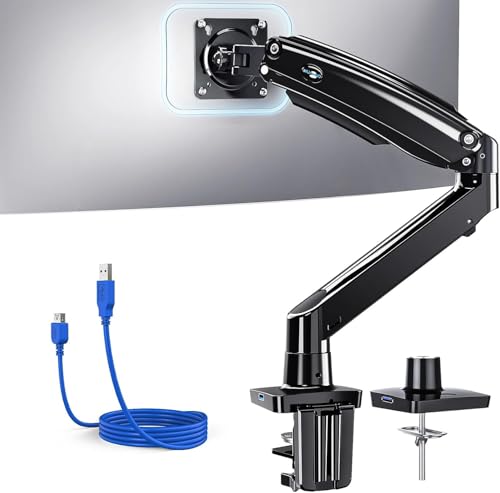
- Supports 13" to 49" screens
- Built-in USB 3.0 port
- C-clamp and grommet mounting
Best For: Large-monitor users who want a sturdy arm with USB and broad adjustability
Gaming-Friendly USB Hub Pick
Afaloona RGB Gas Spring Monitor Arm
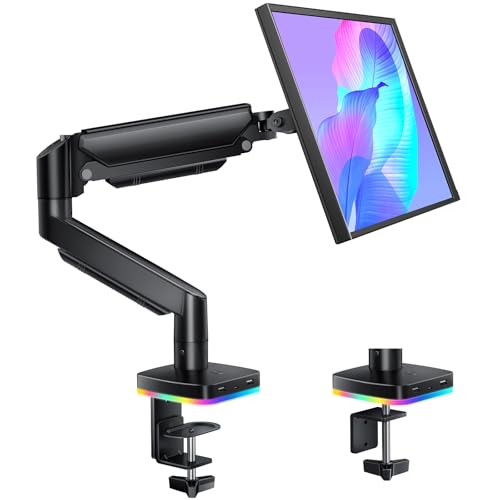
- 3 USB ports: 2 USB-C, 1 USB-A
- Gas spring adjustment with full motion
- RGB lighting for a gaming-style desk
Best For: Gamers and creators who want USB convenience and colorful desk lighting
High-Capacity Desk Solution
ARES WING Heavy Duty Monitor Mount with USB

- Supports 13" to 49" monitors
- Two USB-A ports for charging
- Holds up to 40 lbs on flat screens
Best For: People needing a sturdy single-arm mount with easy-access USB charging
Dual-Arm Productivity Pick
VIVO Premium Dual Monitor Desk Mount with USB

- Supports two monitors up to 40 inches
- Two USB 3.0 ports on the base
- Clamp or grommet installation
Best For: Dual-monitor users who want a flexible arm with built-in USB access
Dual-Display Ergonomics
monTEK Mechanical Spring Dual Monitor Arm with USB
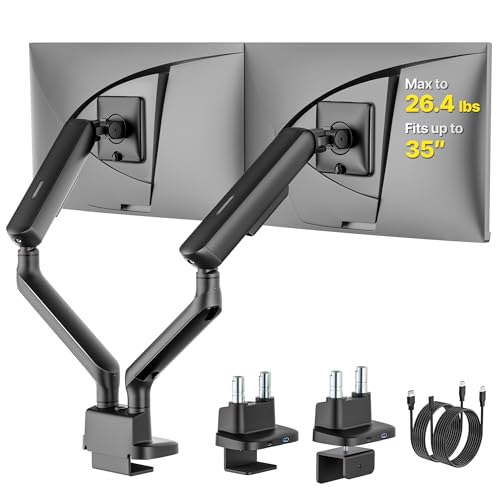
- Built-in USB ports in the base
- Supports 17-35 inch dual screens
- Holds up to 26.4 lbs per arm
Best For: Dual-monitor users with large screens and a tidy desk
Heavy-Duty Single Arm
VIVO Premium Aluminum Monitor Arm with USB

- Two USB 3.0 ports plus multimedia ports
- Fits ultrawide monitors up to 49 inches
- Supports up to 33 lbs with pneumatic lift
Best For: Large single-monitor setups that need integrated USB access
Compact Workspace Upgrade
monTEK Single Monitor Arm with USB Ports

- USB and audio ports for accessories
- Supports 17-32 inch flat or curved screens
- Mechanical spring with clamp/grommet mounting
Best For: Small desks and single-monitor users who want built-in ports
Dual-Arm Charging Workspace
HUANUO Dual Monitor Stand with USB

- Two built-in USB ports with a 5.25 ft cable
- Supports two 13" to 40" monitors up to 26.4 lbs each
- Clamp or grommet mount with full-motion adjustment
Best For: Dual-monitor users who want built-in charging and strong adjustability
Triple-Screen Power Hub
Mount-It! Triple Monitor Desk Stand

- USB-A and USB-C ports built into the base
- Three gas spring arms with independent movement
- Supports 13" to 32" monitors up to 17.6 lbs each
Best For: Triple-monitor users who want built-in USB ports and flexible positioning
Heavy-Duty Vertical Charger

- USB-A 3.0 and USB-C ports for charging and data
- Supports 17" to 57" monitors with VESA 75/100
- Vertical stacking or side-by-side dual setup options
Best For: Large-monitor users who want a heavy-duty mount with USB ports
Heavy-Duty Ergonomic Pick – HUANUO Single Monitor Arm with USB
If you want a monitor arm with built-in USB ports that can handle a large display, this HUANUO single arm is built for bigger setups. It supports screens from 13 to 49 inches, includes a USB 3.0 port, and gives you wide tilt, swivel, and rotation range for a more comfortable desk position.
Best For: Users with ultrawide or large monitors who want a sturdy, adjustable arm with integrated USB and cable management.
Pros:
- Supports 13″ to 49″ monitors and up to 26.48 lbs
- Built-in USB 3.0 port for charging and data transfer
- Includes C-clamp and grommet mounting options
- Wide motion range with tilt, swivel, rotation, and height adjustment
Cons:
- Single-monitor design only
- Best stability depends on a solid wood desk without crossbars
Overall, this is a strong choice if you need an adjustable, heavy-duty arm that also helps reduce desktop clutter. The USB integration is practical, but the real advantage is how much screen size and movement range it offers for a single mount.
Gaming-Friendly USB Hub Pick – Afaloona RGB Gas Spring Monitor Arm
This monitor arm with built-in USB ports is aimed at people who want convenience and a bit of desk flair. The Afaloona arm includes three USB ports, smooth gas spring adjustment, and full-motion movement, making it a practical fit for work, gaming, or a mixed-use setup.
Best For: Gamers, streamers, and desk users who want easy USB access plus RGB lighting.
Pros:
- Three built-in USB ports: 2 USB-C and 1 USB-A
- Gas spring arm tested for over 50,000 cycles
- Full motion with 360° rotation, ±90° swivel, and ±45° tilt
- RGB lighting adds an immersive setup look
Cons:
- Supports only 13″ to 32″ monitors
- Lower max load than heavy-duty single-arm options
If you want USB access right on the arm and like the idea of RGB accents, this model stands out. It is best for smaller monitors and users who value a cleaner, more connected desk over maximum size support.
High-Capacity Desk Solution – ARES WING Heavy Duty Monitor Mount with USB
For shoppers comparing a monitor arm with built-in USB ports, this ARES WING model is a strong pick for larger screens and heavier loads. It supports 13″ to 49″ monitors, includes two USB-A ports, and uses a gas spring system for smooth, controlled positioning.
Best For: Users who need a heavy-duty single arm with simple USB charging access and broad screen compatibility.
Pros:
- Supports up to 40 lbs, or 31 lbs for curved monitors
- Two upgraded USB-A ports for charging convenience
- Clamp and grommet mounting options for flexible installation
- Gas spring system is designed for stable, precise adjustment
Cons:
- USB ports are USB-A only
- Single-monitor setup only
This is a practical fit if your priority is strength first and USB convenience second. It offers a lot of monitor support for the money, and the built-in ports make it easier to keep everyday devices within reach.
Dual-Arm Productivity Pick – VIVO Premium Dual Monitor Desk Mount with USB
If you need a monitor arm with built-in USB ports for a dual-screen setup, this VIVO stand is built for flexibility and organization. It supports two screens up to 40 inches, includes two USB 3.0 ports on the base, and offers a wide range of motion for better ergonomics.
Best For: Dual-monitor users who want USB connectivity and a fully adjustable desk mount.
Pros:
- Supports two monitors up to 40 inches each
- Two USB 3.0 ports on the base for charging or syncing
- Strong motion range with tilt, swivel, and rotation
- Clamp and grommet mounting for drill-free setup
Cons:
- Requires a dual-monitor workspace
- USB ports are located on the base, not the arms
For a two-screen desk, this is one of the most useful options because it combines solid adjustability with convenient USB access. It is especially appealing if you want cleaner cable management and an easier way to plug in small accessories at the desk.
Dual-Display Ergonomics – monTEK Mechanical Spring Dual Monitor Arm with USB
If you want a monitor arm with built-in USB ports that can also handle two large screens, this monTEK dual arm is built for heavier desktop setups. It supports 17 to 35 inch monitors, including ultra-wide and curved displays, and adds two USB ports in the base for convenient charging and data access while keeping the desk clean.
Best For: Dual-monitor users who need strong support for large screens and built-in USB convenience.
Pros:
- Supports large dual monitors up to 26.4 lbs per arm
- Built-in USB ports help reduce clutter on the desk
- Mechanical spring and precision bearings aim for smooth, stable movement
- C-clamp and grommet mounting options included
Cons:
- Dual-arm design may be more than some single-monitor setups need
- Best suited for desks that can accommodate a heavier mount
Overall, this is a practical pick if your priority is a sturdy dual monitor arm with built-in USB ports and broad screen compatibility. The combination of adjustability, cable management, and charging-friendly base design makes it well suited for workstations that need both organization and support.
Heavy-Duty Single Arm – VIVO Premium Aluminum Monitor Arm with USB
This monitor arm with built-in USB ports is aimed at users who want a heavy-duty single-screen mount with added desk convenience. It supports ultrawide monitors up to 49 inches and includes two USB 3.0 ports plus two multimedia ports, making it a strong fit for modern setups that connect multiple devices.
Best For: Ultrawide and large single-monitor setups that need ports built into the arm.
Pros:
- Holds one ultrawide display up to 49 inches and 33 lbs
- Includes two USB 3.0 ports and two multimedia ports
- Pneumatic height adjustment with tilt, swivel, and rotation
- Clamp and grommet mounting options support different desks
Cons:
- Designed for a single monitor, not a dual-screen setup
- Requires VESA holes or a compatible adapter not included
In practice, this is a useful choice if you want a premium single monitor arm with built-in USB ports and strong support for large displays. Its combination of broad compatibility, easy adjustment, and integrated connectivity makes it a versatile workstation upgrade.
Compact Workspace Upgrade – monTEK Single Monitor Arm with USB Ports
If you need a monitor arm with built-in USB ports for a smaller, more streamlined desk, this monTEK single arm focuses on everyday convenience. It supports 17 to 32 inch flat or curved monitors, includes USB/audio ports for frequently used accessories, and uses a mechanical spring for steady positioning.
Best For: Creators, remote workers, and gamers who want a tidy single-monitor setup with easy device access.
Pros:
- USB and audio ports keep accessories within easy reach
- Supports flat and curved monitors from 17 to 32 inches
- Mechanical spring design is built for long-term stability
- Quick-release VESA plates and clamp/grommet installation help simplify setup
Cons:
- Single-arm design limits you to one monitor
- Max screen size is smaller than some ultrawide-focused alternatives
This model makes sense if you want added connectivity without moving up to a bulky dual-arm system. With its compact profile, ergonomic motion, and built-in ports, it’s a straightforward way to clean up a desk while keeping everyday peripherals close at hand.
Dual-Arm Charging Workspace – HUANUO Dual Monitor Stand with USB
If you want a monitor arm with built-in USB ports for a dual-screen setup, the HUANUO HNDS7 adds charging convenience without giving up stability. It supports two 13″ to 40″ monitors, includes clamp or grommet mounting, and gives you broad motion control for dialing in a comfortable desk layout.
Best For: Dual-monitor users who want a sturdy arm with integrated charging and full adjustability.
Pros:
- Built-in USB ports and a 5.25 ft cable for easier charging at the desk
- Holds two monitors up to 26.4 lbs per arm with VESA 75×75 or 100×100 support
- Full motion adjustment: swivel, tilt, and 360-degree rotation
- Clamp and grommet mounting options for flexible desk setups
Cons:
- Designed for dual monitors only, so it is not a multi-screen hub for three displays
- Best fit depends on monitor size, weight, and desk thickness limits
Overall, this is a practical pick if you want a monitor arm with built-in USB ports and a clean, productivity-focused dual-display setup. The charging feature is a nice extra, but the real strength is the heavy-duty support and wide range of positioning adjustments.
Triple-Screen Power Hub – Mount-It! Triple Monitor Desk Stand
For anyone shopping for a monitor arm with built-in USB ports and a three-screen layout, this Mount-It! stand is aimed at busy desks that need both organization and reach. It fits 13″ to 32″ monitors, uses independent gas spring arms, and adds USB-A and USB-C ports in the base so your devices stay within easy access.
Best For: Triple-monitor setups where built-in charging and cable-friendly convenience matter.
Pros:
- Built-in USB-A and USB-C ports in the base for charging and peripherals
- Three independent gas spring arms for separate tilt, swivel, rotate, and height adjustments
- Supports three 13″ to 32″ monitors up to 17.6 lbs per arm
- Clamp or grommet installation for different desk types
Cons:
- Limited to standard 16:9 screens, so it may not suit every monitor shape
- Heavier users should verify size, weight, and VESA compatibility before buying
This is a strong fit if your priority is expanding screen space while keeping USB charging close at hand. It combines a stable triple-arm design with the kind of built-in connectivity that helps reduce desk clutter.
Heavy-Duty Vertical Charger – monTEK Dual Monitor Arm USB
If you need a monitor arm with built-in USB ports for larger displays, the monTEK dual arm is built around strength and flexibility. It supports 17″ to 57″ monitors, offers side-by-side or vertical stacking, and includes USB-A 3.0 and USB-C ports for charging and data use.
Best For: Users with large or ultrawide monitors who want USB connectivity and a heavy-duty dual mount.
Pros:
- Built-in USB-A 3.0 and USB-C ports for charging and fast data transfer
- Supports very large 17″ to 57″ screens with VESA 75×75 and 100×100 compatibility
- Heavy-duty aluminum and steel construction with gas spring adjustment
- Side-by-side or vertical stacking for different dual-monitor layouts
Cons:
- Single-arm-style setup details are inconsistent in the notes, so buyers should double-check the listing carefully
- With such a wide compatibility range, desk space and monitor weight still need to be matched to the mount
This model stands out for oversized-monitor support and USB convenience in one package. If your workspace needs a sturdier dual-arm solution with charging ports, it offers a lot of capability for demanding setups.
How We Picked the Best Monitor Arm with Built-In USB Ports
We prioritized arms that combine solid monitor support with genuinely useful USB connectivity, including charging and data-ready ports where available. We also looked at screen-size range, weight capacity, VESA compatibility, motion range, mounting flexibility, and whether the arm fits everyday office use or heavier ultrawide displays.
Quick Comparison
The right Monitor Arm with Built-In USB Ports depends on your setup: single-arm models are usually best for ultrawide or primary displays, dual-arm options suit shared productivity work, and vertical stackable designs help when desk width is limited. If USB access is a must-have, check port type and placement so the hub is actually easy to reach from your seated position.
Key Buying Factors for a Monitor Arm with Built-In USB Ports
Screen Size and Weight
Always match the arm to your monitor’s size and weight, not just the advertised diagonal. Large curved and ultrawide panels can exceed standard-duty limits even when they look similar in size to lighter displays.
USB Functionality
Some arms include USB-A ports only, while others add USB-C or audio connections. Decide whether you need simple charging, convenient file transfer, or both. A hub that supports only power may not replace a true data connection.
Mounting Style and Desk Fit
C-clamp and grommet bases are the most common choices. Clamp mounts are easier to install and remove, while grommet mounts can feel more secure on desks with a pass-through hole. Make sure the base fits your desk thickness and edge clearance.
Motion and Ergonomics
Look for height adjustment, tilt, swivel, and rotation so your monitor can sit at eye level and reduce neck strain. Gas spring and mechanical spring systems both work well, but heavier screens often benefit from stronger tension control and smoother articulation.
Who Should Buy Which Monitor Arm with Built-In USB Ports?
Choose a single-arm model if you use one primary monitor and want the cleanest desktop with easy access to USB ports. Pick a dual-monitor setup if you split work between screens and want to reduce dock clutter. Go with a vertical stackable or triple-monitor stand if you manage trading, content creation, coding, or multitasking-heavy workflows where screen density matters more than minimal footprint.
If your top priority is convenience, a Monitor Arm with Built-In USB Ports is especially useful for laptops, peripherals, and charging accessories you plug in often. If your top priority is pure load capacity, choose the strongest arm first and treat USB as a bonus feature rather than the main buying reason.