
DaVinci Resolve is demanding, especially when you’re cutting 4K footage, applying heavy color grades, or stacking effects and Fusion work. The right mobile workstation can make the difference between a smooth timeline and constant lag.
In this roundup, we focus on machines built to handle real editing workloads: strong GPUs, plenty of memory, fast SSD storage, and the thermal headroom needed for long sessions.
Best 10 Mobile Workstation for DaVinci Resolve Picks for 2026
Flagship Mobile Workstation
Dell Precision 7680 for demanding creative work

- RTX 2000 Ada 8GB and i7-13850HX
- 32GB DDR5 CAMM, 2TB SSD
- Thunderbolt 4, HDMI, Ethernet, Wi-Fi 6E
Best For: Editors and designers needing a certified pro mobile workstation
Creator Workhorse
MSI WS66 for portable editing performance

- Quadro RTX 4000 8GB with Core i7-10875H
- 32GB RAM and 1TB NVMe SSD
- Touchscreen, fingerprint reader, on-site warranty
Best For: Editors who want a thinner workstation with pro graphics
Upgradeable Creator Laptop
NIMO with USB4 eGPU flexibility

- Ryzen 7 8745HS with 32GB DDR5
- USB4 and included eGPU dock
- 1TB SSD, upgrade support to 64GB RAM
Best For: Creators who want upgrade flexibility for heavier Resolve work
Compact Desk Workstation
Lenovo ThinkStation P3 Tiny for fixed setups
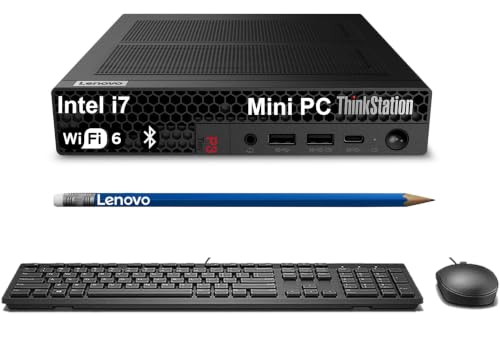
- Core i7-14700 in a 3.01 lb tiny desktop
- Up to 8K display support
- ISV-certified with strong connectivity
Best For: Compact fixed editing stations, not battery-powered mobility
Creator Color Workstation

- 97% DCI-P3, Pantone validated display
- RTX 2060 with 32GB RAM
- 512GB + 512GB RAID-0 SSD storage
Best For: Editors who need accurate color and portable workstation performance
Compact Editing Station

- Core i9-12900H with 14 cores
- 32GB RAM and 1TB PCIe 4.0 SSD
- USB4 plus quad-display support
Best For: Editors wanting a small desktop Resolve workstation with multi-monitor support
Professional Resolve Workhorse

- RTX 2000 Ada 8GB workstation GPU
- 64GB DDR5 CAMM and 1TB SSD
- Thunderbolt 4 and 4-monitor support
Best For: Pros who need a high-end Resolve-ready mobile workstation
Compact Desktop Workstation
ACEMAGIC M1A Pro AI Mini PC Workstation

- i9-13900HK and ARC A770 graphics
- DDR5 memory and PCIe 4.0 storage support
- USB4 plus 4-display output options
Best For: Creators who want a compact desktop-class workstation for editing and multitasking
Portable Creator Laptop
Dell Precision 3490 Mobile Workstation

- 3.09-lb chassis with MIL-STD 810H testing
- 64GB DDR5 RAM and 2TB SSD
- Two Thunderbolt 4 ports for expandability
Best For: Professionals who need a lightweight workstation for editing and business travel
Premium GPU Workstation
Dell Precision 7000 7670 Mobile Workstation
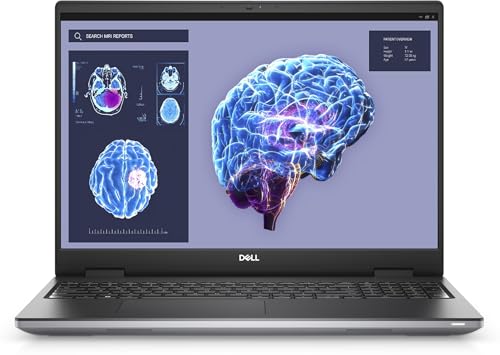
- RTX A3000 12GB dedicated graphics
- 16-core i7 HX processor with 64GB DDR5
- 16-inch 16:10 professional workstation display
Best For: Creators and technical users who need dedicated GPU power for heavy editing
Flagship Mobile Workstation – Dell Precision 7680 for demanding creative work
If you need a mobile workstation for DaVinci Resolve, the Dell Precision 7000 7680 is built around workstation-class hardware: an Intel Core i7-13850HX, NVIDIA RTX 2000 Ada 8GB, 32GB of fast LPCAMM2 DDR5, and a 2TB SSD. The 16-inch FHD+ anti-glare display, Thunderbolt 4, HDMI, USB-A, Ethernet, and support for multiple external monitors make it a practical choice for editing workflows that move between studio and set.
Best For: Editors, designers, and technical users who want a certified, upgrade-ready mobile workstation for Resolve, CAD, and other heavy professional apps.
Pros:
- RTX 2000 Ada 8GB and i7-13850HX provide strong performance for video editing and other creative workloads.
- 32GB DDR5 CAMM memory and a 2TB PCIe NVMe SSD support multitasking and large media libraries.
- Excellent connectivity with 2x Thunderbolt 4, USB-C, USB-A, HDMI, Ethernet, and Wi-Fi 6E.
- ISV certifications and MIL-STD-810H testing add confidence for professional use.
Cons:
- 16-inch FHD+ panel is practical, but not a high-resolution creator display.
- At 5.9 pounds, it is not the lightest option for constant travel.
- Only 45% NTSC color coverage is modest for color-critical work without an external monitor.
Overall, this is a serious mobile workstation for DaVinci Resolve users who prioritize reliability, expandability, and pro-level ports over portability or a premium built-in panel.
Creator Workhorse – MSI WS66 for portable editing performance
The MSI WS66 is a compact mobile workstation for DaVinci Resolve users who want dedicated Nvidia Quadro graphics, solid memory, and a slim 15.6-inch chassis. Its Core i7-10875H, Quadro RTX 4000 8GB, 32GB DDR4, and 1TB NVMe SSD give it the core specs needed for editing, effects, and general professional multitasking, while the touchscreen and fingerprint reader add everyday convenience.
Best For: Creators who want a lighter workstation with professional graphics and enough memory for editing on the go.
Pros:
- NVIDIA Quadro RTX 4000 8GB is a professional GPU suited to workstation software.
- 32GB RAM and a 1TB NVMe SSD provide a comfortable baseline for editing projects.
- 15.6-inch touchscreen and fingerprint reader add useful workflow convenience.
- On-site warranty and Wi-Fi 6 support make it attractive for business use.
Cons:
- 10th-gen Core i7 is older than newer workstation CPUs.
- Windows 10 Pro is listed, which is less current than Windows 11 Pro systems.
- FHD 60Hz display is functional, but not ideal for a premium color-grading setup.
The WS66 remains a practical choice if you value professional GPU support and portability, though newer models have the edge in CPU efficiency and platform freshness.
Upgradeable Creator Laptop – NIMO with USB4 eGPU flexibility
For buyers considering a more flexible mobile workstation for DaVinci Resolve, the NIMO 15.6-inch creator laptop stands out for its Ryzen 7 8745HS, 32GB DDR5, 1TB PCIe 4.0 SSD, and Radeon 780M graphics. The big draw is USB4 support paired with the included eGPU dock, which gives you a path to more graphics power later without replacing the laptop itself.
Best For: Creators who want a capable everyday laptop now and a clear upgrade path for heavier editing or rendering later.
Pros:
- Ryzen 7 8745HS and 32GB RAM handle multitasking and creative software well.
- USB4 plus the included eGPU dock adds a practical upgrade path for stronger graphics performance.
- 1TB SSD and support for up to 64GB RAM help future-proof storage and memory.
- 15.6-inch display gives you useful screen space for timelines and multi-window work.
Cons:
- Integrated Radeon 780M is not as strong as a built-in discrete workstation GPU.
- Real heavy 4K work depends on using the external graphics dock.
- The product positioning is more creator-focused than traditional workstation-focused.
This is a smart pick if you want to start with a versatile, budget-conscious creator laptop and grow into stronger Resolve performance through external GPU expansion.
Compact Desk Workstation – Lenovo ThinkStation P3 Tiny for fixed setups
The Lenovo ThinkStation P3 Tiny is not a laptop, but it can still fit a mobile workstation for DaVinci Resolve workflow when you need a small, portable desktop for a travel kit, studio desk, or multi-monitor editing station. With an Intel Core i7-14700, configurable DDR5 memory, PCIe NVMe storage, and support for up to 8K display output, it offers a compact professional base for editing and production tasks.
Best For: Users who want a tiny workstation desktop for a compact editing setup rather than a battery-powered laptop.
Pros:
- Core i7-14700 and Intel UHD Graphics 770 deliver strong general workstation performance.
- Compact 3.01 lb design saves desk space while staying highly portable.
- Native dual-display support and up to 8K/4K output options suit multi-monitor workflows.
- ISV certification and military-grade durability add professional confidence.
Cons:
- Integrated graphics are far less suitable for Resolve than a discrete GPU laptop.
- It requires external monitor, keyboard, and mouse, so it is not a standalone mobile editing machine.
- No built-in webcam is listed.
As a tiny workstation desktop, it is excellent for space-saving professional use, but Resolve editors who truly need portability and GPU muscle will usually be better served by a dedicated laptop.
Creator Color Workstation – ASUS ProArt StudioBook 17
If you want a mobile workstation for DaVinci Resolve with a strong balance of color accuracy, GPU power, and fast storage, the ASUS ProArt StudioBook 17 is built with creators in mind. Its 17-inch 1920 x 1200 matte display covers 97% DCI-P3 and is Pantone validated, while the RTX 2060 and dual NVMe RAID-0 SSD setup help it handle editing and timeline work efficiently.
Best For: Color-conscious editors who want a larger portable workstation screen and solid RTX-class performance.
Pros:
- 97% DCI-P3 panel with Pantone validation and Delta E <2 for color-sensitive work
- RTX 2060 6GB graphics and Intel Core i7-9750H for editing and GPU-accelerated tasks
- 32GB RAM and 512GB + 512GB PCIe NVMe SSDs in RAID 0 for fast project loading
- Thunderbolt 3, HDMI 2.0, and SD card reader add useful creator connectivity
Cons:
- Older 9th-gen Core i7 platform compared with newer workstation laptops
- 5.7-pound build is not especially light for travel
- No webcam listed in the supplied details
This is a practical choice if display quality and responsive storage matter as much as raw specs. It is especially appealing for Resolve users who want a workstation-style laptop with creator-focused color tuning.
Compact Editing Station – GEEKOM XT12 Pro Mini PC
The GEEKOM XT12 Pro is not a laptop, but it can still serve as a compact desktop alternative for a DaVinci Resolve setup when you want strong CPU performance and lots of display output. With a 12th Gen Intel Core i9-12900H, 32GB of upgradable RAM, a 1TB PCIe 4.0 SSD, and USB4 plus dual HDMI connectivity, it is aimed at multitasking and 4K editing workflows.
Best For: Creators building a compact Resolve editing station with multiple monitors.
Pros:
- Core i9-12900H with 14 cores and 20 threads for heavy multitasking
- 32GB RAM and 1TB PCIe 4.0 SSD, both suited to fast editing workflows
- Two USB4 ports and two HDMI 2.0 ports support quad-screen output
- Wi-Fi 6E and 2.5GbE help keep transfers and network work fast and stable
Cons:
- It is a mini PC, so it is not a mobile workstation laptop
- Graphics are Intel Iris Xe, not a discrete workstation GPU
- Some buyers may need to add their own monitor and peripherals
For Resolve users who care more about a compact, desk-based editing rig than portability, this mini PC offers a lot of connectivity and CPU headroom. It makes sense when your workflow depends on external displays and an always-on workstation setup.
Professional Resolve Workhorse – Dell Precision 7680
The Dell Precision 7680 is the most workstation-focused option here for a mobile workstation for DaVinci Resolve, with a high-end Intel Core i7-13850HX, RTX 2000 Ada 8GB graphics, 64GB of DDR5 CAMM memory, and a 1TB SSD. Its 16-inch FHD+ anti-glare display and support for up to four external monitors make it well suited to demanding editing, effects, and timeline-heavy work.
Best For: Professional editors who want a true workstation laptop for Resolve and other demanding creative apps.
Pros:
- RTX 2000 Ada 8GB GPU for professional creative and rendering workloads
- 64GB DDR5 CAMM memory and 1TB NVMe SSD for heavy multitasking
- Core i7-13850HX vPro platform built for high-performance workstation use
- Thunderbolt 4, USB-C, HDMI, Ethernet, and Wi-Fi 6E offer broad connectivity
Cons:
- 16-inch 45% NTSC display is more functional than color-focused
- 5.9-pound weight makes it a substantial machine to carry
- Premium workstation class may be more than casual editors need
If your Resolve work is serious enough to justify a true mobile workstation, the Precision 7680 stands out for its professional GPU, memory capacity, and enterprise-grade features. It is the strongest fit for users who prioritize reliability, expandability, and sustained performance over portability.
Compact Desktop Workstation – ACEMAGIC M1A Pro AI Mini PC Workstation
If you want a mobile workstation for DaVinci Resolve-style editing without giving up desk space, the ACEMAGIC M1A Pro is a compact desktop alternative built around an Intel Core i9-13900HK and a discrete Intel ARC A770 GPU. It is aimed at creators who need strong sustained performance, fast storage, and multi-display output in a small footprint.
Best For: Editors, creators, and power users who want a compact, desktop-class workstation for demanding creative and AI workloads.
Pros:
- Intel Core i9-13900HK and Intel ARC A770 support heavy creative and rendering tasks.
- Dual-channel DDR5 support and PCIe 4.0 NVMe slots help keep projects and multitasking responsive.
- USB4, DP 2.0, and HDMI outputs support up to 4 displays, useful for multi-panel editing setups.
- 54W sustained cooling is designed for longer workloads rather than short bursts.
Cons:
- It is a mini PC, so it is not truly portable like a laptop workstation.
- GPU is an Intel ARC A770 rather than a top-end Nvidia workstation card.
Overall, this is a strong choice if your version of mobility means moving a compact workstation between desks or studios. It offers a good mix of CPU power, discrete graphics, and connectivity for a streamlined Resolve editing setup.
Portable Creator Laptop – Dell Precision 3490 Mobile Workstation
The Dell Precision 3490 is a true mobile workstation for DaVinci Resolve users who value portability, memory, and professional connectivity. With a 14-inch FHD display, Intel Core Ultra 5 135H, 64GB of DDR5 RAM, and a 2TB SSD, it is built for moving between office, studio, and on-site work without sacrificing core productivity.
Best For: Professionals who need a lightweight Windows workstation for editing, design, and business work on the go.
Pros:
- At 3.09 lbs, it is one of the most portable options in this roundup.
- 64GB DDR5 RAM and a 2TB SSD provide strong headroom for large projects and fast loading.
- Two Thunderbolt 4 ports plus HDMI make external monitor setups straightforward.
- MIL-STD 810H testing and ISV certifications support professional reliability.
Cons:
- Integrated Intel graphics are less powerful than dedicated GPU workstations for heavier Resolve effects.
- The 14-inch FHD display is practical, but not as large as some creative-focused alternatives.
For buyers who prioritize a genuinely mobile workstation, this Dell strikes a strong balance between portability and professional specs. It is especially appealing if you do most of your editing with external displays and need a machine you can carry every day.
Premium GPU Workstation – Dell Precision 7000 7670 Mobile Workstation
If DaVinci Resolve is a major part of your workflow, the Dell Precision 7670 is the most powerful mobile workstation here thanks to its dedicated NVIDIA RTX A3000 12GB GPU, Intel Core i7-12850HX, 64GB of DDR5 RAM, and 2TB SSD. It is built for professionals who want a full-featured laptop that can handle editing, motion work, and other demanding creative tasks.
Best For: Creators and technical professionals who need dedicated graphics and higher-end workstation performance for heavy editing workloads.
Pros:
- Dedicated NVIDIA RTX A3000 12GB GPU is the strongest graphics option in this lineup.
- 16-core Intel i7-12850HX and 64GB DDR5 support demanding multitasking and rendering.
- 16-inch 16:10 display gives more vertical room for timelines and panels.
- Thunderbolt 4, HDMI, Wi-Fi 6E, and ISV certifications suit professional workflows.
Cons:
- At 5.9 lbs, it is the least portable option here.
- 250-nit, 45% NTSC display is functional but not especially color-rich for creative work.
This is the best pick if performance matters more than weight and battery-friendly portability. For Resolve users who want a serious mobile workstation with dedicated graphics, it is the most capable option in the group.
How We Picked the Best Mobile Workstation for DaVinci Resolve
We prioritized hardware that matters most in Resolve: dedicated GPU performance, modern CPU cores, enough system memory for caching and multitasking, and fast NVMe storage. We also looked at cooling design, display quality, and whether each system is truly practical for mobile editing rather than just powerful on paper.
For a Mobile Workstation for DaVinci Resolve, the goal is not the highest spec in every category. It is the best balance of GPU acceleration, RAM capacity, sustained performance, and portability for your workflow.
Quick Comparison
High-end laptops like the Dell Precision 7000 series and Dell Precision 7670 are better suited for serious color work, multicam timelines, and 4K/6K projects with lots of effects. Midrange workstations such as the MSI WS66 and Dell Precision 3490 are better for editors who want lighter weight or a lower entry point. Mini PCs and compact desktops like the Lenovo ThinkStation P3 Tiny, GEEKOM XT12 Pro, and ACEMAGIC M1A Pro are smart picks if you work mostly from a desk but still need Resolve-ready performance.
Key Buying Factors for a Mobile Workstation for DaVinci Resolve
GPU Power Matters Most
DaVinci Resolve benefits heavily from a capable discrete GPU. If you use noise reduction, AI tools, heavy color nodes, or multiple OpenFX effects, prioritize newer NVIDIA RTX or strong discrete-class graphics over integrated graphics alone.
Memory and Cache Headroom
32GB RAM is a practical minimum for serious editing, while 64GB is a better target for large projects, 6K/8K media, Fusion compositions, and multitasking with other creative apps. More RAM also helps keep playback smoother when timelines get complex.
Fast Storage Is Essential
Look for NVMe SSDs, and consider systems with room for more than one drive. Fast storage improves project loading, media caching, and scrubbing through large files. If you work with proxies, having extra internal or external storage is still valuable.
CPU and Thermals Affect Sustained Speed
Resolve uses the CPU for decode, export, and background tasks, so higher-core processors help. Just as important is cooling. A powerful laptop that throttles under load will feel slower than a slightly weaker machine that can sustain its boost clocks.
Display and Connectivity
Color-critical work benefits from a sharp, well-calibrated display with strong brightness and good coverage of creative color spaces. Also check for Thunderbolt, USB-C, and external monitor support if you plan to use docks, fast scratch drives, or reference displays.
Who Should Buy Which Mobile Workstation for DaVinci Resolve?
If you want the strongest all-around Mobile Workstation for DaVinci Resolve, choose one of the higher-end Dell Precision models with 64GB RAM and an RTX-class GPU. If you need portability and a more moderate budget, the MSI WS66 or Dell Precision 3490 are better balanced choices. If you mostly edit at a desk and want maximum value per dollar, consider the compact workstation desktops and mini PCs, especially if you already use external monitors and peripherals.
For most buyers, the best choice comes down to workload size. Light-to-medium 4K editing can run well on a capable midrange system, but color grading, Fusion, and heavy effects justify investing in more GPU, more RAM, and better cooling from the start.