
If you’re in the market for a Mini LED monitor in 2026, you’re in luck. The options available now combine compact design, impressive brightness, and top-tier performance. Whether you’re gaming or creating content, these monitors have features that can meet your needs. But with so many choices, how do you decide which one is right for you? Let’s explore the top contenders that stand out this year.
AOC Q27G3XMN 27″ QHD Gaming Monitor

The AOC Q27G3XMN 27″ QHD Gaming Monitor is an excellent choice for serious gamers who demand exceptional performance and visual quality. With a stunning resolution of 2560×1440 and a refresh rate of 180Hz, you’ll enjoy smooth, tear-free gameplay. The 1ms response time guarantees your actions are swiftly rendered, enhancing your competitive edge. Plus, the 336 dimming zones deliver true blacks and vibrant colors, thanks to the Mini LED backlight and a color gamut of 134% sRGB. Its frameless design adds a sleek touch, making it perfect for any gaming setup. You won’t be disappointed with this powerhouse!
Best For: Serious gamers seeking exceptional performance and visual quality in their gaming setup.
Pros:
- Offers a high refresh rate of 180Hz for smooth and responsive gameplay.
- Features a 1ms response time, ensuring quick action rendering and minimal motion blur.
- Equipped with 336 dimming zones and a color gamut of 134% sRGB for vibrant colors and true blacks.
Cons:
- May be overkill for casual gamers who do not require high-end specifications.
- The Mini LED backlight might come at a premium price compared to standard monitors.
- Requires DisplayPort 1.4 to achieve the maximum refresh rate, which may necessitate additional cables.
Acer Nitro 27” WQHD Gaming IPS MiniLED Monitor (XV275U F3biipprx)
For gamers seeking an edge in competitive play, the Acer Nitro 27” WQHD Gaming IPS MiniLED Monitor (XV275U F3biipprx) stands out with its impressive 320Hz refresh rate and ultra-fast 0.5ms response time. With a stunning WQHD resolution of 2560 x 1440 and up to 1000 nits brightness, every detail pops on screen. The 1152 local dimming zones enhance visuals, providing dynamic contrast for immersive gameplay. Plus, AMD FreeSync Premium eliminates screen tearing, ensuring smooth action. Connectivity options like DisplayPort 1.4 and HDMI 2.1 keep you ready for any gaming setup, elevating your experience to a whole new level.
Best For: Competitive gamers looking for high-performance visuals and fast response times.
Pros:
- Ultra-fast 320Hz refresh rate and 0.5ms response time deliver smooth gameplay and reduced input lag.
- WQHD resolution of 2560 x 1440 and up to 1000 nits brightness provide stunning detail and vibrant colors.
- AMD FreeSync Premium technology eliminates screen tearing for a seamless gaming experience.
Cons:
- The monitor may be overkill for casual gamers who do not require high refresh rates.
- Limited connectivity options with only one Display Port and two HDMI ports may restrict multi-device setups.
- MiniLED technology might come at a higher price point compared to traditional LED monitors.
AOC Gaming Q27G4ZMN 27″ Mini-LED Gaming Monitor
Looking for an exceptional gaming experience? The AOC Gaming Q27G4ZMN 27″ Mini-LED Gaming Monitor delivers just that with its stunning QHD resolution of 2560×1440 and 1152 dimming zones. Enjoy ultra-smooth gameplay thanks to a 240Hz refresh rate and 1ms response time, eliminating motion blur. Its DisplayHDR 1000 certification guarantees high peak brightness and enhanced contrast, perfect for HDR gaming and content creation. With Adaptive-Sync technology, you won’t face tearing or stuttering. Plus, it’s compatible with Xbox, PS5, and Switch, backed by a 3-Year Zero-Bright-dot warranty, making it a fantastic choice for any gamer.
Best For: Gamers seeking an immersive and high-performance display for competitive gaming and content creation.
Pros:
- High refresh rate of 240Hz and 1ms response time for smooth gameplay and reduced motion blur.
- Rich visual quality with QHD resolution, DisplayHDR 1000 certification, and enhanced contrast.
- Compatible with major gaming consoles (Xbox, PS5, and Switch) and comes with a 3-Year Zero-Bright-dot warranty.
Cons:
- The price point may be higher compared to standard gaming monitors.
- Limited to a 27″ size which may not suit everyone’s preference for larger screens.
- Mini-LED technology may result in some users preferring traditional LED or OLED displays for different color profiles.
KTC 27 Inch Mini LED Gaming Monitor

Gamers seeking an edge in competitive play will find the KTC 27 Inch Mini LED Gaming Monitor an ideal choice, thanks to its impressive 180Hz refresh rate and 1ms response time. This QHD monitor features 1152 dimming zones, delivering stunning visuals with vibrant colors and HDR support. You’ll enjoy tear-free gameplay through Adaptive Sync technology, compatible with FreeSync and G-Sync. With multiple connectivity options, including DisplayPort 1.4 and HDMI 2.0, it fits seamlessly into any setup. Plus, ergonomic adjustments guarantee prime viewing angles. Backed by a three-year warranty and responsive customer support, it’s a reliable choice for serious gamers.
Best For: Gamers seeking high-performance visuals and competitive advantages in gameplay.
Pros:
- Exceptional 180Hz refresh rate and 1ms response time for smooth and responsive gaming.
- Impressive visual quality with 1152 dimming zones and VESA Display HDR 1400 support.
- Versatile connectivity options with DisplayPort 1.4 and two HDMI 2.0 ports for easy integration.
Cons:
- May be overkill for casual gamers who do not require high refresh rates.
- Limited to a 27-inch screen size, which may not suit all preferences.
- Potentially higher price point compared to standard monitors without Mini LED technology.
INNOCN 24.5″ 2K QHD Monitor (25M2S)

The INNOCN 24.5″ 2K QHD Monitor (25M2S) stands out as an exceptional choice for esports enthusiasts and professionals seeking top-tier performance. With a stunning 2560 x 1440 resolution and a blazing 240Hz refresh rate, you’ll enjoy smooth, tear-free gameplay thanks to G-SYNC compatibility. The Mini-LED technology delivers peak brightness up to 1000 nits, ensuring vibrant visuals. Plus, its ultra-narrow bezels and RGB lighting enhance your setup’s aesthetics. Connectivity options like HDMI 2.1 and Display-Port 1.4 make it compatible with various devices, while eye care features reduce fatigue, making this monitor perfect for long gaming sessions or work tasks.
Best For: Esports enthusiasts and professionals seeking high-performance gaming monitors with vibrant visuals and reduced eye strain.
Pros:
- 240Hz refresh rate and 1ms response time for ultra-smooth gameplay.
- Mini-LED technology offers peak brightness up to 1000 nits for stunning visuals.
- G-SYNC compatibility ensures tear-free gaming experiences across various devices.
Cons:
- Limited to specific resolutions and refresh rates for optimal performance.
- May be heavier than some competitors without the stand (11.66 lbs).
- The RGB lighting feature may not appeal to all users.
Acer Nitro 31.5” 4K UHD Gaming Monitor (XV325QK V3bmiipprx)
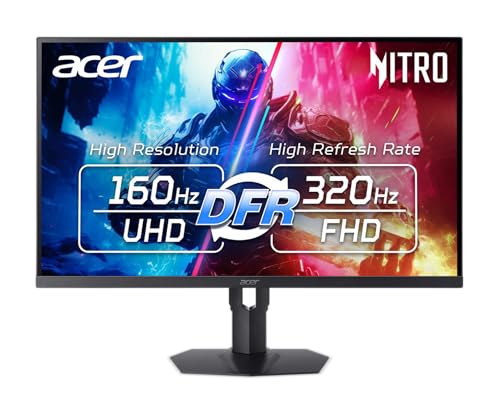
For those seeking an immersive gaming experience, the Acer Nitro 31.5” 4K UHD Gaming Monitor (XV325QK V3bmiipprx) stands out with its Mini LED technology and VESA DisplayHDR 1000 certification. You’ll enjoy stunning visuals thanks to its 1152 local dimming zones, enhancing color accuracy and depth. With a resolution of 3840×2160 and a refresh rate of up to 160Hz, you can switch settings based on your content needs. Plus, AMD FreeSync Premium technology eliminates screen tearing, ensuring smooth gameplay. Equipped with multiple connectivity options, this monitor is perfect for all your gaming, streaming, and work needs.
Best For: Gamers and content creators seeking a high-performance monitor with stunning visuals and smooth gameplay.
Pros:
- Exceptional visual quality with Mini LED technology and VESA DisplayHDR 1000 certification for vibrant colors and deep contrast.
- Fast refresh rate of up to 160Hz and a response time of 0.5ms GTG for an ultra-smooth gaming experience.
- Versatile connectivity options including multiple HDMI 2.1 and DisplayPort 1.4 ports, accommodating various devices.
Cons:
- Size may be too large for smaller desks or setups, requiring ample space for optimal viewing.
- Price point may be higher compared to standard monitors, which might not fit all budgets.
- Limited ergonomic adjustments, which could affect comfort during extended use.
KTC QHD Mini LED Gaming Monitor (27 Inch)
Experience stunning visuals and exceptional performance with the KTC QHD Mini LED Gaming Monitor. This 27-inch display boasts a 2560×1440 resolution, complemented by local dimming across 1152 zones for true blacks and brilliant whites. With a blazing 180Hz refresh rate and a lightning-fast 1ms response time, you’ll enjoy smooth gameplay, enhanced by Freesync and G-sync compatibility. Its ergonomic design allows for multi-angle adjustments, while the stylish borderless look fits seamlessly into your workspace. Plus, you’ll appreciate the connectivity options, including HDMI2.0 and DP1.4. Elevate your gaming experience with this stunning monitor that meets all your needs.
Best For: Gamers and professionals seeking high-performance visuals and fast response times in a stylish, adjustable monitor.
Pros:
- Exceptional 2560×1440 resolution with HDR1400 for stunning image quality.
- Ultra-fast 180Hz refresh rate and 1ms response time ensure smooth gameplay.
- Ergonomic design with multiple adjustments for comfortable viewing angles.
Cons:
- Limited to HDMI 2.0 for certain resolutions, which may restrict performance on older devices.
- Higher price point compared to standard monitors with lower specs.
- May require additional space for optimal setup due to its size and adjustable features.
AOC Q27G40XMN 27-Inch Gaming Monitor (Renewed)

AOC’s Q27G40XMN 27-Inch Gaming Monitor stands out as an excellent choice for gamers seeking immersive visuals and exceptional performance. With its QHD resolution of 2560×1440, you’ll enjoy sharper images and stunning detail. The Mini-LED display delivers vibrant colors and deeper contrasts, enhanced by VESA CERTIFIED HDR1000 for ultra-bright highlights. A lightning-fast 180Hz refresh rate and a 0.5ms response time guarantee smooth, responsive gameplay. Plus, Adaptive Sync technology eliminates stuttering and tearing, giving you a competitive edge. Complete with a stand, power cord, and HDMI cable, this monitor is perfect for both gaming and media enjoyment.
Best For: Gamers who seek high-performance visuals and immersive gameplay experiences.
Pros:
- Exceptional clarity and vibrant colors thanks to Mini-LED technology and VESA CERTIFIED HDR1000.
- High refresh rate of 180Hz and a quick 0.5ms response time for smooth, lag-free gaming.
- Adaptive Sync technology enhances the gaming experience by eliminating screen tearing and stuttering.
Cons:
- May require a powerful graphics card to fully utilize the QHD resolution and high refresh rate.
- Limited adjustability in terms of height and pivot compared to some other gaming monitors.
- Renewed condition may have minor cosmetic imperfections compared to a brand new monitor.
Acer Nitro XV275K P3 27″ 4K UHD Gaming Monitor (Renewed)
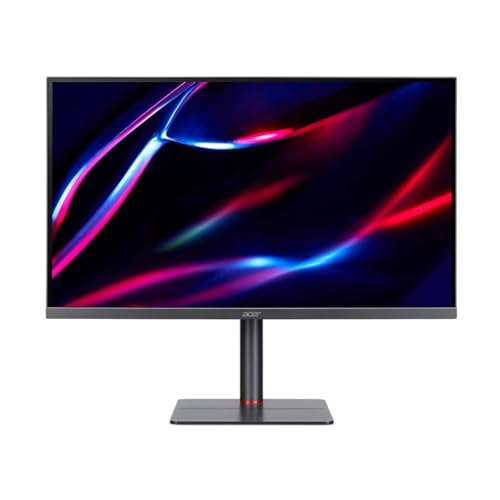
If you’re a gamer seeking a high-performance monitor that delivers stunning visuals and smooth gameplay, the Acer Nitro XV275K P3 is a standout choice. This 27″ IPS panel boasts a 4K UHD resolution and an impressive 160 Hz refresh rate, ensuring ultra-responsive gaming. With AMD FreeSync Premium Pro support, you’ll enjoy tear-free experiences during intense sessions. The Mini-LED backlight technology and VESA DisplayHDR1000 certification provide breathtaking HDR visuals with peak brightness up to 1000 nits. Plus, it covers 99% of the Adobe RGB color space, perfect for creative tasks. Its ergonomic design and versatile connectivity options make it a great addition to any setup.
Best For: Gamers and creative professionals seeking a high-performance monitor with stunning visuals and smooth gameplay.
Pros:
- High refresh rate of 160 Hz and 1 ms response time for ultra-responsive gaming.
- VESA DisplayHDR1000 certification with peak brightness of 1000 nits for breathtaking HDR visuals.
- 99% coverage of the Adobe RGB color space ensures rich color representation, ideal for creative tasks.
Cons:
- As a renewed product, it may show signs of previous use.
- Limited built-in speakers may not meet audio expectations for some users.
- Higher price point compared to standard monitors without advanced features.
AOC Agon PRO AG276QZD2 27″ QD-OLED Gaming Monitor

For gamers seeking an edge in competitive play, the AOC Agon PRO AG276QZD2 27″ QD-OLED Gaming Monitor stands out with its impressive 240Hz refresh rate and ultra-fast 0.03ms response time. With a stunning QHD resolution of 2560×1440, you’ll enjoy over 1.07 billion colors and HDR10 support for extraordinary visuals. Its G-Sync compatibility guarantees smooth gameplay, while the AOC Shadow Control enhances your gaming experience. Built-in speakers and customizable backlighting add to the immersion, along with six game modes for ideal settings. Plus, the 3-Year Zero-Bright-Dot warranty gives you peace of mind while you dominate the competition.
Best For: Competitive gamers looking for a high-performance monitor with exceptional visuals and ultra-fast response times.
Pros:
- 240Hz refresh rate and ultra-fast 0.03ms response time for an edge in competitive gaming.
- Stunning QHD resolution (2560×1440) with HDR10 support for vibrant visuals and deep blacks.
- G-Sync compatibility and customizable game modes for a tailored gaming experience.
Cons:
- Higher price point compared to standard monitors.
- Limited HDR performance with only HDR 400 support.
- May require a powerful GPU to fully utilize its capabilities.
Factors to Consider When Choosing a Mini Led Monitor
When you’re choosing a Mini LED monitor, there are several key factors to keep in mind. Display resolution, refresh rate, and response time can greatly affect your viewing experience, especially for gaming or professional work. Additionally, consider the dimming zone count and HDR certification levels to guarantee you get the best picture quality possible.
Display Resolution Importance
Choosing the right display resolution is essential for getting the most out of your Mini LED monitor. Resolutions like QHD (2560×1440) enhance image clarity and sharpness, making your gaming and content creation experiences more vivid. Higher resolutions give you more screen real estate, allowing you to multitask efficiently by displaying multiple windows without losing readability. Additionally, a monitor’s resolution affects pixel density; more pixels mean smoother edges and less visible pixelation, creating an improved viewing experience. Many modern games and applications are designed for higher resolutions, enabling you to appreciate detailed graphics without distortion. Ultimately, selecting an appropriate resolution for your needs can greatly influence your comfort and reduce eye strain during long sessions.
Refresh Rate Considerations
Maximizing your Mini LED monitor’s potential goes beyond just resolution; refresh rate plays an essential role in your overall experience. A higher refresh rate, like 240Hz or 320Hz, delivers smoother motion and reduces motion blur, especially in fast-paced gaming. Most Mini LED monitors offer refresh rates ranging from 180Hz to 320Hz, catering to various performance needs and hardware capabilities. If you’re into competitive gaming, aim for at least a 144Hz refresh rate to minimize input lag and enhance responsiveness. For casual gaming or media consumption, a refresh rate between 60Hz and 120Hz might be enough, but higher rates can still noticeably improve fluidity. Choose wisely based on how you plan to use your monitor!
Response Time Impact
While you might focus on resolution and refresh rate, response time is just as essential in selecting a Mini LED monitor. This metric measures how quickly a pixel can change colors, typically in milliseconds (ms). Lower values mean faster changes and less motion blur, with a response time of 1ms or lower being ideal for gaming. If you’re into competitive gaming, look for monitors with a response time of 0.5ms to minimize ghosting effects and guarantee smooth visuals. A higher response time can lead to noticeable lag and blurring during rapid movement, negatively affecting your experience. Fortunately, many modern Mini LED monitors achieve low response times while maintaining high refresh rates, enhancing clarity and reducing input lag.
Dimming Zone Count
When it comes to Mini LED monitors, the dimming zone count plays an important role in your viewing experience. A higher number of dimming zones, like 1152 or more, offers better control over local brightness and deeper blacks, enhancing overall visual quality. Monitors typically range from 336 to 1152 dimming zones, with those on the higher end providing superior brightness and detail in dark scenes. More dimming zones also reduce blooming effects, improving clarity and immersion, which is vital for gaming and movies. If you’re a gamer or content creator, keep in mind that a higher dimming zone count greatly enhances color accuracy and dynamic range, making it a key factor in your selection process.
HDR Certification Levels
A higher dimming zone count can greatly enhance your viewing experience, but it’s just one aspect to contemplate. HDR certification levels like VESA DisplayHDR 400, 600, and 1000 reflect the peak brightness and color accuracy of a monitor. If you want vibrant visuals, look for HDR 1000 certification; it requires at least 1000 nits of brightness and covers 90% of the DCI-P3 color gamut, ensuring rich color representation. Monitors with HDR certification also offer local dimming zones that improve contrast by achieving true blacks. Additionally, consider how well the monitor maintains color accuracy across various viewing angles, as this consistency is essential for an immersive experience. Ultimately, these factors determine the quality of your HDR content.
Connectivity Options Available
Selecting the right Mini LED monitor hinges on the variety of connectivity options it offers, so you’ll want to prioritize versatility. Look for options like HDMI 2.1, DisplayPort 1.4, and USB-C to guarantee compatibility with gaming consoles and PCs. HDMI 2.1 is essential for high refresh rates and resolutions, making it perfect for next-gen consoles. A DisplayPort 1.4 connection is important too, as it supports higher bandwidth for enhanced gaming and multimedia experiences. Additionally, check for USB ports, which can be handy for peripherals or charging devices. Finally, consider the number of ports available; having multiple HDMI or DisplayPort inputs lets you switch between devices easily, making your setup more user-friendly.
Ergonomic Design Features
To guarantee comfort and productivity during extended use, it is crucial to take into account ergonomic design features in Mini LED monitors. Look for models with height adjustment, tilt, swivel, and pivot capabilities, allowing you to find the perfect viewing angle and reduce neck strain. A height-adjustable stand aligns the monitor to your eye level, promoting better posture. VESA mount compatibility is another great feature, letting you mount your monitor on a wall or adjustable arm for flexible positioning. To minimize eye strain during long sessions, consider monitors with anti-glare coatings and flicker-free technology. Finally, customizable RGB lighting and aesthetic designs can enhance your workspace, making it both ergonomic and visually appealing.