
A bigger monitor can give you more room for documents, timelines, and games—but screen size alone does not guarantee a better view. Resolution, refresh rate, and viewing distance matter just as much.
These 10 picks span 27-inch everyday displays, 32-inch options, and 34-inch ultrawides. Use the buying guide below to narrow the field to the screen that suits your desk and how you use it.
Best 10 Large Screen PC Monitor Picks for 2026
Best for Multitasking
Samsung ViewFinity S50GC 34-Inch Ultrawide

- 34-inch, 3440 × 1440 ultrawide
- PBP and PIP for two sources
- 100Hz with AMD FreeSync
Best For: Wide-screen productivity and multi-device workflows
Fastest Gaming Pick
SANSUI 34-Inch 200Hz Curved Ultrawide

- 34-inch, 3440 × 1440 curved panel
- Up to 200Hz with Adaptive Sync
- HDMI 2.1 and DisplayPort 1.4
Best For: High-refresh ultrawide gaming
Best 4K Detail
Dell S2725QS 27-Inch IPS Monitor

- 27-inch, 3840 × 2160 IPS panel
- 120Hz with FreeSync Premium
- Fully adjustable stand and speakers
Best For: Sharp 4K work on a conventional 16:9 display
Gaming and Work Balance
Sceptre 34-Inch Curved WQHD Monitor

- 34-inch, 3440 × 1440 ultrawide
- 165Hz listed refresh rate
- Built-in speakers; HDMI and DisplayPort
Best For: Mixed gaming and productivity on one curved screen
Best for Everyday Work

- 32-inch, three-sided borderless display
- 75Hz refresh rate with FreeSync
- FHD resolution limits sharpness at this size
Best For: Spacious everyday productivity and casual viewing
Best for High-Refresh Gaming
SANSUI 32-Inch Curved 240Hz Monitor

- 32-inch 1500R curved display
- 240Hz refresh rate with FreeSync
- FHD resolution; no built-in speakers
Best For: High-refresh gaming on a curved 32-inch screen
Best Compact Alternative
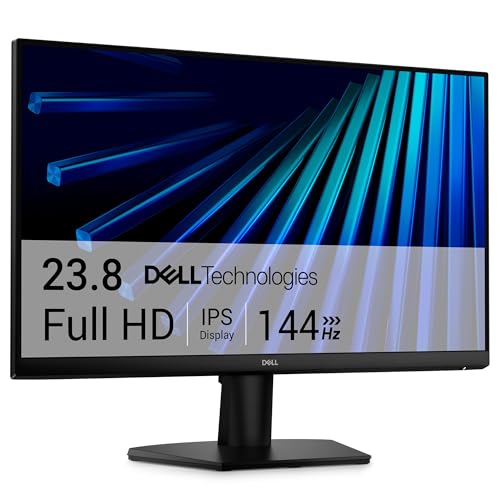
- 27-inch FHD IPS display
- 144Hz refresh rate with FreeSync
- Two HDMI ports; smaller than 32-inch picks
Best For: Desks needing a smaller display with smooth motion
Curved Viewing

- 27-inch 1800R curved FHD screen
- 100Hz refresh rate
- Blue-light reduction and flicker-free features
Best For: Everyday work and casual gaming on a curved screen
Smooth IPS Pick

- 27-inch matte IPS FHD display
- Up to 120Hz with Adaptive-Sync
- HDMI and VGA connections
Best For: Mixed office use and gaming on a flat IPS screen
Connectivity and Audio

- Two HDMI ports plus DisplayPort
- Built-in speakers
- 100Hz with FreeSync support
Best For: Work-and-gaming setups with multiple video sources
Best for Multitasking – Samsung ViewFinity S50GC 34-Inch Ultrawide
If your large screen pc monitor needs to handle several windows at once, the Samsung ViewFinity S50GC offers a 34-inch, 3440 × 1440 ultrawide display. Its flat 21:9 layout gives spreadsheets, timelines, and reference material room to sit side by side.
Best For: Productivity setups that benefit from a wide desktop and two-source viewing.
Pros:
- Picture-by-Picture and Picture-in-Picture support viewing two connected sources.
- 100Hz refresh rate and AMD FreeSync help keep motion smooth.
- Ambient-light brightness adjustment, Eye Saver Mode, and Flicker Free add viewing-comfort options.
Cons:
- Its 5ms response time and 100Hz ceiling are less gaming-focused than faster models in this roundup.
- The 21:9 format may not suit buyers who want a conventional 16:9 screen.
This is a practical pick when workspace and input flexibility matter more than maximum refresh rate. Two HDMI inputs and a DisplayPort input make its split-screen features useful across connected devices.
Fastest Gaming Pick – SANSUI 34-Inch 200Hz Curved Ultrawide
The SANSUI is a large screen pc monitor built around speed: its 34-inch, 1500R curved VA panel pairs 3440 × 1440 resolution with a refresh rate up to 200Hz. The 21:9 format also leaves ample room for games and side-by-side work.
Best For: Gamers who want a high-refresh curved ultrawide and can use separate audio equipment.
Pros:
- Up to 200Hz refresh rate and a specified 1ms OD response time.
- Adaptive Sync and VRR support help reduce tearing.
- Two HDMI 2.1 inputs, DisplayPort 1.4, and PBP add connection and layout flexibility.
Cons:
- No built-in speakers.
- The included stand offers tilt adjustment, but no height adjustment is specified.
Choose this model if refresh rate is your priority in a 34-inch ultrawide. Its VESA 100 × 100 mm compatibility provides another mounting option if the tilt-only stand does not suit your desk.
Best 4K Detail – Dell S2725QS 27-Inch IPS Monitor
The Dell S2725QS takes a different approach to a large screen pc monitor: its 27-inch, 16:9 IPS panel prioritizes sharp 3840 × 2160 detail over ultrawide width. A 120Hz refresh rate makes everyday navigation and compatible games feel smoother than on a standard 60Hz display.
Best For: Buyers who want 4K clarity, a conventional screen shape, and flexible desk positioning.
Pros:
- 4K IPS panel with 99% sRGB coverage for detailed, vibrant visuals.
- Up to 120Hz with AMD FreeSync Premium.
- Height, pivot, swivel, and tilt adjustments, plus built-in speakers.
Cons:
- Its 27-inch, 16:9 screen provides less horizontal workspace than the 34-inch ultrawides here.
- Its 120Hz maximum is below the refresh rates of the gaming-focused SANSUI and Sceptre models.
This is the choice for crisp text and 4K imagery rather than the widest desktop. ComfortView Plus and the adjustable stand also make it well suited to long work sessions.
Gaming and Work Balance – Sceptre 34-Inch Curved WQHD Monitor
For a large screen pc monitor that spans gaming and everyday productivity, the Sceptre offers a 34-inch curved, 21:9 display at 3440 × 1440. Its specified 165Hz refresh rate gives it a faster gaming emphasis than a typical productivity ultrawide.
Best For: Buyers seeking one curved ultrawide for gaming, media, and side-by-side windows.
Pros:
- 3440 × 1440 resolution provides substantial horizontal workspace.
- 165Hz specified refresh rate, 1ms MPRT, and FreeSync support gaming use.
- Built-in speakers and two DisplayPort plus two HDMI connections add convenience.
Cons:
- The stand lists tilt adjustment, with no height adjustment specified.
- Its 165Hz listed refresh rate falls below the SANSUI model’s 200Hz maximum.
The Sceptre is a sensible middle ground if you want ultrawide space and responsive play without giving up built-in audio. Check the connection and refresh-rate settings that fit your PC before buying.
Best for Everyday Work – Samsung 32-Inch Flat Monitor
If you want a large screen pc monitor for documents, presentations, and casual entertainment, this Samsung offers a roomy 32-inch flat display with slim borders on three sides. Its 75Hz refresh rate and AMD FreeSync add smoother motion than a basic 60Hz setup.
Best For: Everyday productivity and casual viewing on a spacious screen.
Pros:
- Three-sided borderless design suits side-by-side monitor setups.
- 75Hz refresh rate and FreeSync help reduce visible tearing.
- Flicker Free and Eye Saver Mode support longer viewing sessions.
Cons:
- 1920 × 1080 resolution may look less sharp across 32 inches than on a smaller display.
- 75Hz refresh rate is modest for fast-paced gaming.
Choose this model for screen space and straightforward connectivity via HDMI or DisplayPort, rather than maximum sharpness or competitive-gaming speed.
Best for High-Refresh Gaming – SANSUI 32-Inch Curved 240Hz Monitor
For a large screen pc monitor geared toward fast games, this SANSUI pairs a 32-inch 1500R curved display with a 240Hz refresh rate and FreeSync. Both its HDMI and DisplayPort connections are listed as supporting up to 240Hz.
Best For: Gamers who prioritize high refresh rates and a curved 32-inch screen.
Pros:
- 240Hz refresh rate and 1ms MPRT specification target fluid gameplay.
- 1500R curve, 300-nit brightness, and listed 125% sRGB gamut.
- Tilt adjustment and 100 × 100mm VESA compatibility offer setup flexibility.
Cons:
- 1920 × 1080 resolution provides limited pixel density at 32 inches.
- No built-in speakers.
This is the speed-focused pick if high-frame-rate gaming matters more to you than fine text detail. A DisplayPort cable is included, but plan on separate audio output if you need sound.
Best Compact Alternative – Dell 27-Inch SE2726H Monitor
If a 32-inch large screen pc monitor feels too big for your desk, the 27-inch Dell SE2726H is a smaller option with a 144Hz refresh rate. Its IPS panel and 178-degree viewing angles suit work, streaming, and casual gaming.
Best For: Buyers who want a 27-inch desktop display with smooth motion and wide viewing angles.
Pros:
- 144Hz refresh rate and AMD FreeSync support smoother visuals.
- IPS panel maintains consistent viewing across wide angles.
- Two HDMI ports make connecting multiple sources convenient.
Cons:
- 27-inch screen offers less workspace than the 32-inch options.
- 1920 × 1080 resolution does not offer the detail of a higher-resolution monitor.
The Dell balances a manageable footprint with fast refresh and eye-comfort features. Note that its advertised 1ms figure is MPRT; the supplied specifications also list an 8ms response time.
Curved Viewing – Samsung 27-Inch Essential S3
If you want a large screen pc monitor that feels more enveloping, this 27-inch Samsung pairs an 1800R curve with a 100Hz refresh rate. Its 1920 × 1080 resolution is suited to buyers who prioritize screen size and smooth motion over pixel density.
Best For: Everyday work and casual gaming with a curved screen.
Pros:
- 1800R curve offers a more immersive viewing experience.
- 100Hz refresh rate helps reduce visible motion blur.
- Blue-light reduction and flicker-free features support longer sessions.
Cons:
- Full HD resolution may look less sharp across 27 inches than a higher-resolution display.
- Only one HDMI port is listed.
The curve is the main reason to choose this model. It is a practical fit if you prefer an engaging view and do not need extra pixels or multiple HDMI inputs.
For shoppers seeking a large screen pc monitor that handles office tasks and fast-moving games, this 27-inch Acer combines an IPS panel with up to a 120Hz refresh rate. It uses a matte Full HD display and supports Adaptive-Sync.
Best For: Mixed office use and gaming on a flat IPS screen.
Pros:
- Up to 120Hz refresh rate and Adaptive-Sync support promote smoother motion.
- IPS panel and matte finish suit a range of desktop tasks.
- Includes HDMI and VGA connections.
Cons:
- 1920 × 1080 resolution offers less detail at 27 inches than higher-resolution options.
- Only one HDMI port is listed.
Its combination of IPS, Adaptive-Sync, and 120Hz makes this the most speed-focused option of the three listed here. Note that the specified 1ms response time is a VRB rating.
This Sceptre is a large screen pc monitor for buyers who want several inputs without adding desktop speakers right away. The 27-inch Full HD display offers a 100Hz refresh rate, two HDMI ports, DisplayPort, and built-in speakers.
Best For: A shared work-and-gaming setup with multiple video connections.
Pros:
- Two HDMI ports and one DisplayPort accommodate multiple devices.
- Built-in speakers help conserve desk space.
- 100% sRGB coverage and FreeSync support add versatility.
Cons:
- Full HD resolution limits sharpness on a 27-inch screen compared with higher-resolution displays.
- 100Hz refresh rate is lower than the Acer’s listed 120Hz maximum.
Choose this model if ports and integrated audio matter more than the highest refresh rate in this group. Its VESA mounting support also gives you another placement option.
How We Picked the Best Large Screen PC Monitor
We looked for a useful range of screen sizes, resolutions, and refresh rates rather than treating the biggest or fastest display as the automatic winner. The selection includes 27-inch models for everyday work, 32-inch screens for more physical viewing area, and 34-inch ultrawides for side-by-side tasks or immersive gaming. We also considered the listed panel technology, connectivity, and gaming features. Specifications are a starting point, not a substitute for checking current pricing, stand adjustments, ports, and independent performance testing before you buy.
Quick Comparison: Which Screen Fits Your Needs?
- Sharp text and detailed visuals: The Dell S2725QS pairs a 27-inch screen with 4K resolution. A 34-inch 3440 × 1440 ultrawide offers a different advantage: more horizontal workspace.
- Wide-screen multitasking: The Samsung ViewFinity S50GC, SANSUI 34-inch, and Sceptre 34-inch models suit buyers who want two windows visible without a dual-monitor setup.
- High-refresh gaming: The SANSUI 32-inch 240Hz, SANSUI 34-inch 200Hz, and Sceptre 34-inch up-to-180Hz models prioritize speed, though your PC must deliver enough frames to benefit.
- Everyday 27-inch use: The Dell SE2726H, Samsung Essential S3, Acer KB272 G0bi, and Sceptre Prime provide smaller-footprint alternatives to an ultrawide.
Key Buying Factors for a Large Screen PC Monitor
Match Resolution to Size
A 27-inch 4K screen can make text and fine detail look crisp, while 3440 × 1440 gives a 34-inch ultrawide ample room for multiple windows. At 32 inches, 1080p has noticeably lower pixel density; consider whether gaming speed matters more to you than sharp text.
Balance Refresh Rate and Hardware
Higher refresh rates can make scrolling and motion look smoother. For gaming, check that your graphics card can drive your chosen resolution at the frame rates you want. Also verify which input supports the monitor’s maximum advertised refresh rate.
Check Desk Fit and Connections
Measure desk width and viewing distance, especially for a 34-inch ultrawide. Confirm that the monitor has the ports your computer needs, and check stand ergonomics or VESA-mount support if positioning matters. Curvature is a preference, not a requirement: it may feel natural on a wide gaming screen, while a flat display can be easier to share or align with other screens.
Who Should Buy Which Large Screen PC Monitor?
Choose a 34-inch ultrawide if you regularly arrange apps side by side or want a wider game view. Pick the 27-inch 4K Dell if fine detail is your priority and you do not need an ultrawide. Competitive gamers should weigh the high-refresh SANSUI options against resolution and their PC’s capabilities. For general browsing, office tasks, and casual gaming, a 27-inch model may be the more practical Large Screen PC Monitor—particularly when desk space or budget is limited.