
If you want one charger that can replace a bulky power brick and still show real-time output, a GaN laptop charger with power display is a smart upgrade. These chargers are built for fast USB-C charging, easier power monitoring, and travel-friendly convenience.
Below, we focus on models that deliver strong wattage, multiple ports, and practical display features so you can choose the right option for your laptop and everyday devices.
Best 10 GaN Laptop Charger with Power Display Picks for 2026
Editor’s Pick
Anker 140W 4-Port Smart Display Charger

- 140W from either USB-C port
- Charges up to 4 devices
- Color display shows charging details
Best For: Desktop users who want high power plus live charging info
Travel Runner-Up
Baseus 140W Compact GaN Charger

- Up to 140W on one USB-C port
- 4-device charging with 3 USB-C + 1 USB-A
- Foldable, about 35% smaller than Apple’s adapter
Best For: Travelers who want a compact high-watt charger
Most Informative Display
SHARGE 140W 3-Port Dot-Matrix Charger
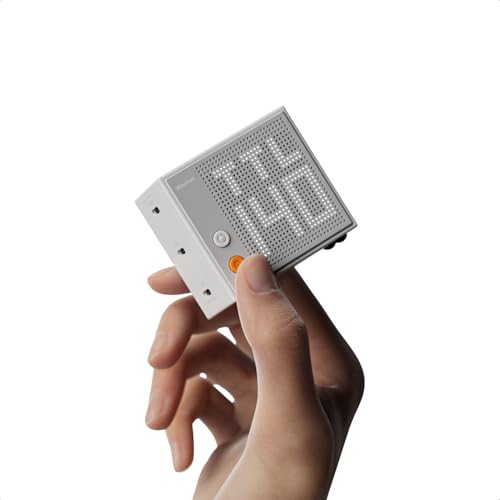
- Real-time wattage display for each port
- Up to 140W with PD 3.1
- 47% smaller than the original 140W MacBook Pro charger
Best For: Shoppers who want the clearest live power readout
Premium Power Pick
Anker Prime 160W Smart Display Charger

- 160W total output with 140W single-port
- Smart display plus Bluetooth app control
- Compact size compared to an AirPods Pro case
Best For: Power users who want the most output and smart control
Best for Easy Setup
140W 3-Port PD 3.1 Charger with Light Indicators

- 140W PD 3.1 output for compatible laptops
- 3 ports for charging a laptop and phone together
- Three-stage lights show charging mode at a glance
Best For: buyers who want a high-wattage multiport charger with simple charging-status indicators
Top Display Feature
160W 5-Port Charger with Rotatable Touch Display

- 160W total output with up to 140W on one USB-C port
- Touch display shows wattage, protocol, and temperature
- Five ports support charging multiple devices together
Best For: power users who want detailed real-time charging data and lots of port options
Best Compact Option
140W Smart Display 4-Port Travel Charger

- High-definition display shows charging status and port performance
- 140W with 3 USB-C ports and 1 USB-A port
- Foldable plug and 9.4 oz weight suit travel
Best For: travelers who want a compact, screen-equipped charger for a laptop and accessories
Compact 100W Smart Display Charger
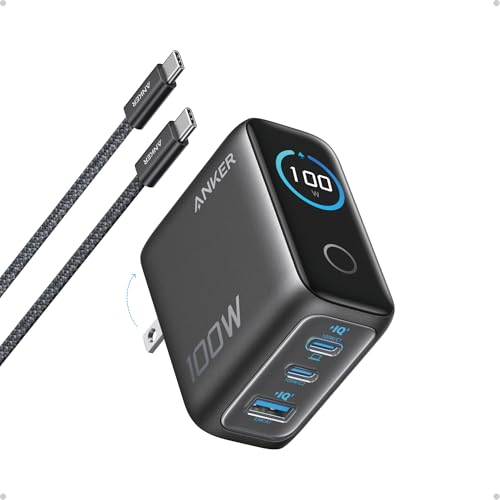
- 100W output from any USB-C port
- Smart display shows status and temperature
- Foldable plug and compact travel size
Best For: Travelers and daily carry users who want a small laptop charger with live power info
Color Screen PD3.1 Charger

- 140W PD3.1 output from USB-C1 or USB-C2
- Color screen shows charging data and temperature
- Includes a 5 ft 240W USB-C cable
Best For: People who want a 140W charger with a color display and bundled cable
Editor’s Pick – Anker 140W 4-Port Smart Display Charger
If you want a GaN laptop charger with power display that can handle a full desk setup, this Anker model is built for that job. It offers up to 140W from either USB-C port, charges up to four devices at once, and uses a color display to show charging status, temperature, and port details.
Best For: Users who want a powerful desktop charger with clear charging feedback and multi-device support.
Pros:
- Up to 140W output from either USB-C port for fast laptop charging
- Charges four devices simultaneously with 4 total ports
- High-definition color display shows status, temperature, and port info
- Activeshield 4.0 monitors temperature over 10 million times per day
Cons:
- Bulkier than compact travel-first chargers
- Includes a 5 ft cable, but no cable-free minimal setup
- Designed as a corded desktop block, not a pocket charger
This is a strong pick if you value visibility and power delivery equally. It balances high wattage, four-device charging, and safety monitoring in one desktop-friendly unit.
Travel Runner-Up – Baseus 140W Compact GaN Charger
This Baseus model is a practical GaN laptop charger with power display-style convenience in a compact travel design, though it focuses more on size and flexibility than on a built-in screen. It delivers up to 140W on a single USB-C port, supports charging four devices, and folds down to save space in a bag.
Best For: Travelers and office users who want a compact 140W charger that can power multiple devices.
Pros:
- Up to 140W from a single USB-C port for laptop charging
- Three USB-C ports plus one USB-A port for four-device charging
- About 35% smaller than Apple’s 140W power adapter
- Foldable prongs make it easier to pack and carry
Cons:
- No built-in power display mentioned in the product notes
- Plastic enclosure instead of metal
- Best for portability, not for detailed charging readouts
If your priority is travel-friendly size with serious wattage, this Baseus charger is easy to recommend. It gives you strong PD3.1 support in a small body and enough ports for a shared charging setup.
Most Informative Display – SHARGE 140W 3-Port Dot-Matrix Charger
If you specifically want a GaN laptop charger with power display, this SHARGE model stands out for the most hands-on monitoring. Its adjustable dot-matrix screen shows real-time wattage for each port, and you can change brightness and orientation to suit your setup.
Best For: Buyers who want a compact 140W charger with a customizable live power display.
Pros:
- Up to 140W max output with PD 3.1 support
- Real-time wattage display for each port
- Brightness and screen orientation are adjustable
- Compact design is 47% smaller than the original 140W MacBook Pro charger
Cons:
- Cable not included
- Only 3 ports, so it supports fewer devices than 4-port rivals
- White finish may not match every desk setup
This is the best fit if the display is the main reason you’re shopping. It combines strong laptop-charging power with clear, customizable feedback in a very small package.
Premium Power Pick – Anker Prime 160W Smart Display Charger
For anyone looking at a GaN laptop charger with power display and wanting the highest overall output here, this Anker Prime model is the most powerful option in the group. It delivers 160W total, offers a 140W single-port output without derating, and uses a smart display with app-based control for live monitoring and mode changes.
Best For: Power users who want maximum output, smart controls, and a compact premium charger.
Pros:
- 160W total output with a 140W single-port rating
- Smart display shows power in real time
- Bluetooth app support for switching modes and custom settings
- Compact enough to be compared to an AirPods Pro case
Cons:
- No cable included
- Likely more charger than casual phone-only users need
- 3 ports, so shared charging is flexible but not maximal
This is the most premium-feeling choice if you want raw power plus modern monitoring tools. It is especially appealing for laptop-first users who still want a small charger they can carry every day.
Best for Easy Setup – 140W 3-Port PD 3.1 Charger with Light Indicators
If you want a GaN laptop charger with power display-like status cues, the AOHI Youth 140W stands out for its three-stage indicator lights and PD 3.1 support. It delivers up to 140W for compatible laptops, while the 3-port layout makes it easier to charge a notebook and a phone together without adding more bricks to your bag.
Best For: users who want a high-wattage multiport charger with visible charging-status indicators and strong laptop support.
Pros:
- 140W PD 3.1 output can fast-charge a MacBook Pro 16-inch, with quoted 0% to 56% in 30 minutes using the right cable.
- Two USB-C ports and one USB-A port support multi-device charging, including 100W laptop plus phone use at the same time.
- Three-stage indicator lights show fast, standard, and trickle charging modes from a distance.
- GaN design and foldable plug help keep the charger relatively compact for travel.
Cons:
- USB-C to MagSafe 3 cable is not included for the claimed MacBook fast-charge setup.
- At around 11 ounces, it is a bit heavier than many 100W chargers.
- Dell laptop series cannot charge at full speed due to protocol restrictions.
This is a practical pick if you value power and simple status indicators over ultra-minimal size. It is especially useful for people who want one charger for a laptop, phone, and tablet, but the light system is more basic than a full numeric power readout.
Top Display Feature – 160W 5-Port Charger with Rotatable Touch Display
The UGREEN Nexode Pro is the most feature-rich GaN laptop charger with power display in this group, thanks to its rotatable touch digital display. It shows total wattage, per-port power data, charging protocol, and internal temperature, making it easier to monitor how your devices are being powered.
Best For: people who want a premium desktop or travel charger with detailed real-time charging information.
Pros:
- 160W total output with up to 140W on a single USB-C port for high-power laptops.
- Five ports total, including four USB-C ports and one USB-A port, for charging multiple devices at once.
- Rotatable touch display shows wattage, per-port power data, protocol, and temperature.
- Foldable plug and compact GaN design make it easier to pack for trips.
Cons:
- Like most high-output multiport chargers, total power is shared across ports when several devices are connected.
- Its feature set is more advanced than a basic charger, so it may be more than some users need.
If you want the clearest live feedback from a charger, this one is hard to beat. It blends strong 160W output with a genuinely useful display, which makes it a strong fit for desk setups and power users managing several devices.
Best Compact Option – 140W Smart Display 4-Port Travel Charger
This KABCON model is a strong budget-style option if you want a GaN laptop charger with power display features without moving up to a larger 5-port unit. Its high-definition smart display shows charging status and port performance in real time, while the 140W rating and 4-port layout make it practical for everyday laptop-and-phone charging.
Best For: travelers and everyday users who want a compact charger with a visible charging screen and four ports.
Pros:
- Smart display provides real-time charging status and port performance.
- 140W output with three USB-C ports and one USB-A port supports multiple devices.
- Foldable plug and 9.4 oz weight make it easy to pack for trips.
- Built-in protection includes over-voltage, over-temperature, over-current, and short-circuit safeguards.
Cons:
- It is a non-cord charger, so it is best used where you already have the right cable setup.
- The display is informative, but it does not offer the deeper per-port and temperature detail of some premium competitors.
This is a well-balanced choice if you want screen-based charging feedback in a compact body. It gives you the basics that matter most: enough wattage for a laptop, room for extra devices, and a display that helps you see what is happening.
Compact 100W Smart Display Charger – Anker 100W 3-Port GaN Charger
If you want a GaN laptop charger with power display that stays simple and travel-friendly, this Anker 100W option is a strong fit. It delivers up to 100W from any USB-C port, adds a high-definition smart display for charging status and temperature, and keeps the footprint small enough for daily carry.
Best For: Users who want a compact 3-port charger with real-time power visibility for a laptop plus everyday devices.
Pros:
- 100W max output from any USB-C port for fast laptop charging
- Smart display shows charging status, temperature, and port performance
- Foldable plug and 330% smaller frame make it easy to pack
- Includes a 4.9 ft USB-C to USB-C cable
Cons:
- Only 3 ports, so it is less flexible than larger multi-device chargers
- USB-C2 and USB-A switch to low-current mode for low-power devices, which may limit speed
This is a practical pick if you value portability and straightforward charge monitoring over maximum port count. It is especially appealing for travelers and anyone who wants a smaller desktop charger that still handles a laptop confidently.
High-Power Multi-Device Display Charger – Baseus Picogo 140W 4-Port
This GaN laptop charger with power display is built for people who need more output and more ports. The Baseus Picogo 140W combines a smart screen, touch control, and 4-port charging, so you can monitor power flow, temperature, and remaining charging time while powering multiple devices.
Best For: Buyers who want a 140W charger for a laptop and several other devices at the same time.
Pros:
- 140W PD3.1 output supports fast charging for high-demand laptops
- 3 USB-C ports plus 1 USB-A port for up to 4 devices
- Smart display shows power flow, temperature, and estimated remaining charging time
- GaN design with cooling features and 91% conversion rate
Cons:
- More feature-rich design may be more than you need for simple single-device charging
- Best performance depends on how power is distributed across connected devices
If you regularly charge a laptop, phone, and accessories together, this model offers a lot of flexibility. Its display and power distribution features make it easier to keep track of what each device is getting without guessing.
Color Screen PD3.1 Charger – wegear 140W GaN 4-Port
For shoppers comparing a GaN laptop charger with power display, this wegear 140W model focuses on speed, visibility, and broad compatibility. It offers PD3.1 charging up to 140W, a smart color screen with touch control, and enough output flexibility to handle multiple devices at once.
Best For: Users who want a 140W charger with a color display and included USB-C cable.
Pros:
- Up to 140W max output from USB-C1 or USB-C2 for fast laptop charging
- Smart digital color screen shows real-time charging data and temperature
- 4 ports allow charging up to 4 devices simultaneously
- Includes a 5 ft 240W USB-C cable in the box
Cons:
- Charging speed can vary depending on the device and protocol
- The size and feature set may be more than needed if you only charge one device
This is a well-rounded pick if you want a visible, easy-to-read display and strong multiport charging in one adapter. The included cable is a useful bonus for anyone setting up a new desktop or travel charging kit.
How We Picked the Best GaN Laptop Charger with Power Display
For this roundup, we prioritized chargers that pair GaN efficiency with a built-in power display, since that combination gives you compact size and better charging visibility. We also looked at total wattage, USB-C port count, support for modern fast-charge standards, and whether the charger can realistically handle a laptop plus phone or tablet at the same time.
We favored designs with clear displays, strong brand reputations, and useful travel features such as foldable plugs and multi-device layouts. Because a GaN Laptop Charger with Power Display is often bought as an all-in-one daily charger, versatility mattered as much as peak power.
Quick Comparison
In this group, 140W models are the sweet spot for most MacBook Pro, Dell XPS, and other performance laptops, while 160W chargers offer more headroom for multi-device setups. If you mostly charge a laptop and phone together, a 3-port design is often enough. If you regularly charge a notebook, tablet, earbuds, and a second phone, 4- or 5-port models are easier to live with.
Compact 100W chargers work best for lighter laptops, ultrabooks, and users who value portability above all else. The display feature is most useful when you want to confirm power delivery, spot throttling, or keep an eye on how much your devices are actually drawing.
Key Buying Factors for a GaN Laptop Charger with Power Display
Wattage and Charging Headroom
Match the charger’s top output to your laptop’s needs. A 100W model can be enough for many thin-and-light machines, but 140W or higher is safer if you want faster charging, better multitasking, or compatibility with power-hungry laptops.
Port Layout and Shared Output
More ports are not automatically better if total output drops too much when everything is connected. Check how the charger splits power across ports so you know whether it can truly support your usual device mix.
Display and Controls
A smart display should be easy to read and helpful, not just decorative. Touch controls can add convenience, but clarity, brightness, and useful metrics matter more than extra gimmicks.
Compatibility and Charging Standards
Look for PD 3.1, PPS, and broad USB-C compatibility if you want the charger to work well across laptops, tablets, phones, and accessories. A good GaN Laptop Charger with Power Display should also be able to adapt well across brands.
Size, Plug Design, and Travel Use
Foldable prongs, compact builds, and lower heat output are valuable if you plan to pack the charger often. If it will live on a desk, port count and readability may matter more than absolute size.
Who Should Buy Which GaN Laptop Charger with Power Display?
If you mainly charge one laptop and a phone, a 100W to 140W 3-port charger is usually the best balance of size and convenience. If you keep multiple devices on one desk, choose a 4- or 5-port model with higher total output so you can charge without constant swapping.
Frequent travelers should lean toward compact 140W options with foldable plugs and a clear display. Power users who want a single desktop hub for a laptop, tablet, and accessories should prioritize the highest-wattage models with the most flexible port configurations.