
If you need portable storage that protects sensitive files without slowing you down, an external SSD with hardware encryption is one of the smartest upgrades you can buy.
We focused on drives that balance security, speed, and everyday usability, with options for business users, creators, students, and anyone who wants better data protection on the go.
Best 10 External SSD with Hardware Encryption Picks for 2026
Vault-Grade PIN Security
Kingston IronKey Vault Privacy 80 960GB
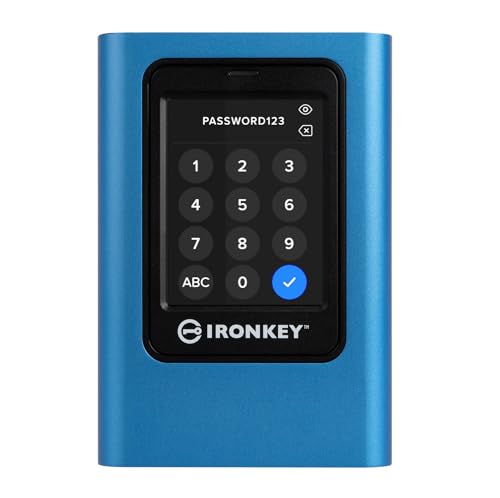
- FIPS 197 certified XTS-AES 256-bit encryption
- Touch-screen PIN with admin/user password modes
- Dual read-only modes for malware protection
Best For: Business users who need secure portable storage
Rugged Speed Pick

- Up to 1,050MB/s transfer speeds
- IP65 water and dust resistance
- Includes hardware encryption
Best For: Photographers, creators, and gamers on the move
Bootable Secure Utility

- AES256-XTS encryption with 38-digit PIN
- Bootable virtual ODD/HDD support
- Write protect plus decoy volume mode
Best For: Power users needing secure bootable virtual drives
Classic Encrypted Workhorse

- FIPS PUB 197 validated hardware encryption
- Wear-resistant keypad with self-destruct protection
- Works with Windows, Mac, and Linux
Best For: Users wanting a rugged, software-free encrypted drive
TouchLock NFC Encryption SSD
Lexar TouchLock Portable SSD 512GB

- One-touch NFC unlock with mobile device
- 128-bit AES hardware encryption
- Magnetic slim build with 2-meter drop protection
Best For: Mobile users who want quick encrypted access and easy backups
Keypad-Locked Encrypted SSD

- Keypad unlock with hardware encryption
- FIPS 140-2 Level 3 and TAA compliant
- Works on Mac and Windows without drivers
Best For: Compliance-focused users who need controlled access and simple cross-platform use
Fast AES Backup SSD

- 256-bit AES hardware encryption
- Up to 1,050 MB/s read and 1,000 MB/s write
- Compact aluminum body with shock resistance
Best For: Creative users and gamers who want fast encrypted storage
Secure Bootable Pick
MINI Pro external encrypted SSD with write-blocking

- AES256-XTS hardware encryption
- Bootable virtual ODD/HDD support
- Built-in hardware write-blocker
Best For: Encrypted portable storage with bootable drive and write protection
Fast Everyday Choice
Lexar ES3 1TB portable SSD with AES encryption

- Up to 1050MB/s read and 1000MB/s write
- Lexar DataShield 256-bit AES encryption
- Compact, lightweight USB-C design
Best For: Fast portable storage with included encryption software
Phone-Friendly Security Pick
Touch portable SSD with fingerprint encryption
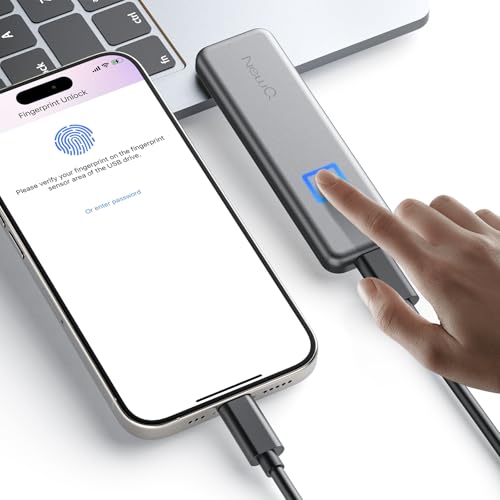
- Fingerprint or password authentication
- No-cost app for local encryption and backup
- USB-C support for phones, tablets, and PCs
Best For: Secure mobile backups and biometric drive access
Vault-Grade PIN Security – Kingston IronKey Vault Privacy 80 960GB
If you want an external SSD with hardware encryption for sensitive files, the Kingston IronKey Vault Privacy 80 is built around security first. It uses FIPS 197 certified XTS-AES 256-bit hardware encryption, plus a touch-screen PIN system with admin/user password options and configurable rules for tighter control.
Best For: Business users and anyone who needs encrypted portable storage with multiple access modes and write protection.
Pros:
- FIPS 197 certified XTS-AES 256-bit hardware encryption
- Touch-screen PIN entry with admin/user password modes
- Configurable password rules for stronger access control
- Dual read-only modes help protect against malware
Cons:
- 250MB/s rated speed is modest for an SSD
- Focused more on security than raw performance
- Bulkier than pocket-sized portable SSDs
For buyers prioritizing data protection over speed, this IronKey stands out with hardware-level encryption and practical lock-down features. It is a strong fit when your portable drive needs to do more than just store files.
Rugged Speed Pick – Samsung T7 Shield 1TB
The Samsung T7 Shield is a practical external SSD with hardware encryption if you want fast transfers plus extra durability. It offers up to 1,050MB/s speeds, IP65 water and dust resistance, and drop protection up to 9.8 feet, making it a strong choice for travel and field work.
Best For: Photographers, creators, and gamers who want a fast encrypted SSD with rugged protection.
Pros:
- Up to 1,050MB/s read speed for quick transfers
- IP65 water and dust resistance
- Drop resistant up to 9.8 feet
- Hardware encryption included
Cons:
- Rugged design adds some bulk versus slimmer drives
- No dedicated keypad or touch-screen lock system
- Best features depend on USB 3.2 Gen 2 support
This drive balances speed, portability, and toughness better than most encrypted portable SSDs. If you need a secure drive that can handle everyday bumps and bad weather, it is an easy one to recommend.
Bootable Secure Utility – iodd ST400 512GB
The iodd ST400 is a specialized external SSD with hardware encryption aimed at users who want security plus bootable virtual drive tools. It combines AES256-XTS encryption, a 38-digit PIN, a device-bound second password, and a decoy volume mode for plausible deniability.
Best For: Power users who need encrypted storage with bootable virtual drive and write-protect features.
Pros:
- AES256-XTS encryption with 38-digit PIN support
- Device-bound second password and decoy volume mode
- Bootable virtual ODD/HDD and Win To Go support
- Write protect and auto sleep features
Cons:
- Highly specialized, so it may be overkill for simple storage
- 512GB capacity is smaller than some general-purpose drives
- Best suited to laptop and Linux-oriented workflows
This is less of a mainstream travel SSD and more of a secure utility drive for advanced use cases. If bootable media, password controls, and hardware encryption all matter, it offers a very focused feature set.
Classic Encrypted Workhorse – Apricorn Aegis Padlock 1TB
The Apricorn Aegis Padlock is a straightforward external drive with hardware encryption for users who want simple, locked-down portable storage. It uses a FIPS PUB 197 validated encryption algorithm, includes a wear-resistant keypad, and adds brute-force self-destruct protection for extra security.
Best For: Users who want a rugged, software-free encrypted external drive with broad OS compatibility.
Pros:
- Military-grade FIPS PUB 197 validated encryption algorithm
- Wear-resistant keypad with brute-force self-destruct feature
- Software-free design with no admin rights needed
- Compatible with Windows, Mac, and Linux
Cons:
- USB 3.0 performance is much slower than newer SSDs
- Uses a hard drive rather than a solid-state drive
- Bulkier and heavier than pocket SSD options
While it is not the fastest drive here, it remains a dependable choice for security-focused buyers who value proven hardware encryption. The simple keypad workflow and broad compatibility make it easy to deploy across mixed systems.
TouchLock NFC Encryption SSD – Lexar TouchLock Portable SSD 512GB
If you want an external SSD with hardware encryption that feels easy to use day to day, the Lexar TouchLock focuses on simple NFC-based unlocking and portable backup. It combines 128-bit AES hardware encryption with a slim magnetic design, so it suits users who want quick access without carrying a separate password manager or keypad.
Best For: Phone and laptop users who want one-touch NFC unlocking, secure backups, and a compact travel drive.
Pros:
- One-touch NFC authentication for unlocking with a mobile device
- 128-bit AES hardware encryption for protected storage
- Magnetic slim profile and 2-meter drop protection
- USB 3.2 Gen 2 support and free Lexar app for backups
Cons:
- The drive will not be recognized until it is unlocked
- 512GB capacity may feel limited for larger media libraries
Overall, this is a practical choice if you value convenience and security together, especially for mobile use. Its standout feature is the NFC unlock flow, but it makes the most sense for buyers who are comfortable with an unlock-first workflow.
Keypad-Locked Encrypted SSD – SecureDrive KP 500GB
If you need an external SSD with hardware encryption that prioritizes controlled access, the SecureDrive KP uses a keypad unlock system and built-in security features. It is aimed at users who want a no-software setup, cross-platform compatibility, and hardware-level protection for sensitive files.
Best For: Buyers who need a keypad-unlocked encrypted drive for business, compliance-sensitive, or shared work environments.
Pros:
- Hardware encrypted drive with keypad unlock
- FIPS 140-2 Level 3 and TAA compliant design
- Works with Mac and Windows without drivers or software
- Includes USB-C and USB-A cables plus a splash-proof pouch
Cons:
- Listed transfer speed is modest compared with faster SSDs
- 500GB capacity may be small for heavier backup needs
- Some bundled antivirus features require activation
This drive is built more for secure handling than for top-end speed, which makes it a strong fit for compliance-driven workflows. If your main goal is hardware encryption and straightforward access control, it offers a clear, practical approach.
Fast AES Backup SSD – Samsung T7 Portable SSD 1TB
For shoppers looking for an external SSD with hardware encryption plus strong everyday performance, the Samsung T7 is a straightforward pick. It pairs 256-bit AES hardware encryption with fast USB 3.2 Gen 2 speeds, making it useful for work files, gaming data, and high-resolution video recording.
Best For: Users who want a fast, compact encrypted SSD for creative work, gaming, and mobile storage.
Pros:
- 256-bit AES hardware encryption for secure storage
- Up to 1,050 MB/s read and 1,000 MB/s write speeds
- Compact aluminum design with shock resistance and fall protection
- Wide compatibility with PC, Mac, smartphone, tablet, and consoles
Cons:
- Uses USB 3.0-class interface terminology rather than a keypad or NFC unlock method
- Premium performance may be more than needed for basic backups
The T7 stands out as the speed-first option in this group, while still adding hardware encryption for peace of mind. If you want one drive that can handle editing, gaming, and secure storage, it is the most versatile all-rounder here.
Secure Bootable Pick – MINI Pro external encrypted SSD with write-blocking
If you want an external SSD with hardware encryption that does more than basic file storage, this MINI Pro is built for controlled access, bootable recovery, and data protection. It combines AES256-XTS hardware encryption, a decoy PIN, and controller-level write protection, making it a strong fit for sensitive work and system maintenance.
Best For: Users who need encrypted portable storage with bootable virtual drive support and write-blocking.
Pros:
- AES256-XTS hardware encryption with PIN-based access control
- Decoy PIN feature can present a prepared decoy VHD volume
- Bootable virtual ODD/HDD support for ISO, VHD, and VMDK files
- Hardware write-blocker helps prevent accidental or malware-driven changes
Cons:
- 512GB capacity is modest if you need a large media library
- USB 3.1 Gen 1 speeds are solid, but not the fastest tier available
- Feature set is specialized, so it may be more than casual users need
This is a niche but very capable encrypted SSD for people who value security and system-level tools over simple plug-and-play use. If bootable media support and write protection matter to your workflow, it stands out immediately.
Fast Everyday Choice – Lexar ES3 1TB portable SSD with AES encryption
The Lexar ES3 is a straightforward external SSD with hardware encryption software for users who want fast transfers and broad device compatibility. It offers USB 3.2 Gen 2 performance up to 1050MB/s read and 1000MB/s write, plus Lexar DataShieldTM 256-bit AES encryption to help protect files.
Best For: Buyers who want a fast, compact external SSD with optional encryption software for everyday use.
Pros:
- Up to 1050MB/s read and 1000MB/s write over USB 3.2 Gen 2
- Lexar DataShieldTM 256-bit AES encryption software for file protection
- Wide compatibility with phones, laptops, gaming consoles, and more
- Lightweight, pocketable design with a Type-C cable included
Cons:
- Encryption is software-based rather than built into the drive hardware
- Performance may be lower on systems that do not support USB 3.2 Gen 2
- Does not add the advanced security features of specialized encrypted drives
For most shoppers, this is the easiest balance of speed, size, and protection. It is not the most advanced security-focused option, but it is a practical pick if you want a fast portable drive with encryption software included.
Phone-Friendly Security Pick – Touch portable SSD with fingerprint encryption
This external SSD with hardware encryption is aimed at mobile users who want secure storage without a complicated setup. It supports fingerprint and password authentication, includes a no-cost app, and is designed for USB-C phones, tablets, Macs, Windows PCs, and more.
Best For: Mobile-first users who want fingerprint access, app-based backup, and simple encrypted storage.
Pros:
- Fingerprint or password authentication for secure access
- Built-in brute force prevention with automatic lockout after repeated failures
- No-cost app for local encryption, secure transfer, and backup organization
- Works with many USB-C devices, including iPhone 15/16/17 series and Android phones
Cons:
- Some mobile devices may need a firmware update to recognize the SSD
- Not compatible with iPhones/iPads that use Lightning without extra hardware
- Listed transfer speed is more modest than faster Gen 2 drives
This model is best viewed as a secure, convenience-focused drive for phone backups and private file transfer. If you want biometric unlocking and app-guided management, it offers a very user-friendly approach.
How We Picked the Best External SSD with Hardware Encryption
We prioritized real-world security and convenience first: hardware-based encryption, strong unlock methods, and reliable build quality. Speed mattered too, but not at the expense of protection. We also considered capacity options, portability, compatibility, and whether the drive is practical for travel, work, or backup use.
Quick Comparison
The best External SSD with Hardware Encryption for you depends on how you plan to unlock it and where you’ll use it. Key differences include keypad versus app-based access, ruggedness, certification level, and whether the drive is tuned more for enterprise compliance or general-purpose daily storage.
Key Buying Factors for External SSD with Hardware Encryption
Encryption Standard and Verification
Look for trusted hardware encryption such as AES-256 or AES-XTS, and pay attention to certifications if you handle regulated or confidential data. FIPS validation can matter for government, healthcare, legal, and enterprise environments.
Unlock Method
PIN pads, touchscreens, NFC, fingerprint authentication, and companion apps each have tradeoffs. Keypads are often best for broad compatibility and offline use, while app-based or biometric access can be faster for personal workflows.
Speed and Interface
USB 3.2 Gen 2 is a strong baseline for modern portable SSDs. If you move large video files, project libraries, or backups, faster read and write performance will save time. Make sure your computer supports the drive’s interface to get the full benefit.
Durability and Portability
Rugged shells, dust and water resistance, and compact designs are important if you travel often or use the drive in the field. If your data will leave the office, physical protection is just as important as encryption.
Who Should Buy Which External SSD with Hardware Encryption?
Choose a keypad-locked or certification-focused drive if compliance and controlled access are your top priorities. Pick a rugged high-speed model if you want an everyday External SSD with Hardware Encryption that can handle travel and creative work. If you value convenience above all, look for fingerprint, NFC, or app-based unlocking. For most buyers, the best choice is the model that matches your security level, device compatibility, and typical file sizes—not just the fastest headline speed.