
Choosing the right external SSD for video editing can make a real difference in load times, proxy workflows, scratch storage, and moving large footage libraries between devices.
Below, we focus on drives that balance speed, durability, compatibility, and capacity so you can match the right SSD to your editing setup and budget.
Best 10 External SSD for Video Editing Picks for 2026
Thunderbolt 3 Speed Pick
SanDisk Professional PRO-G40 4TB

- Up to 3000MB/s read and 2500MB/s write
- Thunderbolt 3 plus USB-C compatibility
- IP68 rating, 3m drop, 4000lb crush resistance
Best For: High-speed editing workflows that need rugged protection
Rugged USB4 Runner-Up

- Up to 4000MB/s read and 3600MB/s write
- USB4 with USB-C plug-and-play setup
- IP55 rugged housing for travel use
Best For: Fast editing storage for portable, rugged use
Value Portable Choice
SanDisk Extreme PRO Portable SSD 1TB

- Up to 2000MB/s read/write speeds
- IP65 protection and 3m drop resistance
- 256-bit AES hardware encryption
Best For: Portable editing and secure everyday project storage
Compact USB4 Edit Pick
Corsair EX400U 2TB Portable SSD

- Up to 4000MB/s read and 3600MB/s write
- Compact USB4/Thunderbolt 4-ready design
- Plug-and-play on PC or Mac
Best For: Fast mobile editing on Mac and PC
Compact Rugged Pick
SanDisk Extreme Portable SSD 1TB

- Up to 1050MB/s read and 1000MB/s write
- IP65 water/dust resistance and 3-meter drop protection
- 256-bit AES encryption with password protection
Best For: Editors who need a tough, portable drive for everyday video work
High-Speed Creator Workhorse

- Up to 2100MB/s read and 2000MB/s write
- 4TB storage for 4K/8K videos and projects
- IP55 resistance and 2-meter drop protection
Best For: Professional creators handling large video files and fast turnaround workflows
Rugged Everyday Favorite
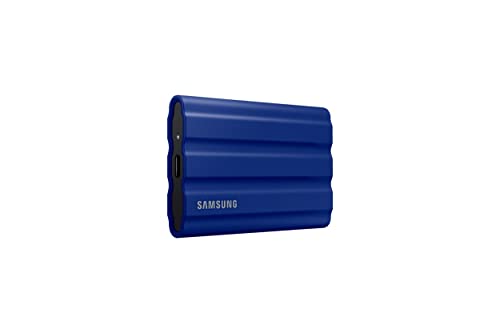
- Up to 1050MB/s read and 1000MB/s write
- IP65 protection with drop resistance up to 9.8 feet
- Samsung Magician software for drive management
Best For: Editors who want a reliable rugged SSD with balanced speed and protection
Compact Everyday Speed

- Up to 1050MB/s read and 1000MB/s write
- 42g slim pocketable design
- 256-bit AES encryption included
Best For: Travel-friendly editing and fast project transfers
Reliable Creator Workhorse

- Up to 1,050MB/s read and 1,000MB/s write
- Supports direct 4K 60fps recording
- Shock-resistant aluminum design
Best For: Everyday editing and direct camera recording
High-Speed Creator Drive

- Up to 2,000MB/s sustained read/write
- Dynamic Thermal Guard for heat control
- Supports Magician Software monitoring
Best For: Heavy editing and large file transfers
Thunderbolt 3 Speed Pick – SanDisk Professional PRO-G40 4TB
If you need an external SSD for video editing that prioritizes raw transfer speed, the SanDisk Professional PRO-G40 is built for demanding workflows. Its Thunderbolt 3 connection delivers up to 3000MB/s read and 2500MB/s write performance, while the USB-C fallback keeps it usable across more systems.
Best For: Editors working with large media files who want fast Thunderbolt 3 performance and rugged protection on set or in transit.
Pros:
- Up to 3000MB/s read and 2500MB/s write speeds over Thunderbolt 3
- Dual-mode compatibility with Thunderbolt 3 and USB-C
- IP68 dust/water resistance plus 3m drop and 4000lb crush resistance
- Aluminum core helps pull heat away to support sustained transfers
Cons:
- Mac ready drive format means setup may be less straightforward for some users
- Maximum performance depends on using a Thunderbolt 3 host
For editors who value speed and durability in one drive, the PRO-G40 stands out as a premium portable option. The large 4TB capacity and rugged enclosure make it a strong fit for heavy project files and travel-heavy production work.
Rugged USB4 Runner-Up – Corsair EX400U Survivor 2TB
The Corsair EX400U Survivor is a practical external SSD for video editing when you want USB4 speed in a tough, travel-friendly shell. With up to 4000MB/s read and 3600MB/s write performance, it can handle large video files and creative workloads quickly on compatible systems.
Best For: Editors who want very fast USB4 storage with IP55 protection for everyday carry and field work.
Pros:
- Up to 4000MB/s read and 3600MB/s write speeds
- USB4 performance with support for USB4/Thunderbolt 4 hosts
- IP55 rugged, environmentally sealed housing
- Single USB-C cable for both power and data
Cons:
- Maximum performance requires a USB4 or higher connection
- 2TB capacity may be limiting for very large media libraries
This drive is a strong balance of speed and portability for editors moving big files between locations. If your laptop or desktop has the right USB4 or Thunderbolt 4 port, the EX400U Survivor offers high-end performance in a durable package.
Value Portable Choice – SanDisk Extreme PRO Portable SSD 1TB
If you want a dependable external SSD for video editing without jumping to the highest-end price tier, the SanDisk Extreme PRO Portable SSD is a proven option. It offers up to 2000MB/s read and write speeds, plus a forged aluminum chassis that acts as a heatsink for better sustained performance.
Best For: Editors who need a compact, rugged USB-C drive for lighter project work and fast file transfers.
Pros:
- Up to 2000MB/s read/write performance
- Forged aluminum chassis helps with sustained speeds
- IP65 water and dust resistance with up to 3-meter drop protection
- Includes 256-bit AES hardware encryption for private files
Cons:
- 1TB capacity is modest for large video libraries
- Slower than the USB4 and Thunderbolt 3 options in this roundup
This drive makes sense when you want reliable speed and toughness in a smaller capacity. It is especially appealing for creators who carry only active projects and want security features built in.
Compact USB4 Edit Pick – Corsair EX400U 2TB Portable SSD
The Corsair EX400U is a compact external SSD for video editing that focuses on high bandwidth and simple plug-and-play use. With up to 4000MB/s read and 3600MB/s write speeds, it is designed to move large files quickly over USB4 or Thunderbolt 4 connections.
Best For: Mac and PC users who want a small, fast USB4 drive for editing, transfers, and mobile workflows.
Pros:
- Up to 4000MB/s read and 3600MB/s write performance
- USB4 and Thunderbolt 4 compatibility for high-bandwidth setups
- Compact form factor for easy transport
- Single-cable plug-and-play operation on PC or Mac
Cons:
- Maximum performance requires USB4 or higher
- 3-year warranty is shorter than some competitors
This is a strong choice if you want top-tier transfer speeds in a small body. Its wide connectivity and straightforward setup make it especially appealing for editors bouncing between desktop and laptop workflows.
Compact Rugged Pick – SanDisk Extreme Portable SSD 1TB
If you want an external SSD for video editing that balances speed, toughness, and portability, the SanDisk Extreme Portable SSD is a practical everyday option. It offers up to 1050MB/s read and 1000MB/s write speeds, plus IP65 water and dust resistance and up to 3-meter drop protection for moving between shoots and edits.
Best For: Editors who need a compact, rugged drive for on-the-go 4K projects and file transfers.
Pros:
- Up to 1050MB/s read and 1000MB/s write performance for fast transfers
- IP65 water and dust resistance with up to 3-meter drop protection
- Carabiner loop makes it easier to secure to a bag or belt loop
- Includes 256-bit AES hardware encryption and password protection
Cons:
- 1TB capacity may be limiting for larger video libraries or longer project archives
- Best speeds depend on host device and other factors
Overall, this is a solid choice if you value durability as much as speed. It is not the fastest drive in this group, but it covers the key needs of many editors who work in transit or in less controlled environments.
High-Speed Creator Workhorse – Crucial X10 Pro 4TB
For an external SSD for video editing where speed matters, the Crucial X10 Pro is built for professional creator workflows. It reaches up to 2100MB/s read and 2000MB/s write speeds and gives you a large 4TB capacity for storing high-resolution footage, 4K/8K videos, and current projects.
Best For: Professional creators who need fast transfers and lots of space for large video projects.
Pros:
- Very fast up to 2100MB/s read and 2000MB/s write speeds
- 4TB capacity suits large footage libraries and active projects
- IP55 water and dust resistance plus 2-meter drop resistance
- Broad USB-C and USB-A compatibility across many devices
Cons:
- More capacity than some casual editors may need
- Performance still depends on the connected device and setup
This is the most performance-focused option in the group, especially if you move huge files regularly. The combination of speed, capacity, and protection makes it a strong fit for demanding editing workflows.
Rugged Everyday Favorite – Samsung T7 Shield 2TB
The Samsung T7 Shield is a strong external SSD for video editing if you want dependable speed in a rugged shell. It uses USB 3.2 Gen 2 with up to 1050MB/s read and 1000MB/s write speeds, while its IP65 rating and drop resistance help protect projects when you are working outside the studio.
Best For: Photographers and video editors who want a rugged, well-rounded portable SSD.
Pros:
- Up to 1050MB/s read and 1000MB/s write speeds for quick file movement
- IP65 water and dust resistance with drop resistance up to 9.8 feet
- Works with PC, Mac, Android devices, and gaming consoles
- Samsung Magician software helps monitor drive health and manage updates
Cons:
- 2TB capacity is solid, but not as roomy as 4TB class drives
- It matches top-tier Gen 2 speeds, but does not exceed them
If you want a dependable middle-ground drive, this one is easy to recommend. It combines familiar 10Gbps-class performance with stronger-than-average protection and broad compatibility.
Compact Everyday Speed – Lexar ES3 1TB Portable SSD
If you want an external SSD for video editing that stays small and fast, the Lexar ES3 1TB is built for quick file transfers and easy carry. With USB 3.2 Gen 2 speeds up to 1050MB/s read and 1000MB/s write, it can help move footage and project files efficiently, though performance depends on your device’s USB support.
Best For: Editors who want a slim, travel-friendly SSD for fast day-to-day project transfers.
Pros:
- Up to 1050MB/s read and 1000MB/s write over USB 3.2 Gen 2
- Very compact 42g design that fits easily in a pocket
- Includes USB-C cable for plug-and-play use
- Lexar DataShield 256-bit AES encryption for file protection
Cons:
- Performance may be lower on systems without USB 3.2 Gen 2
- Not supported on iPhone 14 and older models
- No MagSafe support in this version
Overall, the ES3 is a straightforward pick for editors who value portability and strong baseline speed more than premium features. It is best suited to lighter editing workflows, fast offloads, and carrying projects between locations.
Reliable Creator Workhorse – Samsung T7 Portable SSD 1TB
The Samsung T7 is a strong external SSD for video editing if you want dependable speed in a compact drive. It offers up to 1,050MB/s read and 1,000MB/s write with PCIe NVMe technology, plus support for recording 4K 60fps video directly to the drive on compatible devices.
Best For: Editors and creators who want a proven, durable SSD for everyday editing and direct camera recording.
Pros:
- Fast up to 1,050MB/s read and 1,000MB/s write
- Supports direct 4K 60fps recording on compatible devices
- Aluminum unibody with shock resistance and 6-foot fall protection
- 256-bit AES hardware encryption and broad compatibility
Cons:
- Speed depends on the connected device’s USB 3.2 Gen 2 support
- Not as fast as the newer T9 model
- 1TB capacity may be limiting for larger editing libraries
For most editors, the T7 hits a practical balance of speed, durability, and compatibility. It is a safe choice for active production work, especially when you want a portable drive that can handle footage transfers and on-device recording.
High-Speed Creator Drive – Samsung T9 Portable SSD 1TB
If you need a faster external SSD for video editing, the Samsung T9 is the standout option here. It delivers sustained read and write speeds up to 2,000MB/s, which is a major step up for loading timelines, moving large footage sets, and handling longer transfers.
Best For: Creators who want the fastest drive in this group for heavier editing workloads and large file transfers.
Pros:
- Up to 2,000MB/s sustained read and write speeds
- Dynamic Thermal Guard helps control heat during heavy use
- Supports compatible desktops, cameras, gaming consoles, and iPhone 15 Pro workflows
- Includes Magician Software for firmware updates and drive health monitoring
Cons:
- Requires the right hardware to reach top 2,000MB/s performance
- Only 1TB capacity in this listing
- Likely more drive than casual editors need
The T9 is the best fit when speed matters more than anything else. For video editors working with bigger files or wanting the quickest transfer experience, it offers the strongest performance of the three drives listed.
How We Picked the Best External SSD for Video Editing
We prioritized real-world editing value: sustained transfer speed, interface support, durability, capacity options, and broad compatibility with Windows, macOS, and common editing workflows. For an External SSD for Video Editing, peak numbers matter less than consistent performance when copying large clips, caches, and project files.
We also favored models with dependable thermals, rugged shells, and clear interface standards such as USB 3.2 Gen 2, USB 3.2 Gen 2×2, USB4, and Thunderbolt. That helps you avoid paying for speed your computer cannot use.
Quick Comparison
For the fastest tier, USB4 and Thunderbolt-capable drives are the best fit for large media libraries and active 4K or higher-resolution timelines. Mid-range 10Gbps and 20Gbps models are often plenty for editing compressed footage, proxies, and everyday project storage. Rugged IP-rated options are smart for travel, field production, and on-set backup.
Key Buying Factors for External SSD for Video Editing
Speed and Interface
Match the drive to your port. A high-speed SSD only delivers its full value if your laptop or desktop supports the same standard. USB-C is just the connector; the underlying protocol determines actual performance. If you regularly move huge camera originals, look for higher sustained write speeds, not just advertised peak reads.
Capacity
Video files grow fast, so 1TB is a minimum for many creators, while 2TB or 4TB is better for long-form projects, multicam edits, and working with ProRes, RAW, or large cache folders. More capacity also helps keep free space available, which can support steadier performance.
Durability
If you travel often, shoot on location, or keep drives in a gear bag, choose a rugged model with dust and water resistance. Aluminum shells, shock protection, and compact builds reduce the risk of downtime from everyday handling.
Compatibility
Make sure the SSD works with your editing machine, your dock or hub, and your camera workflow if you use it for offloading. Some drives are better suited to Mac and Thunderbolt setups, while others offer broader plug-and-play flexibility.
Who Should Buy Which External SSD for Video Editing?
Pick a USB4 or Thunderbolt model if you want the most headroom for demanding timelines and large file transfers. Choose a rugged 10Gbps or 20Gbps drive if portability and reliability matter more than absolute top-end speed. If your work is mostly proxy-based or you need simple project storage, a well-priced 1TB or 2TB drive can be the most practical choice.
For most buyers, the best External SSD for Video Editing is the one that fits your ports, your project size, and your workflow without forcing compromises in capacity or reliability.