
Choosing the right desktop computer for graphic design can make everyday creative work feel faster, smoother, and far less frustrating. The best systems handle large files, multi-app workflows, and high-resolution displays without lag.
Below, we focus on desktops that offer the performance, memory, and expansion potential designers need for modern creative projects.
Best 10 Desktop Computer for Graphic Design Picks for 2026
Creator Powerhouse

- 10-core i5-14400 with RTX 4060 graphics
- 32GB RAM and 1TB SSD for creative multitasking
- USB-C, HDMI, VGA, and card reader connectivity
Best For: Designers who want dedicated graphics and strong everyday creator performance
AI-Ready All-Rounder

- Ryzen 7 8700G with AMD Ryzen AI support
- 32GB DDR5 and 1TB Gen4 NVMe SSD
- Wi-Fi 6, Bluetooth 5.4, and included peripherals
Best For: Designers who want a fast, modern all-round desktop with integrated graphics
Business-Ready Multitasker

- 10-core Core i7 with 32GB DDR5 RAM
- 1TB SSD and Windows 11 Pro included
- HDMI and DisplayPort support multiple monitors
Best For: Designers who need a practical business desktop for multitasking and dual displays
AI-Ready Premium Tower
HP OmniDesk for Modern Creative Work

- Intel Core Ultra 7 265 for multitasking and content creation
- 16GB DDR5 RAM with a 1TB SSD for quick workflows
- Includes a docking station and has a Dark Wood finish
Best For: Designers who want a stylish, modern desktop with easy connectivity
Budget Renewed Workhorse
Dell Optiplex 3060 for Everyday Design Tasks

- Core i5-8500 platform with 32GB RAM and a 1TB SSD
- Built-in Wi-Fi and Bluetooth for flexible placement
- Renewed unit with quality guarantee and tech support
Best For: Budget buyers needing a dependable PC for lighter creative work
Creator GPU Tower
HP OmniDesk with RTX 5060 Power
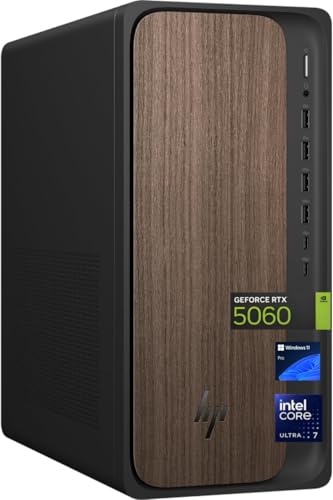
- Dedicated NVIDIA GeForce RTX 5060 graphics
- Intel Core Ultra 7 265 with 32GB DDR5 RAM
- Large 2TB SSD plus Wi-Fi 6 and Bluetooth 5.4
Best For: Creators who want stronger GPU support for demanding design work
Creative Workstation Pick
HP Workstation PC Desktop for Editing and Design

- Quadro K1200 4GB suits creative and CAD software
- 32GB RAM and Core i5 support multitasking
- 1TB SSD plus 4TB HDD adds speed and storage
Best For: Designers who want a renewed workstation with dedicated graphics and plenty of storage
Modern Business Tower
Dell Tower Desktop ECT1250 with Core Ultra 7

- Core Ultra 7 platform adds AI-ready performance
- Supports up to four FHD or two 4K displays
- 1TB SSD and tool-less upgrades improve practicality
Best For: Buyers who want a secure, modern desktop for productivity and lighter design work
High-Memory Productivity Tower
HP OmniDesk M03 with 4-Monitor Support

- 32GB DDR5 RAM keeps multitasking smooth
- Core Ultra 7 265 delivers strong everyday speed
- 4-monitor 4K support suits larger design setups
Best For: Creators and professionals who want a fast, multi-monitor desktop for everyday design work
Creator Powerhouse – HP Envy RTX 4060 Tower
If you need a desktop computer for graphic design that can also handle editing, multitasking, and light 3D work, this HP Envy is built around strong all-around performance. The 10-core Intel Core i5-14400, 32GB of RAM, and GeForce RTX 4060 give it a solid mix of CPU and GPU power for demanding creative workflows.
Best For: Designers and creators who want a well-rounded Windows 11 Pro tower with dedicated graphics and plenty of memory.
Pros:
- GeForce RTX 4060 with 8GB dedicated graphics for smooth creative graphics work.
- 32GB DDR4 RAM helps with multitasking across design apps and browser tabs.
- 1TB SSD provides fast storage for project files and active workloads.
- Wide connectivity includes USB-C, multiple USB-A ports, HDMI, VGA, Ethernet, and a media card reader.
Cons:
- Uses DDR4 memory rather than newer DDR5.
- Single HDMI output may limit some multi-display setups without adapters.
Overall, this is a strong pick if you want dedicated NVIDIA graphics and a capable Intel processor in a straightforward tower for creative work.
AI-Ready All-Rounder – HP OmniDesk Ryzen 7
This HP OmniDesk is a practical desktop computer for graphic design if you prefer fast memory, modern connectivity, and an efficient integrated-graphics setup. Its Ryzen 7 8700G processor, 32GB of DDR5 memory, and 1TB NVMe SSD make it a responsive option for editing, content creation, and day-to-day design work.
Best For: Creators who want a balanced tower with fast DDR5 memory, Wi-Fi 6, and included keyboard and mouse.
Pros:
- Ryzen 7 8700G offers strong 8-core performance plus AMD Ryzen AI support.
- 32GB DDR5-5200 memory and a 1TB PCIe Gen4 NVMe SSD keep the system snappy.
- Wi-Fi 6, Bluetooth 5.4, and Gigabit Ethernet cover modern connectivity needs.
- Includes HP wireless keyboard and mouse, so it is ready to set up quickly.
Cons:
- Uses integrated Radeon 780M graphics instead of a dedicated GPU.
- Comes with Windows 11 Home rather than Pro.
If your design work leans more toward general creative productivity than heavy GPU rendering, this OmniDesk offers a very capable and modern everyday package.
Premium Workspace Pick – HP OmniDesk Core Ultra 7
For a desktop computer for graphic design that emphasizes productivity, storage, and multi-display flexibility, this HP OmniDesk stands out. The Intel Core Ultra 7 265, 32GB of DDR5 RAM, and 2TB SSD create a spacious, responsive base for creative projects, while the understated dark wood design gives it a more premium look on a desk.
Best For: Creators who want a stylish, high-capacity desktop with support for up to four displays.
Pros:
- Intel Core Ultra 7 265 is designed for efficient AI-powered productivity and creative workflows.
- 2TB PCIe Gen4 SSD offers generous space for large project files and assets.
- 32GB DDR5 RAM supports smoother multitasking and heavier app use.
- Quad display support makes it easier to build an expanded design workstation.
Cons:
- Uses integrated Intel Graphics rather than a dedicated graphics card.
- Windows 11 Home may be less ideal for business-focused users than Pro.
This is a smart choice if you value storage, multi-monitor support, and a more refined desktop design over discrete GPU power.
Business-Ready Multitasker – ASUS V500 Core i7
This ASUS V500 is a capable desktop computer for graphic design if your workflow centers on productivity, file management, and multi-monitor setups. With a 10-core Intel Core i7-13620H, 32GB of DDR5 RAM, and a 1TB SSD, it offers solid responsiveness for everyday creative tasks and office-style workloads.
Best For: Designers and small business users who want a Windows 11 Pro tower with DisplayPort and HDMI for multiple screens.
Pros:
- Intel Core i7-13620H delivers 10-core, 16-thread performance for multitasking.
- 32GB DDR5 memory and a 1TB SSD support smooth startup and everyday project work.
- HDMI plus DisplayPort outputs make multi-monitor workflows easier.
- Windows 11 Pro and Wi-Fi 6 suit business-focused setups.
Cons:
- Integrated Intel UHD Graphics 600 is better for general use than graphics-heavy creative tasks.
- Memory speed is listed at 4800 MHz, which is more modest than some newer DDR5 systems.
For users who prioritize a dependable workspace machine with strong CPU performance and flexible display support, this ASUS desktop is a practical option.
AI-Ready Premium Tower – HP OmniDesk for Modern Creative Work
If you want a desktop computer for graphic design that feels fast, polished, and office-friendly, the HP OmniDesk is built for everyday creative workloads. Its Intel Core Ultra 7 processor, DDR5 memory, and 1TB SSD should keep design apps responsive while the included docking station makes it easier to build a clean multi-monitor setup.
Best For: Designers, freelancers, and home-office users who want a stylish tower with modern performance and simple connectivity.
Pros:
- Intel Core Ultra 7 265 is aimed at multitasking, productivity, content creation, and AI-enhanced workloads.
- 16GB DDR5 RAM and a 1TB SSD support smooth workflow and fast load times.
- Includes a docking station for easier monitor and accessory expansion.
- Dark Wood finish gives it a more refined look than a typical plain office PC.
Cons:
- Graphics are integrated, so it is not the strongest choice for demanding 3D rendering or heavy GPU-based effects.
- The product details list both 16GB and 32GB memory figures, so buyers may want to double-check the exact configuration.
Overall, this HP OmniDesk is a practical pick if you value a premium-looking desktop computer for graphic design with modern CPU performance and a tidy desk setup over high-end discrete graphics.
Budget Renewed Workhorse – Dell Optiplex 3060 for Everyday Design Tasks
The Dell Optiplex 3060 is a renewed desktop computer for graphic design buyers who need a value-focused machine for lighter creative work. It pairs a Core i5-8500 processor with 32GB of RAM and a 1TB SSD, and it also adds built-in Wi-Fi, Bluetooth, and 4K-capable output for a flexible home or office setup.
Best For: Budget-conscious users who need a dependable desktop for general productivity, simple design work, and everyday office tasks.
Pros:
- 32GB RAM and a 1TB SSD provide generous memory and storage for the price tier.
- Built-in Wi-Fi and Bluetooth make it easier to place on a desk without extra adapters.
- Supports HDMI or DisplayPort output and lists up to 3840×2160 resolution.
- Renewed from a Microsoft Authorized Refurbisher with quality guarantee and free tech support.
Cons:
- Older Intel Core i5-8500 platform is less future-focused than newer processors.
- Integrated graphics limit suitability for demanding visual effects or 3D workloads.
- Warranty is only 90 days.
This Dell is best approached as a practical, lower-cost workstation for everyday graphic tasks rather than a high-end creative powerhouse.
Creator GPU Tower – HP OmniDesk with RTX 5060 Power
If your priority is a desktop computer for graphic design with more graphical headroom, this HP OmniDesk steps up with a dedicated NVIDIA GeForce RTX 5060. Combined with an Intel Core Ultra 7 265, 32GB of DDR5 RAM, and a 2TB SSD, it is built for heavier creative workflows, faster project handling, and room to grow.
Best For: Designers and creators who want stronger GPU support for more demanding design, editing, and multitasking work.
Pros:
- Dedicated NVIDIA GeForce RTX 5060 graphics provide more capability than integrated-graphics desktops.
- Intel Core Ultra 7 265 and 32GB DDR5 RAM are well suited to demanding multitasking.
- 2TB SSD offers substantial space for design files, assets, and software.
- Includes Wi-Fi 6, Bluetooth 5.4, wired keyboard and mouse, and Windows 11 Pro.
Cons:
- At 49.8 pounds, it is a relatively heavy tower.
- The power supply is 400W, so this is more of a balanced creative PC than an extreme workstation.
For buyers who want a more capable creative desktop with dedicated graphics, this HP OmniDesk is the strongest fit in the group and the most suitable choice for more demanding visual work.
Creative Workstation Pick – HP Workstation PC Desktop for Editing and Design
If you need a desktop computer for graphic design that also handles heavier creative software, this HP Workstation PC is built around the kind of specs designers actually use. The Intel Core i5, 32GB of DDR4 RAM, and NVIDIA Quadro K1200 4GB GPU make it a practical fit for photo editing, 3D work, AutoCAD, and other workstation-style applications.
Best For: Designers who want a renewed workstation with dedicated graphics, lots of memory, and large local storage.
Pros:
- NVIDIA Quadro K1200 4GB graphics are suited to creative and CAD-style software.
- 32GB DDR4 RAM helps keep editing and multitasking responsive.
- 1TB SSD plus 4TB HDD gives you fast boot times and lots of file storage.
- Wide port selection includes USB-C, DisplayPort, VGA, and Ethernet.
Cons:
- Renewed hardware may not appeal to buyers who want brand-new equipment.
- Older Core i5 platform is less future-focused than newer Ultra chips.
- Graphics card is workstation-oriented rather than a high-end modern GPU.
This HP stands out for creators who value proven workstation support and storage capacity over the latest platform. For graphic design work, it offers a solid balance of memory, dedicated graphics, and practical connectivity.
Modern Business Tower – Dell Tower Desktop ECT1250 with Core Ultra 7
For a desktop computer for graphic design that also needs to fit a general office workflow, the Dell Tower ECT1250 brings a newer Intel Core Ultra 7 processor, 1TB M.2 SSD storage, and support for multiple monitors. It relies on integrated Intel UHD Graphics, so it is best viewed as a productivity-first desktop rather than a graphics workstation.
Best For: Buyers who want a modern, secure desktop for everyday work, multi-monitor setups, and lighter design tasks.
Pros:
- Intel Core Ultra 7 processor adds a modern platform with built-in AI features.
- Supports up to four FHD monitors or two 4K displays.
- Tool-less entry makes upgrades and maintenance easier.
- Includes Windows 11 Pro, TPM security, and 1-year onsite service.
Cons:
- Integrated Intel UHD Graphics limit it for demanding creative workloads.
- 16GB memory is modest compared with heavier design-focused systems.
- Designed primarily for business and everyday use, not specialized graphics work.
This Dell is a sensible choice if your design needs are light and your priorities include security, service, and multi-monitor flexibility. It is better suited to productivity-driven creative setups than intensive visual production.
High-Memory Productivity Tower – HP OmniDesk M03 with 4-Monitor Support
The HP OmniDesk M03 is a strong desktop computer for graphic design if your workflow depends on fast multitasking, large files, and multiple displays. With a Core Ultra 7 265 processor, 32GB of DDR5 RAM, and 1TB SSD storage, it is built to stay responsive across creative apps, browser tabs, and business tasks.
Best For: Creators and professionals who want a fast, memory-rich desktop with 4-monitor support and modern connectivity.
Pros:
- 32GB DDR5 RAM helps smooth multitasking across creative and business apps.
- Core Ultra 7 265 processor offers strong modern performance.
- Supports up to 4 monitors at 4K resolution.
- Wi-Fi 6, USB-C, HDMI, and DisplayPort provide flexible connectivity.
Cons:
- Integrated graphics may not satisfy users needing a dedicated GPU for heavy rendering.
- It is positioned as a business desktop, not a specialized creator workstation.
- The bundle adds a flash drive, but core creative hardware remains the main focus.
For design users who value responsiveness and a strong multi-monitor setup, this HP offers a compelling mix of speed and practicality. It is especially appealing if your work involves juggling projects, displays, and storage-heavy files.
How We Picked the Best Desktop Computer for Graphic Design
We prioritized practical design performance over raw specs alone. For a Desktop Computer for Graphic Design, that means enough CPU power for multitasking, at least 16GB of RAM for serious work, fast SSD storage, and graphics support that can help with creative apps, external monitors, and smooth visual output.
We also looked at upgrade headroom, port selection, wireless connectivity, and whether each system makes sense for beginners, freelancers, and heavier creative users.
Quick Comparison
For most designers, the best value usually comes from systems with 32GB RAM and a 1TB SSD, since those specs handle Adobe Creative Cloud, Figma, browser tabs, and asset libraries well. If you work in motion graphics, 3D, or GPU-accelerated editing, a discrete graphics card is the bigger differentiator. If you mainly create logos, web graphics, marketing assets, or UI mockups, integrated graphics can still be perfectly workable.
Key Buying Factors for a Desktop Computer for Graphic Design
CPU Performance
Look for a modern multi-core processor so apps open quickly and exports finish faster. Strong single-core speed helps with responsiveness, while more cores improve rendering and background multitasking.
Memory and Storage
16GB RAM is the practical minimum, but 32GB is a smarter choice if you regularly work with layered files, large documents, or multiple design apps at once. A 1TB SSD keeps projects, caches, and source assets accessible without constant cleanup.
Graphics Capabilities
Dedicated GPUs matter most for 3D work, video editing, and accelerated effects. For standard 2D design, integrated graphics can still do the job, especially when paired with a strong CPU and ample RAM.
Ports, Monitors, and Workflow
Designers often use color-accurate external monitors, tablets, card readers, and multiple peripherals. Check for DisplayPort, USB-C, enough USB-A ports, and multi-monitor support before you buy.
Upgrade Potential
A desktop is often chosen for longevity. Easy access to RAM slots, storage bays, and graphics upgrade options can extend the life of your system as your workload grows.
Who Should Buy Which Desktop Computer for Graphic Design?
If you’re a student or light creative user, a capable desktop with 16GB RAM and integrated graphics is often enough. Freelancers and in-house designers should aim for 32GB RAM and a 1TB SSD for smoother daily work. If you edit video, build 3D scenes, or want more future-proof graphics power, choose a model with a discrete GPU and stronger cooling.
In short, the best Desktop Computer for Graphic Design is the one that matches your workload today while leaving room for tomorrow’s projects.