
If you want to stream or record modern games without giving up HDR image quality, a capture card with HDR10 passthrough is the right upgrade.
This roundup focuses on models that balance smooth passthrough, low latency, and the capture quality needed for PS5, Xbox Series X/S, Switch, and PC setups.
Best 10 Capture Card with HDR10 Passthrough Picks for 2026
Premium Internal Pick
Elgato 4K Pro for high-end PC setups

- 8K60 passthrough with 4K60 HDR10 capture
- HDMI 2.1 and up to 1080p240 recording
- VRR passthrough and ultra-low latency
Best For: High-end Windows PC users who want an internal card with top-tier passthrough and capture specs.
Plug-and-Play Value
4K60 USB-C capture with audio mixing

- 4K@60Hz capture with HDR10 support
- USB-C plug-and-play with no drivers
- Built-in audio mixing and MIC inputs
Best For: Users who want an external, easy-to-set-up capture device for streaming and recording.
Console-Friendly Choice
Elgato HD60 S+ for smooth HDR console capture

- 1080p60 HDR10 capture with 4K60 passthrough
- Instant Gameview for low-latency monitoring
- Flashback Recording for retroactive saves
Best For: Console gamers and streamers who want a proven external HDR capture solution.
Portable Modern Choice
Elgato 4K S for modern consoles

- 4K60 capture with HDR10 support
- 1440p120 and 1080p240 passthrough
- Near-zero latency with analog audio in
Best For: Console players who want a compact capture card for high-refresh gameplay and HDR support.
Premium HDMI 2.1 Pick
AVerMedia Live Gamer Ultra 2.1

- 4K60 capture for PS5, Xbox, Switch, and PC
- 4K144 HDR/VRR passthrough with low latency
- Built-in party chat support and 5.1 audio capture
Best For: Serious streamers who want modern HDMI 2.1 passthrough
Plug-and-Play HDR Choice

- 4K30 HDR10 or 1080p60 HDR10 capture
- 4K60 HDR10 and VRR passthrough support
- Driverless setup on Windows and Mac
Best For: Buyers who want simple, low-latency HDR10 passthrough
PCIe Streaming Value
AVerMedia Live Streamer Ultra HD
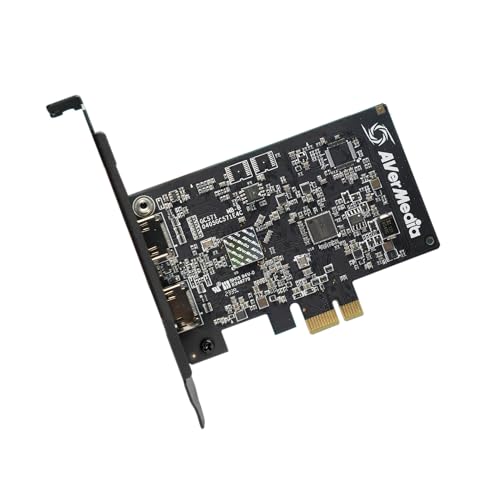
- 4K60 pass-through with 4K30 capture
- VRR support and 1080p120 output
- Driver-free PCIe install for Windows rigs
Best For: PC builders who want an internal pass-through capture card
Portable 4K Console Capture
PORTTA DX20R for High-Refresh Gaming

- 4K@60 capture with HDR and VRR support
- Passthrough up to 1080p@240Hz and 2K@120Hz
- Plug-and-play on Windows, macOS, and Linux
Best For: Console gamers who want portable 4K capture with high-refresh passthrough
Internal 4K HDR Capture

- 4K60 HDR10 capture with zero-lag passthrough
- Up to 240 fps high-frame capture support
- PCIe internal card for Windows setups
Best For: PC builders and streamers needing internal 4K HDR10 passthrough
USB 3.1 HDR10 Passthrough
NearStream CCD30 for Multi-Device Streaming

- 4K60 capture and 4K60 passthrough
- HDR10 support with flexible capture formats
- Mic input and headphone monitoring included
Best For: Creators needing one HDR10 card for consoles, cameras, and dual-PC streaming
Premium Internal Pick – Elgato 4K Pro for high-end PC setups
If you want a capture card with HDR10 passthrough for a premium desktop build, the Elgato 4K Pro is aimed at users who need very high refresh support and clean capture in one internal card. It offers 8K60 passthrough, 4K60 HDR10 capture, HDMI 2.1 in/out, and support for VRR passthrough, making it a strong fit for demanding gaming and streaming workflows.
Best For: Enthusiasts building a Windows-based dual-PC or high-end console capture setup that values 8K60 passthrough and low-latency monitoring.
Pros:
- 8K60 passthrough with 4K60 HDR10 capture
- HDMI 2.1 support and up to 1080p240 recording
- VRR passthrough helps reduce screen tearing
- Ultra-low latency is useful for live broadcasting
Cons:
- Internal PCIe design requires a compatible Windows 10 system
- Made for users who can install hardware inside a PC
This is the most advanced option here if passthrough quality and high frame-rate support matter more than portability. It is a practical choice for creators who want a capture card with HDR10 passthrough and modern HDMI 2.1 features in a permanent setup.
Plug-and-Play Value – 4K60 USB-C capture with audio mixing
This capture card with HDR10 passthrough is built for users who want a plug-and-play external option with broad software support. It captures up to 4K60 video, supports HDR10 and HDCP 2.2/1.4, and adds audio mixing with dedicated MIC input for streams, recordings, and presentations.
Best For: Streamers and creators who want an easy USB-C capture device with HDR10 support and built-in audio mixing.
Pros:
- Captures up to 4K@60Hz with HDR10 support
- Plug-and-play USB-C setup with no drivers required
- Audio mixing plus dedicated audio/MIC jacks
- Works with OBS, VLC, PotPlayer, and vMix
Cons:
- Listed capture resolution is 1080p in the details
- Designed around HDMI devices and Windows/MacOS workflows
For creators who value quick setup and audio flexibility, this model covers the basics without adding complexity. It is best when you need a straightforward capture card with HDR10 passthrough support for streaming or recording from HDMI sources.
Console-Friendly Choice – Elgato HD60 S+ for smooth HDR console capture
If you are looking for a capture card with HDR10 passthrough for console play, the Elgato HD60 S+ focuses on smooth gameplay and simple external setup. It records in 1080p60 HDR10 and offers 4K60 HDR10 zero-lag passthrough, which lets you keep playing in the original format while capturing footage for OBS or similar apps.
Best For: Console and PC users who want dependable external capture with low latency and HDR10 passthrough.
Pros:
- 1080p60 HDR10 capture with 4K60 HDR10 passthrough
- Ultra-low-latency Instant Gameview
- Unlimited capture to hard drive
- Flashback Recording for saving moments retroactively
Cons:
- Capture is limited to 1080p60 rather than 4K capture
- Best suited to Windows and macOS desktop workflows
This model is a strong fit if you care more about smooth passthrough and dependable capture than the highest recording resolution. For many creators, it hits the right balance between convenience, HDR support, and low-latency play.
Portable Modern Choice – Elgato 4K S for modern consoles
The Elgato 4K S is a compact capture card with HDR10 passthrough support aimed at modern console and multi-device setups. It delivers 4K60 capture, supports 1440p120 or 1080p240 passthrough, and uses near-zero latency so you can play and record without feeling held back.
Best For: Gamers who need a small USB-C capture card for PS5, Xbox Series X/S, Switch 2, and similar devices.
Pros:
- 4K60 capture with HDR10 support
- 1440p120 or 1080p240 passthrough for high-frame-rate play
- Near-zero latency suits live gaming
- Analog audio input for chat or commentary
Cons:
- Capture resolution is listed as 1080p in the details
- HDR10 tone mapping is noted for Windows use
This is a practical option if you want modern passthrough features in a small external form factor. It stands out for high refresh-rate support, making it a flexible capture card with HDR10 passthrough for current-gen consoles and PC-adjacent setups.
Premium HDMI 2.1 Pick – AVerMedia Live Gamer Ultra 2.1
If you want a capture card with HDR10 passthrough that also keeps up with modern consoles, this AVerMedia model is built for high-end gaming and streaming. It supports 4K60 capture with 4K144 HDR/VRR passthrough, so you can play smoothly while recording in OBS, Twitch, or Streamlabs on Mac and PC.
Best For: Streamers and console players who want 4K60 capture with HDMI 2.1 passthrough and low latency.
Pros:
- 4K60 capture for streaming PS5, PS5 Pro, Xbox, and Nintendo Switch gameplay
- 4K144 HDR/VRR passthrough for smooth high-refresh gameplay
- Low-latency capture helps keep audio and video synced in real time
- Built-in party chat support with direct headset connection and 5.1 channel audio capture
Cons:
- Geared more toward users who need advanced HDMI 2.1 features
- RGB lighting is useful for aesthetics, but not essential to capture performance
This is the strongest option here if passthrough quality matters as much as capture quality. It focuses on modern console features and fast response, making it a good fit for serious streaming setups.
Plug-and-Play HDR Choice – Elgato HD60 X
The Elgato HD60 X is a practical pick if you need a capture card with HDR10 passthrough and an easy setup. It offers driverless plug-and-play use on Windows and Mac, plus 4K30 HDR10 or 1080p60 HDR10 capture, making it a flexible option for straightforward streaming and recording.
Best For: Users who want simple setup, low latency, and HDR10 passthrough without extra hassle.
Pros:
- 4K30 HDR10 or 1080p60 HDR10 capture
- 4K60 HDR10, 1440p120, 1080p120, and VRR passthrough support
- Driverless plug-and-play setup on Windows and Mac
- Sub-100ms latency for smoother audio/video syncing
Cons:
- Capture resolution tops out at 1080p60 for the listed headline mode
- Requires a PC or Mac with the listed minimum system requirements
For buyers who value convenience over complexity, this model keeps the experience simple while still covering HDR10 passthrough and modern gaming features. It’s a dependable all-rounder for common streaming apps and platforms.
PCIe Streaming Value – AVerMedia Live Streamer Ultra HD
If you’re shopping for a capture card with HDR10 passthrough-style gaming support and want an internal PCIe solution, this AVerMedia card focuses on smooth console play and dependable streaming. It offers 4K60 pass-through, 4K30 capture, VRR support, and 1080p120 high-frame-rate support for a responsive gameplay setup.
Best For: PC builders and streamers who prefer a PCIe capture card with pass-through gaming features.
Pros:
- 4K60 pass-through for PS5, PS4 Pro, Xbox Series X/S, Xbox One X, and Switch
- VRR support for tear-free, responsive gameplay
- 1080p120 high-frame-rate support for smoother footage
- Driver-free plug-and-play PCIe installation
Cons:
- Windows 11 support is listed in the supplied notes
- Capture tops out at 4K30 rather than 4K60
This is the best fit if you want an internal card and care more about pass-through gaming features than maximum capture resolution. It’s a straightforward option for Windows-based streaming rigs that need broad PCIe compatibility.
Portable 4K Console Capture – PORTTA DX20R for High-Refresh Gaming
If you want a capture card with HDR10 passthrough for console gameplay, the PORTTA DX20R is built for fast-paced setups that still need strong image quality. It captures up to 4K60 and supports passthrough for high refresh rates like 1080p@240Hz and 2K@120Hz, while HDR and VRR support help keep the picture smooth and responsive.
Best For: Streamers and console players who want portable 4K capture with HDR, VRR, and very high-refresh passthrough.
Pros:
- Captures up to 4K@60Hz with support for 2K@144Hz and 1080p@240Hz passthrough.
- Includes HDR and VRR support for smoother-looking gameplay.
- Works plug-and-play with Windows, macOS, and Linux.
- Utility software adds audio mixing, EDID control, firmware updates, and video tuning.
Cons:
- Best advanced controls depend on the PORTTA CapHub Utility.
- Passthrough specs are strongest at lower resolutions than 4K.
Overall, the DX20R is a flexible external choice if you want modern console support, low-latency capture, and software tools in a compact USB 3.0 format.
Internal 4K HDR Capture – AVerMedia GC573 Live Gamer 4K
The AVerMedia GC573 is a strong capture card with HDR10 passthrough for users who want an internal PCIe solution for next-gen consoles and PC streaming. It records in 4K60 HDR10 with zero-lag pass-through, and it also supports high-frame capture up to 240 fps for smoother workflows in OBS and similar apps.
Best For: PC builders and streamers who want an internal 4K60 HDR10 capture card with zero-lag passthrough.
Pros:
- Captures and passes through 4K60 HDR10 with zero-lag performance.
- Supports high-frame-rate capture up to 240 fps.
- Works with OBS, Streamlabs, and XSplit for streaming.
- Includes AVerMedia Gaming Utility for resolution and frame-rate control.
Cons:
- Requires a PCI Express x4 internal install.
- Built for Windows 10/11 rather than cross-platform use.
If you prefer an internal card and want dependable HDR10 passthrough for PS5 or Xbox Series X/S, the GC573 is aimed at performance-focused setups that can use its PCIe design.
USB 3.1 HDR10 Passthrough – NearStream CCD30 for Multi-Device Streaming
The NearStream CCD30 is a capture card with HDR10 passthrough for users who want a flexible external option across consoles, cameras, and dual-PC streaming. It supports up to 4K60 capture and 4K60 passthrough, and its low-latency design plus broad OS support make it practical for gaming, live streaming, recording, and creator workflows.
Best For: Creators who want an HDR10 capture card that works across consoles, cameras, and Windows, Mac, or Linux setups.
Pros:
- Supports 4K60 capture and 4K60 HDMI passthrough.
- Includes HDR10 support with multiple color and capture formats.
- Works with PS5, Xbox, Switch, DSLR/mirrorless cameras, and dual-PC setups.
- Has 3.5mm mic input and headphone monitoring for live commentary.
Cons:
- Best 4K60 modes depend on system specs and capture format.
- Does not focus on very high-refresh passthrough like some gaming-first cards.
For users who need one device to handle gaming, camera capture, and monitoring, the CCD30 stands out as a versatile USB 3.1 choice with HDR10 passthrough.
How We Picked the Best Capture Card with HDR10 Passthrough
We prioritized capture cards with stable HDR10 passthrough, low-latency performance, and strong real-world compatibility across consoles and PCs. We also considered whether a model was better suited to beginners, creators, or advanced users who need higher refresh-rate passthrough or internal PCIe performance.
Where possible, we favored cards with clear support for HDCP handling, USB or PCIe reliability, and passthrough modes that preserve gameplay fluidity while recording at a lower resolution or frame rate.
Quick Comparison
The best Capture Card with HDR10 Passthrough depends on your setup. External USB models are easiest to move between systems and are usually the best fit for console players and casual streamers. Internal PCIe cards tend to offer stronger throughput and are often preferred by users building a dedicated streaming PC.
If you play at 120Hz or above, look closely at passthrough specs rather than capture specs alone. Some cards record in 4K60 HDR10 but pass through higher refresh rates for competitive gaming.
Key Buying Factors for a Capture Card with HDR10 Passthrough
Passthrough Resolution and Refresh Rate
Passthrough matters more than capture format if you play fast-paced games. Make sure the card supports the resolution and refresh rate your display needs, such as 4K60, 1440p120, or even 4K120/144Hz depending on your monitor or TV.
HDR10 Support and Signal Handling
Not every card that mentions HDR can handle it well in a live setup. Look for explicit HDR10 passthrough support and confirm that the card works with your console’s HDR output, your display, and your streaming software without forcing unwanted color changes.
Connection Type
USB capture cards are simple and portable, which makes them ideal for laptop streamers or multi-device setups. PCIe cards are better when you want maximum stability, lower overhead, and a more permanent desktop installation.
Capture Quality Vs. Passthrough Quality
Many buyers focus on 4K capture, but not everyone needs native 4K recording. If you mainly stream, a card that passes through a sharp HDR signal while capturing at 1080p60 or 4K60 may be the smartest value.
Who Should Buy Which Capture Card with HDR10 Passthrough?
Choose a USB external model if you want easy setup, console streaming, or flexibility across different computers. Choose an internal card if you are building a dedicated creator PC and want the most dependable high-end workflow.
Competitive players should prioritize high-refresh passthrough and ultra-low latency first. Streamers and content creators should weigh software support, audio options, and whether the card’s HDR10 passthrough stays consistent across their exact console, capture app, and display chain.