
Consistent vocal volume is one of the easiest ways to make a podcast sound more polished. The right compressor can reduce distracting level swings, protect against peaks, and help speech sit clearly in a mix without constant fader adjustments.
This roundup includes dedicated rack compressors, channel strips, audio interfaces, and podcast recorders with compression-related features. Use the buying guide below to match the hardware to your microphones, recording setup, workflow, and budget.
Best 10 Audio Compressors for Podcasting Picks for 2026
Flexible Rackmount Control

- Dual-channel VCA compression with Overeasy mode
- Built-in noise gate and LED gain-reduction monitoring
- XLR/TRS I/O plus sidechain insert
Best For: Rack-based podcast and streaming setups needing hands-on dynamics control
Classic Studio Processing
Behringer Composer Pro-XL MDX2600

- Two-channel compressor, limiter, and gate
- Intended for production, mixing, and mastering
- Portable rack-style unit with two-year warranty
Best For: External-hardware podcast studios needing versatile dynamics processing
USB Podcasting Hub

- Two XMAX-L mic preamps with phantom power
- Stereo loopback streams for calls and computer audio
- Stream Mix mode with effects and reverb
Best For: USB podcasting and streaming with integrated routing and effects
Warm Channel-Strip Processing
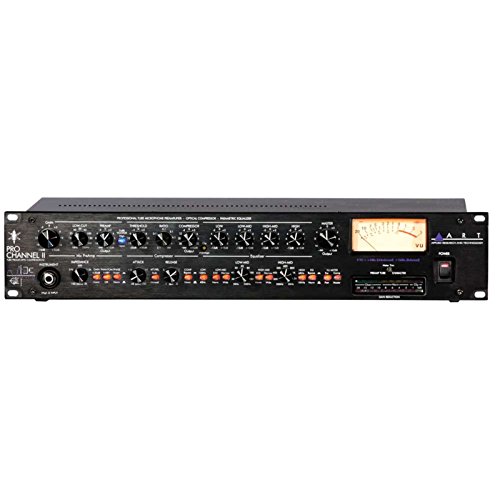
- Tube mic preamp, compressor, and EQ in one channel
- Selectable optical or tube compression
- Switchable VU metering for chain monitoring
Best For: Voice-focused studios wanting integrated tone shaping and compression
Entry-Level Recording Hub

- Two combo XLR/line/instrument inputs
- Zero-latency USB/direct monitoring
- Includes MPC Beats software
Best For: Compact two-microphone podcast and streaming setups
Dedicated Analog Dynamics

- Compact analog compressor design
- Ten gain-reduction status LEDs
- True bypass and 1/4-inch audio interface
Best For: Hands-on hardware compression in an analog signal chain
Multi-Guest Podcast Recorder

- Four XLR microphone inputs
- Four headphone outputs with individual volume
- Automatic mix-minus for remote interviews
Best For: Multi-person and remote-interview podcast recording
Premium Tube Character

- Single-channel tube optical compression
- Warm, balanced, versatile sound profile
- Includes rackmount chassis and compressor unit
Best For: Podcasters wanting warm analog compression on one voice channel
Flexible Vocal Control

- Two channels with adjustable attack and release
- XLR/TRS inputs and outputs
- Noise gate, LED metering, and sidechain insert
Best For: Podcasters and streamers needing flexible two-channel vocal processing
Peak Protection Processor

- Dual-channel compression with peak limiting
- Built-in noise gate and signal-processing features
- 1U rackmount design with XLR/TRS connectivity
Best For: Podcast and streaming setups needing level control and peak protection
Flexible Rackmount Control – Dual-Channel Audio Compressor
For podcasters who want hands-on dynamics control, this dual-channel unit is one of the more flexible audio compressors for podcasting. Its VCA circuitry, adjustable attack and release, LED monitoring, and built-in noise gate can help manage vocal levels in a rack-based studio, streaming setup, or live environment.
Best For: Podcasters and streamers using XLR or TRS-connected microphones and requiring dual-channel, rackmount processing.
Pros:
- Dual-channel compression with Overeasy and automatic attack/release settings.
- Built-in noise gate and independent LED indicators for monitoring gain reduction, compression, and gate thresholds.
- XLR and 1/4-inch TRS connectivity, plus a sidechain insert for targeted frequency control.
- Classic VCA circuitry is designed to add vocal warmth and detail.
Cons:
- Its 1U rackmount design may be more equipment than a simple desktop podcast setup needs.
- It requires corded power and separate microphones or other audio sources.
This is a strong fit when you want physical controls and routing flexibility rather than software-only processing. The sidechain and noise-gate features are particularly useful for more involved voice and streaming chains.
Classic Studio Processing – Behringer Composer Pro-XL MDX2600
The Behringer Composer Pro-XL MDX2600 is a practical two-channel option for podcasters building a conventional studio signal chain. As a compressor, limiter, and gate, it is suited to audio production, mixing, and mastering applications where you want several types of dynamics processing in one rack unit.
Best For: Podcast studios that want two-channel compression, limiting, and gating in a traditional rack-based workflow.
Pros:
- Combines a two-channel compressor, limiter, and gate.
- Designed for audio production, mixing, and mastering uses.
- Portable form factor and a stated two-year warranty.
Cons:
- The supplied information does not specify podcast-focused features such as USB connectivity or integrated loopback.
- As a rack-style processor, it may require additional equipment for microphone connection and recording.
Choose this model if your podcast setup already uses external audio hardware and you want broad dynamics processing rather than a dedicated interface. Its two-channel configuration can also suit setups with more than one voice source.
USB Podcasting Hub – PreSonus Revelator io24
The PreSonus Revelator io24 takes a different approach to audio compressors for podcasting by combining a USB-C audio interface with integrated effects and a loopback mixer. Its two XMAX-L microphone preamps, phantom power, presets, and Stream Mix mode make it a convenient central hub for recording and streaming workflows.
Best For: USB podcasting and streaming setups that need microphone inputs, software loopback, presets, and integrated effects.
Pros:
- Two XMAX-L mic preamps with +48V phantom power for professional XLR microphones.
- Two stereo loopback streams for mixing calls, backing tracks, and other computer audio.
- Stream Mix mode combines hardware inputs, effects, loopback audio, reverb, and sends for streaming software.
- USB connectivity, 96 kHz maximum sample rate, and compatibility with Windows and macOS.
Cons:
- It is an audio interface with integrated effects rather than a dedicated standalone rack compressor.
- It has two channels, which may be limiting for larger multi-microphone productions.
For many modern podcasters, this is the most streamlined option in the group because it combines inputs, effects, and computer routing in one compact device. It is especially compelling for remote interviews and live streaming workflows that rely on loopback audio.
Warm Channel-Strip Processing – ART Pro Channel II
ART Pro Channel II Microphone Preamp/Compressor/EQ Professional Tube Based Selectable VU Metering
Check Price On AmazonThe ART Pro Channel II combines a tube microphone preamp, selectable optical or tube compression, and tube EQ in one professional recording channel. For podcasters comparing audio compressors for podcasting, it offers a more complete, tone-shaping approach than a compressor alone, with selectable VU metering for monitoring different points in the chain.
Best For: Voice-focused podcast studios seeking tube-based preamp, compression, and EQ processing through XLR or 1/4-inch connections.
Pros:
- Combines tube mic preamp, switchable optical/tube compressor, and tube EQ.
- Designed to provide a warm, smooth, and silky sound character.
- Selectable VU metering can monitor mic pre output, compressor output, or main output.
- Offers XLR, 1/4-inch TRS, and 1/4-inch TS connectivity.
Cons:
- It is a single-channel processor, so separate units may be needed for multiple independent microphones.
- Its 13.4-pound, larger-format design is less convenient for compact desktop setups.
This channel strip makes the most sense when vocal tone is as important as level control. The integrated preamp and EQ can simplify a voice-processing chain, while the selectable compressor types provide additional shaping options.
Entry-Level Recording Hub – M-Audio M-Track Duo
For creators building a simple setup around audio compressors for podcasting, the M-Audio M-Track Duo provides a compact USB interface with two combo inputs, transparent preamps, and straightforward monitoring. It supports microphones, instruments, and line-level sources for recording, streaming, and podcast production.
Best For: Podcasters and home creators who need two-input USB recording with flexible monitoring.
Pros:
- Two combo XLR/line/instrument inputs with phantom power for compatible condenser microphones.
- 1/4-inch headphone and stereo outputs support flexible monitoring.
- USB/direct monitoring switch enables zero-latency monitoring.
- Includes MPC Beats and supports up to 48 kHz audio resolution.
Cons:
- Offers two input channels, which may be limiting for larger panel discussions.
- It is an audio interface rather than a dedicated compressor.
The M-Track Duo is a practical foundation for a compact podcasting chain, especially when you want to connect one or two microphones and handle processing in your recording software.
Dedicated Analog Dynamics – MXR Studio Compressor
The MXR Studio Compressor is a dedicated analog compressor in a compact pedal format. For audio compressors for podcasting, it is most relevant to creators using compatible 1/4-inch audio hardware and seeking hands-on compression before or within a broader recording chain.
Best For: Users who want a compact, analog compressor with visible gain-reduction monitoring.
Pros:
- Dedicated studio compressor with analog signal format.
- Ten gain-reduction status LEDs provide visual feedback.
- Constant Headroom Technology is designed for clear, clean performance.
- True bypass preserves the direct signal when the effect is bypassed.
Cons:
- Uses a 1/4-inch audio interface and may require additional podcasting hardware.
- Its pedal-style format may be less convenient than software compression for computer-based workflows.
- The supplied notes do not identify microphone inputs or USB connectivity.
This is the most purpose-built compression option in the roundup, but its pedal format makes it better suited to a hardware signal chain than to a plug-and-play USB podcast setup.
Multi-Guest Podcast Recorder – Zoom PodTrak P4
The Zoom PodTrak P4 is a portable podcast recorder with four XLR microphone inputs, four individually controlled headphone outputs, and dedicated features for interviews. For audio compressors for podcasting, it offers a practical recording hub, while compression can be handled through the connected workflow or later production.
Best For: Multi-person podcasts, call-in interviews, and mobile recording sessions.
Pros:
- Four microphone inputs with phantom power accommodate larger conversations.
- Four headphone outputs each have individual volume control.
- Automatic mix-minus supports phone and remote interviews.
- Includes programmable sound pads, multitrack recording, and USB audio interface mode.
Cons:
- It is a recorder and interface rather than a dedicated hardware compressor.
- Battery operation lasts up to 3.5 hours on two AA batteries.
- Its feature set may be more than necessary for a single-host podcast.
Choose the PodTrak P4 when the priority is managing several guests, headphones, and remote callers in one portable unit. It is a strong podcast production hub, but dedicated compression will need to come from another part of the setup or post-production software.
Premium Tube Character – WA-1B Optical Compressor
The Warm Audio WA-1B Optical Compressor is a single-channel option for podcasting setups that prioritize warm, balanced, and versatile analog character. Its tube optical compression design and knob-based controls offer hands-on level shaping for a voice channel.
Best For: Podcasters seeking warm analog compression for one microphone channel.
Pros:
- Tube optical compression provides a warm, balanced sound profile.
- Single-channel design suits focused voice processing.
- Rackmount chassis and compressor unit are included.
Cons:
- Only one channel is available.
- Its 12.1-pound, rack-oriented format may be more equipment than a simple desktop setup needs.
Choose the WA-1B when tonal character and dedicated analog control matter more than channel count or compactness. It is a specialized pick among audio compressors for podcasting rather than an all-purpose multi-channel processor.
Flexible Vocal Control – Dual-Channel Vocal Compressor
This dual-channel rackmount compressor is built for podcasting and other vocal-focused applications, combining VCA compression with adjustable attack and release controls. XLR/TRS connectivity, LED metering, and a noise gate make it practical for integrating microphones and other studio hardware.
Best For: Podcasters, streamers, and vocal producers needing two channels with flexible routing and monitoring.
Pros:
- Dual-channel compression supports multiple vocal or instrument sources.
- Adjustable attack, release, and Overeasy compression allow detailed control.
- Includes XLR/TRS connectivity, LED metering, noise gate, and sidechain insert.
- Designed for studio, live, streaming, podcasting, and broadcast applications.
Cons:
- The 1U rackmount form factor requires suitable rack or equipment placement.
- Its broad feature set may be more involved than needed for basic podcast compression.
For creators who want room to expand beyond a single microphone, this is a versatile choice. Its dual-channel layout and vocal-oriented features make it one of the more adaptable audio compressors for podcasting in this group.
Peak Protection Processor – 2-Channel Audio Compressor
This 1U, two-channel audio processor combines compression, peak limiting, and noise gating for setups that need consistent output and protection against overload. Its XLR/TRS inputs and outputs support integration with studio, live, and streaming equipment.
Best For: Podcast and streaming rigs that need dual-channel dynamics control with peak limiting and noise reduction.
Pros:
- Dual-channel compression and peak limiting help maintain consistent levels.
- Built-in noise gate can reduce unwanted background noise.
- XLR and 1/4-inch TRS connectivity supports flexible signal routing.
- Additional electronic crossover, feedback suppression, DSP reverb, and anti-howling processing are included.
Cons:
- The feature set is oriented toward broader stage and live-sound processing, which may exceed a basic podcast workflow.
- The supplied notes do not specify detailed attack, release, or metering controls.
This model is worth considering when podcasting is part of a larger studio, streaming, or stage setup. Its two channels and peak-limiting functions provide useful protection, while the extra processing features add flexibility for more demanding signal chains.
How We Picked the Best Audio Compressors for Podcasting
We compared these 10 selections by looking at the type of processing they provide, their connection options, channel count, controls, portability, and likely use case. The list includes traditional hardware compressors as well as interfaces and podcast recorders that may offer compression, effects, or workflow features in addition to recording.
We also considered whether each option suits voice recording, live streaming, remote interviews, music production, or a more permanent studio installation. A dedicated compressor offers hands-on dynamic control, while an interface or recorder may be more practical if you need preamps, monitoring, routing, and recording in one device.
Quick Comparison
| Type | Best suited to | Main advantage |
|---|---|---|
| Dual-channel rack compressor | Studios and live rigs | Independent processing for two signals |
| Channel strip | Single-mic vocal chains | Preamp, compression, and EQ in one unit |
| USB audio interface | Computer-based podcasting | Simple recording and monitoring workflow |
| Podcast recorder | Multi-person or mobile productions | Multiple inputs, headphones, and standalone operation |
| Compact compressor | Portable or instrument setups | Small footprint and straightforward control |
Key Buying Factors for Audio Compressors for Podcasting
Compressor Controls
Look for threshold, ratio, attack, release, and makeup gain controls if you want to shape compression precisely. Automatic or simplified controls can be easier for beginners, but they offer less control over fast peaks and natural vocal dynamics.
Channels and Routing
A single-channel unit may be sufficient for a solo host. Choose two channels or more for co-hosts, stereo sources, or separate processing paths. Sidechain inserts can also help you connect external processors or use filters to prevent low-frequency rumble from triggering excessive compression.
Inputs, Outputs, and Compatibility
Check whether your microphones use XLR, whether the unit expects line-level signals, and whether phantom power is required. USB interfaces and recorders connect directly to a computer or mobile workflow, while rack processors typically need a mixer, interface, or preamp with suitable analog connections.
Noise Control and Headroom
Noise gates can reduce room noise between phrases, but aggressive settings may cut off quiet words. Peak limiting provides extra protection against overloads. Prioritize clean gain staging and leave headroom rather than relying on heavy processing to fix distorted recordings.
Workflow and Portability
For a fixed studio, a rackmount compressor or channel strip may provide the most hands-on control. For travel, remote interviews, or multiple guests, an integrated recorder or interface can reduce cable clutter and setup time.
Who Should Buy Which Audio Compressors for Podcasting?
Choose a Dedicated Rack Compressor If…
You already own an audio interface or mixer and want physical controls, dual-channel processing, gating, limiting, or flexible studio routing.
Choose a Channel Strip If…
You want to build a focused vocal chain around one microphone and prefer combining microphone preamplification, compression, and EQ in a single device.
Choose an Audio Interface If…
You record primarily into a computer and need microphone inputs, headphone monitoring, USB connectivity, and software-based podcast production in one compact setup.
Choose a Podcast Recorder If…
You record several guests, conduct phone or remote interviews, need multiple headphone outputs, or want a simpler setup that can work away from a desktop computer.
Whichever format you choose, apply moderate compression and monitor with headphones while setting levels. Natural speech, clean gain staging, and reliable connections matter just as much as the compressor itself.