
Finding affordable Christmas gift ideas for gamers is easier when you focus on how they play: at a desk, online with friends, or on a console. This list brings together useful gear and small accessories for a range of gaming setups.
13 Christmas Gift Ideas for Gamers
1. KTC 27-Inch QHD 144Hz Gaming Monitor
A Sharper Desktop View
KTC 27-Inch QHD 144Hz Gaming Monitor

- 27-inch QHD (2560 × 1440) display with a 144Hz refresh rate.
- Supports FreeSync and G-Sync adaptive sync.
- HDMI and DisplayPort connections; tilt-adjustable and VESA-mountable.
Best For: A desktop gamer looking for a smoother, sharper display.
2. COMHOMA Big and Tall Gaming Chair
A More Relaxed Gaming Seat
COMHOMA Big and Tall Gaming Chair

- Spacious seat and wider backrest with thick padding.
- Features height-adjustable armrests and an integrated footrest.
- Reclines up to 145°; requires user assembly.
Best For: A gamer who spends long stretches at a desk and wants a roomy chair.
3. Nylavee 2.1 Desktop Speakers with Subwoofer
Desk-Friendly Game Audio
Nylavee 2.1 Desktop Speakers with Subwoofer

- 2.1-channel desktop speaker system with a dedicated subwoofer.
- Connects by USB, AUX, or Bluetooth 5.4.
- Includes eight RGB lighting modes and a rotary control knob.
Best For: A gamer who wants desktop audio for games, movies, and music.
4. 55L Gaming Laptop Backpack
A Carry-On for Gaming Gear

- 55-liter capacity with three compartments and multiple organizer pockets.
- Padded laptop compartment is designed for laptops up to 19 inches.
- 180° lay-flat opening, water-resistant fabric, and adjustable straps.
Best For: A gamer who carries a large laptop and accessories on trips or to school.
5. EPOMAKER x Aula F75 MAX Mechanical Keyboard
A Customizable Keyboard Upgrade
EPOMAKER x Aula F75 MAX Mechanical Keyboard

- 75% layout with 80 keys, a customizable TFT screen, and volume knob.
- Offers Bluetooth, 2.4GHz wireless, and USB-C connections.
- Hot-swappable switches, RGB backlighting, and adjustable kickstand.
Best For: A PC gamer who likes compact controls and a personalized desk setup.
6. Quntis Curved Monitor Light Bar
Lighting for a Wide Gaming Desk
Quntis Curved Monitor Light Bar

- Designed for curved monitors over 34 inches and large flat screens.
- Front light has adjustable brightness and color temperature.
- Adds 15 RGB backlight modes and a foldable dual-light design.
Best For: A gamer with a large monitor who wants adjustable desk lighting.
7. EMEET C960 1080p Webcam
A Camera for Game Chats

- Captures 1080p video through a 90° wide-angle lens.
- Built-in pair of omnidirectional microphones and a privacy cover.
- USB connection with Type-A and A-to-C adapter options.
Best For: A gamer who video chats or streams from a compatible computer.
8. Guermok USB Capture Card
A Starter Tool for Gameplay Capture

- Supports up to 4K at 60 fps capture and 4K at 60Hz passthrough.
- Includes 3.5mm audio input and microphone output.
- Plug-and-play design supports listed consoles, computers, and streaming software.
Best For: A console gamer interested in recording or streaming gameplay.
9. Wireless Gaming Headset with 7.1 Surround Sound
Wireless Audio for Game Nights
Wireless Gaming Headset with 7.1 Surround Sound
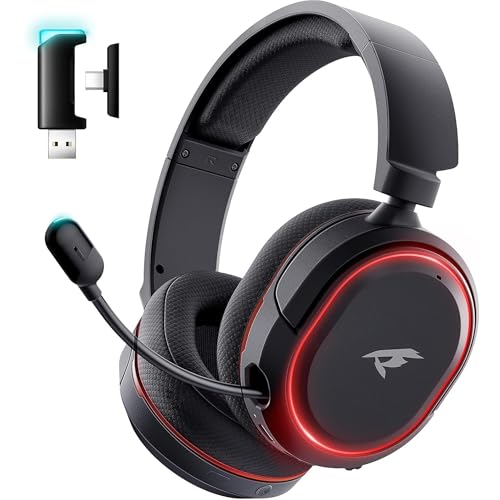
- Offers 2.4GHz wireless, Bluetooth 5.4, and 3.5mm wired connections.
- Features a retractable microphone with one-touch mute.
- Product listing states up to 100 hours of battery life in Bluetooth mode with lights and mic off.
Best For: A gamer who wants wireless game audio and voice chat across compatible devices.
10. FIFINE AmpliGame A6V USB Gaming Microphone
A Clearer Voice Chat Setup
FIFINE AmpliGame A6V USB Gaming Microphone

- USB desktop microphone with a quick mute button and gain knob.
- Includes a tripod stand, shock mount, and detachable pop filter.
- RGB lighting and a 6.6-foot detachable USB cable.
Best For: A gamer who wants a dedicated mic for team chat or streaming.
11. EasySMX X15 Wireless Gaming Controller
Flexible Controller Play
EasySMX X15 Wireless Gaming Controller

- Supports Windows PC, Steam, Switch, Android, and iOS.
- Connects over 2.4G wireless, Bluetooth, or USB-C.
- Hall Effect joysticks and triggers, plus two programmable back buttons.
Best For: A gamer who prefers a controller for compatible PC or console games.
12. Redragon M810 PRO Wireless Gaming Mouse
Untethered Mouse Control
Redragon M810 PRO Wireless Gaming Mouse

- Connects wirelessly through a 2.4GHz receiver and supports USB-C.
- Eight programmable buttons and five onboard DPI levels.
- Rechargeable battery listing states up to 45 hours in eco mode.
Best For: A PC gamer who wants programmable controls and wireless movement.
13. KontrolFreek Universal Thumb Grips, 8-Pack
A Small Controller Personalization
KontrolFreek Universal Thumb Grips, 8-Pack

- Eight rubber thumb grips in blue, green, red, and black.
- Designed for Nintendo Switch Pro, PlayStation, and Xbox controllers listed.
- Adds a grippy surface and can cover worn joystick tops.
Best For: A console gamer who wants extra thumb grip or a simple controller refresh.
How to Choose a Gift for a Gamer
Start with the recipient’s setup and habits. A PC player who spends most evenings at a desk may appreciate an upgrade that gets regular use, such as a keyboard, mouse, speakers, monitor light, or chair. For someone who plays online with friends, a webcam, microphone, or headset can support calls and streams as well as games. Console players may get more use from a controller, thumb grips, or a capture card for recording gameplay.
Think about what the player already owns. A gift does not need to be the biggest piece of equipment to feel useful. Desk accessories and controller add-ons can refresh a familiar setup, while a monitor or chair is a more substantial change. If you are unsure, consider the item they use most often or a routine they mention: carrying a laptop, chatting with a team, or playing from the couch.
Set a Budget That Fits the Gift
Affordable Christmas gift ideas for gamers can include both small accessories and larger upgrades. Decide on a comfortable spending range before choosing, then compare gifts that solve a clear need within it. Thumb grips are a compact option for a console player, while a microphone or mouse adds a dedicated feature to a PC setup. A chair, monitor, or headset is a bigger commitment, so it is especially useful to match the choice to the recipient’s preferences.
For shared gifting, practical accessories can also work well as part of a coordinated present. A keyboard and mouse suit a desktop setup, while a webcam and microphone can support streaming or calls. Keep the budget focused on the person’s actual play style rather than assuming every gamer wants lighting, high-end gear, or a full setup overhaul.
Check Compatibility and Personalization
Before selecting electronics, check the product’s listed platforms and the recipient’s device. The capture card, for example, needs a compatible HDMI source and computer connection; its notes recommend a USB 3.0 or higher port for higher-resolution support. A webcam is listed for Windows, macOS, and Android TV, but not game consoles, tablets, or Windows Hello. Likewise, the controller and headset list specific platforms and connection methods, so confirm the gamer’s console or computer can use the mode you have in mind.
Personalization can mean choosing a practical feature rather than a color. A keyboard with hot-swappable switches suits someone who enjoys customization; a backpack makes more sense for a gamer who travels with a laptop. If you can ask casually, check whether they prefer a headset or speakers, keyboard or controller, and wireless or wired connections. These preferences can matter more than extra features.
Timing and Last-Minute Decisions
For Christmas shopping, leave time to confirm compatibility and compare dimensions with the available desk or storage space. A 34-inch-plus curved monitor light bar needs a suitably large screen, and a roomy chair requires space for its footprint. A laptop backpack is intended for larger computers, but checking the recipient’s laptop size helps avoid a mismatch.
When time is short, choose a gift whose use is easy to understand and whose compatibility is straightforward to confirm. Small accessories may be simpler to match than a display or chair, while a digital-age gift still deserves a quick check of ports, platform, or controller model. A thoughtful choice tied to how the gamer actually plays makes a useful Christmas present, whether it upgrades a daily setup or adds a personal touch.