
If you need a no-drama DisplayPort cable for a high-end monitor and GPU, the Acer 8K DisplayPort Cable 10FT is easy to understand.
It is built around DP 1.4 bandwidth, broad compatibility, and a tougher braided construction.
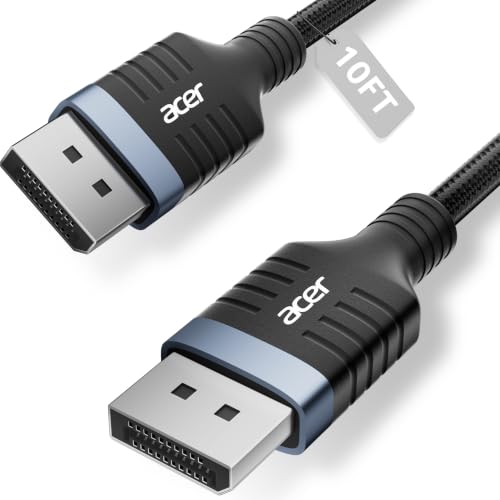
Acer 8K DP Cable Review Summary
The Acer 8K DisplayPort Cable 10FT makes sense for buyers who want a dependable cable rather than a feature experiment.
It is aimed at people connecting modern gaming monitors, high-resolution displays, and performance GPUs that benefit from 32.4Gbps-class throughput, HDR support, and a secure physical build.
This is not the product for someone who simply wants any short monitor lead.
Its value is in supporting demanding display modes such as 8K@60Hz, 5K@240Hz, and 4K@144Hz, while also promising FreeSync, G-Sync, HDCP 2.2, and MST support.
That combination makes it a strong fit for a gaming desk, a productivity rig with multiple screens, or a workstation where signal stability matters more than saving a little money on a basic cable.
The main tradeoff is obvious: it is a single-purpose accessory, so the buying decision comes down to whether your setup can actually use its bandwidth and build quality.
If you have a compatible DisplayPort source and display, this Acer 8K DP Cable review points to a sensible, well-specced option.
If your needs are modest, it is probably more cable than you need.
Review Scorecard
| Category | Score | Why it scores this way |
|---|---|---|
| Display bandwidth | 9/10 | DP 1.4, 32.4Gbps, and support for 8K/4K high refresh modes make it well suited to demanding displays. |
| Gaming fit | 9/10 | FreeSync, G-Sync, and tear-reduction support are directly relevant to gaming monitors and fast GPUs. |
| Build quality | 8/10 | The braided jacket, reinforced shell, and shielding suggest a cable designed for daily use. |
| Compatibility | 8/10 | Backward compatibility with older DP versions widens the number of systems it can serve. |
| Productivity value | 8/10 | MST-ready support and multi-monitor flexibility matter for workstations and mixed-use desks. |
| Ease of setup | 9/10 | Plug-and-play behavior and broad monitor/GPU support keep deployment simple. |
| Value for demanding users | 8/10 | It is best justified when you actually need its higher-end feature set, not as a basic spare cable. |
Key Features and Specifications of Acer 8K DP Cable
The headline specification is DP 1.4 support with up to 32.4Gbps bandwidth.
According to the listing, that enables 8K@60Hz, 5K@240Hz, and 4K@144Hz, along with Dynamic HDR and HDCP 2.2.
Those details matter because they tell you this cable is positioned for modern high-bandwidth display chains, not entry-level office monitors.
The cable is also described as backward compatible with DisplayPort 1.3, 1.2, 1.1, and 1.0.
That makes it easier to use across mixed hardware generations, which is useful if you upgrade your monitor before you replace the rest of the PC.
Other listed capabilities are aimed at real desktop use:
- MST-ready daisy chaining for extended or mirrored multi-monitor setups
- Support for FreeSync and G-Sync
- Compatibility notes for popular monitors and GPUs, including Odyssey, Alienware, Dell, ASUS, HP, RTX 4090/3090, and RX 7900 series
- Braided jacket construction with a reinforced aluminum shell
- Multi-layer shielding to reduce electromagnetic interference
The 10-foot length is practical for most desk layouts.
It gives enough slack to route cleanly from a tower under a desk to a monitor without forcing a tight bend, but it is still short enough to avoid unnecessary cable clutter.
Pros and Cons of Acer 8K DP Cable
Pros
- Supports the kind of display modes that matter on premium monitors, including 8K and very high refresh 4K use cases.
- Broad DP backward compatibility makes it easier to keep around after hardware changes.
- The braided jacket and reinforced shell should hold up better than a thin throwaway cable.
- MST support is useful if you run more than one monitor from a compatible setup.
- Gaming features like FreeSync and G-Sync support make it relevant to performance-focused builds.
Cons
- It is overkill for a basic 1080p or standard 1440p office setup.
- The feature list is only useful if your GPU, monitor, and settings can actually take advantage of it.
- Like most listing-driven accessories, the real-world payoff depends on the rest of your display chain.
The balance here is straightforward: the cable looks strongest when you are already buying into a higher-end monitor and want fewer weak links in the chain.
It looks less compelling as a generic spare.
Who Should Buy Acer 8K DP Cable?
Buy this if you have a gaming monitor or high-end display that can benefit from DisplayPort 1.4 bandwidth.
It is especially relevant if you are aiming for 4K at high refresh rates, want HDR support, or need a cable that can keep pace with a powerful GPU.
It also makes sense for people building a clean dual-monitor or multi-monitor desk.
The MST-ready feature is not something every buyer needs, but it is exactly the kind of detail that can simplify a workstation when multiple screens are part of the plan.
This is a good fit for:
- PC gamers with FreeSync or G-Sync displays
- Users connecting RTX 4090/3090 or RX 7900-class hardware to a compatible monitor
- Workstation users who want stable, shielded cabling for long sessions
- Anyone who wants one cable that can survive future hardware changes better than a bare-minimum lead
You should probably skip it if:
- Your monitor is only a basic office panel
- You do not care about HDR, refresh rate, or multi-monitor routing
- You want the cheapest possible cable and do not need the build extras
DisplayPort Cable Fit and Performance Considerations
Bandwidth Matters More Than Marketing
For a DisplayPort cable, the useful question is not whether it sounds premium.
It is whether the cable can carry the signal your hardware is asking for.
The Acer cable is clearly built for high-bandwidth scenarios, which is why it belongs in conversations about 8K, 4K high refresh, and premium gaming setups rather than in generic accessory bins.
Desk Layout and Length
Ten feet is a sensible middle ground.
It is long enough to support under-desk routing and monitor arm setups, but not so long that you are paying for slack you will never use.
If your tower sits far from the display or you are building a larger office run, you may still want a longer cable.
Build Quality and Cable Life
The braided jacket, reinforced shell, and shielding are the kind of physical details that matter in everyday use.
They do not guarantee perfection, but they do suggest this is meant to survive repeated plugging, desk movement, and the mild abuse that comes with a working PC setup.
Where It Fits Best
This cable makes the most sense when you want a stable link between serious hardware and a display that can actually show the difference.
If your monitor is capable and your GPU is strong enough, the Acer 8K DP Cable is a logical companion piece rather than an afterthought.
Alternatives to Acer 8K DP Cable
If you want to compare options, look at other established DisplayPort cable lines that are commonly sold for gaming and workstation use:
- Cable Matters DisplayPort 1.4 Cable
- UGREEN DisplayPort 1.4 Cable
- Amazon Basics DisplayPort Cable
- IVANKY DisplayPort Cable
Cable Matters and UGREEN are the most obvious comparison points if you want similarly positioned high-bandwidth cables.
Amazon Basics is the simpler fallback if you want something more straightforward, while IVANKY is another familiar name for buyers comparing braided monitor cables.
Is Acer 8K DP Cable Worth It?
Yes, if you are buying for a compatible high-end display setup and want a cable that matches the rest of the hardware.
The Acer 8K DisplayPort Cable 10FT is worth it when you care about bandwidth, build quality, and future-proof compatibility more than bare-minimum cost.
If your setup is modest, it is harder to justify.
But for gaming rigs, premium monitors, and multi-display desks, this Acer 8K DisplayPort cable looks like a practical buy rather than a flashy one.