
Choosing a power supply can feel intimidating when wattage, efficiency ratings, connectors, and modular cables all compete for your attention. The right PSU should match your components, fit your case, and provide dependable protection without making installation unnecessarily difficult.
This roundup includes practical options for entry-level desktops, gaming upgrades, and newer graphics cards, plus a power supply tester for troubleshooting. Use the guide below to narrow the choices by system demand, features, and budget.
Best 10 Computer Power Supplies for Beginners Picks for 2026
Reliable Starter
MSI MAG A550BN 550W Bronze PSU

- 550W ATX output
- 80 PLUS Bronze with active PFC
- Low-noise fan and 5-year warranty
Best For: Entry-level and moderate-power desktop builds
Diagnostic Helper
Fuhengli PC Power Supply Tester
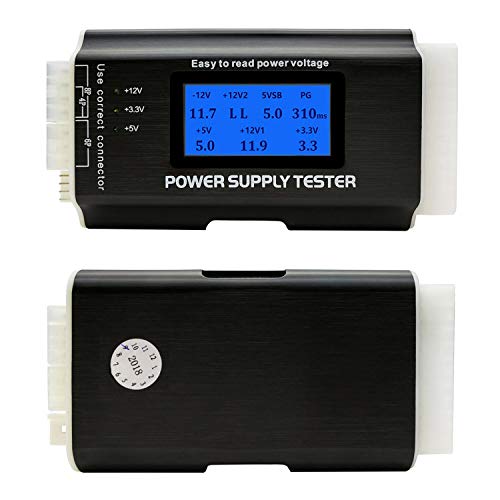
- Tests common ATX and peripheral connectors
- 1.8-inch LCD with voltage readings
- Alarm signals out-of-range values
Best For: Basic PC power-supply troubleshooting
Balanced Budget Pick
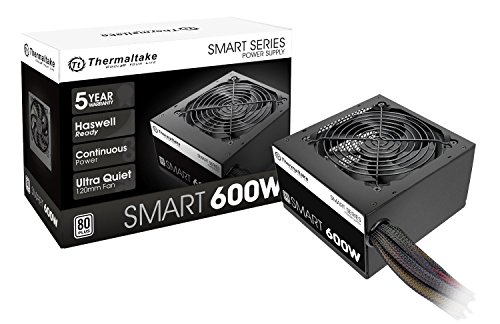
- 600W continuous output
- Active PFC and core protections
- Two PCIe 6+2-pin connectors
Best For: Conventional desktops needing moderate extra capacity
Future-Ready Upgrade

- 750W fully modular output
- 80 PLUS Gold certification
- ATX 3.1 and PCIe 5.1 ready
Best For: Modern gaming PCs and upgrade-focused builds
Budget 600W Starter
Apevia Spirit 600W ATX Power Supply
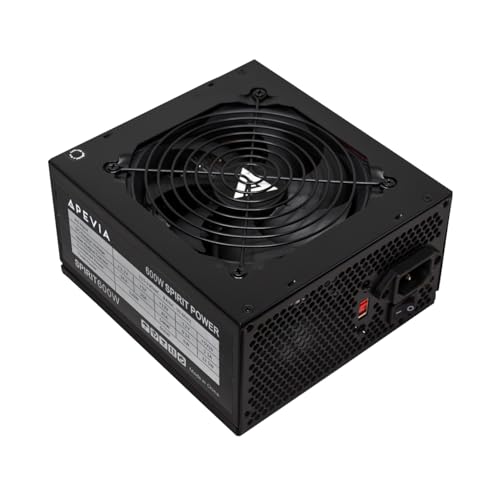
- 600W output with a 45A single 12V rail
- Standard CPU, GPU, SATA, and Molex connectors
- Multiple protections and a one-year replacement warranty
Best For: Basic ATX builds on a budget
Reliable Bronze Pick

- 500W continuous ATX output
- 80 PLUS Bronze certified
- Five-year warranty with four listed protections
Best For: Standard desktop builds needing 500W
Upgrade-Ready Modular

- 1000W, 80 PLUS Gold, and fully modular cabling
- ATX 3.1 and PCIe 5.1-ready 12V-2x6 cable
- Includes tester, cable tools, and a 10-year warranty
Best For: High-performance builds with modern GPUs
Flexible Gold Power

- 600W ATX output with 80 Plus Gold certification
- Semi-modular cabling and four PCIe 6+2-pin connectors
- Active PFC with OVP, OPP, and SCP protection
Best For: ATX gaming builds needing flexible connectivity
Next-Gen Ready
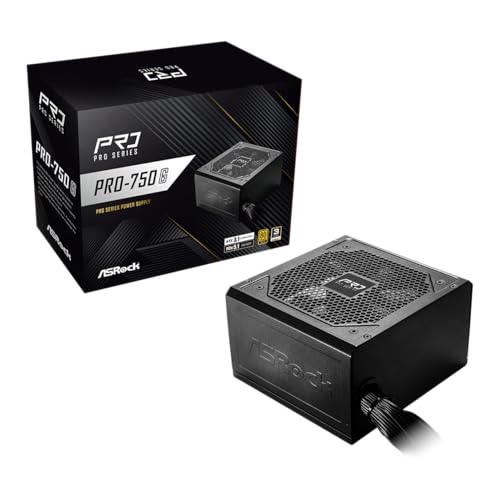
- 750W output with 80 Plus Gold efficiency
- ATX 3.1, PCIe 5.1, and native 12V-2x6 connector
- Three-year warranty and low-noise 120mm fan
Best For: Modern ATX builds with newer graphics cards
Compact and Protected
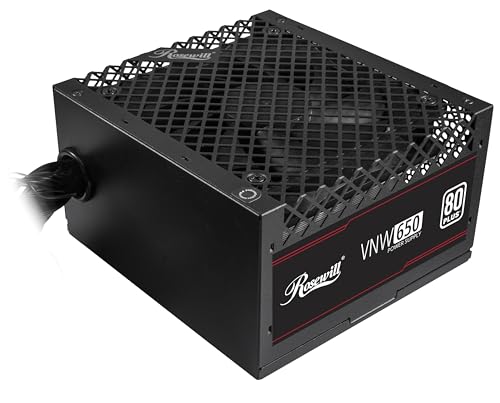
- 650W SFX design for small-form-factor systems
- 120mm FDB fan with low-noise thermal control
- Five protection features and a five-year warranty
Best For: Compact PC builds requiring an SFX power supply
Reliable Starter – MSI MAG A550BN 550W Bronze PSU
For beginners choosing computer power supplies, the MSI MAG A550BN is a straightforward 550W option for a standard desktop build. Its ATX form factor, 80 PLUS Bronze certification, active PFC, and low-noise fan provide a practical balance of everyday performance and efficiency.
Best For: Beginner-friendly desktop PCs using a conventional ATX power supply and moderate power requirements.
Pros:
- 550W output suits many entry-level and midrange desktop configurations.
- 80 PLUS Bronze certification and active PFC support efficient operation.
- Non-modular design keeps the setup simple, while the low-noise fan helps reduce fan noise.
- Includes a 5-year limited warranty.
Cons:
- Non-modular cables cannot be detached, which may make cable management less flexible.
- The supplied notes do not identify newer ATX 3.1 or PCIe 5.x compatibility.
This is a sensible starting point for computer power supplies for beginners who want a familiar ATX unit without paying for modular cabling or higher wattage than their build requires.
Diagnostic Helper – Fuhengli PC Power Supply Tester
The Fuhengli tester is not a power supply replacement; it is a compact troubleshooting tool for beginners learning about computer power supplies. It checks common ATX, EPS, PCIe, SATA, IDE, and floppy connectors, displaying key readings on an LCD and using an alarm when test values fall outside the normal range.
Best For: Beginners diagnosing connectors and checking an existing PC power supply before replacing components.
Pros:
- Supports 20-pin and 24-pin ATX, EPS 8-pin, PCIe 6-pin, SATA, IDE, and floppy connectors.
- 1.8-inch LCD displays several voltage readings for easy reference.
- Compact aluminum-alloy enclosure is light and portable.
- Audible alarm alerts you when a measured value is beyond the normal range.
Cons:
- It cannot test PCIe 8-pin connectors according to the supplied notes.
- It is a diagnostic accessory, not a replacement computer power supply.
- Some connector readings are shown through indicator lights rather than the LCD.
For beginners who want to understand whether an existing unit is behaving normally, this tester offers a simple way to inspect common power connectors. Follow the connector-specific display instructions carefully, especially for SATA cables.
Balanced Budget Pick – Thermaltake SMART 600W PSU
The Thermaltake SMART 600W is a practical option for beginners comparing computer power supplies for a conventional desktop. It provides 600W of continuous output, 80 PLUS certification, active PFC, a dedicated +12V rail, and several built-in protections for everyday system use.
Best For: Standard desktop builds that need more capacity than a basic 550W unit and use up to two PCIe 6+2-pin connectors.
Pros:
- Delivers 600W continuous output at 40°C.
- 80 PLUS certification targets 80% efficiency under typical load.
- Includes over-power, over-voltage, and short-circuit protection.
- Provides two PCIe 6+2-pin connectors and a 5-year warranty.
Cons:
- The supplied notes describe it as semi-modular in the details but also identify the included product as non-modular, so verify the exact cable design before ordering.
- It uses the older ATX 12V 2.31 and EPS 12V 2.92 standards rather than the newer standards listed for some modern units.
- The supplied details do not state 80 PLUS Bronze or Gold certification.
This model can suit a straightforward desktop when its connector set and stated standards match the build. Beginners should confirm the cabling arrangement and graphics-card requirements before purchase.
Future-Ready Upgrade – MSI MAG A750GL PCIe 5
For beginners assembling a gaming PC, the MSI MAG A750GL offers more headroom than entry-level computer power supplies. Its 750W output, 80 PLUS Gold certification, fully modular design, ATX 3.1 and PCIe 5.1 readiness, and native dual-color 12V-2×6 cable are aimed at newer, higher-demand systems.
Best For: Gaming desktops and upgrade-focused builds that can use 750W and newer PCIe power connectivity.
Pros:
- 750W capacity provides additional power headroom for compatible gaming hardware.
- 80 PLUS Gold certification supports efficient operation.
- Fully modular cables can simplify installation and cable management.
- ATX 3.1, PCIe 5.1, and a native 12V-2×6 cable support newer components; warranty coverage is 10 years.
Cons:
- Higher capacity and newer features may be unnecessary for a basic office or entry-level build.
- Modular cabling requires careful matching of each detachable cable during installation.
- The supplied minimum input-voltage detail lists 230V, so confirm electrical compatibility for your location.
This is the strongest fit of the group for a beginner planning a modern gaming system or future upgrades. Its modular layout and current standards are useful, but the extra capacity is best justified when the rest of the build demands it.
Budget 600W Starter – Apevia Spirit 600W ATX Power Supply
For beginners comparing computer power supplies, the Apevia Spirit 600W is a straightforward, non-modular ATX option with a single 12V output and support for common motherboard and graphics-card connectors. Its 120mm thermally controlled fan and built-in protections make it suitable for a basic PC build, provided the system’s power needs fit its 600W capacity.
Best For: Entry-level or budget ATX computers using standard 20+4-pin motherboard, 4+4-pin CPU, and 6+2-pin PCIe connections.
Pros:
- 600W output with a single 12V rail rated at 45A.
- Includes 20/24-pin, 4+4-pin CPU, two 6+2-pin PCIe, SATA, and Molex connectors.
- Provides short-circuit, over-current, over-voltage, over-power, under-voltage, and over-temperature protection.
- One-year replacement warranty is included.
Cons:
- Non-modular cables can make cable management more difficult for beginners.
- The supplied notes do not list an efficiency certification.
This model emphasizes basic compatibility and protection rather than modular convenience. Confirm your case, connector requirements, and total system wattage before installation; the unit must have its PC cables properly connected to power on.
Reliable Bronze Pick – ARESGAME AGV Series 500W PSU
For beginners shopping for computer power supplies, the ARESGAME AGV Series 500W keeps the setup simple with a non-modular ATX design, continuous 500W output, and 80 PLUS Bronze certification. It is a practical choice for a standard personal computer whose components do not require more capacity.
Best For: Mainstream ATX desktop builds that need a certified, non-modular 500W power supply.
Pros:
- Provides 500W of continuous output.
- 80 PLUS Bronze certified, with 85% or higher efficiency under typical loads.
- Includes OVP, UVP, OPP, and SCP protection.
- Backed by a five-year manufacturer warranty.
Cons:
- Non-modular wiring leaves all cables attached and may complicate cable management.
- Its 500W capacity may not suit higher-power upgrades.
The AGV Series is easier to evaluate than an uncertified budget unit because its Bronze rating and warranty provide clear reference points. Check the required connectors and estimated system draw before choosing it for a build or upgrade.
Upgrade-Ready Modular – Auotac 1000W ATX 3.1 Gold PSU
For beginners exploring computer power supplies for a powerful or upgrade-focused build, this Auotac 1000W model offers fully modular cabling, 80 PLUS Gold efficiency, and ATX 3.1 and PCIe 5.1 support. Its included tester and cable-management accessories can make first-time installation easier, though its capacity and features may be more than a basic PC needs.
Best For: High-performance ATX systems with modern graphics cards and a need for flexible cable management.
Pros:
- 1000W output with 80 PLUS Gold certification and stated 92% efficiency.
- Fully modular design reduces unused wiring inside the case.
- Includes a native dual-color 12V-2×6 PCIe 5.1 cable for compatible graphics cards.
- Comes with a PSU tester, cable comb, cable ties, and a 10-year limited warranty.
Cons:
- 1000W capacity and advanced features may be unnecessary for a basic computer.
- ARGB lighting may not appeal to users seeking a plain, non-illuminated build.
This is the most upgrade-oriented option in the group, combining modern standards with modular installation aids. Beginners should still verify GPU compatibility, case clearance, and total power requirements before connecting the cables.
Flexible Gold Power – Apevia Prestige 600W
For beginners comparing computer power supplies, the Apevia Prestige 600W offers a useful mix of capacity, connectivity, and efficiency for standard gaming or multi-GPU builds. Its semi-modular design, active PFC, and automatic 110V/230V switching simplify installation and everyday use.
Best For: Beginners building ATX gaming PCs with moderate power needs and multiple PCIe-connected components.
Pros:
- 80 Plus Gold certification and active PFC support efficient operation.
- Four PCIe 6+2-pin connectors support a range of GPU configurations.
- Semi-modular design and flexible 4+4-pin CPU connector support easier cable management.
- Includes OVP, OPP, and SCP protection features.
Cons:
- The one-year warranty is shorter than those of some competing models.
- The 135mm fan may be less suitable for builders prioritizing the smallest possible PSU format.
This is a capable option when you want 600W of Gold-rated ATX power and broad connector support without moving to a higher-wattage unit. Confirm your case clearance and required connectors before buying.
Next-Gen Ready – ASRock PRO 750G
For beginners choosing computer power supplies for newer graphics cards, the ASRock PRO 750G provides 750W of Gold-certified power with ATX 3.1 and PCIe 5.1 compatibility. Its native 12V-2×6 connector and standard ATX form factor make it a straightforward choice for compatible modern builds.
Best For: New mid-range to high-end PCs using modern graphics hardware and needing a standard ATX power supply.
Pros:
- 750W capacity suits a range of mid-range to high-end configurations.
- ATX 3.1 and PCIe 5.1 compliance supports newer components.
- Native 12V-2×6 connector supports up to 450W power delivery.
- Includes a low-noise 120mm fan and three-year manufacturer warranty.
Cons:
- Non-modular cabling can make cable management less convenient.
- Its listed input range is 100V to 120V AC, so buyers should verify regional compatibility.
The PRO 750G is appealing if you are assembling a current-generation PC and want a dedicated modern GPU connector. Check your graphics card requirements, case space, and local voltage compatibility before purchase.
Compact and Protected – Rosewill VNW650 650W SFX
For beginners shopping for computer power supplies in a compact format, the Rosewill VNW650 combines 650W capacity with an SFX form factor and a 140×150×86mm chassis. Its non-modular design keeps the configuration simple, while the 120mm FDB fan and five-protection suite support quiet, protected operation.
Best For: Small-form-factor PC builders who need 650W in an SFX-compatible power supply.
Pros:
- Compact SFX chassis is designed for flexible small-form-factor integration.
- 650W output and a high-amperage +12V rail support many mainstream configurations.
- 120mm FDB fan is designed for low-noise cooling.
- Includes UVP, OVP, OPP, SCP, and OCP protection.
Cons:
- Non-modular cables may leave extra wiring in compact cases.
- 80 Plus White certification is less efficient than Gold-rated alternatives.
- Verify that your case accepts an SFX power supply before ordering.
The VNW650 stands out when case size matters more than premium efficiency. Its five protection features and five-year warranty add reassurance, but beginners should confirm the SFX form factor and connector requirements first.
How We Picked the Best Computer Power Supplies for Beginners
We focused on the details that matter most to first-time builders: appropriate wattage, recognized efficiency certifications, connector compatibility, protection features, installation complexity, noise considerations, and warranty coverage. The selection spans affordable non-modular units, quieter Gold-rated models, higher-capacity gaming PSUs, and newer ATX 3.1 designs with native 12V-2×6 support.
Because product listings and revisions can change, confirm the exact model, included cables, warranty terms, and electrical specifications before purchasing. A power supply tester can also be useful when diagnosing a PC that will not start, although it should not replace careful inspection or professional service.
Quick Comparison
| Best For | Typical Capacity | Useful Features |
|---|---|---|
| Basic office or entry-level PC | 500W–600W | Affordable pricing, simple installation |
| Mainstream gaming build | 650W–750W | More headroom, Gold efficiency, modular cables |
| Modern high-performance GPU | 750W–1000W | ATX 3.1 and native 12V-2×6 connectivity |
| Troubleshooting | Not applicable | Standalone PSU testing tool |
Key Buying Factors for Computer Power Supplies for Beginners
Wattage and Upgrade Headroom
Estimate the combined needs of the CPU and graphics card, then leave reasonable headroom for transient spikes and future upgrades. Around 500W–600W often suits basic systems, while gaming PCs commonly benefit from 650W–750W. High-end GPUs may justify 850W or 1000W, but excess capacity alone does not guarantee quality.
Efficiency and Electrical Protection
80 Plus Bronze and Gold ratings describe efficiency, not overall build quality. Look for active PFC and standard protections such as over-voltage, under-voltage, over-power, short-circuit, and over-temperature protection. These features help reduce risk during faults and demanding workloads.
Cables, Connectors, and Installation
Non-modular PSUs have permanently attached cables and are usually cheaper, but unused wires can make cable management harder. Semi-modular or fully modular models let you connect only what you need. For newer graphics cards, check whether the PSU includes the required native 12V-2×6 or PCIe 5.x cable rather than relying on adapters.
Size, Noise, and Warranty
Confirm that the unit uses the ATX format your case supports and that its cable lengths will reach your motherboard and GPU. Larger fans and low-noise modes can improve acoustics. A longer warranty is also a useful confidence signal, though it should be considered alongside specifications and seller reliability.
Who Should Buy Which Computer Power Supplies for Beginners?
For a Basic Desktop or First Build
Choose a reputable 500W–600W Bronze unit if you are using integrated graphics or an entry-level GPU. A non-modular design keeps the purchase cost down and is suitable when simple cable management is acceptable.
For a Mainstream Gaming PC
A 650W–750W Gold model offers a useful balance of efficiency, capacity, and upgrade flexibility. Fully modular cabling is especially helpful in compact cases or for builders who want a cleaner installation.
For a New High-End Graphics Card
Prioritize an ATX 3.1 PSU with a native 12V-2×6 connector and enough capacity for the complete system. A 750W model may suit efficient builds, while 1000W provides more headroom for power-hungry CPUs and GPUs.
For Troubleshooting an Existing PC
A PSU tester can help identify obvious voltage or startup faults, but do not open a power supply or continue using one that smells burned, makes unusual noises, or shows physical damage. Replace questionable units with a properly rated model instead.