
Choosing among the best MIDI interfaces for beginners can be confusing because the category includes simple USB-to-MIDI cables, multi-port MIDI hubs, and full audio interfaces with MIDI built in.
This roundup focuses on practical starter options for connecting keyboards, synthesizers, controllers, and computers, with attention to setup simplicity, connectivity, portability, and room to grow.
Best 10 Midi Interfaces for Beginners Picks for 2026
Best All-in-One Starter
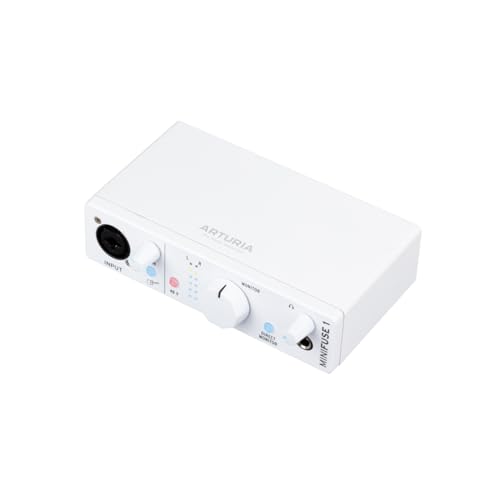
- Five-pin MIDI in and out
- Compact audio recording with loopback
- Five-year warranty and software bundle
Best For: Beginners building a compact audio-and-MIDI home studio
Best for Learning Keys

- 25 velocity-sensitive mini keys
- Built-in beginner learning courses
- Portable USB control for major platforms
Best For: New producers learning keyboard-based music production
Best for First Recordings

- Mic preamp plus Hi-Z instrument input
- 24-bit/192kHz recording and Air mode
- Includes several starter recording tools
Best For: Beginners recording vocals, guitar, bass, or podcasts
Best for Hardware Routing
Nektar MIDIFLEX4 MIDI Interface

- Four configurable MIDI ports
- Standalone split and merge modes
- Includes Bitwig 8-Track software
Best For: Beginners connecting multiple external MIDI devices
Most Expandable
CME H2MIDI Pro Compact USB Host MIDI Interface

- Connects USB MIDI gear to traditional 5-pin DIN hardware
- Supports up to eight USB MIDI devices with a hub
- Includes routing, filtering, mapping, and preset tools
Best For: Beginners building a mixed USB-and-DIN MIDI setup
Best Audio-and-MIDI Hub
Yamaha URX22C 2-in/2-out Interface

- Combines two-channel audio and MIDI I/O
- Adds combo inputs, phantom power, and a Hi-Z input
- Includes DSP monitoring effects and Steinberg software
Best For: Beginners who need MIDI and audio recording together
Best Simple Cable Setup

- Plug-and-play USB-to-5-pin MIDI connection
- Supports all 16 MIDI channels and major MIDI messages
- Works across major desktop and mobile operating systems
Best For: Beginners connecting one MIDI instrument to a computer
Best All-in-One Pick

- MIDI I/O plus 2-in/2-out audio
- Analog filter and flexible combo inputs
- Includes a broad production software bundle
Best For: Beginners building a MIDI and audio recording setup
Best Budget MIDI Cable

- One MIDI input and one MIDI output
- Plug-and-play Windows and Mac connection
- LEDs show power and signal activity
Best For: Simple keyboard or synthesizer-to-computer setups
Best Portable Audio/MIDI Combo

- 2x2 USB-C audio and MIDI interface
- Two mic/line/instrument inputs with phantom power
- Includes XLR cable and production software
Best For: Beginners recording audio and using MIDI hardware together
Best All-in-One Starter – Arturia MiniFuse 1
For beginners comparing MIDI interfaces for beginners, the Arturia MiniFuse 1 is a compact USB audio interface that also includes five-pin MIDI input and output. It combines simple recording connections, headphone monitoring, loopback, and beginner-focused software in a small desktop unit.
Best For: Beginners who want one compact interface for recording vocals, guitar, synths, and MIDI hardware.
Pros:
- Includes five-pin MIDI input and output for synths, controllers, and drum machines
- Offers 48V phantom power, balanced outputs, headphone volume control, and loopback
- Comes with Ableton Live Lite, Analog Lab Intro, effects, guitar software, and other creative tools
- Backed by a five-year warranty and extensive reliability testing
Cons:
- Has one main combo mic/instrument/line input, limiting simultaneous recording options
- Its broad software bundle may take time for complete beginners to explore
The MiniFuse 1 is a strong beginner choice when MIDI connectivity and basic audio recording need to share one affordable, portable setup. Its included software and long warranty add useful value for someone building a first home studio.
Best for Learning Keys – Donner N-25 MIDI Keyboard
Although it is a controller rather than a traditional MIDI interface, the Donner N-25 is a practical entry point for beginners searching MIDI interfaces for beginners who primarily need a simple way to play software instruments. Its 25 velocity-sensitive mini keys, USB connection, and built-in learning courses keep the setup approachable.
Best For: New producers and keyboard learners who want a portable controller for melodies, riffs, and basic music production.
Pros:
- Provides 25 velocity-sensitive mini keys in a compact, lightweight design
- Includes arpeggiator, sustain, octave, tap tempo, pitch bend, and programmable banks
- Works with Mac, Windows, iOS, Android, and several major DAWs without extra drivers on Mac and PC
- Includes 40 keyboard-teaching courses and music production software
Cons:
- It is a USB MIDI keyboard controller, not a multi-port MIDI interface for connecting external hardware
- Mini keys may feel less spacious than full-size keys
- The listed warranty is only 90 days
The N-25 makes sense for beginners whose first MIDI need is playing virtual instruments rather than routing several pieces of hardware. Its teaching content and straightforward controls can help new users start without a complicated interface setup.
Best for First Recordings – Focusrite Scarlett Solo
The Focusrite Scarlett Solo is a beginner-friendly audio interface for people comparing MIDI interfaces for beginners but also need reliable vocal and instrument recording. It provides a mic preamp, a Hi-Z instrument input, Air mode, direct headphone listening, and bundled recording software.
Best For: Beginners recording one microphone and one guitar or bass while using software instruments and a computer-based setup.
Pros:
- Combines one XLR microphone preamp with a Hi-Z instrument input
- Records and mixes at up to 24-bit/192kHz, with Gain Halos to help avoid clipping
- Includes Air mode, low-noise balanced outputs, and headphone monitoring
- Comes with Pro Tools Intro+, Ableton Live Lite, Cubase LE, and Hitmaker Expansion
Cons:
- The supplied notes do not list five-pin MIDI input or output
- Its single mic preamp limits simultaneous microphone recording
- The supplied warranty details differ, listing both two and three years
Choose the Scarlett Solo when recording audio is more important than connecting external MIDI hardware. It is a focused, well-equipped starting point for vocals, guitar, bass, podcasts, and computer-based production.
Best for Hardware Routing – Nektar MIDIFLEX4 MIDI Interface
For beginners looking beyond a single controller, the Nektar MIDIFLEX4 is a flexible USB MIDI interface with four MIDI ports. Its configurable routing, automatic port detection, and standalone merge and split modes make it useful when a growing setup includes multiple keyboards, synths, or other MIDI devices.
Best For: Beginners who want to connect and route several external MIDI devices from a computer or standalone rig.
Pros:
- Offers four MIDI ports with 1-in/3-out, 2-in/2-out, or 4-out configurations
- Uses automatic port detection and LED indicators for status feedback
- Supports standalone MIDI split and merge functions
- Includes Bitwig 8-Track with software instruments and effects
Cons:
- It is designed for MIDI routing and does not replace an audio interface for microphones or instruments
- Its flexible routing options may require more setup understanding than a basic controller
- Computer compatibility is listed for Windows, Mac, Linux, and iOS, but specific setup requirements may vary
The MIDIFLEX4 is a sensible step up for beginners who expect their hardware collection to grow. It offers more routing flexibility than a simple USB keyboard, while the LED indicators and included Bitwig software provide useful support for getting started.
Most Expandable – CME H2MIDI Pro Compact USB Host MIDI Interface
For beginners choosing midi interfaces for beginners, the CME H2MIDI Pro is a flexible option when a setup may include both modern USB gear and traditional 5-pin MIDI hardware. It can operate without a computer, while USB-C connectivity also supports hybrid computer and mobile workflows.
Best For: Beginners building a mixed USB-and-DIN MIDI setup with room to expand.
Pros:
- Connects USB class-compliant MIDI devices to 5-pin DIN equipment without a computer.
- Supports up to eight USB MIDI devices through a standard USB hub.
- Offers routing, filtering, mapping, splitting, and up to four saved presets.
- Works with macOS, Windows, iOS, Android, Linux, and ChromeOS.
Cons:
- Its advanced routing features may be more than a first-time user needs.
- It requires class-compliant USB MIDI hardware for host connections.
- It has one MIDI input and one MIDI output over 5-pin DIN.
The H2MIDI Pro stands out for flexibility and future expansion rather than simple cable replacement. It is a strong pick if you expect your beginner setup to grow into a more complex hardware rig.
Best Audio-and-MIDI Hub – Yamaha URX22C 2-in/2-out Interface
The Yamaha URX22C is a practical choice for beginners who want midi interfaces for beginners with built-in audio recording. Alongside MIDI I/O, it provides two combo inputs, two main outputs, headphone support, and DSP-powered monitoring for an all-in-one studio starting point.
Best For: Beginners who need MIDI connectivity and two-channel audio recording in one interface.
Pros:
- Combines 2-in/2-out audio with MIDI I/O.
- Includes two XLR/TRS combo inputs with Class-A D-PRE preamps and +48 V phantom power.
- Provides one Hi-Z input for compatible instruments and two TRS main outputs.
- Offers latency-free DSP monitoring with reverb, channel strip, and guitar amp effects.
Cons:
- It is more involved than a MIDI-only cable or interface.
- Its bundled software and effects may be unnecessary for users focused solely on MIDI.
- Compatibility listed in the supplied details is limited to Windows, macOS, and iOS.
Choose the URX22C if your beginner setup will include microphones, instruments, or vocals as well as MIDI. Its rugged metal housing and integrated monitoring effects make it a capable foundation for a small studio.
Best Simple Cable Setup – CME U2MIDI Pro USB MIDI Cable
For beginners looking for midi interfaces for beginners without extra hardware, the CME U2MIDI Pro keeps the connection straightforward: plug its USB-A end into a computer or compatible device and connect the color-coded 5-pin plugs to a MIDI instrument. It is designed for plug-and-play use across major operating systems.
Best For: Beginners connecting one MIDI instrument to a computer with minimal setup.
Pros:
- Provides plug-and-play USB-to-5-pin MIDI connection without drivers.
- Works with macOS, iOS, Windows, Android, Linux, and ChromeOS.
- Supports all 16 MIDI channels and messages including clock, sysex, MTC, and MPE.
- Includes LED indicators and software for filtering, routing, merging, and splitting.
Cons:
- It provides a single 1-in/1-out MIDI connection rather than multiple ports.
- The USB connector is USB-A, which may require an adapter for some newer devices.
- Advanced routing and mapping require the UxMIDI Tools software.
The U2MIDI Pro is the most approachable option here for a basic computer-to-instrument connection. Its integrated cable design reduces clutter, while the extra MIDI tools leave room to explore more advanced control later.
Best All-in-One Pick – Korg microAUDIO 722
For beginners comparing midi interfaces for beginners, the Korg microAUDIO 722 is a versatile choice when you also need recording and monitoring capabilities. It combines MIDI I/O with two combo inputs, phantom power, Hi-Z support, and USB-C connectivity.
Best For: Beginners who want one interface for MIDI hardware, microphones, instruments, and basic production.
Pros:
- Built-in MIDI I/O for connecting keyboards, synthesizers, and other hardware.
- Two-in/two-out design with 24-bit/192 kHz conversion.
- Combo inputs support microphones, line sources, and Hi-Z instruments.
- Includes an analog filter and a software bundle with Ableton Live Lite, Komplete Select, and Ozone Elements.
Cons:
- May offer more audio features than needed if you only want basic MIDI-to-computer connectivity.
- Warranty information must be confirmed with the seller or manufacturer.
The microAUDIO 722 is a strong beginner-friendly option for building a small studio around both MIDI gear and audio recording. Its larger feature set makes it more flexible than a simple MIDI cable, though potentially less streamlined for basic setups.
Best Budget MIDI Cable – LEKATO USB-C MIDI Interface
The LEKATO is a straightforward option for beginners searching for midi interfaces for beginners and needing to connect a standard MIDI keyboard or synthesizer to a computer. Its USB-C cable provides one MIDI input and one MIDI output, with LED indicators to show power and signal activity.
Best For: Beginners who need a simple MIDI connection for a keyboard, digital piano, synthesizer, drum pad, Mac, Windows PC, or iPad.
Pros:
- One MIDI input and one MIDI output support up to 16 channels.
- Plug-and-play design with no special drivers required according to the supplied notes.
- LED indicators help monitor power and MIDI signal activity.
- Compact 6.5-foot cable format is simpler than using a separate interface and cable.
Cons:
- It handles MIDI data rather than microphone or instrument audio recording.
- Older or specific synthesizers may require compatibility checks or additional settings.
If your goal is simply to record or edit MIDI from one hardware device, the LEKATO keeps the setup affordable and uncomplicated. Check your equipment’s connector and compatibility before ordering, especially with vintage hardware.
Best Portable Audio/MIDI Combo – Arturia MiniFuse 2
For beginners who want midi interfaces for beginners with room to grow into recording, the Arturia MiniFuse 2 combines MIDI I/O with two microphone, line, or instrument preamps. This bundle also includes a 20-foot XLR cable, making it practical for starting a small audio and MIDI workstation.
Best For: Beginners recording vocals or instruments while using a MIDI keyboard or other hardware.
Pros:
- 2×2 USB-C audio/MIDI interface with direct monitoring and MIDI I/O.
- Two mic/line/instrument inputs with phantom power.
- 24-bit/192 kHz converters and bus-powered operation for Mac and Windows.
- Includes a 20-foot XLR cable, software bundle, USB hub, and limited five-year warranty.
Cons:
- The bundle is less suitable if you only need a basic MIDI cable.
- Only one headphone output is listed.
The MiniFuse 2 is a well-rounded starting point for a beginner studio because it supports both MIDI control and conventional audio recording. Its bundled XLR cable and software add practical value, particularly for users recording microphones alongside a keyboard.
How We Picked the Best Midi Interfaces for Beginners
We selected products that address the most common beginner setups: connecting one keyboard to a computer, managing several hardware instruments, or combining MIDI with microphone and instrument recording. The lineup includes dedicated MIDI interfaces, USB-to-MIDI cables, compact controllers, and audio interfaces with MIDI I/O.
Our priorities were plug-and-play compatibility, clearly labeled connections, useful port counts, dependable computer connectivity, and practical value. We also considered whether each option leaves room for expansion, since many new producers add a second synth, drum machine, or audio input later.
Quick Comparison
| Best For | What to Look For | Recommended Type |
|---|---|---|
| One keyboard or synth | Simple computer connection | USB-to-MIDI cable |
| Several MIDI devices | Multiple DIN ports and routing | Dedicated MIDI interface |
| MIDI plus recording | Mic/instrument inputs and MIDI I/O | Audio/MIDI interface |
| Portable beginner setup | USB-C, compact size, bus power | Small interface or controller |
Key Buying Factors for Midi Interfaces for Beginners
Connection Type and Compatibility
Check your computer and instrument connections before buying. USB-C is convenient for newer laptops, but you may need an adapter for older USB-A systems. Traditional five-pin DIN MIDI remains common on keyboards, synths, and drum machines, while USB MIDI devices may connect directly without a separate interface.
Port Count and MIDI Routing
A basic setup may need only one MIDI input and output. If you plan to use multiple instruments, choose a model with additional ports or routing features. A MIDI interface is not the same as an audio interface: some models send and receive MIDI only, while others also provide microphone, line, or instrument inputs.
Audio Features
If you record vocals, guitar, or hardware synths, an audio/MIDI interface can be more practical than buying separate devices. Consider input count, headphone monitoring, phantom power, latency, and the included software. Higher sample-rate support is useful, but reliable drivers and straightforward controls matter more for most beginners.
Ease of Setup and Expansion
Look for class-compliant or clearly supported devices, status indicators, sturdy connectors, and a sensible control layout. A low-cost cable can be ideal for one keyboard, but a dedicated interface is usually a better long-term choice when you expect to expand.
Who Should Buy Which Midi Interfaces for Beginners?
Choose a USB-to-MIDI cable if you simply need to connect one older keyboard or synth to a computer. Choose a dedicated MIDI interface if you need dependable DIN connections, multiple devices, or MIDI routing. Choose an audio/MIDI interface if recording microphones, guitars, or line-level instruments is equally important. Choose a compact MIDI controller if you are starting without a keyboard and want portable keys for software instruments.
For most first-time buyers, prioritize the connections you need today while leaving enough ports and audio capability for your likely next upgrade.