
Choosing a streaming encoder can feel complicated when product listings are packed with codec names, network protocols, and resolution claims. The right model should make it easy to connect your source, send a stable stream, and use the platforms or workflows you already understand.
This roundup compares 10 streaming encoders for beginners, from straightforward HDMI-to-IP boxes to more capable 4K, SDI, NDI, recording, and production-focused options. Use the guide below to match features with your setup, budget, and comfort level.
Best 10 Streaming Encoders for Beginners Picks for 2026
Flexible 4K Streaming Hub
URayCoder UHE265-1L-4K Encoder

- 4K H.265/H.264 encoding
- Up to four protocol outputs
- Lifetime warranty and support
Best For: Flexible HDMI streaming and multi-platform broadcasts
Pro SDI Starter
Blackmagic Design Streaming Encoder HD

- 1080p output up to 60fps
- 12G-SDI input and loop output
- H.264 and H.265 support
Best For: SDI-based HD production workflows
Protocol-Rich 4K Box
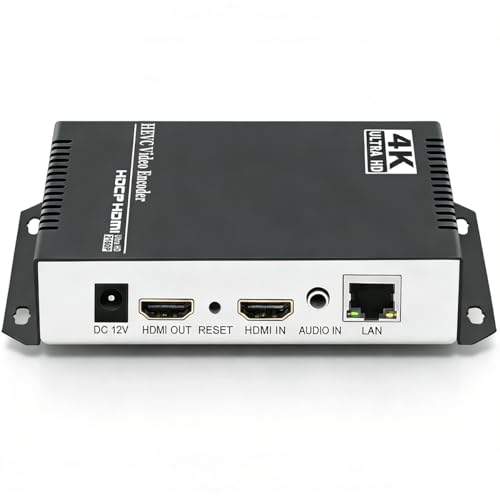
- 4K H.265/H.264 encoding
- Supports multiple streaming protocols
- Four simultaneous stream outputs
Best For: Flexible HDMI-to-IP and multi-platform streaming
All-in-One Production Choice

- HDMI and SDI with dual-input mixing
- 4K streaming and simultaneous recording
- Up to six streaming destinations
Best For: Growing live-production workflows and hybrid inputs
Flexible 4K Starter
UNISHEEN DisplayPort Streaming Encoder

- 4K30 DisplayPort input and output
- Supports up to four simultaneous streams
- Built-in image processing and overlays
Best For: DisplayPort-based beginner streaming setups
Plug-and-Play Gaming Pick

- PC-free streaming with HDMI passthrough
- Supports NDI, SRT, RTMP(S), and RTSP
- Web control from a PC, phone, or tablet
Best For: Console gamers and compact IP video setups
Professional Upgrade Choice
Blackmagic Streaming Encoder 4K
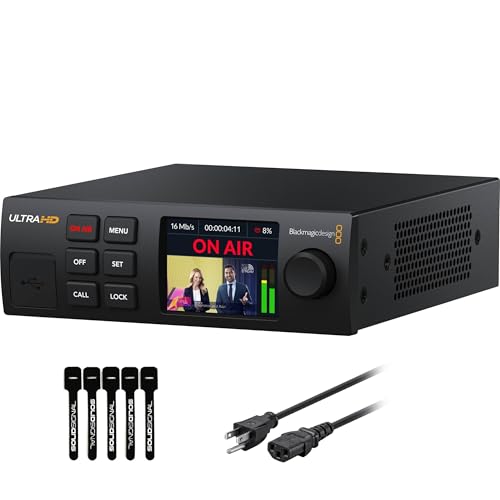
- 4K60 H.264/H.265 streaming
- 12G-SDI input with standards conversion
- Ethernet and mobile auto-failover
Best For: SDI-based beginners entering professional production
Flexible Multistream Encoder
1080p H.265/H.264 HDMI Encoder

- 1080p60 H.265/H.264 hardware encoding
- Supports up to four protocol outputs
- Includes overlays and HDMI or line-in audio
Best For: Beginners who want flexible multistreaming and customization
Simple Setup Pick

- Browser-based setup with no PC software
- Hardware 1080p60 H.265/H.264 encoding
- Compact design with overlay and audio support
Best For: First-time users who prioritize easy browser configuration
Future-Ready 4K Choice
URayCoder 4K HDMI Network Encoder

- Accepts 4K UHD video at up to 30fps
- Supports up to four simultaneous protocol outputs
- Includes overlays, audio options, and broad compatibility
Best For: Growing creators who want 4K support and upgrade flexibility
Flexible 4K Streaming Hub – URayCoder UHE265-1L-4K Encoder
For beginners comparing streaming encoders for beginners, the URayCoder UHE265-1L-4K offers a broad feature set in a compact HDMI-to-network design. It supports 4K input and output, common streaming protocols, and management through an intuitive interface.
Best For: Beginners who want flexible HDMI streaming, multi-platform output, and room to customize their broadcasts.
Pros:
- Supports H.265 and H.264 encoding, with 4K video at up to 30fps.
- Can output up to four streams using protocols such as RTMP, SRT, HLS, RTSP, and UDP.
- Includes overlays, captions, logos, timestamps, cropping, and audio-input options.
- Includes a lifetime warranty and technical support.
Cons:
- Its extensive protocol and customization options may feel overwhelming to first-time users.
- 4K operation is limited to 30fps, while higher frame rates apply at 2K and lower resolutions.
This is a versatile choice for users who expect their setup to grow beyond basic one-platform streaming. Its combination of 4K support, multi-destination output, and accessible management makes it especially adaptable.
Pro SDI Starter – Blackmagic Design Streaming Encoder HD
The Blackmagic Design Streaming Encoder HD is a focused option for beginners researching streaming encoders for beginners who need dependable 1080p streaming from an SDI-based setup. It supports H.264 and H.265 encoding and includes 12G-SDI input with loop output.
Best For: Users building a professional HD workflow around SDI equipment and 1080p streaming.
Pros:
- Supports 1080p output at up to 60fps.
- Offers H.264 and H.265 video codec support.
- Provides 12G-SDI input and loop output for compatible production systems.
- Includes a two-year manufacturer guarantee.
Cons:
- Its stated resolution is limited to 1080p rather than 4K.
- SDI connectivity makes it less suitable for beginners using only consumer HDMI sources.
This encoder is best viewed as a straightforward HD choice for users already working with SDI cameras or production hardware. It avoids unnecessary 4K complexity while retaining modern codec support and smooth 60fps output.
Protocol-Rich 4K Box – URayCoder HDMI IP Encoder
The URayCoder HDMI IP Encoder is a strong candidate for beginners seeking streaming encoders for beginners with extensive network compatibility. It converts HDMI video to IP streams, supports 4K input and output, and works with platforms and servers including YouTube, Facebook, OBS, and Twitch.
Best For: HDMI users who need broad protocol support, multi-platform streaming, and configurable branding tools.
Pros:
- Supports 4K at up to 30fps and up to 120fps at 2K or lower resolutions.
- Works with RTMP(S), RTSP, SRT, HLS, UDP, WebRTC, and other listed protocols.
- Can send as many as four video streams using different protocols.
- Offers overlays, captions, logo placement, timestamps, and image adjustments.
Cons:
- The large number of configuration options may require a learning period.
- 4K frame rate is capped at 30fps.
With its wide protocol range and practical HDMI-to-Ethernet workflow, this model suits creators who want more control than a basic single-platform encoder provides. It is particularly useful when one source must serve several streaming destinations or server types.
All-in-One Production Choice – Magewell Ultra Encode AIO
The Magewell Ultra Encode AIO is a feature-rich option for beginners exploring streaming encoders for beginners who may also need recording and live-production tools. It accepts HDMI or SDI, supports 4K encoding, and combines streaming, recording, overlays, and dual-input layouts in one device.
Best For: Growing creators and small production teams needing HDMI/SDI flexibility, recording, and multi-destination output.
Pros:
- Accepts HDMI and SDI inputs, with picture-in-picture and side-by-side mixing.
- Supports 4K encoding, including HDMI up to 4096×2160p60.
- Streams to up to six destinations using protocols such as RTMP, RTMPS, SRT, NDI|HX, and HLS.
- Can stream and record simultaneously to SD cards, USB storage, or network drives.
Cons:
- Its professional feature set may be more than a basic beginner stream requires.
- The 3.6-pound rack-mountable unit is less compact than a simple encoder box.
This is the most expandable option in the group. Its combination of dual-input production, onboard processing, recording, and flexible networking makes it a practical long-term choice for users moving toward more involved live events.
Flexible 4K Starter – UNISHEEN DisplayPort Streaming Encoder
For beginners comparing streaming encoders for beginners, the UNISHEEN BM3350DP-A-Plus is a compact choice for DisplayPort-based setups. It supports 4K30 input and output, H.264/H.265 encoding, and several network protocols, though its DisplayPort connectivity means it is best matched to compatible sources.
Best For: Beginners building a DisplayPort 4K streaming setup who want multiple protocol options and built-in image controls.
Pros:
- Supports 4K UHD input and output at up to 2160p30.
- Can output up to four streams simultaneously using different protocols.
- Includes de-interlacing, noise reduction, sharpening, rotation, cropping, and text or image overlays.
- Offers lifetime technical support and complimentary firmware upgrades.
Cons:
- Limited to 4K30 rather than 4K60 output.
- Uses DisplayPort connectivity, so HDMI-source users may need additional hardware.
- The range of settings and protocols may be more than a first-time user needs.
This encoder is a practical fit when flexibility matters more than the simplest possible workflow. Its simultaneous streams and processing tools provide room to grow, but beginners should confirm source compatibility before buying.
Plug-and-Play Gaming Pick – Zowietek ZowieBox 4K Encoder
The Zowietek ZowieBox stands out among streaming encoders for beginners because it can handle standalone gaming without an encoding PC. Its compact design, LCD status screen, HDMI passthrough, and web-based controls make it approachable while still supporting NDI, SRT, RTMP(S), and RTSP workflows.
Best For: Beginners streaming console gameplay, live events, webcams, or PTZ-camera sources who want a compact, PC-free encoder.
Pros:
- Supports up to 4K capture with zero-lag HDMI passthrough for gameplay.
- Works as an encoder or decoder and supports NDI|HX3/HX2/HX.
- Can be managed from a PC, phone, or tablet through its web interface.
- Offers USB-C power, PoE, DC output, and a tripod mount.
Cons:
- Encoder and decoder modes cannot run simultaneously.
- Full NDI signals are not supported.
- USB capture-card functionality is currently unavailable.
ZowieBox is one of the more beginner-friendly options here for gaming and flexible IP video setups. Its broad feature set is useful for expansion, but users should understand the NDI and mode limitations before planning a more advanced workflow.
Professional Upgrade Choice – Blackmagic Streaming Encoder 4K
For beginners seeking streaming encoders for beginners with a path into professional production, the Blackmagic Design Streaming Encoder 4K offers substantial headroom. It encodes HD and Ultra HD sources up to 2160p60 through 12G-SDI, supports SRT and RTMP, and can stream without a separate encoding PC.
Best For: Beginners working with SDI cameras or production equipment who want broadcast-oriented features and room to expand.
Pros:
- Supports H.264 and H.265 streaming up to 2160p60.
- Includes 12G-SDI input, loop output, and automatic standards conversion.
- Ethernet and USB-C smartphone tethering provide connection flexibility with auto-failover.
- Offers captions, timecode, REST API control, tally, talkback, and USB-C webcam outputs.
Cons:
- Its SDI-focused design may be excessive for simple webcam or HDMI streaming.
- More advanced controls and production features can create a steeper learning curve.
- It is heavier and larger than the compact encoder options in this roundup.
This is the strongest long-term option for a beginner entering SDI-based production, but it may be unnecessary for casual streaming. Choose it when reliability, 4K60 support, connectivity redundancy, and professional control features justify the larger investment and learning curve.
Flexible Multistream Encoder – 1080p H.265/H.264 HDMI Encoder
For beginners comparing streaming encoders for beginners, this URayCoder model offers a versatile way to send HDMI video over a network without relying on a capture computer. It supports 1080p input and output at up to 60fps, multiple streaming protocols, and browser-based management from connected devices.
Best For: New streamers who want multistreaming, flexible protocol support, and customizable overlays in a single encoder.
Pros:
- Supports H.265/H.264 encoding at up to 1080p60.
- Can output up to four streams using different protocols, including RTMP(S), RTSP, HLS, UDP, and SRT.
- Includes logo, caption, timestamp, cropping, and mirroring options.
- Accepts HDMI or 3.5mm line-in audio and includes lifetime warranty and technical support.
Cons:
- Its broad configuration options may take time for complete beginners to learn.
- It is limited to 1080p rather than 4K input or output.
This is a strong all-around option when your priority is protocol flexibility and simultaneous platform streaming. Beginners should appreciate the included instructions, while more advanced users can take advantage of its overlays and detailed video settings.
Simple Setup Pick – UNISHEEN 1080p60 HDMI Encoder
Among streaming encoders for beginners, the UNISHEEN BM1000 stands out for its browser-based setup and compact design. It provides dedicated 1080p60 H.265/H.264 encoding and can be configured without installing software or drivers.
Best For: First-time users who want a compact encoder with browser configuration and broad network protocol support.
Pros:
- Hardware encoding supports broadcast-quality 1080p60 video.
- Browser setup avoids dedicated software, drivers, and operating-system compatibility issues.
- Supports SRT, RTMP(S), RTSP, UDP, HTTP, HLS, WebRTC, and other distribution protocols.
- Compact form factor, external audio input, and built-in text, logo, and timestamp overlays.
Cons:
- Advanced configurations require basic networking knowledge.
- Includes a one-year limited warranty rather than the lifetime coverage offered by some alternatives.
- The listed power specification is relatively substantial for a compact unit.
The BM1000 is a practical beginner choice when easy browser access matters most. DHCP is enabled by default to help avoid IP conflicts, but users planning more advanced RTMP or RTSP setups should be comfortable with basic network settings.
Future-Ready 4K Choice – URayCoder 4K HDMI Network Encoder
For beginners choosing streaming encoders for beginners with room to grow, this URayCoder model adds 4K HDMI support to a broad network-streaming feature set. It accepts 4K video at up to 30fps and supports up to 120fps at 2K and lower resolutions, making it suitable for higher-resolution sources and demanding motion content.
Best For: Beginners and growing creators who want 4K input support, multistreaming, and extensive protocol compatibility.
Pros:
- Supports 4K UHD input and output at up to 30fps.
- Supports up to 120fps at 2K and lower resolutions.
- Works with RTMP(S), RTSP, SRT, HLS, WebRTC, UDP, ONVIF, and other protocols.
- Offers four-stream output, overlays, adjustable video settings, and HDMI or line-in audio.
Cons:
- 4K operation is limited to 30fps.
- Its extensive settings and protocol list may be more than a basic single-platform stream requires.
- The supplied details do not specify a warranty duration beyond the manufacturer’s stated lifetime support claim.
This is the most capable option of the three for creators using 4K HDMI sources or planning future upgrades. It costs complexity in exchange for more headroom, so it is best suited to beginners willing to learn network-streaming settings rather than seeking the simplest possible setup.
How We Picked the Best Streaming Encoders for Beginners
We focused on encoders that accept common video sources and support practical streaming workflows without requiring a full broadcast setup. Key considerations included HDMI or SDI input compatibility, support for H.264 and H.265, streaming protocols such as RTMP, RTMPS, SRT, RTSP, HLS, and WebRTC, maximum resolution, and ease of network configuration.
We also considered whether an encoder suits a simple one-camera setup or is better for advanced users who need recording, NDI, dual-input mixing, 4K production, or flexible professional connectivity. Specifications can vary by firmware and region, so verify current manufacturer details before purchase.
Quick Comparison
For basic YouTube or Facebook Live use, an HDMI encoder supporting H.264 and RTMP or RTMPS is usually the easiest starting point. H.265 can reduce bandwidth at comparable quality, but platform compatibility is not always as broad. SRT is valuable when network conditions are unpredictable, while RTSP, UDP, HLS, and WebRTC are more useful for IPTV, monitoring, embedded video, or specialized distribution.
Resolution also affects the decision. A 1080p encoder is often sufficient for a webcam, console, lecture, or small event. Choose a 4K-capable model when your source is 4K, you want room for future upgrades, or you need higher-end production features. Confirm the actual output resolution and frame rate rather than relying only on “4K” in a product title.
Key Buying Factors for Streaming Encoders for Beginners
Inputs and Source Compatibility
Check whether the unit accepts HDMI, SDI, DisplayPort, or another connector used by your camera, switcher, computer, or console. If your source uses HDCP or a nonstandard signal, compatibility may require additional equipment.
Protocol and Platform Support
Make sure the encoder supports the destination you plan to use. RTMP or RTMPS is common for major social platforms, while SRT is useful for resilient contribution links. Built-in presets, a browser-based setup page, or clear configuration software can make the first stream much easier.
Resolution, Frame Rate, and Codec
Match the encoder to your source and internet upload speed. H.264 offers broad compatibility; H.265 may deliver better efficiency but can introduce platform or playback limitations. A device advertised as 4K may still have limits on frame rate, bitrate, input type, or simultaneous outputs.
Network and Power Requirements
Ethernet is generally more dependable than Wi-Fi for live broadcasts. Look for the network connection you need, stable power, status indicators, and recovery behavior after an interruption. A compact encoder is only useful if it can remain connected throughout the event.
Who Should Buy Which Streaming Encoders for Beginners?
Choose a simple 1080p HDMI encoder if you are streaming one camera, presentation, console, or laptop and want the least complicated setup. Select a multi-protocol 4K model if you need more resolution, H.265 efficiency, SRT, or flexibility for future projects. Production teams should consider devices with SDI, NDI, recording, dual-input mixing, or simultaneous streaming and capture. Buyers working with IPTV or internal networks should prioritize RTSP, UDP, HLS, and management features over social-platform presets.
Before ordering, confirm input connectors, supported frame rates, required protocols, power accessories, and whether your chosen platform accepts the selected codec and bitrate. Those details matter more than a high-resolution label alone.