
Portable optical disc drives remain useful when a laptop lacks a built-in drive or you need to access software, music, movies, archived files, or writable media. The right model can add convenient CD and DVD support without taking up much space in a laptop bag.
This roundup compares 10 compact external drives, from straightforward DVD writers to more versatile Blu-ray models. Consider connection type, operating-system support, disc formats, portability, and your intended use before choosing.
Best 10 Portable Optical Disc Drives Picks for 2026
Best Overall Convenience

- Slim 14mm, 200g portable design
- USB-powered plug-and-play operation
- Includes CyberLink Media Suite
Best For: Ultrabook and notebook users needing everyday CD/DVD access
Best for Mac Compatibility
Samsung Ultra-Slim 8X DVD Rewriter

- Compatible with Mac OS X
- Ultra-slim 14mm design
- 8x DVD reading and writing
Best For: Mac users wanting a compact personal DVD rewriter
Best for Broad Device Compatibility
Synteryx USB-A & Type-C CD/DVD Drive

- USB-A and Type-C connectors included
- Supports Windows, macOS, and Linux
- Reads and burns common CD/DVD formats
Best For: Mixed-device homes, offices, and computer users
Best for Media Format Support
Transcend TS8XDVDS Portable DVD Writer

- Supports DVD-RAM and dual-layer discs
- Up to 8x DVD and 24x CD speeds
- 13.9mm USB-powered portable design
Best For: Laptop users with varied CD/DVD media collections
Premium Mac/PC Pick
ASUS ZenDrive External DVD Burner

- Slim 13mm design with USB-A and Type-C cables
- Supports M-Disc and up to 8x DVD writing
- Includes disc encryption and hidden-file features
Best For: Mac and Windows users seeking archival and security features
Fast Plug-and-Play Pick
Amicool USB 3.0 External DVD Drive

- USB 3.0 and Type-C support up to 5Gbps
- Compatible with Windows, Linux, and modern Macs
- Slim design with built-in cable and anti-shock features
Best For: Computer users wanting flexible, fast connections
Lightweight Travel Pick

- Only 0.55 pounds and about 0.59 inches thick
- USB-A and USB-C connectivity with plug-and-play setup
- Reads and writes CDs at 24x and DVDs at up to 8x
Best For: Travelers needing a compact computer disc drive
Best All-in-One Connectivity

- CD/DVD reader and burner with USB-A and USB-C support
- Adds USB ports plus SD/TF card readers
- Up to 24x CD and 8x DVD speeds
Best For: Users needing disc access and extra connectivity in one portable drive
Best for Blu-ray Media

- Reads and writes Blu-ray, DVD, and CD media
- Includes USB 3.0, USB-C, USB ports, and SD/TF slots
- Slim design with embedded cable storage
Best For: Users who need portable Blu-ray access on a compatible computer
Best Simple CD/DVD Workhorse
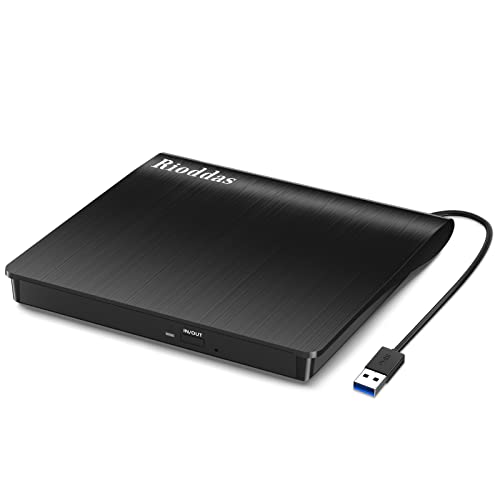
- USB-powered CD/DVD reader and burner
- Physical eject button and embedded cable
- Compatible with Windows, macOS, and Linux computers
Best For: Everyday CD/DVD playback and burning on laptops or desktops
Best Overall Convenience – Dell DW316 Slim DVD RW Drive
The Dell DW316 is a practical choice among portable optical disc drives for laptop users who want straightforward CD and DVD playback or burning. Its slim 14mm profile, 200g weight, USB power, and plug-and-play setup make it easy to use at home or carry in a bag.
Best For: Ultrabook and notebook users who want a lightweight, USB-powered DVD/CD drive with included media software.
Pros:
- Slim, lightweight design for travel and small workspaces
- USB-powered operation requires no batteries or power cord
- Reads and writes CDs and DVDs
- Includes CyberLink Media Suite and a 1-year limited hardware warranty
Cons:
- Uses a USB connection rather than a newer dedicated interface
- Designed primarily for laptops and PC use
The DW316 balances portability and everyday disc functionality well. It is a sensible pick if you want a branded external drive for software installation, media playback, and basic disc burning without a bulky setup.
Best for Mac Compatibility – Samsung Ultra-Slim 8X DVD Rewriter
The Samsung SE-218GN/RSBD is one of the more compact portable optical disc drives for users who need DVD writing in a slim enclosure. It supports Mac OS X, connects through USB, and includes a top-mounted eject button and LED for convenient operation.
Best For: Mac OS X users and anyone seeking an ultra-slim DVD rewriter for personal use.
Pros:
- Ultra-slim 14mm form factor
- Compatible with Mac OS X
- Reads and writes DVDs at up to 8x
- Top-mounted eject button and LED indicator
Cons:
- USB 2.0 interface is older than faster modern connections
- Does not list the broader media-format support of some competing drives
With its compact footprint and Mac OS X compatibility, this Samsung model suits users who prioritize a discreet external DVD writer. Its 8x read/write capability is appropriate for routine media and data tasks.
Best for Broad Device Compatibility – Synteryx USB-A & Type-C CD/DVD Drive
The Synteryx external drive is a flexible option among portable optical disc drives, with both USB-A and Type-C connectivity. It combines CD and DVD reading and burning, supports Windows, macOS, and Linux, and is designed for laptops, desktops, and Mac computers.
Best For: Households or workspaces with different computers and a mix of USB-A and USB-C ports.
Pros:
- Includes USB-A and Type-C connection options
- Supports Windows, macOS, and Linux
- Reads and writes multiple CD and DVD formats
- Includes cables, adapter, protective case, and a 1-year manufacturer warranty
Cons:
- Brand and long-term durability may require closer buyer evaluation
- Requires an available USB port and does not operate as a standalone player
This is the most versatile choice in the group for mixed-device environments. Its dual-connector setup and broad operating-system support reduce compatibility concerns, while the compact design makes it suitable for travel or occasional desk use.
Best for Media Format Support – Transcend TS8XDVDS Portable DVD Writer
Transcend 8K Extra Slim Portable DVD Writer Optical Drive (TS8XDVDS-K) | Ultra-slim, sleek design
Check Price On AmazonThe Transcend TS8XDVDS is a strong option among portable optical disc drives for users who need broad disc-format support in an ultra-slim package. It handles CDs, standard DVDs, dual-layer media, and DVD-RAM, while USB power and plug-and-play installation keep setup simple.
Best For: Laptop users who need support for DVD-RAM, dual-layer discs, and common CD/DVD media.
Pros:
- Supports CD-R/RW, DVD±R/RW, DVD±R DL, and DVD-RAM
- Reads and writes DVDs at up to 8x and CDs at up to 24x
- Ultra-slim 13.9mm design
- Includes CyberLink Power2Go and a 2-year limited warranty
Cons:
- Uses USB 2.0 with a listed transfer rate of 480 megabits per second
- Operating-system details focus on Windows 7–10 and Mac OS X 10.7 or later
The TS8XDVDS stands out when media compatibility matters more than having the newest interface. Its support for dual-layer and DVD-RAM discs gives it extra flexibility for archiving, media writing, and accessing older disc collections.
Premium Mac/PC Pick – ASUS ZenDrive External DVD Burner
The ASUS ZenDrive is a slim, practical choice among portable optical disc drives for Mac and Windows laptops or desktops. Its 13mm profile, included USB 2.0 and Type-C cables, 8x DVD performance, and M-Disc support make it suited to everyday playback, burning, and archival use.
Best For: Mac and Windows users who want a compact drive with M-Disc support and added disc-security features.
Pros:
- Includes both USB 2.0 and Type-C cables.
- Supports DVD writing and reading at up to 8x, plus CD speeds up to 24x.
- Offers M-Disc support and DISC Encryption II for password-controlled or hidden files.
- Compatible with Windows and Mac OS X 10.6 or later.
Cons:
- Uses USB 2.0 rather than USB 3.0, so transfers may be slower than newer alternatives.
- Its listed operating-system support may not cover every current platform.
The ZenDrive stands out when disc longevity and security matter as much as portability. It is a well-rounded option for personal, business, or gaming use, although users seeking the fastest USB transfers may prefer a USB 3.0 model.
Fast Plug-and-Play Pick – Amicool USB 3.0 External DVD Drive
The Amicool combines USB 3.0 and Type-C connectivity in a portable design, making it a flexible option among portable optical disc drives. It supports common CD and DVD formats, plug-and-play setup, and compatibility with Windows, macOS, and Linux computers.
Best For: Laptop and desktop users who want broad computer compatibility, dual connectors, and faster USB 3.0 transfers.
Pros:
- Provides both USB 3.0 and Type-C interfaces with data speeds up to 5Gbps.
- Supports up to 8x DVD reading and 24x CD reading/writing.
- Works with Windows, Linux, and Intel or Apple Silicon Macs.
- Built-in cable, slim body, error correction, and anti-shock features improve portability.
Cons:
- Does not support Blu-ray, DVD-RAM, ChromeOS, or mobile devices such as iPad and iPhone.
- Direct connection is recommended; hubs and extension cables may cause power or recognition problems.
- Apple DVD Player is not supported according to the supplied notes.
The Amicool is a strong everyday choice for computer users who value connection flexibility and quick setup. Its power requirements and platform exclusions are worth checking before purchase, especially for Mac users and desktop owners.
Lightweight Travel Pick – Compact USB 3.0 CD/DVD Drive
This compact external CD/DVD drive is designed for portability, with a 0.59-inch thickness, 0.55-pound weight, and built-in cable. It is a straightforward option among portable optical disc drives, offering USB-A and USB-C connectivity, plug-and-play operation, and up to 8x DVD or 24x CD performance.
Best For: Travelers and laptop users who need a lightweight drive for reading, burning, or installing software on compatible computers.
Pros:
- Lightweight 0.55-pound body measures about 0.59 inches thick.
- Includes USB-A and USB-C interfaces with up to 5Gbps transfer support.
- Offers plug-and-play operation without a separate driver installation.
- Supports up to 8x DVD and 24x CD reading or writing.
Cons:
- Not compatible with Chromebooks, car platforms, tablets, or televisions.
- Plastic enclosure may be less substantial than an aluminum-bodied alternative.
- Built-in cable design cannot be detached for replacement or storage.
The drive prioritizes low weight and simple connectivity, making it convenient to carry with a laptop. It is best suited to basic CD and DVD tasks rather than users who need Blu-ray support or compatibility with non-computer devices.
Best All-in-One Connectivity – 8-in-1 USB CD/DVD Drive
If you need portable optical disc drives for more than basic disc playback, this 8-in-1 model combines CD/DVD reading and burning with USB expansion and card readers. Its USB 3.0 connection, USB-C support, and broad computer compatibility make it a versatile choice for laptops and desktops.
Best For: Users who want a portable CD/DVD burner with extra USB ports and SD/TF card transfer capabilities.
Pros:
- Combines CD/DVD reading and burning with one USB 3.0 port, three USB 2.0 ports, USB-C, and SD/TF card slots.
- Supports USB-A and USB-C connections and works with compatible Windows, macOS, and Linux computers.
- Offers up to 24x CD and 8x DVD read speeds, with up to 24x CD and 8x DVD writing speeds.
- Includes plug-and-play operation, error correction, and a one-year warranty.
Cons:
- The SD and TF card slots cannot be used simultaneously.
- Some Windows 10/11 systems may need the extra power cable if the drive is not recognized.
- It does not support Blu-ray discs, smartphones, tablets, TVs, cars, or projectors.
This model stands out when connectivity matters as much as disc access. Its built-in ports add useful flexibility, but buyers should account for possible power-related recognition issues on some Windows laptops.
Best for Blu-ray Media – 5-in-1 Portable Blu-ray Drive
Among portable optical disc drives, this BUNUD model is the option to consider when Blu-ray support is essential. It reads and writes Blu-ray, DVD, and CD media, while its USB 3.0 and USB-C cables make it suitable for compatible Windows and Mac computers.
Best For: Laptop and desktop users who need portable Blu-ray, DVD, and CD playback, burning, and data backup.
Pros:
- Supports Blu-ray, DVD, and CD reading and writing for a broad range of disc tasks.
- Includes two USB ports and SD/TF card slots for added file-transfer and connectivity options.
- Offers both USB and USB-C connections with plug-and-play setup and no driver installation.
- Slim design and an embedded cable make it easier to carry and store.
Cons:
- It cannot play 4K Ultra HD discs.
- It is not compatible with iPads, tablets, projectors, TVs, cars, smartphones, or Chrome OS.
- Blu-ray video read speed is listed at up to 6x, with 2x specified for video playback.
This is the strongest match for buyers who specifically need Blu-ray functionality in a portable format. Confirm your device and disc requirements first, especially if you expect 4K Ultra HD playback.
Best Simple CD/DVD Workhorse – Rioddas USB 3.0 CD/DVD Drive
This Rioddas model is a straightforward choice among portable optical disc drives for reading and burning CDs and DVDs. It uses USB power, includes a built-in cable, and adds practical touches such as a physical eject button and a textured housing.
Best For: Buyers seeking an uncomplicated CD/DVD reader and burner for compatible laptops and desktops.
Pros:
- Plug-and-play setup uses USB power without an external adapter or driver.
- USB 3.0 supports data transfer rates up to 5Gbps and is backward compatible with USB 2.0.
- Physical eject button can release a disc even when the computer does not recognize the drive.
- Embedded cable design helps keep the connection cable with the compact drive.
Cons:
- It does not support Blu-ray or 4K discs.
- It is not compatible with ChromeOS, smartphones, tablets, TVs, projectors, or vehicles.
- Desktop users may get best results from a high-power rear USB port.
Choose this drive if you want reliable everyday CD/DVD functionality without extra card readers or a more complex port hub. Its eject button and cable storage improve convenience, while compatibility limits should be checked before purchase.
How We Picked These Portable Optical Disc Drives
We focused on external drives that balance everyday usability, portability, compatibility, and useful disc features. The selection includes established models from Dell, Samsung, Transcend, and ASUS, alongside versatile third-party drives with USB-A, USB-C, or both connection types.
We also considered whether each drive supports CD and DVD reading or writing, whether it offers features such as M-Disc compatibility, and whether its slim design suits travel. Blu-ray capability is included for shoppers who need higher-capacity media rather than only standard CD or DVD access.
Quick Comparison
- Best for simple plug-and-play use: Dell DW316 or Samsung SE-218GN.
- Best for Mac and Windows flexibility: ASUS ZenDrive or a dual-interface USB-A/USB-C model.
- Best for extra portability: Transcend TS8XDVDS-K and other ultra-slim drives.
- Best for modern laptops: A drive with native USB-C, or one supplied with both connector types.
- Best for Blu-ray media: The external Blu-ray drive in this selection.
Key Buying Factors for Portable Optical Disc Drives
Connection and Power
Check the ports on your computer before buying. USB-A remains common on desktops and older laptops, while newer systems may rely on USB-C. A dual-connector drive is often the most convenient choice. Most compact drives draw power through USB, but some computers may provide insufficient power through a hub, so connecting directly to the laptop is preferable.
Disc Formats and Writing Support
Confirm that the drive handles the media you plan to use. CD/DVD readers can play or copy standard discs, while DVD writers add the ability to create data, music, or video discs. M-Disc support may appeal to users creating archival media, but both the drive and compatible discs are required. Blu-ray models are necessary for reading or writing BD media.
Operating-System Compatibility
Many external drives work with Windows and macOS, but included software may be platform-specific or unavailable on newer operating systems. Check current system requirements, especially if you use a recent Mac, a computer with only USB-C ports, or a managed work laptop.
Size, Noise, and Intended Use
Slim drives are easier to carry, while sturdier enclosures may better suit frequent desktop use. Optical drives can produce audible spinning and vibration during high-speed operation. If you mainly archive files or watch occasional DVDs, prioritize reliable connectivity and compactness over maximum speed.
Who Should Buy Which Portable Optical Disc Drives?
Choose a basic external DVD writer if you need occasional software installation, disc playback, or file burning at a low cost. Pick a dual-port USB-A/USB-C model if you switch between older and newer computers. Travelers should favor the lightest slim drive with a short, durable cable. For long-term disc archiving, consider M-Disc support and verify the software workflow first. Finally, choose the Blu-ray option only if you own Blu-ray media or need its greater storage capacity; a standard DVD drive is simpler and usually sufficient for CDs and DVDs.