
Choosing a new router does not have to mean paying for features your household will never use. The best WiFi routers under $300 balance speed, coverage, device capacity, security, and long-term value for your specific home.
This roundup includes affordable WiFi 6, WiFi 6E, WiFi 7, and older but capable dual- and tri-band models, making it easier to match your budget and internet plan with the right networking hardware.
Best 10 Wifi Routers Under 300 Picks for 2026
Best Wi-Fi 7 Speed

- Wi-Fi 7 with MLO, Multi-RUs, and 4K-QAM
- Up to 2,400 sq. ft. and 90 devices
- Two 2.5 Gbps ports plus three Gigabit LAN ports
Best For: Wi-Fi 7 households and multi-gig internet
Best for Small Homes

- Wi-Fi 6 speeds up to 1.8 Gbps
- Up to 1,500 sq. ft. for 20 devices
- Four Gigabit LAN ports and app-based setup
Best For: Apartments and small homes
Best Value Wi-Fi 7

- Wi-Fi 7 with MLO, Multi-RUs, and 4K-QAM
- Up to 2,000 sq. ft. and 60 devices
- Two 2.5 Gbps ports plus three Gigabit LAN ports
Best For: Multi-gig households wanting an affordable Wi-Fi 7 upgrade
Best for 6 GHz Connectivity

- Tri-band Wi-Fi 6E with a dedicated 6 GHz band
- Up to 5,400 Mbps combined throughput
- EasyMesh, VPN support, and HomeShield features
Best For: Wi-Fi 6E gaming, streaming, and busy households
Best Value WiFi 6

- WiFi 6 AX1800 dual-band performance
- Four antennas with beamforming for coverage
- VPN server and WPA3 support
Best For: Affordable WiFi 6 home networking
Best for Security Features

- WiFi 6 with MU-MIMO and OFDMA
- Subscription-free AiProtection security
- Five gigabit ports and Instant Guard VPN
Best For: Security-conscious homes and smart networks
Best Budget WiFi 5

- AC1750 dual-band wireless networking
- Advertised coverage up to 2,500 square feet
- Parental controls, QoS, and USB print server
Best For: Budget-conscious everyday home networks
Best Budget Coverage
TP-Link Archer A54 AC1200 Router

- Dual-band Wi-Fi up to 1,200 Mbps total
- Four antennas cover up to 1,000 square feet
- WPA3, EasyMesh, app control, and AP mode
Best For: Smaller homes seeking affordable, easy-to-manage Wi-Fi
Best for Busy Homes
TP-Link Archer A20 AC4000 Tri-Band Router
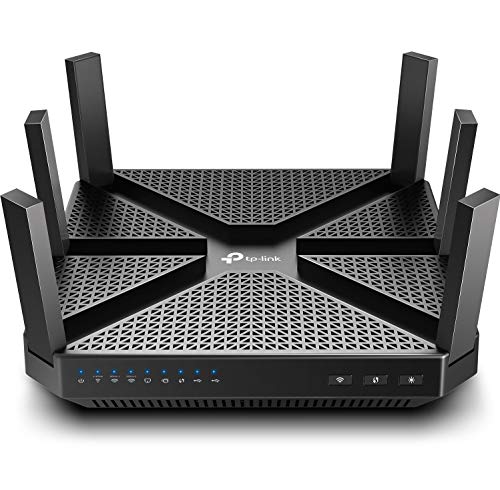
- Tri-band AC4000 Wi-Fi for busy networks
- 1.8 GHz quad-core processor and MU-MIMO
- Gigabit ports, RangeBoost, and HomeCare security
Best For: Larger homes with streaming, gaming, and many connected devices
Best Wired Performance
TP-Link Archer A6 AC1200 Gigabit Router

- AC1200 dual-band Wi-Fi with 900 Mbps on 5 GHz
- Four gigabit LAN ports for wired devices
- WPA3, MU-MIMO, AP mode, and OneMesh support
Best For: Homes needing affordable Wi-Fi plus gigabit wired connectivity
Best Wi-Fi 7 Speed – TP-Link Archer BE400
For shoppers comparing wifi routers under 300, the TP-Link Archer BE400 stands out with Wi-Fi 7 features, multi-gig wired ports, and strong stated capacity for busy households. It is a dual-band router, so it does not include a 6 GHz band, but compatible Wi-Fi 7 devices can use Multi-Link Operation, Multi-RUs, and 4K-QAM.
Best For: Homes with Wi-Fi 7 devices, multi-gig internet, streaming, gaming, and many connected devices.
Pros:
- Wi-Fi 7 features include MLO, Multi-RUs, and 4K-QAM.
- Up to 5,764 Mbps on 5 GHz and 688 Mbps on 2.4 GHz.
- Coverage is rated up to 2,400 square feet for as many as 90 devices.
- Includes a 2.5 Gbps WAN/LAN port, a 2.5 Gbps LAN port, and three 1 Gbps LAN ports.
Cons:
- Dual-band design does not provide a 6 GHz band.
- Requires a separate modem.
- EasyMesh compatibility does not extend to TP-Link Deco systems.
The Archer BE400 is a forward-looking choice when you want Wi-Fi 7 performance and faster-than-gigabit wired networking without moving to a tri-band model. Its capabilities are most useful when your devices and internet service can take advantage of them.
Best for Small Homes – NETGEAR Nighthawk R6700AX
The NETGEAR Nighthawk R6700AX is a straightforward option among wifi routers under 300 for apartments and small homes. Its Wi-Fi 6 connection supports everyday streaming, video calls, browsing, and smart-home devices, while the Nighthawk app simplifies setup and network management.
Best For: Apartments and small homes with up to 20 connected devices and standard broadband service.
Pros:
- Wi-Fi 6 speeds up to 1.8 Gbps across the 2.4 GHz and 5 GHz bands.
- Rated coverage reaches up to 1,500 square feet.
- Four Gigabit LAN ports support wired consoles, computers, streamers, and storage devices.
- Includes WPA3, automatic firmware updates, and a guest network without requiring a subscription.
Cons:
- Coverage and capacity are limited compared with routers designed for larger homes or more devices.
- NETGEAR Armor protection continues by subscription after the 30-day trial.
- Requires an existing modem or gateway.
The R6700AX focuses on reliable basics rather than advanced multi-gig networking. It makes sense for a smaller space where easy setup, four wired ports, and dependable Wi-Fi 6 matter more than maximum throughput.
Best Value Wi-Fi 7 – TP-Link Archer BE230
The TP-Link Archer BE230 brings several Wi-Fi 7 advantages to the wifi routers under 300 category while keeping the design dual-band. It combines speeds up to 3,600 Mbps, two 2.5 Gbps connections, EasyMesh support, and coverage rated for up to 60 devices.
Best For: Users seeking Wi-Fi 7 features, multi-gig wired connectivity, and a practical upgrade for a medium-size home.
Pros:
- Supports Wi-Fi 7, Multi-Link Operation, Multi-RUs, and 4K-QAM.
- Rated speeds reach 2,882 Mbps on 5 GHz and 688 Mbps on 2.4 GHz.
- Includes one 2.5 Gbps WAN/LAN port, one 2.5 Gbps LAN port, and three Gigabit LAN ports.
- Coverage is rated up to 2,000 square feet for up to 60 devices, with EasyMesh expansion.
Cons:
- Dual-band design does not support 6 GHz.
- Requires a separate modem for most internet providers.
- Actual performance varies with distance, walls, interference, and device compatibility.
The Archer BE230 is a balanced pick for buyers who want Wi-Fi 7 and multi-gig Ethernet without needing a 6 GHz network. Its mesh compatibility also gives you an upgrade path if one router does not cover the entire home.
Best for 6 GHz Connectivity – TP-Link Archer AXE75
For shoppers comparing wifi routers under 300 who specifically want access to 6 GHz, the TP-Link Archer AXE75 offers tri-band Wi-Fi 6E with up to 5,400 Mbps combined throughput. The additional band is designed to provide more bandwidth and lower latency for compatible devices, while OFDMA helps the router handle simultaneous connections.
Best For: Wi-Fi 6E devices, responsive gaming and video calls, and households needing tri-band capacity.
Pros:
- Tri-band Wi-Fi 6E includes 2.4 GHz, 5 GHz, and 6 GHz bands.
- Up to 5,400 Mbps combined speeds, including 2,402 Mbps on both 6 GHz and 5 GHz.
- OFDMA and tri-band operation increase capacity for multiple devices.
- Supports EasyMesh, VPN server and client functions, and basic HomeShield security features.
Cons:
- The 2.5 Gbps WAN port noted in the product highlight is not reflected in the listed 1,000 Mbps LAN bandwidth.
- The 6 GHz advantage requires compatible Wi-Fi 6E devices.
- Requires a modem for most internet providers.
The Archer AXE75 is a strong fit when the priority is tri-band performance and a dedicated 6 GHz connection rather than Wi-Fi 7. It also offers useful network-management and VPN features for buyers who want more control than a basic router provides.
Best Value WiFi 6 – TP-Link Archer AX21
For shoppers comparing wifi routers under 300, the TP-Link Archer AX21 is a practical WiFi 6 option for everyday streaming, gaming, downloads, and connected-home use. Its dual-band AX1800 design supports up to 1.8 Gbps combined bandwidth, though actual performance depends on distance, obstacles, and network conditions. A separate modem is required.
Best For: Homes that want an affordable WiFi 6 router with broad coverage, device-management features, and VPN server support.
Pros:
- WiFi 6 with OFDMA helps communicate with multiple devices more efficiently.
- Four high-gain antennas, beamforming, and an advanced front-end module support reliable coverage.
- Includes WPA3 support, OpenVPN and PPTP VPN servers, and Alexa compatibility.
- Five gigabit ports provide fast wired connectivity.
Cons:
- It is dual-band and does not support the 6 GHz band.
- A separate cable or DSL modem is needed for internet access.
- Advertised speeds and coverage vary with walls, distance, and other conditions.
The Archer AX21 stands out as a balanced pick for households upgrading to WiFi 6 without needing a 6 GHz network. Its coverage-oriented hardware and security features make it a versatile choice for routine home networking.
Best for Security Features – ASUS RT-AX1800S
Among wifi routers under 300, the ASUS RT-AX1800S offers a strong feature mix for streaming, gaming, and smart-home networks. It uses WiFi 6 with MU-MIMO, OFDMA, and 1024-QAM, plus five gigabit ports for wired devices. Actual throughput and coverage depend on the network environment.
Best For: Households prioritizing subscription-free network security, parental controls, and flexible management features.
Pros:
- WiFi 6 supports MU-MIMO and OFDMA for improved efficiency with multiple devices.
- AiProtection Classic provides commercial-grade network security features without a subscription.
- ASUS Instant Guard offers one-click secure VPN access away from home.
- Four gigabit LAN ports and one gigabit WAN port support fast wired connections.
Cons:
- It is a dual-band router and does not provide 6 GHz connectivity.
- Coverage and real-world speeds vary with building materials, traffic, and network overhead.
- A separate modem may be required depending on the internet setup.
The RT-AX1800S is a sensible choice when built-in security and remote-access tools matter as much as wireless speed. Its AiMesh compatibility also gives buyers a path to an extendable ASUS network.
Best Budget WiFi 5 – TP-Link Archer A7
TP-Link Archer AC1750 WiFi Router - Dualband Gigabit, Qualcomm inside, Works with Alexa(A7), Black
Check Price On AmazonFor buyers seeking wifi routers under 300 at a lower feature tier, the TP-Link Archer A7 is a straightforward dual-band AC1750 option. Its Qualcomm processor, advertised coverage of up to 2,500 square feet, and gigabit-class wireless rating suit everyday browsing, streaming, gaming, and connected devices. It requires a compatible cable or DSL modem.
Best For: Budget-focused households that need dependable dual-band WiFi, parental controls, and basic wired networking.
Pros:
- AC1750 dual-band wireless performance supports up to 1,750 Mbps combined data rate.
- Advertised maximum range reaches up to 2,500 square feet.
- Includes parental controls, QoS, internet security, and Alexa compatibility.
- USB print-server functionality adds flexibility for compatible printers.
Cons:
- It uses WiFi 5 rather than the newer WiFi 6 standard.
- The supplied notes do not list WiFi 6 efficiency features such as OFDMA.
- Coverage and wireless performance can vary by home layout and interference.
The Archer A7 remains a practical choice for buyers who want familiar dual-band networking and useful household controls without moving to a WiFi 6 model. It is best suited to standard home use rather than newer high-density wireless demands.
Best Budget Coverage – TP-Link Archer A54 AC1200 Router
The TP-Link Archer A54 is a practical choice for shoppers comparing wifi routers under 300 for a smaller home or apartment. Its dual-band Wi-Fi 5 connection provides up to 867 Mbps on 5 GHz and 300 Mbps on 2.4 GHz, while four external antennas are designed to cover up to 1,000 square feet.
Best For: Budget-conscious households that want straightforward setup, app management, and essential wireless coverage.
Pros:
- Dual-band speeds up to 1,200 Mbps total.
- Four external antennas and stated coverage of up to 1,000 square feet.
- Includes WPA3 security, parental controls, guest Wi-Fi, and Access Point mode.
- Supports EasyMesh expansion and management through the TP-Link Tether app.
Cons:
- Uses 10/100 Mbps Ethernet ports rather than gigabit ports.
- Wi-Fi 5 dual-band design does not support the 6 GHz band.
- A separate modem is required for most internet providers.
The Archer A54 keeps the feature set focused and useful for everyday browsing, streaming, and connected devices. It is most compelling when coverage needs are moderate and wired network speeds above 100 Mbps are not a priority.
Best for Busy Homes – TP-Link Archer A20 AC4000 Tri-Band Router
For shoppers evaluating wifi routers under 300 for heavy household traffic, the TP-Link Archer A20 offers tri-band Wi-Fi 5 with AC4000-class throughput. Its 1.8 GHz quad-core processor, MU-MIMO, and RangeBoost features are designed to help manage multiple simultaneous connections across a larger home.
Best For: Larger or device-heavy households that stream 4K video, game, and connect several devices at once.
Pros:
- Tri-band AC4000 wireless design for multiple connected devices.
- 1.8 GHz quad-core 64-bit processor helps handle concurrent requests.
- MU-MIMO, RangeBoost, beamforming, and gigabit ports support demanding home networks.
- HomeCare security and parental controls add network-management features.
Cons:
- It is a Wi-Fi 5 router and does not provide 6 GHz connectivity.
- The supplied notes list WPA2-PSK and WPS rather than WPA3 security.
- A separate modem is needed for an internet connection.
The Archer A20 is the performance-oriented option in this group, particularly for busy four-bedroom homes and households with many active clients. Its tri-band layout and processing hardware are useful advantages, though newer Wi-Fi generations may offer more current wireless features.
Best Wired Performance – TP-Link Archer A6 AC1200 Gigabit Router
The TP-Link Archer A6 is a strong fit for shoppers seeking wifi routers under 300 with gigabit wired connectivity. This dual-band Wi-Fi 5 router pairs up to 300 Mbps on 2.4 GHz with up to 900 Mbps on 5 GHz, plus four gigabit LAN ports for compatible wired devices and internet plans.
Best For: Homes that want affordable dual-band Wi-Fi with faster wired connections for computers, consoles, cameras, or streaming devices.
Pros:
- AC1200 dual-band performance with up to 900 Mbps on 5 GHz.
- Four gigabit LAN ports support faster wired networking.
- Beamforming, four external antennas, and MU-MIMO help support coverage and multiple devices.
- Includes WPA3, parental controls, Access Point mode, and OneMesh compatibility.
Cons:
- It uses Wi-Fi 5 and does not support the 6 GHz band.
- Dual-band capacity may be less suited to especially crowded networks than a tri-band model.
- A separate modem is required for most internet service providers.
The Archer A6 balances a modest AC1200 wireless rating with a particularly useful set of gigabit LAN ports. It is a sensible pick when wired performance matters as much as everyday wireless coverage and OneMesh expansion is appealing.
How We Picked the Best Wifi Routers Under 300
We focused on routers that offer strong value at their typical price, prioritizing wireless standard, advertised throughput, band configuration, wired ports, coverage potential, security features, and ease of setup. The list spans WiFi 5 through WiFi 7 so shoppers can compare current performance with lower-cost options.
We also considered practical differences between dual-band and tri-band designs, support for mesh expansion, parental controls, VPN features, and the number of connected devices each class of router is suited to handle. Advertised speeds are theoretical; real-world results depend on your internet plan, home layout, interference, and client devices.
Quick Comparison
- Best for newer devices: WiFi 7 models such as the TP-Link BE6500 and Archer BE230.
- Best balance of performance and price: WiFi 6 routers such as the NETGEAR R6700AX, TP-Link Archer AX21, and ASUS RT-AX1800S.
- Best for extra wireless capacity: Tri-band models, including the TP-Link AXE5400 and AC4000.
- Best for basic broadband plans: AC1200 and AC1750 routers, including the Archer A54, Archer A6, and Archer A7.
Key Buying Factors for WiFi Routers Under $300
Wireless Standard and Speed
WiFi 6 is a strong fit for most homes, especially when multiple phones, laptops, televisions, and smart-home devices share the connection. WiFi 6E adds access to the less-congested 6GHz band, while WiFi 7 is more attractive for newer devices, faster broadband, and longer-term upgrade value.
Coverage and Home Layout
Router placement matters as much as the specifications. A central, elevated position usually improves coverage. Large or multi-level homes may benefit more from a mesh-compatible router or a dedicated mesh system than from a single high-powered unit.
Band Configuration and Device Load
Dual-band routers are simpler and often less expensive. Tri-band models can reduce congestion in busy homes, but their advantages are most noticeable when you have many active devices or compatible clients.
Ports, Security, and Controls
Check the number and speed of Ethernet ports if you connect gaming consoles, desktop computers, storage, or access points. Also compare subscription requirements for security tools, parental controls, VPN support, firmware updates, and app-based management.
Who Should Buy Which Wifi Routers Under 300?
Choose WiFi 7 if you have a fast broadband plan, newer phones and laptops, or want a router that is less likely to feel outdated soon. Choose WiFi 6 for the best all-around combination of efficiency, compatibility, and value in an average household.
Choose a tri-band router for crowded networks, many simultaneous users, or a home with heavy streaming and gaming activity. Choose an AC1200 or AC1750 model if your internet plan is modest and your priority is dependable basic connectivity rather than maximum wireless speed.
Before buying, confirm your modem or gateway setup, broadband speed, home size, and return policy. A router that matches those factors will generally deliver better value than one chosen solely by its highest advertised number.