
The best dynamic microphone for podcasting can make voices sound fuller and clearer while helping reduce room noise, keyboard sounds, and other distractions. The right model depends on your recording setup, budget, connection needs, and how much control you want over your audio.
We selected 10 USB, XLR, and hybrid microphones for different podcasting, streaming, and recording workflows. Use the guide below to compare features and choose a microphone that fits your current setup without limiting future upgrades.
Best 10 Dynamic Microphone for Podcasting Picks for 2026
Best Hybrid Starter

- USB-C and XLR connectivity
- Includes stand, windscreen, and cables
- Unidirectional dynamic design
Best For: New podcasters wanting simple USB-C recording and an XLR upgrade path
Best Professional Vocal Detail
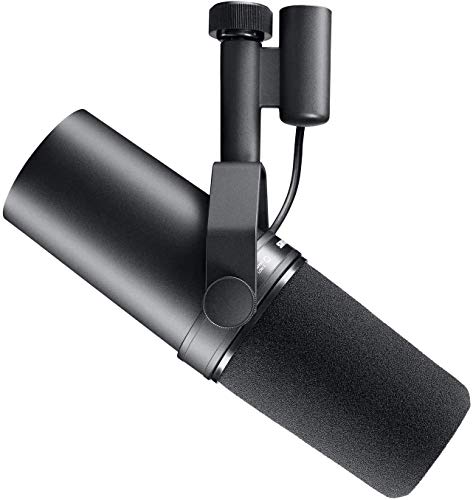
- Warm, balanced vocal capture
- Cardioid pattern and built-in pop filtering
- Rugged, shielded XLR construction
Best For: Experienced creators with an XLR setup and ample gain
Best Broadcast Value

- Speech-tuned dynamic capsule
- Internal pop filter and shock mounting
- Durable all-metal construction
Best For: XLR-based podcasters seeking focused broadcast sound
Best USB Controls

- Plug-and-play computer and mobile recording
- Noise reduction and mute controls
- Zero-latency headphone monitoring
Best For: Creators needing flexible USB recording across multiple devices
Studio Voice Pick

- XLR-only dynamic microphone
- Voice-isolation design with cardioid pattern
- Rugged all-metal build
Best For: Podcasters building an interface-based recording setup
Flexible Creator Pick

- USB and XLR connectivity
- USB mute, gain, and headphone controls
- Cardioid pickup with RGB lighting
Best For: Beginners, gamers, and creators planning a future XLR upgrade
Smart Workflow Pick

- USB-C and XLR outputs
- Auto level and real-time denoising
- Customizable LED touch panel
Best For: Podcasters and streamers wanting automated audio control
Flexible USB/XLR Pick

- USB and XLR connectivity
- Built-in mute, gain, and monitoring controls
- Includes windscreen and shock mount
Best For: Creators moving from USB recording toward XLR
Complete Desktop Kit

- USB/XLR dual-mode operation
- Includes stand, shock mount, pop filter, and cables
- Zero-latency USB monitoring
Best For: New podcasters wanting an all-in-one setup
Wireless Two-Person Option

- Wireless, USB, and XLR connectivity
- Supports two wireless mics with separate tracks
- Up to 60m range and 60 hours of battery life
Best For: Mobile podcasters and interview recording
Best Hybrid Starter – Samson Q2U USB/XLR
The Samson Q2U is a practical dynamic microphone for podcasting when you want both simple computer recording and a future-ready XLR connection. Its USB-C connectivity, unidirectional pickup pattern, and included desktop accessories make it a convenient starter setup.
Best For: New podcasters who want USB-C plug-and-play recording with the option to use an XLR interface later.
Pros:
- Offers both USB-C and XLR connectivity.
- Includes a tripod desktop stand, mic clip, windscreen, and both cables.
- Unidirectional dynamic design suits focused voice recording.
Cons:
- Frequency range is listed as 50Hz–15kHz.
- USB-C recording requires a compatible USB-C interface or connection.
Choose the Q2U if flexibility and included setup gear matter more than advanced studio features. It is a straightforward option for recording directly to a computer while preserving an upgrade path to traditional audio equipment.
Best Professional Vocal Detail – Shure SM7B
The Shure SM7B is a professional dynamic microphone for podcasting built for controlled, close-mic vocal work. Its cardioid pattern, built-in pop filtering, electromagnetic shielding, and rugged metal construction support clean, consistent speech capture through an XLR setup.
Best For: Experienced podcasters, streamers, and recording creators with an XLR interface or mixer and sufficient gain.
Pros:
- Produces warm, balanced vocals with a wide frequency response.
- Cardioid pickup, air suspension, and shielding help reduce room interference and hum.
- Includes close-talk and foam windscreens plus a locking yoke mount.
Cons:
- Requires an XLR connection and at least 60dB of gain is recommended.
- Interface or mixer is not included.
- Heavier than the other listed microphones at 2.7 pounds.
The SM7B makes the most sense when you already have suitable XLR hardware and want extensive control over a polished vocal sound. It is less convenient for beginners seeking direct USB recording.
Best Broadcast Value – RØDE PodMic
The RØDE PodMic is a focused dynamic microphone for podcasting with a broadcast-tuned capsule and cardioid pickup pattern. Its internal pop filter, integrated shock mounting, and all-metal construction help simplify a durable XLR desk setup.
Best For: Podcasters who use an XLR interface, mixer, or RØDECaster and want speech-focused sound with built-in protection.
Pros:
- Broadcast-quality dynamic capsule is tuned for speech.
- Internal pop filter and shock mounting help manage plosives and desk thumps.
- All-metal body is designed for long-term durability.
Cons:
- Requires an XLR interface or mixer; it is not a USB microphone.
- Its table-oriented form factor may require a suitable mounting arrangement.
The PodMic is a sensible choice for creators who already work with XLR equipment and want a purpose-built broadcast microphone. Its integrated protection reduces the need for extra accessories at the recording position.
Best USB Controls – ZealSound K66 USB Mic
The ZealSound K66 is a feature-rich USB microphone for podcasting aimed at creators who want direct computer and mobile recording. Its condenser capsule, noise-reduction mode, mute control, adjustable volume and echo, and zero-latency headphone monitoring provide hands-on control without requiring an interface.
Best For: Multi-platform creators recording podcasts, streams, calls, and videos on computers, tablets, or compatible phones.
Pros:
- Plug-and-play USB operation supports Windows, Mac, PS4, PS5, and selected mobile devices.
- Includes USB-C and Lightning adapters for compatible phones and tablets.
- Provides noise reduction, mute, gain, echo, and headphone monitoring controls.
Cons:
- Uses a condenser capsule rather than a dynamic design.
- Its many controls may be more than a simple voice-recording setup requires.
- Noise reduction mode is intended to reduce background sounds, not eliminate every room noise.
The K66 is best when convenience and onboard controls are priorities, especially for creators moving between desktop and mobile recording. Consider a dynamic model instead if minimizing room sensitivity is your main goal.
Studio Voice Pick – Shure MV7X
The Shure MV7X is a focused dynamic microphone for podcasting designed for creators who already use—or plan to add—an audio interface or mixer. Its XLR-only connection, cardioid pattern, and voice-isolation design suit spoken-word recording in a studio or creator setup.
Best For: Podcasters and vocal creators who want a durable, broadcast-inspired XLR microphone.
Pros:
- Cardioid design and integrated shock mount help reduce room noise, distractions, and vibrations.
- XLR output provides signal-control flexibility with compatible interfaces and mixers.
- All-metal construction includes an adjustable yoke mount and 3/8-inch adapter.
Cons:
- XLR-only connectivity requires a compatible audio interface or mixer.
- An XLR cable is not listed among the supplied accessories.
The MV7X is a straightforward choice for a permanent recording setup. It avoids extra USB features in favor of a rugged build and focused vocal capture, making it especially suitable for users comfortable with XLR equipment.
Flexible Creator Pick – FIFINE AmpliGame AM8
The FIFINE AmpliGame AM8 is a versatile dynamic microphone for podcasting that supports both USB and XLR connections. USB provides plug-and-play convenience with mute, headphone monitoring, gain control, and RGB features, while XLR offers an upgrade path to an interface or mixer.
Best For: Beginner creators, gamers, and podcasters who want USB convenience with optional XLR flexibility.
Pros:
- USB and XLR connectivity supports both simple computer setups and future equipment upgrades.
- USB mode includes tap-to-mute, a headphone jack, monitoring volume, and a gain knob.
- Cardioid pickup and included windscreen help support clearer vocal recording.
- Built-in 3/8-inch and 5/8-inch threads fit many mic stands without an external adapter.
Cons:
- XLR cable is not included.
- RGB and function controls are available only in USB mode.
The AM8 is a practical all-in-one option for users who may start with USB and move to XLR later. Its gaming-oriented RGB controls are an added benefit for streaming, but they are unavailable when the microphone is connected through XLR.
Smart Workflow Pick – Shure MV7+
The Shure MV7+ combines USB-C convenience with XLR flexibility in a feature-rich dynamic microphone for podcasting. Auto Level Mode, real-time denoising, a customizable LED touch panel, and built-in reverb make it suited to creators who want hands-on control over their recording workflow.
Best For: Podcasters, streamers, and video-call users seeking automatic level control and modern USB-C features.
Pros:
- USB-C and XLR outputs support computers, mobile devices, interfaces, and mixers.
- Auto Level Mode adjusts gain based on speaking distance and volume.
- Real-time denoising helps reduce background noise during recording.
- LED touch controls provide level monitoring, tap-to-mute, and customizable lighting.
Cons:
- Its advanced feature set may be more than needed for a basic XLR-only setup.
- The supplied USB cable is USB-C to USB-C, which may require an adapter for some computers.
The MV7+ is the most workflow-oriented option in this group. It offers a simple USB-C path for modern devices while retaining XLR connectivity for more traditional studio setups, with automatic processing aimed at consistent spoken-word audio.
Flexible USB/XLR Pick – FIFINE AmpliTank K688
The FIFINE AmpliTank K688 is a practical dynamic microphone for podcasting when you want both simple USB recording and the option to upgrade to an XLR setup. Its cardioid pickup pattern helps reduce background noise, while onboard controls make computer-based recording convenient.
Best For: Podcasters who want USB simplicity now and XLR flexibility later.
Pros:
- USB and XLR outputs support computers, mixers, and audio interfaces.
- Cardioid pickup, included windscreen, and shock mount help manage noise and vibration.
- USB mode includes tap-to-mute, gain control, headphone monitoring, and headphone volume adjustment.
Cons:
- Arm stand, mic stand, and XLR cable are not included.
- Onboard controls and headphone monitoring work only through USB.
- Close-mic positioning is recommended for recording.
The K688 is a versatile choice for creators building toward a more advanced audio setup. It is especially appealing if direct USB monitoring and future XLR connectivity matter more than an all-inclusive stand kit.
Complete Desktop Kit – MAONO HD300T
The MAONO HD300T is a convenient dynamic microphone for podcasting that includes the key desktop accessories needed to start recording. It offers plug-and-play USB operation for computers plus XLR connectivity for an audio interface or mixer.
Best For: Beginners who want a ready-to-use desktop podcasting setup.
Pros:
- Dual USB/XLR outputs provide flexible connection options.
- Cardioid dynamic pickup focuses on vocals and helps reduce unwanted room sound.
- Package includes a metal desktop stand, shock mount, pop filter, USB cable, and XLR cable.
- USB mode provides zero-latency headphone monitoring and volume control.
Cons:
- The included desktop stand may be less suitable than a boom arm for larger workspaces.
- Advanced control features are centered on USB operation.
The HD300T stands out for its complete accessory bundle and straightforward workflow. Choose it when you want to begin podcasting without separately sourcing a stand, pop filter, shock mount, or XLR cable.
Wireless Two-Person Option – MAONO PD200W
The MAONO PD200W is a versatile dynamic microphone for podcasting when wireless freedom and multi-person recording are priorities. It can connect wirelessly, by USB, or through XLR, and its receiver supports two wireless microphones for duo podcasts or interviews.
Best For: Mobile creators and hosts recording interviews, conversations, or podcasts away from a fixed desk.
Pros:
- Wireless, USB, and XLR connection options cover portable and studio-style workflows.
- One receiver can connect two wireless microphones with separate tracks for editing.
- Cardioid pickup and three-stage noise cancellation help focus on voices.
- Offers up to a 60m wireless range and up to 60 hours of battery life with RGB off.
Cons:
- Camera and Lightning accessories are sold separately.
- Wireless operation requires charging and managing the included receiver.
- The feature-rich setup may be more than needed for a simple single-mic desk recording.
The PD200W is the most flexible option here for creators who record in different locations or regularly host guests. Its separate-track two-mic capability is particularly useful for interviews, while USB and XLR preserve simpler wired workflows.
How We Picked the Best Dynamic Microphone for Podcasting
We focused on microphones designed for close-range speech, podcasting, streaming, and voice recording. The selection includes straightforward USB models, traditional XLR microphones for audio interfaces, and hybrid options that support both connection types. We also considered practical features such as headphone monitoring, mute controls, gain adjustment, included accessories, polar pattern, and compatibility with computers and recording equipment.
Sound quality matters, but usability matters just as much. A microphone that requires an interface may be ideal for a studio, while a USB model can be a better fit for a new podcaster recording directly into a computer. Dynamic designs are generally well suited to untreated rooms because they focus on nearby speech and are less sensitive than many condenser microphones to ambient noise.
Quick Comparison
- Best for simple USB/XLR flexibility: Samson Q2U
- Best-known professional broadcast option: Shure SM7B
- Best for a dedicated XLR podcast setup: RØDE PodMic or Shure MV7X
- Best for USB convenience with advanced controls: Shure MV7+
- Best for budget gaming and streaming: FIFINE AmpliGame AM8
- Best for a hybrid wireless workflow: MAONO PD200W
- Best for affordable USB/XLR recording: FIFINE AmpliTank K688 or MAONO HD300T
Key Buying Factors for a Dynamic Microphone for Podcasting
USB, XLR, or Both
USB microphones connect directly to a computer and are usually the easiest choice for solo recording. XLR microphones require an audio interface, mixer, or compatible recorder, but they provide a more expandable setup. A USB/XLR microphone offers a useful middle ground if you want to start simply and upgrade later.
Gain and Required Equipment
Some broadcast-style dynamics need substantial clean gain. Check whether your interface can drive the microphone without excessive hiss, or plan for an inline gain booster if the manufacturer recommends one. USB models include their own digital conversion and can avoid this issue.
Monitoring and Controls
Headphone monitoring helps you catch clipping, background noise, and poor microphone placement while recording. On-mic gain, volume, and mute controls are especially useful for livestreaming and solo podcasting, though they should not replace proper software-level recording checks.
Room Conditions and Positioning
A Dynamic Microphone for Podcasting works best when positioned close to the speaker, typically with the capsule aimed toward the mouth and a pop filter or windscreen in place. Keep the microphone slightly off-axis to reduce plosives, and remember that a boom arm or sturdy stand can be as important as the microphone itself.
Who Should Buy Which Dynamic Microphone for Podcasting?
Choose a USB model if you want the fastest setup for a laptop, online interviews, streaming, or occasional recording. Choose an XLR model if you already own an interface or plan to build a multi-microphone studio. Choose a hybrid model if you want immediate USB convenience but may move to an interface later.
For beginners, prioritize simple connectivity, headphone monitoring, and included accessories. For experienced creators, focus on voice character, gain requirements, mounting options, and compatibility with your existing signal chain. If you record in a noisy or untreated room, favor close-talk dynamic designs and spend time on placement before upgrading other equipment.