
A useful workspace gift can make daily planning, computer work, and creative projects feel more comfortable and organized. These productivity Christmas gift ideas for women range from compact desk upgrades to larger equipment for home offices.
11 Workspace Gifts for Productive Days
1. Anker Prime 14-in-1 Docking Station
A Hub for a Connected Desk
Anker Prime 14-in-1 Docking Station

- Offers 14-in-1 connectivity with USB-C, USB-A, Ethernet, audio, and dual HDMI ports.
- Provides up to 160W total output and supports charging up to four devices at once.
- Supports Windows, ChromeOS, USB-C, USB4, and Thunderbolt; macOS mirrors the two external displays, and Linux is unsupported.
Best For: Someone who connects a compatible laptop to monitors and desk peripherals.
2. TRALT Ergonomic Office Chair with Lumbar Support
A More Supportive Workday Seat
TRALT Ergonomic Office Chair with Lumbar Support

- Includes adjustable lumbar support, headrest, armrests, and seat height.
- Features a mesh backrest and a seat described as 19.7 inches wide and 17.3 inches deep.
- The listed maximum weight recommendation is 330 pounds.
Best For: Someone who works or studies at a desk for long stretches.
3. SOLAKAKA KI99 Pro Quiet Mechanical Keyboard
A Quieter, Customizable Typing Setup
SOLAKAKA KI99 Pro Quiet Mechanical Keyboard

- Connects through Bluetooth, 2.4G wireless, or USB-C and supports Windows and macOS.
- Its 96% layout includes a control knob for volume, media, and lighting.
- Silent switches, RGB lighting, and hot-swappable keys offer a customizable desk setup.
Best For: A frequent typist who enjoys customizing her keyboard and workspace.
4. HUION Keydial Mini Programmable Keypad
Shortcuts at Her Fingertips
HUION Keydial Mini Programmable Keypad

- Has 18 programmable shortcut keys and a dial configurable for up to three functions.
- Connects over Bluetooth and has a one-handed design for either hand.
- Designed for creative work such as photo and video editing, with software compatibility depending on shortcut support.
Best For: A creator or power user who repeats shortcuts in compatible software.
5. ProtoArc EM11 NL Vertical Wireless Mouse
A Different Shape for Desk Navigation
ProtoArc EM11 NL Vertical Wireless Mouse

- Its vertical design is intended to keep the wrist and forearm in a more natural position.
- Connects to up to three devices using Bluetooth or a USB-A receiver; the included USB-C cable is for charging.
- Designed for hands under 7.5 inches long; the listing notes a learning period and that forward/back buttons do not work with macOS.
Best For: A computer user with small to medium hands open to trying a vertical mouse.
6. LOXP Adjustable Rotating Laptop Stand
A Flexible Laptop Viewing Angle
LOXP Adjustable Rotating Laptop Stand

- Adjusts in height and angle and has a 360-degree rotating base.
- Folds for storage or travel and has non-slip silicone to help keep a laptop in place.
- Made for laptops from 10 to 16 inches.
Best For: A laptop user who wants adjustable positioning at home or in the office.
7. LED Desk Lamp with Wireless Phone Charging
Light and Charging in One Desk Spot
LED Desk Lamp with Wireless Phone Charging

- Has three color temperature settings, smooth dimming, and a 360-degree adjustable tube.
- Includes a built-in 10W wireless charger for compatible iPhones and Android phones.
- Uses built-in LED beads that cannot be removed, according to the listing.
Best For: Someone who reads or works at a desk and wants adjustable light with phone charging.
8. Dell 27-inch 4K USB-C Monitor
A Larger Canvas for Multitasking

- The 27-inch IPS display has 4K resolution and a listed 99% sRGB color gamut.
- Includes a USB-C connection with up to 65W power delivery, plus two HDMI ports.
- Offers height, pivot, swivel, and tilt adjustments.
Best For: A professional or creator who would benefit from a larger desktop display.
9. Penstar eNote 2 E-Ink Digital Notebook
Handwritten Notes with Digital Organization
Penstar eNote 2 E-Ink Digital Notebook

- The 10.3-inch e-ink notebook supports handwriting and annotations on books and PDF files.
- Features include handwriting-to-text, voice-to-text, and note organization with folders and tags.
- The supplied bundle includes a stylus, spare tips, magnetic folio cover, charging cable, and quick start guide.
Best For: Someone who likes writing notes by hand and wants digital tools to organize them.
10. VIVO 42-inch Standing Desk Converter
A Sit-to-Stand Desk Upgrade
VIVO 42-inch Standing Desk Converter

- Raises from 4.5 to 20 inches with a height-locking mechanism.
- The 42-by-15.7-inch top is described as roomy enough for dual monitors.
- The desktop supports up to 33 pounds, and the keyboard tray supports up to 4.4 pounds.
Best For: A desk worker who wants the option to alternate between sitting and standing.
11. cocopar 15.6-inch Portable Touchscreen Monitor
Extra Screen Space for Work on the Move
cocopar 15.6-inch Portable Touchscreen Monitor
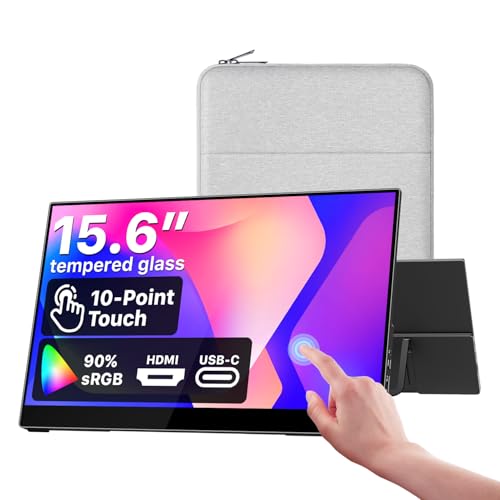
- The 15.6-inch display has 1920-by-1080 resolution and a built-in adjustable kickstand.
- Supports touch gestures on macOS and Windows; single-cable USB-C use requires Thunderbolt or USB-C DP Alt Mode support.
- Includes a protective sleeve, power adapter, and HDMI and USB-C cables.
Best For: A remote worker or traveler whose compatible laptop could use a second screen.
Choosing a Productivity Gift for Her
Start with the friction she encounters in a normal workday. If she often plugs and unplugs several accessories, a docking station can centralize a desk setup. If she loses time to repeated commands in creative software, a programmable keypad may help, provided the software supports the shortcuts. For someone who switches between rooms or works while traveling, a foldable laptop stand or portable monitor is easier to move than a full-size display.
Comfort gifts deserve a little more thought. A chair is a substantial present, so consider her desk space, preferred seating position, and whether the listed seat dimensions suit her. A vertical mouse changes the hand position and may take time to learn; check the hand-size guidance and operating-system notes first. A standing desk converter can add the option to change positions, but measure the existing desk and account for the riser’s footprint and supported weight.
Match the Gift to Your Budget
Smaller desk accessories, such as a programmable keypad, keyboard, lamp, or laptop stand, can make thoughtful gifts without replacing major equipment. A docking station or ergonomic mouse is a more focused upgrade when you know what device or setup she already uses. A monitor, e-ink notebook, chair, or standing desk converter is a larger commitment and should solve a clear daily need.
Think about the full setup cost, too. A new display may call for the right cable or a compatible laptop port. A chair or desk riser may need space and assembly. A digital notebook can be valuable to someone who reads and annotates documents, while a lamp with wireless charging is most useful if her phone supports that charging method. Price alone does not determine whether a gift will be useful; fit with her routine matters more.
Check Compatibility and Personalization
Before choosing computer accessories, identify her laptop’s operating system and ports. The docking station supports USB-C, USB4, and Thunderbolt connections, but its display behavior differs by system: the listing says macOS mirrors the external displays and Linux is unsupported. The portable monitor’s single-cable setup requires Thunderbolt or USB-C DP Alt Mode. A monitor’s resolution and refresh features are only useful when her computer and intended work support them.
Personalization can make a practical gift feel considered. A keyboard with hot-swappable switches suits someone who enjoys tuning a setup; a simpler plug-in accessory may suit someone who prefers fewer settings. For the keypad, consider whether she edits photos or video, draws, or uses repeated commands. For the e-ink notebook, think about whether she would value handwritten notes, PDF markup, and searchable or organized notes. For a mouse, check hand size and remember that some buttons are not compatible with macOS.
Plan for Christmas Timing and Last-Minute Choices
For a large workspace gift, allow time to confirm dimensions, ports, and where it will sit. A chair, monitor, or desk converter can be difficult to choose as a surprise if the recipient has strong ergonomic preferences. If those details are uncertain, select a smaller accessory based on a setup you already know, such as a lamp for her desk or a stand sized for her laptop.
For a last-minute decision, compatibility is still the key check: confirm the laptop model or operating system, look for the necessary USB-C display support, and verify phone wireless-charging support where relevant. Avoid assuming a product will fit simply because it is marketed for office use. The best productivity Christmas gift is one that fits into the recipient’s real habits and workspace, whether she spends the day writing, designing, studying, or moving between home and the office.