
A gaming PC setup often powers a tower, monitor, speakers, router, lighting, and accessories from one area. The right power strip helps organize that load while adding practical surge protection and easier access to charging ports.
These 10 options cover different priorities, from high outlet counts and long cords to USB-C charging, RGB accents, wide-spaced receptacles, and clamp-on desk designs. Use the guide below to match capacity and features to your hardware.
Best 10 Power Strips for Gaming PC Setup Picks for 2026
Reliable High-Capacity Pick
Amazon Basics 12-Outlet Surge Protector

- 12 outlets with an 8-foot cord
- 4000-joule surge protection
- 15-amp breaker and wall-mount keyhole
Best For: Large gaming rooms and workstations needing many AC outlets
Maximum Connectivity Pick
SUPERDANNY 22-Outlet USB Power Strip

- 22 AC outlets plus six USB ports
- Widely spaced outlets fit bulky adapters
- Mountable design with a flat 45-degree plug
Best For: Multi-device gaming and media setups
Trusted Heavy-Duty Option
Belkin 12-Outlet Surge Protector

- 12 widely spaced AC outlets
- 3940-joule surge protection
- 8-foot cord with angled flat plug
Best For: Compact gaming desks and home-office workstations
Gaming-Focused RGB Pick
4000J USB-C RGB Gaming Surge Protector

- Six wide-spaced AC outlets
- 4000-joule protection with 20W USB-C PD
- Three RGB modes and four brightness levels
Best For: Gaming PC desks wanting RGB and USB-C charging
Best Overall
TROND 10-Outlet USB-C Surge Protector

- 10 widely spaced AC outlets
- 4000J surge protection
- Wall-mountable with USB-C and USB-A ports
Best For: Gaming desks with numerous peripherals and bulky adapters
Best for Maximum Capacity

- 16 AC outlets and 5 USB ports
- Tower design saves desk space
- Overload and short-circuit protection
Best For: Crowded gaming stations with many connected devices
Best for Fast USB Charging

- 65W USB Power Delivery
- Six AC outlets plus three USB ports
- 2100J surge protection and RGB lighting
Best For: Gaming desks needing fast USB-C charging and RGB styling
Best Desk-Mounted Pick
Clamp-On USB-C Charging Station

- Clamps to desks up to 1.96 inches thick
- Five outlets plus four USB-C and two USB-A ports
- 1,200J surge protection with 40W total USB output
Best For: Gamers wanting an accessible, mounted charging hub
Best High-Capacity Pick
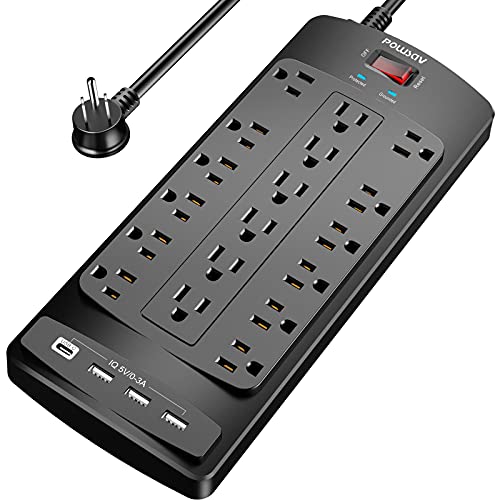
- Provides 18 AC outlets and four USB ports
- 2,100J surge protection with overload switch
- Six-foot cord with a right-angle flat plug
Best For: Large gaming setups with numerous connected devices
Best Long-Cord Pick

- Ten-foot cord reaches distant gaming desks
- 12 outlets, two USB ports, and two USB-C ports
- 4,800J surge rating with a slim flat plug
Best For: Gaming setups far from the wall outlet
Reliable High-Capacity Pick – Amazon Basics 12-Outlet Surge Protector
For power strips for gaming pc setup, this Amazon Basics model offers a straightforward way to connect a gaming PC, monitor, console, router, and other desk equipment. Its 12 outlets, 8-foot cord, and 4000-joule surge rating suit larger indoor setups.
Best For: Gaming rooms and workstations that need many AC outlets and a long reach.
Pros:
- 12 outlets provide room for multiple gaming and home-office devices.
- 4000-joule surge protection and a 15-amp circuit breaker add protection against electrical events and overloads.
- 8-foot cord and rear keyhole mount support flexible placement.
- Safety shutters help prevent incorrect outlet use.
Cons:
- It does not include USB charging ports.
- The rectangular design may take more desk or floor space than a compact strip.
This is a practical, no-frills choice when outlet quantity and surge capacity matter more than built-in USB charging or gaming-focused lighting.
Maximum Connectivity Pick – SUPERDANNY 22-Outlet USB Power Strip
Among power strips for gaming pc setup, the SUPERDANNY stands out for connecting a large collection of gear in one location. It combines 22 AC outlets with six USB ports, widely spaced receptacles, and a 6.5-foot heavy-duty cord.
Best For: Gaming or media setups with numerous adapters, consoles, PCs, and USB-powered devices.
Pros:
- 22 grounded AC outlets and six USB ports support extensive device connectivity.
- Widely spaced outlets help accommodate bulky plugs and adapters.
- Includes five USB-A ports and one USB-C port with smart charging up to 5V/3A.
- Four rear keyholes and a 45-degree flat plug offer mounting and placement flexibility.
Cons:
- The large outlet count results in a relatively sizable strip.
- Side outlets cannot be rotated.
- Its 2100-joule rating is lower than some high-capacity alternatives.
Choose this model when centralized connectivity and cable organization are priorities. Its extensive outlet layout is particularly useful for a multi-device gaming or entertainment station.
Trusted Heavy-Duty Option – Belkin 12-Outlet Surge Protector
This Belkin model is a sensible option for power strips for gaming pc setup when you want 12 AC outlets, a slim form, and a long flat-plug cord. Its widely spaced outlets are designed to accommodate larger chargers and plugs around a workstation.
Best For: Home offices and gaming desks that favor a compact, established-brand surge protector.
Pros:
- 12 AC outlets provide ample connection space for computers, monitors, and accessories.
- 3940-joule surge protection supports protection for electronics and appliances.
- Widely spaced outlets help reduce plug interference.
- Includes a safety indicator, wall-mountable design, 8-foot cord, and angled plug.
Cons:
- It does not provide USB charging ports.
- The supplied notes list a 15-amp maximum, so total connected load still needs to remain within that limit.
Belkin’s combination of high surge capacity, a slim profile, safety indicator, and two-year limited warranty makes this a balanced choice for a clean PC workstation.
Gaming-Focused RGB Pick – 4000J USB-C RGB Gaming Surge Protector
For power strips for gaming pc setup that also complement a gaming desk, this RGB model combines six wide-spaced AC outlets with USB-A and USB-C charging. Its angled layout, 6-foot cord, and built-in lighting are tailored to organized PC stations.
Best For: Gaming PC desks that need USB-C charging and customizable ambient lighting.
Pros:
- 4000-joule surge protection and 15-amp overload protection suit a gaming setup.
- Six AC outlets are arranged with 1.8-inch spacing for larger plugs.
- One USB-A port and two USB-C ports provide charging, with USB-C PD up to 20W.
- RGB lighting offers three modes and four brightness levels.
Cons:
- Six AC outlets provide less expansion than larger multi-outlet strips.
- The RGB lighting may be unnecessary for users seeking a purely utilitarian power strip.
- The supplied details do not specify a mounting feature.
This is the most gaming-specific option in the group. It makes sense for a desk where visual customization, USB-C charging, and spaced outlets are more important than maximum AC capacity.
Best Overall – TROND 10-Outlet USB-C Surge Protector
For a gaming PC setup that needs flexible connectivity, the TROND power strip combines 10 widely spaced AC outlets with two USB-C and two USB-A ports. Its 4000-joule surge rating, flat plug, and wall-mountable design make it practical for desks, entertainment centers, or areas where bulky adapters need extra room.
Best For: Gaming desks with many peripherals, adapters, and charging devices.
Pros:
- 10 widely spaced outlets accommodate blocky plugs and large adapters.
- Includes two USB-C and two USB-A charging ports.
- 4000-joule surge protection and an integrated circuit breaker.
- 45-degree flat plug and mounting holes support tidy installation.
Cons:
- USB charging output is limited to 17W total.
- Its 9.61-by-3.94-inch body may be larger than compact desk strips.
This is a strong all-around choice when outlet spacing and surge protection matter more than high-speed USB charging. The 5-foot, 14-AWG cord also gives a gaming setup useful reach.
Best for Maximum Capacity – 16-Outlet Power Strip Tower
When a gaming PC setup includes several monitors, consoles, speakers, and chargers, this tower-style power strip offers 16 AC outlets plus five USB ports. Its vertical design helps concentrate connections in a smaller footprint while the 6-foot cord provides added placement flexibility.
Best For: Multi-device gaming stations that need the highest outlet count.
Pros:
- Provides 16 AC outlets and five USB ports for up to 21 devices.
- Vertical tower shape helps organize connections in limited desk space.
- Includes overload protection, a short-circuit fuse, and lightning protection.
- 6-foot cord and 45-degree flat plug offer flexible positioning.
Cons:
- Maximum current is listed as 10A.
- USB output is 17W total, so it is not intended for high-wattage USB charging.
- The tower format may not suit users who prefer a flat power strip.
This model prioritizes capacity and organization. It is a useful fit for a crowded gaming setup, provided your connected equipment stays within its listed power limits.
Best for Fast USB Charging – 65W RGB Gaming Power Strip
For a gaming PC setup where USB charging speed and desk aesthetics matter, this RGB-equipped power strip offers six AC outlets, two USB-C ports, and one USB-A port. Its standout feature is 65W USB Power Delivery, while the 2100-joule surge rating adds protection for connected electronics.
Best For: Gaming desks that need fast USB-C charging and RGB styling.
Pros:
- 65W USB Power Delivery supports faster compatible-device charging.
- Six AC outlets plus two USB-C and one USB-A port.
- 2100-joule surge protection for connected electronics.
- 6-foot heavy-duty extension cord provides useful reach.
Cons:
- Offers fewer AC outlets than the other options in this roundup.
- RGB lighting may not appeal to users seeking a low-profile appearance.
- The listed warranty is six months.
This is the most gaming-focused option of the three, combining RGB lighting with higher-powered USB charging. Choose it when fast USB-C charging is more important than maximizing the number of AC outlets.
Best Desk-Mounted Pick – Clamp-On USB-C Charging Station
For a tidy gaming PC setup, this desk-clamp power strip mounts to the edge of a tabletop instead of sitting in a cable pile. It combines five widely spaced outlets with USB-C and USB-A charging, plus 1,200 joules of surge protection. The clamp fits desks up to 1.96 inches thick and requires roughly 0.4–0.5 inches of clearance from the wall.
Best For: Gamers who want a semi-permanent, space-saving power station mounted directly to the desk.
Pros:
- Desk clamp helps keep the power strip accessible and cables organized.
- Includes four USB-C ports, two USB-A ports, and five AC outlets.
- USB-C ports support up to 20W each, with 40W total USB output.
- ETL listed and built with overload protection and a fireproof plastic enclosure.
Cons:
- Five AC outlets may be limiting for a gaming setup with many peripherals.
- The clamp requires compatible desk thickness and wall clearance.
- Its 1,200-joule rating is lower than the ratings of some larger alternatives.
This is a practical choice when desk organization and convenient device charging matter more than maximum outlet capacity. Check your desk dimensions before installing.
Best High-Capacity Pick – 18-Outlet Gaming Power Strip
When a gaming PC setup includes multiple monitors, consoles, speakers, chargers, and accessories, this high-capacity power strip provides 18 AC outlets and four USB ports. Its six-foot flat-plug cord, 2,100-joule surge rating, overload switch, and ETL certification make it a versatile option for a crowded desk or entertainment area.
Best For: Gamers with many devices who need the highest outlet count in this roundup.
Pros:
- Offers 18 widely spaced AC outlets and four USB ports.
- 2,100 joules of surge protection helps guard connected electronics from spikes and fluctuations.
- Six-foot extension cord and right-angle flat plug provide flexible placement.
- Includes an overload protection switch, grounding indicator, and ETL certification.
Cons:
- The large 11.7-by-4.9-inch body may take up substantial desk or floor space.
- USB charging is provided through USB ports rather than USB-C ports.
- It is less specialized for cable-free desk mounting than a clamp-on model.
This is the strongest fit for an equipment-heavy gaming station. Its broad outlet layout reduces the need for additional power strips, though you should plan for its relatively large footprint.
Best Long-Cord Pick – 4800J Power Strip with USB-C
This LeZone model is a flexible option for power strips for gaming PC setup when the wall outlet is far from the desk. It supplies 12 AC outlets, two USB ports, and two USB-C ports, while the 10-foot cord and ultra-thin flat plug help with furniture placement. Its 4,800-joule surge rating is the highest listed among these products.
Best For: Gaming desks positioned far from the wall outlet or behind bulky furniture.
Pros:
- Ten-foot extension cord reaches distant desks and entertainment centers.
- Ultra-thin 0.31-inch flat plug is designed for tight spaces behind furniture.
- Provides 12 AC outlets plus two USB and two USB-C ports.
- Features a 4,800-joule surge protection rating and wall-mountable design.
Cons:
- USB-C output is rated at 15W, which may be slower than higher-output charging stations.
- It has fewer AC outlets than the 18-outlet model.
- The supplied notes do not specify an ETL certification.
Choose this model for reach and surge protection, especially when cable routing is difficult. Its 10-foot cord and slim plug are useful behind furniture, while 12 outlets cover most moderately sized gaming stations.
How We Picked These Power Strips for Gaming PC Setup
We focused on features that matter at a gaming desk: surge-energy rating, outlet spacing, cord length, charging support, physical design, and safety certifications where listed. The selection includes compact strips, high-capacity models, tower formats, and desk-mounted options so shoppers can compare different setup layouts rather than one identical style.
A higher joule rating can indicate more surge-absorption capacity, but it is not a substitute for a properly grounded outlet or a whole-home surge protector. We also considered whether each design makes it easier to connect bulky power adapters without blocking neighboring outlets.
Quick Comparison
- Most general-purpose: Look for a 10- or 12-outlet strip with a long cord and a substantial surge rating.
- Best for many devices: Tower and 18- or 22-outlet designs provide more connection points, but require careful load management.
- Best for charging: Models with USB-C Power Delivery are useful for phones, handheld consoles, controllers, and laptops.
- Best for a clean desk: Flat plugs, wall-mountable bodies, and clamp-on designs reduce cable clutter.
- Best for aesthetics: RGB-equipped options can coordinate with a gaming setup, though lighting should not outweigh electrical specifications.
Key Buying Factors for Power Strips for Gaming PC Setup
Surge Protection and Electrical Limits
Check the joule rating, clamping information when provided, and whether the product is listed or certified by a recognized safety organization. Confirm the strip’s amperage and wattage limits, then stay within them. Do not use a power strip to run high-draw heating appliances alongside gaming equipment.
Outlet Layout and Spacing
Gaming PCs and monitors may use large adapters that cover adjacent receptacles. Wide-spaced outlets, angled sockets, or a tower profile can provide more usable capacity than a tightly packed row. Count your current devices and leave room for future upgrades.
Cord Length and Placement
An 8- or 10-foot cord can reach a distant wall outlet, while a shorter cord may be tidier on a desktop. Flat plugs are helpful behind furniture, but avoid routing cords where chairs, casters, or foot traffic can damage them.
USB and USB-C Charging
USB ports are convenient for accessories, but their total output varies. If you need fast charging, check the stated USB-C Power Delivery wattage and total shared output rather than assuming every USB-C port offers laptop-class charging.
Who Should Buy Which Power Strips for Gaming PC Setup?
Choose a standard 10- or 12-outlet model for a typical tower, one or two monitors, speakers, networking gear, and accessories. Choose a high-outlet or tower model for multi-monitor battlestations, streaming equipment, and several peripherals, provided the total load remains within the rating. Choose a USB-C model if charging handheld devices is a daily priority. Choose a clamp-on strip when the desk is crowded and easy front-edge access matters. Choose a wall-mountable or long-cord option for a permanent workstation where cable routing and reach are more important than portability.