
A dedicated knob can make everyday PC control faster, whether you use it for volume, scrolling, lighting, or custom shortcuts. The best mechanical keyboards with knob for PC combine that convenience with reliable switches, useful layouts, and comfortable typing.
We compared 10 standout options across compact, full-size, wired, and wireless designs to help you find the right balance of controls, connectivity, customization, and value.
Best 10 Mechanical Keyboards with Knob for PC Picks for 2026
Best Customizable Pick
AULA F75 Pro Wireless Mechanical Keyboard

- Tri-mode connectivity with up to five devices
- Hot-swappable 75% layout with 4000mAh battery
- Knob controls lighting or media by mode
Best For: Wireless customization and compact PC gaming setups
Best Battery Life
wegear GK470 75% Mechanical Keyboard

- 5000mAh battery rated up to 3700 hours
- Tri-mode connections with three-device Bluetooth switching
- Linear switches and five-layer noise control
Best For: Long wireless work and gaming sessions
Best Gaming Controls
Redragon K673 PRO Wireless Keyboard

- Multifunction knob controls lighting and media
- Tri-mode connectivity for PC, laptop, and tablet
- Gasket mount and five-layer dampening
Best For: Compact gaming setups with quick physical controls
Best Full-Layout Wired Pick

- 96-key layout keeps the number pad and arrow keys
- Wired USB-C connection works with PC and Mac
- PBT keycaps, hot-swap support, and 17 RGB modes
Best For: Work and gaming setups that need a compact numpad
Full-Size Macro Control

- Full-size 104-key wired layout with media wheel
- Five onboard macro keys and hot-swappable switches
- Clicky Blue switches with RGB backlighting
Best For: Gamers and productivity users who want macros and full-size controls
Smart Compact Enthusiast Pick
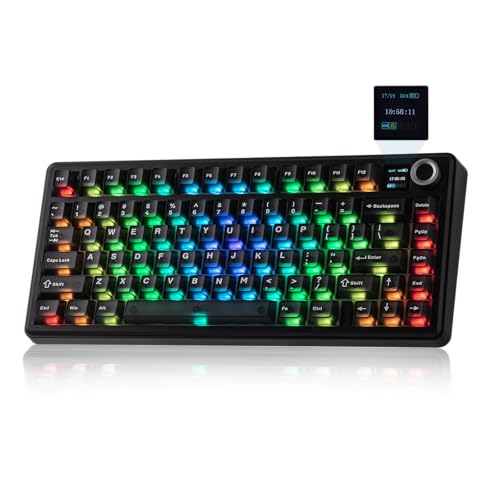
- 75% layout with knob and customizable TFT screen
- Bluetooth, 2.4GHz wireless, and USB-C connectivity
- Gasket mount, linear switches, and hot-swappable design
Best For: Users wanting a customizable compact keyboard for gaming and work
Compact Wired Pick
Ajazz AK820 75% Mechanical Keyboard

- 82-key layout with aluminum volume knob
- Hot-swappable 3-pin and 5-pin switch support
- Gasket mount with five-layer sound dampening
Best For: PC users wanting a compact wired keyboard for gaming and work
Feature-Rich Full-Size Pick
AULA F108 Pro Wireless Keyboard
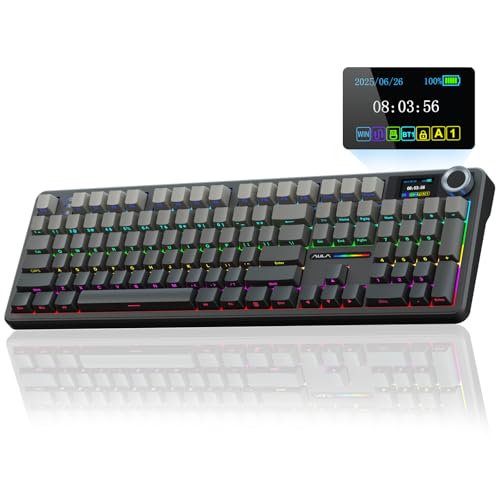
- 104-key layout with number pad and multifunction knob
- TFT display plus Bluetooth, 2.4GHz, and USB-C modes
- 8000mAh battery and hot-swappable switch support
Best For: Productivity users who need full-size functionality and wireless flexibility
Wireless Compact Pick
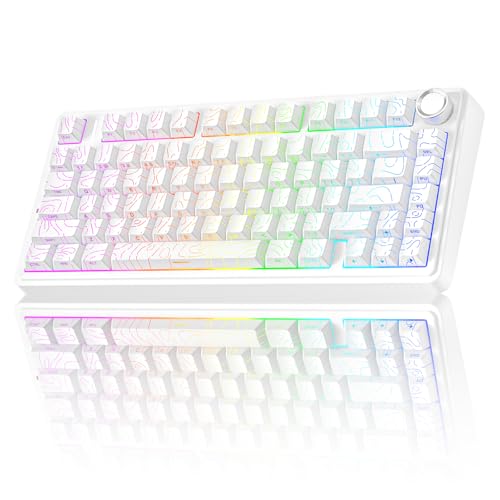
- 81-key 75% layout with multifunction control knob
- Bluetooth, 2.4GHz, and wired connectivity
- 4000mAh battery and hot-swappable 3-pin/5-pin support
Best For: Gamers wanting a compact wireless keyboard with lighting and media controls
Best Customizable Pick – AULA F75 Pro Wireless Mechanical Keyboard
The AULA F75 Pro is a strong choice among mechanical keyboards with knob for PC users who want wireless flexibility, a compact layout, and extensive customization. Its 75% design keeps arrow keys while saving desk space, and the knob controls lighting or media depending on the selected mode.
Best For: PC gamers and enthusiasts who want a customizable wireless keyboard with a soft, dampened typing feel.
Pros:
- Tri-mode Bluetooth 5.0, 2.4GHz, and USB-C connectivity supports up to five devices.
- Hot-swappable PCB accepts 3-pin and 5-pin switches without soldering.
- Five-layer filling, pre-lubricated stabilizers, and Reaper switches target a smoother, quieter feel.
- 4000mAh battery, RGB lighting, macros, and N-key rollover add practical gaming features.
Cons:
- The 75% layout does not provide a dedicated number pad.
- Knob functions change between gaming and office modes, so users must learn the mode controls.
Choose the F75 Pro if you value switch customization and multi-device use as much as gaming performance. It offers a feature-rich package, though users needing a full-size layout may prefer a larger board.
Best Battery Life – wegear GK470 75% Mechanical Keyboard
The wegear GK470 is one of the mechanical keyboards with knob for PC that emphasizes long wireless use and a cushioned typing experience. This 75% board combines linear switches, tri-mode connectivity, RGB lighting, and a claimed battery runtime of up to 3700 hours with RGB disabled over Bluetooth.
Best For: PC, Mac, and laptop users who prioritize extended battery life and a smooth linear typing feel.
Pros:
- 5000mAh battery is rated for up to 3700 hours under specified Bluetooth, RGB-off testing.
- Tri-mode USB-C, 2.4GHz, and Bluetooth connectivity supports three Bluetooth devices.
- Hot-swap-friendly linear switches are rated for 50 million clicks.
- Five-layer construction and a 3mm IXPE pad help absorb bottom-out noise.
Cons:
- The stated maximum battery life depends on Bluetooth use with RGB turned off.
- Double-shot ABS keycaps may offer a different feel and durability profile than PBT keycaps.
The GK470 is a practical pick for users who dislike frequent charging and want one keyboard across several devices. Its strongest advantages are endurance, connectivity, and a quieter gasket-style typing design.
Best Gaming Controls – Redragon K673 PRO Wireless Keyboard
The Redragon K673 PRO is a compact option among mechanical keyboards with knob for PC, combining an 81-key layout with a multifunction control wheel. Its knob adjusts backlight brightness and media playback, while tri-mode connectivity lets you move between a PC, laptop, and tablet.
Best For: Gamers who want quick media and lighting controls, wireless flexibility, and a cushioned typing feel.
Pros:
- Knob provides direct control over backlight brightness and media playback.
- USB-C, Bluetooth, and 2.4GHz connections are designed for quick device switching.
- Gasket mounting and five-layer dampening support a soft, quieter typing experience.
- Hot-swap socket accepts most 3-pin and 5-pin switches, with software for macros and lighting.
Cons:
- Its 81-key compact layout omits a dedicated number pad.
- The supplied details identify Windows as the compatible operating system family.
The K673 PRO makes the most sense when a physical control wheel and gaming-oriented customization matter. It balances compactness with useful connectivity, though users seeking a full-size work keyboard may need another layout.
Best Full-Layout Wired Pick – AK96 96% Mechanical Keyboard
The AK96 is a wired choice among mechanical keyboards with knob for PC users who need more keys without moving to a traditional full-size board. Its 96-key layout retains arrow keys and a number pad, while PBT keycaps, RGB lighting, hot-swappable support, and a smart display add versatility.
Best For: PC and Mac users who want a compact work-and-gaming layout with a numpad and dedicated controls.
Pros:
- 96% layout retains arrow keys and a number pad in a more compact form.
- USB-C wired connection supports plug-and-play use with PC and Mac.
- PBT keycaps resist fading, while 17 RGB modes and dual-side LEDs add customization.
- Hot-swappable design, full key rollover, kickstands, and non-slip pads support practical daily use.
Cons:
- It is wired only, with no Bluetooth or 2.4GHz wireless mode.
- The included blue switches are clicky, which may not suit users seeking a quiet keyboard.
- The supplied details do not specify the knob’s exact control functions.
The AK96 stands out for buyers who need a numpad but want to save space compared with a standard full-size board. Its wired design and clicky switches make it better suited to stable desk setups than quiet shared workspaces.
Full-Size Macro Control – Redragon K580 VATA
For shoppers seeking mechanical keyboards with knob for pc, the Redragon K580 VATA combines a full-size 104-key layout with a dedicated media wheel. Its clicky Outemu Blue switches, onboard macro keys, and wired USB-C connection make it a practical choice for gaming and shortcut-heavy work.
Best For: PC gamers and users who want full-size controls, clicky feedback, and onboard macros.
Pros:
- Dedicated media wheel and play/pause/skip controls.
- Five onboard macro keys record combos without requiring software.
- Hot-swappable switch sockets support switch experimentation without soldering.
- Full anti-ghosting supports rapid multi-key inputs.
Cons:
- Its 100% layout takes more desk space than compact alternatives.
- Stock Blue switches are distinctly loud and clicky.
- Connection is wired rather than wireless.
The K580 is a strong fit when dedicated macro buttons and a physical volume wheel matter more than portability. Optional software adds deeper RGB and macro customization, while the included double-shot keycaps and rated 50-million-keystroke lifespan support long-term use.
Smart Compact Enthusiast Pick – EPOMAKER X Aula F75 MAX
The EPOMAKER X Aula F75 MAX is one of the more feature-rich mechanical keyboards with knob for pc, pairing a compact 75% layout with a volume knob, TFT smart display, and three connection modes. Its gasket-mount design, pre-lubed linear switches, and hot-swappable sockets target users who care about both comfort and customization.
Best For: PC, Mac, and Linux users who want a compact wireless keyboard with display controls and a softer, quieter typing feel.
Pros:
- Tri-mode connectivity includes Bluetooth 5.0, 2.4GHz wireless, and USB-C.
- Customizable TFT screen displays information and supports GIF-style personalization.
- Gasket mount, flex-cut plate, and layered dampening support a softer typing experience.
- Hot-swappable design accepts 3- and 5-pin mechanical switches.
Cons:
- The 75% layout omits some dedicated full-size keys.
- Plate-mount stabilizers may require modification for users wanting screw-in stabilizers.
- Advanced RGB, remapping, and macro features may require software or setup through shortcuts and the screen.
Choose the F75 MAX if you want a compact board that feels more like a customizable enthusiast keyboard than a basic gaming model. Its knob, display, multi-device connectivity, and gasket construction give it broad appeal for gaming, programming, and office work.
Flexible Wireless Value – Redragon K521WL Wireless Keyboard
The Redragon K521WL offers a straightforward option among mechanical keyboards with knob for pc, adding a multifunction volume control to a tri-mode keyboard. Bluetooth, 2.4GHz wireless, and USB connections make it convenient for switching between devices, while the 4000mAh battery supports cable-free use.
Best For: Windows PC users who want wireless flexibility, quick volume control, and programmable RGB features.
Pros:
- Knob adjusts volume, mutes with a press, and can switch modes with a long press.
- Supports Bluetooth, 2.4GHz wireless, and wired connections.
- 4000mAh rechargeable battery is built in for wireless operation.
- Software supports RGB, key-function, and macro customization.
Cons:
- The product is described as having mechanical-feeling keys, so it may not suit buyers seeking a specified traditional switch model.
- Compatibility details list Windows and PC rather than a broad range of operating systems.
- Its classic full-size styling may be less space-efficient than compact layouts.
The K521WL is a practical pick for users who prioritize wireless convenience and easy multimedia access. Its knob doubles as a lighting and mode control, while the tri-mode connection and programmable software add flexibility for gaming and everyday PC use.
Compact Wired Pick – Ajazz AK820 75% Mechanical Keyboard
If you want mechanical keyboards with knob for pc use without giving up essential navigation keys, the Ajazz AK820 is a practical compact choice. Its wired USB-C connection, 82-key 75% layout, aluminum volume knob, RGB lighting, and hot-swappable PCB suit gaming, office work, programming, and everyday typing.
Best For: PC users who want a space-saving wired keyboard with adjustable sound, lighting, and switches.
Pros:
- Compact 75% layout retains essential keys while saving desk space
- Aluminum volume knob provides quick audio adjustment
- Hot-swappable PCB supports both 3-pin and 5-pin switches
- Gasket mount and five-layer dampening help create a softer, quieter typing feel
Cons:
- Wired-only connectivity may not suit users who want Bluetooth or 2.4GHz wireless
- Not water resistant
The AK820 is a well-rounded option for a PC setup where stable wired performance and compact dimensions matter. Its PBT keycaps, south-facing RGB, and customization-friendly construction add useful flexibility for both work and gaming.
Feature-Rich Full-Size Pick – AULA F108 Pro Wireless Keyboard
For shoppers seeking mechanical keyboards with knob for pc setups and a full complement of keys, the AULA F108 Pro combines a 104-key layout with a multifunction knob and TFT color display. Tri-mode connectivity, hot-swappable switches, RGB backlighting, and an 8000mAh battery make it adaptable for work and gaming.
Best For: Users who need a number pad, wireless flexibility, and extra controls in a customizable keyboard.
Pros:
- Full-size 104-key layout includes function keys, arrows, and a number pad
- Tri-mode connection supports Bluetooth 5.0, 2.4GHz wireless, and USB-C wired use
- TFT display and multifunction knob can show or control settings such as volume, battery, and lighting
- 8000mAh battery and hot-swappable support add convenience for extended use and customization
Cons:
- Display image and date/time customization requires Windows software and wired mode
- Its full-size footprint takes more desk space than a compact keyboard
- Some Linux F-zone functions may be affected by incompatible driver versions
The F108 Pro is the most feature-heavy option here, especially for productivity users who rely on a number pad. Choose it if the display, large battery, and multi-device connectivity are more valuable to you than a smaller footprint.
Wireless Compact Pick – AULA F75 Pro 75% Keyboard
The AULA F75 Pro is a strong fit for shoppers comparing mechanical keyboards with knob for pc gaming and everyday use. Its 81-key 75% layout preserves arrow keys, while tri-mode connectivity, a 4000mAh battery, hot-swappable switches, and a mode-switching control knob provide flexibility without a full-size footprint.
Best For: Gamers and multitaskers who want a compact wireless keyboard with separate lighting and media control.
Pros:
- Tri-mode connectivity works with Bluetooth 5.0, 2.4GHz wireless, and USB wired connections
- Compact 75% layout saves desk space while retaining arrow keys
- Knob switches between gaming and office modes for lighting or media control
- Gasket-style construction, five-layer filling, and pre-lubricated switches target a softer, smoother feel
Cons:
- Its 81-key layout does not include a dedicated number pad
- Some advanced functions, including macro customization, require the F75 driver
The F75 Pro balances portability, customization, and control well. It is especially appealing when you want wireless connectivity and a compact layout, but still value a physical knob for quickly managing lighting or audio.
How We Picked the Best Mechanical Keyboards with Knob for PC
We selected these Mechanical Keyboards with Knob for PC based on the features that matter most in daily use: knob placement and function, layout, switch and keycap support, connectivity, construction, software compatibility, and gaming-oriented extras. We also considered whether each model suits a specific type of buyer, from compact-desk users to shoppers who need a full number pad.
Because product configurations can vary, check the current listing for the included switches, keycaps, battery capacity, wireless modes, and software support before ordering.
Quick Comparison
| Type | Best For | What to Look For |
|---|---|---|
| 75% compact | Most desktop users | Function row, arrows, hot-swap sockets, wireless options |
| 96% or full-size | Productivity and number entry | Numpad, media controls, desk footprint |
| Gaming-focused | Fast control and RGB | Low-latency connection, rollover, macros, software |
| Display-equipped | Customization | Screen controls, compatible software, battery impact |
Key Buying Factors for Mechanical Keyboards with Knob for PC
Choose the Right Layout
A 75% keyboard keeps the arrow keys and function row while reducing desk space, making it a strong all-around choice. A 96% or full-size board is better if you regularly use a number pad. Compact layouts may require more reliance on function-layer shortcuts.
Check What the Knob Actually Controls
Most knobs adjust volume by default, but some also support muting, scrolling, lighting, or software-assigned commands. A push-to-click function is especially useful for quickly muting audio. Confirm whether remapping requires a Windows-only utility.
Compare Wired and Wireless Connectivity
USB-C wired models are simple and consistent for gaming. Wireless keyboards offer a cleaner setup and may support Bluetooth, 2.4GHz, and wired modes. For competitive play, 2.4GHz or USB is generally preferable to Bluetooth. Battery capacity matters more on models with RGB or built-in displays.
Look at Customization and Typing Feel
Hot-swappable sockets let you change compatible switches without soldering. Gasket or dampened constructions can produce a softer, quieter feel, while pre-lubed switches may sound smoother out of the box. PBT keycaps typically resist shine better than standard ABS caps.
Who Should Buy Which Mechanical Keyboards with Knob for PC?
Choose a 75% model if you want the best balance of navigation keys, compact size, and customization. Choose a 96% or full-size model if spreadsheets, accounting, or frequent numeric entry are priorities. Choose a wireless tri-mode board for flexible use across a desktop, laptop, and other compatible devices.
Choose a display-equipped keyboard if you enjoy monitoring or customizing on-board information and do not mind potentially higher battery use. Choose a gaming-focused wired model if consistent connection, macros, RGB, and dedicated media controls matter more than portability.