
Building or repairing Ethernet cables is much easier with the right crimping tool. The best network crimping tools for beginners combine a comfortable handle, clear cable support, dependable connector termination, and useful extras such as testers or wire strippers.
We selected 10 options ranging from compact standalone crimpers to complete RJ45 tool kits. Whether you are wiring a home office, replacing damaged connectors, or learning basic network cabling, this roundup can help you choose a practical setup without paying for features you will not use.
Best 10 Network Crimping Tools for Beginners Picks for 2026
Best All-in-One Pick

- Combines stripping, cutting, and crimping
- On-tool guide helps reduce wiring errors
- Supports RJ11, RJ12, and compatible RJ45 connectors
Best For: Beginners building voice and data cables with one versatile tool
Best Complete Starter Kit
Cable Matters 7-in-1 Network Tool Kit

- Includes crimper, tester, and punch-down tools
- Comes with RJ45 connectors, boots, and case
- Supports RJ45, RJ12, and RJ11 cables
Best For: DIYers who need a full entry-level networking toolkit
Best Pass-Through Kit
Solsop All-in-One Ethernet Crimper

- Includes crimper, tester, stripper, connectors, and boots
- Supports shielded and unshielded plugs
- Includes 50 connectors and 50 boots
Best For: Beginners practicing pass-through Ethernet cable assembly
Best Compact Option

- Compact design for easy storage and transport
- Built for Klein Tools pass-through RJ45 connectors
- On-tool guide supports accurate wiring
Best For: Beginners needing a portable, dedicated pass-through crimper
Best for Easy Setup
ZOERAX 11-in-1 Network Tool Kit

- Combines crimping, testing, punch-down, and stripping tools
- Supports RJ11, RJ12, standard RJ45, and pass-through RJ45
- Includes connectors, boots, spare blades, and a storage case
Best For: Beginners building a versatile home or office network toolkit
Best Durable Single Tool
Cable Matters Cat 8 Ethernet Crimper
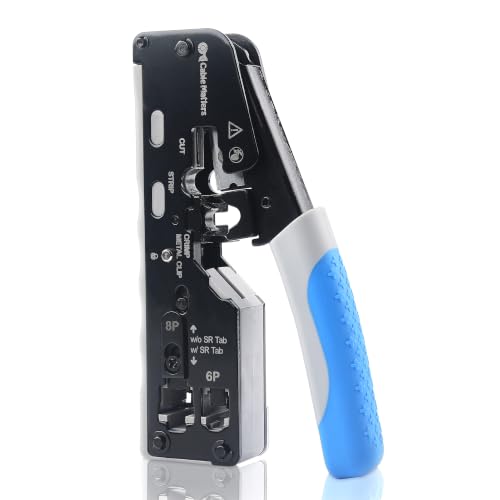
- Cuts, strips, and crimps in one metal-frame tool
- Supports shielded Cat5 through Cat8 and RJ11/RJ12 connectors
- Pass-through design helps simplify cable termination
Best For: DIYers making custom shielded Ethernet cables
Best for Larger DIY Projects
RJ45 Pass-Through Crimping Tool Kit

- Includes 50 connectors and 50 strain-relief boots
- Supports Cat5 through Cat7 plus RJ11 and RJ12
- Adds a 60V PoE-protected tester and adjustable strippers
Best For: Beginners handling multiple cable installations or repairs
Best All-in-One Starter Kit
RJ45 Pass-Through Crimper and Tester

- Crimps, strips, and cuts in one tool
- Includes tester, connectors, and covers
- Supports Cat5e, Cat6, and Cat6a 8P8C plugs
Best For: Beginners building and testing basic Ethernet cables
Best Accessory Bundle

- Includes 50 connectors and 50 strain-relief boots
- Supports RJ11, RJ12, and RJ45 connectors
- Adds separate cutters, strippers, tester, and spare blades
Best For: Beginners tackling multiple cable installations
Best Simple Pick
Mini RJ45 and RJ11 Pass-Through Crimper

- Compact design is about two-thirds standard size
- Works with Ethernet and telephone connectors
- Includes 50 connectors, covers, tester, and blades
Best For: Beginners needing a portable multi-connector tool
Best All-in-One Pick – Klein Tools VDV226-110
For beginners comparing network crimping tools for beginners, the Klein Tools VDV226-110 is a straightforward choice for voice and data cable work. It combines stripping, cutting, and crimping, while its on-tool wiring guide can help reduce common wiring mistakes.
Best For: Beginners who want one ergonomic tool for RJ11, RJ12, and compatible pass-through RJ45 terminations.
Pros:
- Combines a wire stripper, cutter, and crimper in one tool.
- Full-cycle ratchet helps ensure complete connector termination.
- Supports 4-, 6-, and 8-position modular connectors.
- Flush trimming helps prevent unwanted conductor contact.
Cons:
- Pass-through RJ45 crimping is specified for Klein Tools connectors.
- It is a single tool rather than a complete testing kit.
The VDV226-110 offers a useful balance of guidance, versatility, and secure ratcheting for first-time cable builders. Choose it when you already have connectors and testing equipment or prefer to assemble a focused tool setup.
Best Complete Starter Kit – Cable Matters 7-in-1 Network Tool Kit
Among network crimping tools for beginners, the Cable Matters 7-in-1 kit stands out when you need more than a crimper. It includes tools for building, terminating, testing, and organizing Ethernet cables, making it practical for a first home or field networking setup.
Best For: Beginners and DIYers who want a broad network toolkit with a tester, punch-down equipment, connectors, and carrying case.
Pros:
- Includes an RJ45 crimper with built-in cutter and stripper.
- Supports RJ45, RJ12, and RJ11 cable types.
- Cable tester checks pin connections and shielding with LED indicators.
- Includes punch-down tools, connectors, boots, and a carrying case.
Cons:
- The larger kit weighs 0.88 kg and may be more than needed for occasional crimping.
- It includes multiple tools to learn and store rather than a single focused crimper.
This is the most comprehensive option for someone starting from scratch. Its tester and punch-down accessories add useful capability, while the case keeps the tools together for transport or storage.
Best Pass-Through Kit – Solsop All-in-One Ethernet Crimper
For shoppers seeking network crimping tools for beginners with supplies included, the Solsop pass-through kit is a convenient starting point. It combines cutting, stripping, crimping, cable testing, and starter connectors in one package.
Best For: Beginners making pass-through Ethernet cables who want connectors, boots, a tester, and replacement blades included.
Pros:
- Works with CAT5 through CAT7 cables and RJ11/RJ12 connectors.
- Supports shielded and unshielded modular plugs.
- Includes 50 pass-through Cat6 connectors and 50 boots.
- Tester is specified for cables up to 300 meters.
Cons:
- The network tester requires a 9V battery, which is not included.
- The kit is larger and heavier than a basic standalone crimper.
The Solsop kit offers strong value for practice and small installations because the consumables are already included. Its pass-through focus and tester make it especially useful for beginners learning to assemble and verify Ethernet cables.
Best Compact Option – Klein Tools VDV226-005
Klein Tools VDV226-005 Compact Modular Data Cable Crimping Tool, for Pass-Thru RJ45 Connectors
Check Price On AmazonIf portability matters when choosing network crimping tools for beginners, the Klein Tools VDV226-005 keeps the setup focused and compact. It is designed for installing Klein Tools pass-through RJ45 connectors and includes an on-tool wiring guide to support accurate terminations.
Best For: Beginners who need a compact crimper specifically for Klein Tools pass-through RJ45 connectors.
Pros:
- Compact 5.5-inch design is easy to store and carry.
- Crimps and trims compatible Klein Tools pass-through RJ45 connectors.
- On-tool wiring guide helps minimize wiring errors.
- Replacement blades are available.
Cons:
- Not intended for standard, non-pass-through connectors.
- It does not include a cable tester, connectors, or a stripper.
The VDV226-005 is a sensible pick when you want a lightweight, dedicated pass-through crimper rather than a full kit. Confirm that your connectors match its compatibility requirements before buying.
Best for Easy Setup – ZOERAX 11-in-1 Network Tool Kit
For beginners comparing network crimping tools for beginners, the ZOERAX kit is a practical all-in-one option. It combines a pass-through RJ45 crimper with testing, punch-down, stripping, and cutting tools, plus connectors and boots in a portable case.
Best For: Beginners who want a broad toolkit for home, office, and occasional outdoor network-cable projects.
Pros:
- Includes crimping, cable testing, punch-down, stripping, and cutting tools.
- Supports RJ11, RJ12, standard RJ45, and RJ45 pass-through connectors.
- Includes 10 Cat6 pass-through connectors, 10 boots, spare blades, and a storage case.
Cons:
- The cable tester requires a 9V battery, which is not included.
- Its 11-in-1 coverage may be more equipment than needed for simple crimping tasks.
This is a strong choice when convenience matters more than having a single specialized tool. The included tester and termination accessories make it easier for a beginner to complete and verify a basic installation without buying several separate items.
Best Durable Single Tool – Cable Matters Cat 8 Ethernet Crimper
The Cable Matters tool is a focused pick for beginners who prefer one durable tool over a larger bundle. It combines cutting, stripping, and crimping, with pass-through support and compatibility across several Ethernet categories.
Best For: DIYers who want a sturdy, metal-frame crimper for shielded Ethernet cable and custom-length patch cables.
Pros:
- Combines a wire cutter, stripper, and crimper in one tool.
- Works with Cat5 through Cat8 shielded connectors, plus RJ11 and RJ12.
- Pass-through design and adjustable crimp settings can simplify cable termination.
Cons:
- It is primarily a crimping tool and does not include a cable tester or connector supply.
- Its shielded-connector features may be unnecessary for basic unshielded beginner projects.
Choose this model if you already have cable and connectors, or want to assemble custom-length cables with a durable tool. Its narrower scope keeps the setup straightforward, while the broad compatibility leaves room for more advanced projects.
Best for Larger DIY Projects – RJ45 Pass-Through Crimping Tool Kit
For beginners who expect to make several cables, this kit offers useful supplies alongside its pass-through crimper. It includes a tester with 60V PoE protection, adjustable stripping tools, cutters, 50 connectors, and 50 strain-relief boots.
Best For: DIY network installation, repair, and testing where multiple Cat5e-to-Cat7 cables may be terminated.
Pros:
- Includes 50 Cat6 pass-through connectors and 50 matching boots for repeated projects.
- Supports Cat5, Cat5e, Cat6, Cat6A, Cat7, RJ11, and RJ12 standards.
- Tester supports 60V PoE and includes anti-burn protection according to the supplied notes.
- Adjustable stripping tool helps accommodate round and flat network cables.
Cons:
- The tester requires a 9V battery, which is not included.
- The larger accessory count may be excessive for someone making only one cable.
This kit is especially practical when material quantity matters. Beginners can practice pass-through terminations, test their work, and keep spare connectors and boots available for future repairs or additional cable runs.
Best All-in-One Starter Kit – RJ45 Pass-Through Crimper and Tester
For beginners comparing network crimping tools, this kit offers a straightforward starting point: the pass-through crimper combines cutting, stripping, and crimping, while the included tester helps check completed cables. It supports Cat5e, Cat6, and Cat6a 8P8C connectors, including shielded types.
Best For: Beginners who want a compact Ethernet crimping kit with basic testing capability and starter connectors.
Pros:
- Combines crimping, stripping, and cutting in one tool.
- Includes 20 pass-through Cat6 connectors and 20 connector covers.
- Includes a network cable tester for checking network and phone cables.
- Steel construction, replaceable blades, and an ergonomic polypropylene handle.
Cons:
- The 9V battery for the tester is not included.
- The crimper is designed for 8-position connectors and is not intended for AMP connectors.
This is a practical entry-level choice for occasional home network work. Its included tester and connectors reduce the need to buy several essentials separately, while the pass-through design can make connector installation easier for new users.
Best Accessory Bundle – 8-in-1 Ethernet Crimping Kit
Among network crimping tools for beginners, this 8-in-1 kit stands out for its broad accessory selection. It includes a pass-through crimper, separate cutters and strippers, spare blades, a cable tester, and 50 connectors with strain-relief boots for multiple cable jobs.
Best For: Beginners who want a larger supply of connectors and separate tools for cutting and stripping different cable types.
Pros:
- Includes 50 Cat6 pass-through connectors and 50 strain-relief boots.
- Crimps 4-, 6-, and 8-position modular connectors, including RJ11, RJ12, and RJ45 pass-through plugs.
- Includes separate wire cutters, a network cable stripper, a mini stripper, and spare blades.
- Tester includes a 60V PoE test feature according to the supplied product notes.
Cons:
- The tester requires a 9V battery, which is not included.
- The larger accessory assortment may be more than needed for a single small repair.
This kit is useful when you want room to practice or complete several cable installations without immediately replenishing supplies. Its separate cutting and stripping tools also give beginners more flexibility than a single all-in-one crimper.
Best Simple Pick – Mini RJ45 and RJ11 Pass-Through Crimper
This compact kit is a convenient option for beginners seeking network crimping tools that are easy to handle. Its pass-through crimper strips, cuts, and crimps in one tool, and it supports both 8P Ethernet and 6P telephone connectors.
Best For: Beginners who prioritize a smaller tool and need to work with both Ethernet and telephone connectors.
Pros:
- Mini design is about two-thirds the size of traditional crimpers.
- Supports pass-through and non-pass-through RJ45 connectors plus RJ11/RJ12 telephone connectors.
- Includes 50 Cat5e pass-through connectors, 50 covers, a stripper, blades, and a cable tester.
- Pass-through blades cut excess wires while crimping the connector.
Cons:
- The tester battery is not included.
- The supplied Cat5e connectors specify a maximum insulated wire outside diameter of 1.1 mm for 24 AWG cable.
Its smaller format can be appealing for occasional users or anyone with limited storage space. The broad connector compatibility and included supplies make it more versatile than a basic Ethernet-only crimper, though users should confirm cable size before starting.
How We Picked the Best Network Crimping Tools for Beginners
We focused on tools and kits that make common Ethernet work approachable: terminating RJ45 connectors, preparing Cat5e, Cat6, or higher-category cable, and checking finished cables for basic continuity. We also considered whether each option includes useful accessories such as a cable tester, stripper, cutter, spare connectors, or punch-down tool.
Pass-through compatibility received special attention because it allows the conductors to extend through the connector before crimping, making wire-order checks easier for many first-time users. We also looked for practical differences in size, included equipment, connector support, and suitability for occasional home repairs versus repeated installation work.
Quick Comparison
| Best for | Look for | Typical choice |
|---|---|---|
| First-time users | Pass-through design, tester, and clear instructions | Complete RJ45 kit |
| Occasional repairs | Compact body and integrated cutter or stripper | Standalone modular crimper |
| Home network projects | Tester, punch-down tool, spare connectors, and accessories | Multi-piece network tool kit |
| Frequent cable making | Strong ratcheting mechanism and comfortable handles | Dedicated ratcheting crimper |
Key Buying Factors for Network Crimping Tools for Beginners
Connector and Cable Compatibility
Confirm that the tool supports the connectors you plan to use. Most home Ethernet projects use 8P8C modular plugs commonly called RJ45, while telephone work may require RJ11 or RJ12 support. Cat5e and Cat6 are common choices; Cat6A and Cat8 compatibility can depend on the specific connector and cable construction.
Pass-Through Operation
Pass-through crimpers can simplify assembly by letting individual wires extend through the plug. This helps beginners verify the T568A or T568B color sequence before crimping, but the tool must include a cutter designed for pass-through connectors. Standard plugs are not automatically compatible with every pass-through crimper.
Testing and Included Accessories
A basic cable tester can reveal swapped, missing, or disconnected conductors before a cable is installed. A stripper and cutter are useful for preparing cable, while a punch-down tool matters if you will terminate wall jacks or patch panels. Extra connectors add convenience, but check their category and compatibility with your cable.
Build Quality and Ergonomics
A ratcheting mechanism helps produce consistent crimps and prevents the handles from opening too early. For occasional jobs, a compact tool may be easier to store. If you will make many cables, prioritize smooth operation, comfortable grips, and a sturdy frame over the largest accessory bundle.
Who Should Buy Which Network Crimping Tools for Beginners?
Choose a complete kit if you are new to Ethernet cabling or need several tools at once. It is usually the simplest starting point for home offices, basic troubleshooting, and short cable runs. Select a compact crimper if you already own a tester and stripper or only need to replace connectors occasionally.
For larger wiring projects, choose a kit with a tester, punch-down tool, and compatible spare plugs. Experienced users who make cables regularly should favor a durable ratcheting crimper with the exact connector support their installation requires. Regardless of the tool, follow the same wiring standard at both ends, inspect the conductor order, and test every finished cable before putting it into service.