
Leudaich One Cable Laptop Screen Extender is built for laptop users who want more screen space without carrying a full external monitor setup.
If you need a portable way to spread out windows, this Leudaich screen extender has a clear use case.
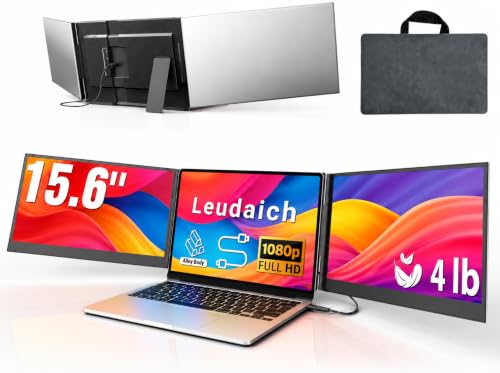
Leudaich One Cable Laptop Screen Extender Review Summary
The Leudaich One Cable Laptop Screen Extender makes the most sense for people who work from laptops and regularly hit the limits of a single display.
It is aimed at users who value speed, portability, and a cleaner desk more than raw simplicity, because the first-time setup requires driver installation.
If your day involves spreadsheets, chats, reference documents, or side-by-side comparisons, this is the kind of accessory that can change how your laptop feels to use.
Review Scorecard
| Category | Score | Why it matters |
|---|---|---|
| Portability | 9/10 | Slim aluminum build, carry bag, and all-in-one design suit mobile work. |
| Productivity Value | 9/10 | Triple-display workflow is the main reason to buy it. |
| Image Quality | 8/10 | 15.6-inch FHD IPS panels with 300 nits and 100% sRGB are strong on paper. |
| Setup Simplicity | 6/10 | One-cable concept helps, but the driver requirement adds friction. |
| Compatibility Flexibility | 8/10 | Supports USB-C or USB-A after setup and is positioned for 13-17 inch laptops. |
| Build and Ergonomics | 8/10 | Aluminum shell, no-clip design, and 180-degree rotation add practicality. |
| Value for the Right Buyer | 8/10 | Good fit if you will actually use the extra screen real estate every day. |
Key Features and Specifications of Leudaich One Cable Laptop Screen Extender
This Leudaich One Cable Laptop Screen Extender centers on a portable dual-screen attachment that turns a laptop into a triple-display workstation.
The listing says it uses a single USB-C or USB-A cable after driver installation, which is the key convenience feature.
It is designed for 13-17 inch laptops and includes two 15.6-inch FHD 1080P IPS displays with 300 nits brightness and 100% sRGB.
The rest of the package is clearly aimed at travel and desk flexibility.
The shell is aluminum alloy, the product is listed at about 4 pounds, and it ships with a leather carry bag.
The independent structure is meant to reduce hinge stress, and the no-clip design should make mounting and removal quicker than many clamp-heavy laptop monitor attachments.
Notable listing details:
- 15.6-inch dual displays
- FHD 1080P IPS panels
- 300 nits brightness
- 100% sRGB
- 180-degree rotation
- USB-C or USB-A connection after driver install
- Works with 13-17 inch laptops
- Aluminum alloy body
- Carry bag included
- Power adapter and cables included
Pros and Cons of Leudaich One Cable Laptop Screen Extender
Pros
- Strong productivity upside if you often juggle multiple windows.
- Portable form factor makes it easier to move between home, office, and travel.
- IPS panels and 100% sRGB make it more credible for color-sensitive everyday work than a basic bargain display.
- No-clip design is easier to live with than more finicky laptop extenders.
- Independent structure should be gentler on the laptop hinge than some attached setups.
Cons
- Driver required before first use, which adds setup time.
- Not the simplest plug-and-play accessory for people who want zero software steps.
- About 4 pounds is still noticeable in a bag, even if it is portable by monitor standards.
- Best value depends on workflow; casual users may not need triple-screen hardware.
Who Should Buy Leudaich One Cable Laptop Screen Extender?
Buy this Leudaich screen extender if your laptop is your main work machine and you routinely benefit from having more than one extra pane open at once.
It is especially appealing for remote workers, analysts, students, and anyone who likes a structured multi-window workflow without packing a separate monitor, stand, and cables.
It also fits users who move between locations and want a more complete desk setup in a compact package.
The included bag, aluminum build, and single-cable idea all point to a product that is meant to travel.
Skip it if you want an ultra-simple accessory with no driver step, or if you only occasionally wish your screen were bigger.
In that case, a basic portable monitor or a larger laptop may be the more practical choice.
Laptop Workflow and Use Cases for Leudaich One Cable Laptop Screen Extender
Side-by-Side Work
The clearest benefit of this Leudaich One Cable Laptop Screen Extender is the ability to keep reference material, communication apps, and active work visible at the same time.
That matters for anyone switching constantly between tabs and windows.
Portable Desk Setup
The aluminum body, carry bag, and no-clip design make this more of a mobile workstation tool than a permanent desk fixture.
It is built for users who want a more serious setup without committing to a desktop rig.
Presentation and Shared Viewing
The 180-degree rotation is useful when one or both screens need to be shown to another person.
That makes the product more flexible for collaboration than a fixed-angle laptop add-on.
Setup Tradeoff
The biggest practical tradeoff is the driver requirement.
The one-cable idea is attractive, but the first-time setup still asks for more attention than a plain external monitor would.
Alternatives to Leudaich One Cable Laptop Screen Extender
If you want a different route, look at other Amazon-sold portable monitor lines that solve adjacent problems:
- ASUS ZenScreen
- Lenovo portable monitor
- ARZOPA portable monitor
- ViewSonic portable monitor
- Mobile Pixels laptop monitor extender
ASUS and ViewSonic are better if you want a straightforward portable display from a familiar monitor brand.
Lenovo can be attractive for buyers already aligned with that ecosystem.
ARZOPA is worth checking if your priority is a simpler portable-monitor format.
Mobile Pixels is the closest alternative category-wise if you specifically want a laptop-mounted extender concept.
Is Leudaich One Cable Laptop Screen Extender Worth It?
Yes, if you will actually use the extra workspace. The Leudaich One Cable Laptop Screen Extender has a strong fit for people who live in spreadsheets, meetings, documents, or multitasking-heavy work and want that setup to travel with them.
The main caution is the setup friction: the driver requirement means this is not the best pick for buyers who want instant simplicity.
But if you care more about a portable triple-screen workflow than about keeping things bare-minimum, this Leudaich screen extender is worth considering.