
Redragon M656 wireless gaming mouse review: this is a straightforward pick for buyers who want cable-free play, configurable controls, and a grip-friendly shape without unnecessary complexity.
If you are asking whether the Redragon M656 wireless gaming mouse is worth it, the answer depends on whether you value programmable buttons and simple 2.4GHz convenience more than premium extras.
As a budget-minded gaming mouse with 4000 DPI support, seven programmable buttons, and an ergonomic body, it is built for players who want practical control first.
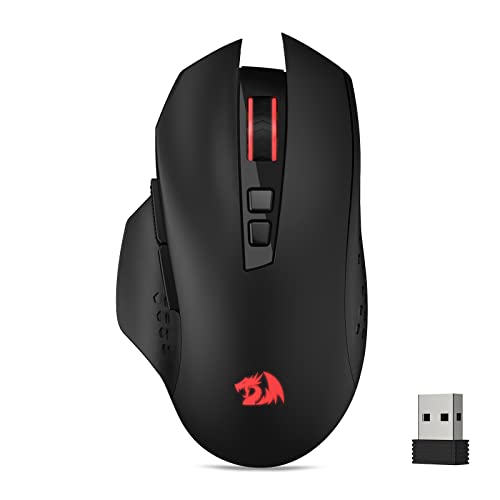
Redragon M656 Wireless Optical Gaming Mouse Review Summary
The Redragon M656 wireless gaming mouse makes sense for players who want a no-fuss peripheral with enough flexibility for everyday gaming and work.
Its appeal is not flashy industrial design or high-end sensor marketing; it is the combination of wireless freedom, adjustable DPI, macro-ready buttons, and an ergonomic shape that should suit users who want dependable control in a compact package.
Best for: casual to mid-level gamers, office users who like macros, and buyers who want a wireless mouse with more customization than a basic office model.
Not ideal for: buyers who need a rechargeable mouse, people who want a heavyweight feature set, or anyone expecting premium esports-tier hardware.
Review Scorecard
| Metric | Score | Why it matters |
|---|---|---|
| Wireless convenience | 8/10 | 2.4GHz nano receiver keeps the setup simple and cable-free. |
| Control flexibility | 8/10 | Seven programmable buttons and macro support add real usefulness. |
| Tracking range | 7/10 | 1000 to 4000 DPI covers common play styles, though it is not a high-end sensor story. |
| Comfort | 8/10 | The ergonomic grip body should suit longer sessions for many hand sizes. |
| Battery-minded design | 7/10 | ECO sleep mode helps conserve power, but the battery is not included. |
| Value for features | 8/10 | The feature mix is practical rather than luxurious, which should appeal to value shoppers. |
Key Features and Specifications of Redragon M656 Wireless Optical Gaming Mouse
The Redragon M656 wireless gaming mouse is built around a practical feature set rather than a crowded spec sheet.
The listing highlights a 2.4GHz wireless connection, five on-board DPI levels, seven programmable buttons, and a PAW3104 optical Pixart sensor.
That combination tells you exactly what the product is trying to be: a flexible, everyday gaming mouse with enough responsiveness and customization to cover most mainstream needs.
The DPI range is listed at 1000, 1500, 2000, 2400, and 4000.
That spread is wide enough for switching between precise cursor movement and faster sweeping motion, and the fact that the settings can be customized through software adds some tuning room.
The 500Hz polling rate also suggests a mouse designed to keep up with ordinary gaming use rather than feeling sluggish in general movement.
The button layout is one of the stronger selling points.
With seven programmable buttons, including two side macro buttons, the mouse is positioned for users who like to bind repeated actions, shortcuts, or utility commands.
That matters beyond games too, especially if you use your mouse for productivity workflows or repetitive navigation.
The shell is described as ergonomic, and that matters because comfort is often the real difference between a mouse you keep and one you replace.
Redragon also notes an ECO sleep mode for battery savings during intermittent use.
Since the battery is not included, buyers should treat that as part of the setup cost and not an afterthought.
Here is the short version of the core facts:
| Feature | Detail |
|---|---|
| Connection | 2.4GHz wireless nano receiver |
| DPI levels | 1000 / 1500 / 2000 / 2400 / 4000 |
| Programmable buttons | 7 total |
| Side buttons | 2 macro buttons |
| Sensor | PAW3104 optical Pixart sensor |
| Polling rate | 500Hz |
| Power | ECO sleep mode; battery not included |
| Lighting | Red logo light and red LED software styling |
Pros and Cons of Redragon M656 Wireless Optical Gaming Mouse
Pros
- Wireless simplicity through the 2.4GHz nano receiver makes it easy to set up and use.
- Seven programmable buttons give it real utility for macros, shortcuts, and game commands.
- Five DPI presets make it easier to adapt the mouse to different tasks.
- Ergonomic grip body should help buyers who care about comfort over visual flair.
- ECO sleep mode is a practical touch for power-conscious users.
Cons
- Battery not included, so it is not ready to use out of the box without extra setup.
- No rechargeable battery claim in the listing, which may disappoint buyers who prefer built-in charging.
- Not a premium-spec mouse, so power users looking for top-end sensor features may want more.
- Lighting is limited, with the red theme being more functional than expressive.
Who Should Buy Redragon M656 Wireless Optical Gaming Mouse?
Buy this if you want a wireless gaming mouse with useful customization and do not want to pay for features you will never use.
It is a strong fit for players who bind abilities, inventory actions, or repeated commands and want those commands close at hand on the side buttons.
It also makes sense for users who split time between gaming and general computer work.
The adjustable DPI levels can help you move from precise desktop control to faster game movement, and the wireless setup keeps the desk cleaner than a wired alternative.
Skip it if you want a mouse that is clearly positioned as a high-end competitive device.
The feature set here is practical, not extravagant, and that is part of the appeal.
If you want a premium rechargeable mouse, a more advanced sensor story, or a more elaborate lighting system, this is probably not the best match.
Wireless Control and Everyday Use
2.4GHz Connection Simplicity
The main advantage here is the plug-and-play nature of the 2.4GHz nano receiver.
For buyers who dislike cable drag or who move their mouse between different desk setups, that kind of simplicity matters more than spec-sheet bragging rights.
DPI Flexibility for Mixed Tasks
Five DPI levels let the Redragon M656 move between slower, more exact pointer control and faster tracking.
That is useful if you play different genres or also use the mouse for work, because you are not locked into one sensitivity feel.
Macro Buttons for Faster Input
The two side macro buttons and total of seven programmable buttons are the clearest reason to choose this model over a plain wireless mouse.
If you regularly repeat actions or want common shortcuts under your thumb, the layout is genuinely useful.
Comfort and Power Practicality
The ergonomic grip body suggests a mouse designed for longer sessions, not just short bursts.
ECO sleep mode is also a sensible inclusion, but the missing battery means buyers should plan ahead rather than assume full out-of-box readiness.
Alternatives to Redragon M656 Wireless Optical Gaming Mouse
If you want a closer Amazon alternative, look at the Logitech G305 Lightspeed wireless gaming mouse, which is a common choice for buyers who want a compact wireless gaming mouse.
Another option is the Razer DeathAdder Essential, which may suit users who prefer a familiar gaming shape and do not need wireless.
For a similar value-focused path, the Corsair Harpoon RGB Wireless is worth comparing if you want a recognized gaming brand with a wireless layout.
If your priority is a broader feature set from the same general category, the Logitech G502 X LIGHTSPEED is a stronger premium comparison point, though it sits in a different class.
Is Redragon M656 Wireless Optical Gaming Mouse Worth It?
The Redragon M656 wireless gaming mouse is worth it if you want a budget-conscious wireless mouse with real customization value.
Its strongest arguments are the wireless 2.4GHz setup, the ergonomic shape, the seven programmable buttons, and the useful DPI range.
Those are practical features that support both gaming and everyday use.
It is less compelling if you are shopping for a premium rechargeable mouse or a more advanced competitive model.
For the right buyer, though, this is a sensible and focused choice that covers the basics well and adds enough macro support to feel genuinely useful.