
AsiaHorse Nyota Pro 120mm PC Fans are aimed at builders who want cleaner wiring without giving up airflow or lighting.
If you are shopping for a PC case or radiator fan set, this [AsiaHorse Nyota Pro 120mm PC Fans review] is mainly about whether the modular design actually makes the build easier.
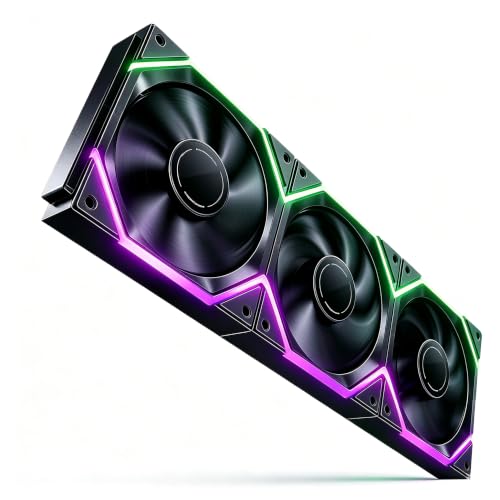
Nyota Pro Review Summary
The AsiaHorse Nyota Pro makes sense for a very specific buyer: someone who values a tidier interior, PWM control, and configurable ARGB more than a plain, no-frills fan pack.
The standout feature is the modular daisy-chain system, which the listing says lets one cable power the whole chain and reduces clutter.
That is a real advantage in modern builds where cable routing can consume more time than the install itself.
It also looks well suited to gamers and performance-oriented builders who want a fan that is not just decorative.
The listing claims up to 2000RPM, 61.5CFM maximum airflow, 2.16mmH2O static pressure, and 29dB maximum noise.
Those are not lab-verified figures here, but they do point to a fan meant to handle both case airflow and radiator duty rather than only serving as a light show accessory.
The best fit is a builder who wants one product to cover appearance, airflow, and easier cable management at the same time.
Review Scorecard
| Category | Score | Rationale |
|---|---|---|
| Cable management | 10/10 | Modular interlocking design is the clearest advantage and directly addresses clutter. |
| Cooling potential | 8/10 | PWM control, 2000RPM ceiling, and listed airflow/static pressure suggest serious all-round use. |
| Lighting flexibility | 9/10 | Dual-zone asynchronous ARGB and 18 addressable LEDs offer more creative control than basic fan lighting. |
| Build practicality | 8/10 | Standard 120mm sizing and radiator screws make it easier to slot into common builds. |
| Noise focus | 7/10 | The listing emphasizes 29dB max and anti-vibration pads, but real-world acoustics will depend on tuning. |
| Value for builders | 8/10 | Strong feature mix if you want both aesthetics and utility, not just one or the other. |
Key Features and Specifications of Nyota Pro
The Nyota Pro is a standard 120x120x25mm PC fan that uses a 4-pin PWM connection for speed control.
The speed range is listed as 800 to 2000RPM, which gives it room to stay quieter at low load and ramp up when heat builds.
For a case fan, that range is useful; for a radiator fan, the higher ceiling matters even more.
The airflow-focused claims are also strong on paper.
AsiaHorse lists 61.5CFM maximum airflow and 2.16mmH2O maximum pressure, which is the kind of combination buyers usually want when they need a fan that can move air through a restrictive case or cooler.
The reversible blade design adds flexibility for intake or exhaust use, which helps if you are matching a fan set to a mixed layout.
Lighting is another major part of the product identity.
Each fan is described as having 18 addressable LEDs, split as 9 per side, with dual-zone asynchronous control through the AsiaHorse UMBRA Hub and software.
That means the lighting pitch is not just “ARGB exists,” but rather “you can do more with each side of the fan.” For visual builds, that can be the difference between acceptable and genuinely distinctive.
Other useful listing details include:
- Modular daisy-chain connection for fan-to-fan assembly
- Single-cable power approach to reduce wiring
- High-purity copper connections
- Braided flame-retardant cables
- HDB bearings for long-term operation
- Thick anti-vibration rubber pads
- Compatible with 5V 3-pin ARGB motherboards
- Includes water-cooling mounting screws for radiator use
- Compatible with AsiaHorse ARGB accessories such as Hydrus cables and Aurora covers
Pros and Cons of Nyota Pro
Pros
- Cleaner build process: the modular connection system is the defining benefit and should noticeably reduce cable clutter.
- Flexible lighting behavior: dual-zone asynchronous ARGB is more adaptable than ordinary single-effect fan lighting.
- Useful performance envelope: the listed airflow, pressure, and PWM range make it suitable for more than just cosmetic use.
- Broad fit: standard 120mm sizing and included radiator screws make it versatile across common PC layouts.
- Noise-conscious design touches: anti-vibration pads and HDB bearings are good signs for day-to-day usability.
Cons
- Software dependence for the full lighting story: the most distinctive lighting effects appear tied to the hub and software ecosystem.
- Spec-first presentation: the listing makes strong claims, but buyers still need to rely on manufacturer figures rather than independent test data.
- May be more fan than some builders need: if you only want basic airflow, the modular ARGB system may be overkill.
Who Should Buy Nyota Pro?
The AsiaHorse Nyota Pro is a good choice for builders who want their fan purchase to solve multiple problems at once.
If your goals are cleaner cable routing, strong-looking RGB, and respectable cooling hardware in a standard 120mm form factor, this is a very practical option.
It is especially appealing for showcase cases, tidy mid-towers, and builds where the inside of the PC is meant to be seen.
It also makes sense for users who are building around an AIO or radiator and want fan mounting compatibility without sacrificing the ARGB theme.
The listing specifically mentions radiator screws and PWM control, which are both helpful signals for that use case.
You may want to skip it if your build is completely hidden, if you do not care about lighting, or if you prefer the simplest possible fan installation.
In those cases, the extra modular and visual features will not do much for you.
Likewise, if your only concern is absolute performance and you plan to compare against heavily benchmarked premium fans, you will probably want to evaluate more established no-nonsense cooling lines as well.
Modular Cooling and Lighting Fit
Cable Reduction in Real Builds
The major practical promise here is not raw speed.
It is the chance to cut down on the usual tangle of fan power and ARGB leads.
For multi-fan layouts, that can make a difference to both installation time and how finished the build looks through a side panel.
Airflow Versus Clean Aesthetics
What makes the Nyota Pro interesting is that it is not trying to be only decorative.
The listed 9-blade design, PWM range, and pressure figure suggest that AsiaHorse wants this to function as a serious cooling part while still looking clean enough for show builds.
Lighting That Can Actually Stand Out
The dual-zone asynchronous setup is the more interesting part of the RGB story.
Instead of treating the fan as a single ring of light, the design is meant to create different effects on each side, which gives builders more freedom when the fans are mounted as intake, exhaust, or radiator hardware.
Installation and Compatibility
Standard 120mm dimensions keep the product easy to place, and compatibility with 5V 3-pin ARGB motherboards means it should fit into common modern ecosystems.
The inclusion of radiator screws also strengthens the case for mixed case-and-cooler use.
Alternatives to Nyota Pro
If you want a different angle on the same category, there are several credible alternatives worth comparing:
- Corsair AF120 ARGB if you want a better-known ecosystem and straightforward RGB case fans.
- Lian Li UNI FAN SL-INF 120 if cable reduction is your top priority and you want a more established modular fan line.
- Thermaltake TOUGHFAN 12 ARGB if you want a performance-oriented fan with lighting and a more conventional setup.
- DeepCool FC120 if you want a simpler linked-fan approach without leaning as hard into the AsiaHorse lighting ecosystem.
Is Nyota Pro Worth It?
The AsiaHorse Nyota Pro is worth considering if your build benefits from cleaner wiring, flexible ARGB, and a fan that is meant to do more than just spin quietly in the background.
The modular design is the strongest reason to buy it, and the listed cooling and lighting features support that idea well.
If you are building a visible PC and want a fan set that can simplify installation while still giving you a strong visual result, this is a sensible pick.
If you do not care about lighting or you prefer a more traditional fan purchase, you will likely find better value elsewhere.
For the right builder, though, the Nyota Pro looks like a practical and visually focused upgrade.