
Bluetooth adapters can add wireless convenience to older PCs, speaker systems, and car stereos without replacing the hardware you already own. The right pick depends on whether you need a USB dongle, an audio receiver, or a travel-friendly transmitter.
Below, we break down the best options for 2026 based on compatibility, range, audio use, and everyday value so you can choose the model that fits your setup.
Best 10 Bluetooth Adapters Picks for 2026
Desktop Bluetooth Upgrade
TP-Link UB500 Bluetooth 5.4 USB Adapter

- Bluetooth 5.4 with EDR and BLE
- Plug and play for Windows 8.1/10/11
- Nano-sized USB design with broad device support
Best For: Windows PC users needing a compact Bluetooth dongle
Travel Audio Transmitter
Twelve South AirFly SE Bluetooth Audio Adapter

- Turns 3.5mm audio jacks into wireless audio
- Works with AirPods, earbuds, and headphones
- Over 20 hours of battery life and USB-C charging
Best For: Travelers wanting wireless headphones on wired audio sources
Budget PC Dongle
TP-Link UB400 Bluetooth 4.0 Adapter

- Bluetooth 4.0 with backward compatibility
- Plug and play on Windows 8/8.1/10
- Nano dongle with up to 65 ft range
Best For: Basic Bluetooth for Windows PCs and laptops
Home Stereo Receiver
Esinkin Bluetooth Audio Adapter for Music Streaming

- Adds Bluetooth to speakers and stereo systems
- Single-button pairing with automatic reconnect
- Receiver only; needs external power
Best For: Wireless music streaming to existing home audio gear
Windows 6.0 Dongle
Bluetooth 6.0 Windows USB Adapter

- Bluetooth 6.0 with EDR/BLE
- Connects up to 5 devices
- Plug and play for Windows 11/10/8.1
Best For: Windows users needing a simple USB Bluetooth adapter for accessories
AUX Car Receiver
3.5mm Bluetooth Receiver for Car

- Turns AUX audio into wireless streaming
- Bluetooth 5.0 with CVC8.0/DSP noise reduction
- Up to 16 hours of battery life
Best For: Cars and speakers with 3.5mm AUX that need wireless audio and calls
Car Power & Sound Upgrade
Nulaxy 54W Bluetooth 5.3 Car Adapter

- 54W total charging with PD36W and QC18W
- Bluetooth 5.3 for stable calls and music
- Voice controls, bass boost, and 5-color lighting
Best For: Drivers wanting charging plus Bluetooth audio in one FM transmitter
Windows USB Connectivity Pick
UGREEN Bluetooth 5.3 USB Adapter

- Bluetooth 5.3 with stable BR+EDR connectivity
- Connects up to 5 devices at once
- Plug-and-play for Windows 11/10/8.1
Best For: Windows PC users who want a tiny USB Bluetooth dongle
Home Audio Wireless Receiver
SONRU Bluetooth 5.3 Audio Adapter
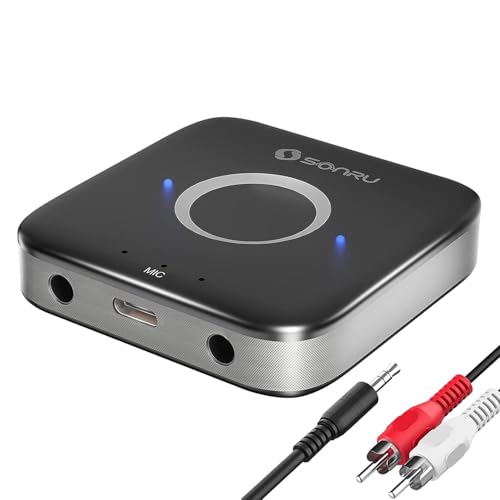
- Adds Bluetooth to older speakers and stereos
- Includes AUX and RCA cables with dual ports
- 15-hour battery life with noise cancellation
Best For: Users upgrading home stereo or car audio to wireless Bluetooth
Desktop Bluetooth Upgrade – TP-Link UB500 Bluetooth 5.4 USB Adapter
If you want one of the most practical bluetooth adapters for a Windows PC, the TP-Link UB500 is a simple way to add modern wireless support without taking up much space. It offers Bluetooth 5.4 with EDR and BLE, broad backward compatibility, and a nano-sized design you can leave plugged in.
Best For: Windows users who want a tiny plug-and-play adapter for headphones, keyboards, mice, printers, and other Bluetooth devices.
Pros:
- Bluetooth 5.4 with backward compatibility across older Bluetooth versions
- Plug and play on Windows 8.1/10/11, with free driver support for Windows 7
- Nano-sized design stays out of the way in a USB port
- Supports multi-device wireless communication with low-energy operation
Cons:
- Windows PCs only; not compatible with macOS, Linux, TVs, or Windows 8
- Not for direct console use
- Setup may require disabling an existing internal Bluetooth adapter to avoid conflicts
For a straightforward desktop Bluetooth upgrade, the UB500 focuses on compatibility, compact size, and easy setup. It is a solid fit if you mainly need stable Bluetooth connectivity on a Windows machine.
Travel Audio Transmitter – Twelve South AirFly SE Bluetooth Audio Adapter
Among bluetooth adapters for travel, the Twelve South AirFly SE is built for turning a 3.5mm audio jack into a wireless listening setup. It lets you connect AirPods, earbuds, or Bluetooth headphones to in-flight entertainment, gym equipment, gaming devices, and other wired audio sources.
Best For: Travelers and commuters who want wireless headphone use from wired audio jacks.
Pros:
- Works with 3.5mm audio jacks on planes, gym gear, and gaming devices
- Pairs with AirPods, earbuds, and wireless headphones
- More than 20 hours of battery life on a single charge
- Can be used while charging via USB-C
Cons:
- Designed as an audio transmitter, not a general-purpose PC Bluetooth adapter
- Focused on listening use rather than broad device connectivity
The AirFly SE is a practical pick when your main goal is wireless audio from wired sources. Its long battery life and compact form make it especially useful for travel.
Budget PC Dongle – TP-Link UB400 Bluetooth 4.0 Adapter
If you are looking for simple bluetooth adapters for an older or newer Windows PC, the TP-Link UB400 is a compact way to add Bluetooth 4.0 support. It offers plug-and-play operation on supported Windows versions, broad backward compatibility, and a small nano design that can stay connected full time.
Best For: Users who want an affordable, basic Bluetooth dongle for Windows PCs and laptops.
Pros:
- Bluetooth 4.0 with backward compatibility to earlier Bluetooth versions
- Plug and play on Windows 8, 8.1, and 10
- Nano-sized design for a low-profile USB connection
- Up to 65 ft operating range and BLE support
Cons:
- Not compatible with Mac, Linux, or TV use
- Windows 7 and XP require a driver download
- Older Bluetooth 4.0 spec than newer adapters in this roundup
The UB400 is a no-frills choice when you mainly need dependable Bluetooth on a Windows machine. It is best suited to basic peripherals and audio use rather than the newest wireless standards.
Home Stereo Receiver – Esinkin Bluetooth Audio Adapter for Music Streaming
For home audio systems, this bluetooth adapter is designed to add wireless streaming to speakers and stereo gear that already uses a 3.5 mm or RCA input. It works as a Bluetooth receiver for smartphones, tablets, computers, and laptops, making it a simple upgrade for existing powered speakers or A/V receivers.
Best For: Turning an existing stereo or powered speaker setup into a wireless music receiver.
Pros:
- Connects to speakers or stereo systems through 3.5 mm or RCA
- Single-button pairing with automatic reconnect
- Works with most Bluetooth-enabled phones, tablets, computers, and laptops
- Powered by AC-to-DC adapter or USB cable, so no built-in battery is needed
Cons:
- Receiver only; it does not transmit Bluetooth audio
- Requires external power
- Indoors range is listed at 30-40 ft without obstacles
The Esinkin is a focused solution for adding Bluetooth streaming to wired home audio gear. If you only need receiver functionality for an existing sound system, it keeps the setup simple.
Windows 6.0 Dongle – Bluetooth 6.0 Windows USB Adapter
If you want bluetooth adapters for a Windows PC with a simple plug-and-play setup, this UGREEN dongle is built for fast, low-hassle use. It supports Bluetooth 6.0 with EDR and BLE, handles multiple device types at once, and is aimed at users who need a compact receiver for everyday accessories.
Best For: Windows 11/10/8.1 users who want a no-driver USB Bluetooth adapter for keyboards, mice, headphones, and printers.
Pros:
- Bluetooth 6.0 with EDR and BLE for faster transfers and efficient power use
- Supports up to 5 connected Bluetooth devices at the same time
- Plug and play on Windows 11/10/8.1 with no driver installation required
- Backward compatible with Bluetooth 5.4 and 5.3
Cons:
- Windows only; Linux, macOS, and Windows 7 are not supported
- Not compatible with TV, car systems, or game consoles
- Range can be affected by walls and wireless interference
Overall, this is a strong pick if your priority is a straightforward USB Bluetooth adapter for a supported Windows machine. Its main strengths are simplicity, multi-device support, and newer Bluetooth 6.0 hardware.
AUX Car Receiver – 3.5mm Bluetooth Receiver for Car
This COMSOON option is one of the more practical bluetooth adapters for older audio gear, turning a 3.5mm AUX input into a wireless connection. It’s designed for car stereos, home speakers, and wired headphones, with Bluetooth 5.0, noise reduction, and hands-free calling built in.
Best For: Drivers or home listeners who want to add wireless audio and calling to non-Bluetooth AUX devices.
Pros:
- Connects to non-Bluetooth car audio systems, home stereos, speakers, and wired headphones via 3.5mm AUX
- Bluetooth 5.0 chip for stable connection, fast transmission, and wide signal range
- CVC8.0 noise cancellation and DSP help reduce echo and background noise during calls
- Up to 16 hours of battery life with Type-C fast charging support
Cons:
- Cannot be paired with Bluetooth headphones
- Requires charging, so it is not a purely passive adapter
- Performance may be affected in areas with strong magnetic interference
For adding wireless streaming to older AUX-based gear, this is a flexible and travel-friendly receiver. It stands out most if you want both music playback and hands-free call support in a compact unit.
Range Boost Dongle – Bluetooth 5.3 Long-Range USB Adapter
Among bluetooth adapters for desktops and laptops, this TP-Link dongle is aimed at users who want a compact upgrade with better coverage. It uses Bluetooth 5.3 plus EDR, adds a multi-directional antenna, and is designed for Windows systems with easy setup on current versions.
Best For: Windows PC users who want a long-range USB Bluetooth adapter with adjustable antenna placement.
Pros:
- Bluetooth 5.3 plus EDR with backward compatibility to older Bluetooth versions
- Claims up to twice the speed and four times the coverage versus Bluetooth 4.0
- Multi-directional antenna can be rotated and adjusted for better reception
- Plug and play on Windows 8.1, 10, and 11, with driver support for Windows 7
Cons:
- Windows-focused support; setup depends on the operating system
- Windows 7 requires a driver download
- Needs an internet connection for plug-and-play setup on supported systems
This is a good fit if range and signal positioning matter more than absolute simplicity. The adjustable antenna and newer Bluetooth 5.3 hardware make it especially appealing for desktop setups that sit farther from peripherals.
Car Power & Sound Upgrade – Nulaxy 54W Bluetooth 5.3 Car Adapter
If you want bluetooth adapters for the car that do more than stream music, this Nulaxy model is built around charging and connectivity. It combines Bluetooth 5.3 with a 4-port fast-charging layout, so it can handle hands-free calls, navigation prompts, and multi-device charging in one compact unit.
Best For: Drivers who want a Bluetooth car adapter with fast charging, stable audio, and simple hands-free controls.
Pros:
- 54W total output with PD36W and QC18W for fast, parallel charging.
- Bluetooth 5.3 for quicker pairing and stable music/call connections.
- One-touch bass mode and five-color lighting for easier nighttime use.
- Voice-command support and raised button design for hands-free driving.
Cons:
- Requires matching the transmitter size to the car cigarette lighter socket.
- FM transmitter setup depends on finding a blank radio frequency.
- Works only within the supported 12V to 24V vehicle range.
For drivers who need an all-in-one car audio and charging solution, this Nulaxy unit stands out for practical everyday use. It is especially appealing if you want bluetooth adapters that combine safer control, broader compatibility, and fast power delivery.
Windows USB Connectivity Pick – UGREEN Bluetooth 5.3 USB Adapter
Among bluetooth adapters for PCs, this UGREEN USB dongle is focused on simple expansion for Windows desktops and laptops. It uses Bluetooth 5.3, supports up to five connected devices, and keeps a very small footprint if you want a leave-in adapter for mice, keyboards, headsets, and printers.
Best For: Windows users who need a compact plug-and-play Bluetooth adapter for everyday peripherals.
Pros:
- Bluetooth 5.3 for improved stability and lower power use.
- Supports up to 5 Bluetooth devices at the same time.
- Plug-and-play on Windows 11, 10, and 8.1 with no driver install.
- Mini size stays out of the way on laptops and desktops.
Cons:
- Windows only; not compatible with Mac, Linux, or Windows 7.
- Not supported for TV, car use, or game consoles.
- Must disable any built-in Bluetooth module before using it on some PCs.
This is a practical choice if you mainly need reliable Bluetooth on a Windows machine without extra setup. It is less flexible than some bluetooth adapters, but it stays focused on core PC accessory support and easy portability.
Home Audio Wireless Receiver – SONRU Bluetooth 5.3 Audio Adapter
If your goal is to add wireless playback to older audio gear, this SONRU unit is one of the more versatile bluetooth adapters for speakers, home stereos, and non-Bluetooth car audio systems. It uses Bluetooth 5.3, includes AUX and RCA connections, and adds features like noise cancellation and dual-device support.
Best For: People who want to upgrade older speakers, stereos, or car audio with Bluetooth listening.
Pros:
- Bluetooth 5.3 receiver for updating non-Bluetooth audio gear.
- Dual 3.5mm AUX ports plus included AUX and RCA cables.
- Noise cancellation and echo cancellation for cleaner sound.
- 15-hour battery life with use-while-charging support.
Cons:
- Receiver only; it cannot pair with Bluetooth headphones or speakers.
- Designed for receiving audio, not transmitting it.
- Works best with wired audio systems rather than standalone wireless devices.
This model makes sense if you want a straightforward way to modernize older audio equipment without replacing it. For bluetooth adapters in the home or car stereo category, its mix of battery life, dual connections, and wired output options is especially practical.
How We Picked the Best Bluetooth Adapters
We focused on Bluetooth Adapters that solve common real-world needs: adding wireless support to a desktop or laptop, streaming audio to a home stereo, or connecting phones in a car. We prioritized broad compatibility, reliable pairing, practical range, and useful extras such as low-latency audio support, plug-and-play setup, and compact designs that stay out of the way.
We also considered whether a model is best suited for data use, music streaming, or hands-free audio. That matters because not all Bluetooth Adapters are interchangeable, even when they look similar.
Quick Comparison: Which Type Fits Your Setup?
USB dongles are the best fit for PCs that lack built-in Bluetooth or need an upgrade to a newer version. Audio receivers are ideal for speakers, stereos, and car AUX inputs when you want to stream from a phone. Transmitters are the right choice when you need to send audio from one source to another, such as a TV, airplane seat, or older media device.
If you want the simplest setup, look for plug-and-play PC adapters. If your priority is music quality, focus on low latency and stable audio codecs. If you use the road often, car-oriented models with charging ports or dual-purpose features may offer the most value.
Key Buying Factors for Bluetooth Adapters
Compatibility
Check operating system support before buying. Some Bluetooth Adapters are Windows-focused, while others work better for speakers, receivers, or vehicles. Make sure the device matches your source and destination equipment.
Bluetooth Version
Newer versions generally improve efficiency, stability, and range, but version number alone does not guarantee better performance. A well-designed Bluetooth 5.3 or 5.4 adapter can still outperform a poorly implemented newer chip.
Range and Antenna Design
For desktop use or larger rooms, long-range models can reduce dropouts. For portable setups, compact dongles are easier to carry and leave plugged in.
Audio Features
If you care about music or video playback, look for low latency, strong signal stability, and support for common audio profiles. These features matter more than raw version numbers for listening quality.
Ease of Use
Some Bluetooth Adapters work immediately, while others require drivers or setup steps. If you want a quick install, choose a model designed for straightforward pairing and broad system support.
Who Should Buy Which Bluetooth Adapters?
Choose a USB dongle if you need Bluetooth on a PC. Choose an audio receiver if your goal is to modernize a speaker or stereo system. Choose a car adapter if you want streaming and hands-free convenience while driving. If you travel often, a transmitter-style option may be the most flexible of all.
In short, the best Bluetooth Adapters are the ones that match your exact use case rather than the newest specs on paper. Focus on compatibility first, then range, audio performance, and convenience.