
If you want better control without sacrificing desk space, the right yoke can make a huge difference. This roundup focuses on flight simulator yokes for small spaces that balance realism, footprint, and day-to-day usability.
We looked for options that are easier to mount, simpler to stow, and practical for compact sim rigs, whether you fly on PC or across multiple platforms.
Best 10 Flight Simulator Yokes for Small Spaces Picks for 2026
Compact Starter Pick
Honeycomb Alpha LITE for Small Spaces

- 180° self-centering yoke rotation
- Compact essentials-focused control layout
- Built for PC sim use with MSFS 20/24
Best For: Entry-level sim pilots with limited desk space
Desktop-Ready Bundle
Logitech G Pro Yoke and Pedals Bundle

- Includes yoke plus self-centering rudder pedals
- 14 buttons, POV hat, and mode switch
- Adjustable pedal fit with toe brakes
Best For: Users building a fuller Windows flight sim setup
Space-Savvy Premium Pick
Honeycomb Alpha Yoke With Switch Panel

- 180° yoke with minimal deadzone
- Built-in switch panel adds cockpit controls
- Clamp or micro-suction mounting options
Best For: PC pilots who want premium controls and flexible mounting
Boeing-Style Flight Pack
Thrustmaster TCA Yoke and Quadrant

- Boeing 787-inspired yoke and throttle quadrant
- Pendular motion with 8.3-inch range
- Metal build with 35 action buttons
Best For: Boeing-style simmers who want realistic controls on PC or Xbox
Compact Pro-Grade Pick
Logitech G PRO Flight Yoke System

- Desk clamps help it fit more securely on small desks.
- Includes yoke plus throttle quadrant for a fuller setup.
- 54+ programmable controls keep most functions within reach.
Best For: Sim pilots who want a realistic, desk-mounted yoke setup
Space-Saving Modern Option
MOZA Flight Simulator MFY YOKE

- Dedicated yoke design keeps the setup simple.
- Potentially easier to place on a smaller desk.
- Limited supplied details make feature comparison difficult.
Best For: Buyers who want a minimal dedicated yoke setup
All-in-One Desk Setup
Turtle Beach VelocityOne Flight

- Combines yoke, throttle quadrant, trim wheel, and rudder controls.
- Secure clamping system suits many home desk setups.
- Built-in display and controls reduce the need for extras.
Best For: PC and Xbox users who want an integrated control system with lots of built-in features
Compact Control
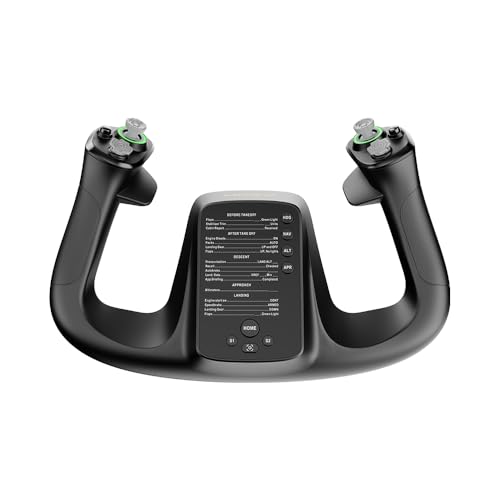
- 1.3 kg yoke keeps the setup relatively light
- 34 configurable inputs reduce the need for extra hardware
- PA66 composite and aluminum alloy build adds durability
Best For: PC pilots who need a compact, control-rich yoke
Force Feedback Focus

- 4.2 Nm roll torque adds realistic force feedback
- 180° rotation and 95 mm pitch travel support precise control
- PC USB base is built for a focused cockpit setup
Best For: PC sim pilots who want realistic force feedback in a base
Desk-Mount Classic
Logitech G PRO Flight Yoke System

- 2-position desk clamp helps it fit more desks
- 75 programmable controls plus throttle quadrant boost flexibility
- Steel shaft is built for smooth, accurate control
Best For: PC pilots who want a mounted yoke with a full throttle setup
Compact Starter Pick – Honeycomb Alpha LITE for Small Spaces
If you want flight simulator yokes for small spaces without giving up realistic control, the Honeycomb Alpha LITE is a smart entry-level choice. It focuses on the most important functions, keeps the layout simple, and still gives you 180° yoke rotation with self-centering action for precise flying.
Best For: New sim pilots who want a compact, straightforward yoke for PC flight sims and quick setup.
Pros:
- Focused control layout with left and right rocker switches, buttons, and a POV switch
- 180° rotation with minimal dead zone for accurate maneuvers
- High-quality materials and precision components for long-term use
- Compatible with MSFS 20 and 24 on PC
Cons:
- No separate switch panel included
- Designed mainly around essentials rather than a full cockpit feature set
Overall, this is a practical pick if desk space is limited and you mainly want the core yoke experience. It keeps things simple while still aiming for smooth, realistic control.
Desktop-Ready Bundle – Logitech G Pro Yoke and Pedals Bundle
For flight simulator yokes for small spaces, this Logitech bundle is best considered if you want one purchase that covers both yoke and rudder control. The included yoke system offers a realistic control feel, while the rudder pedals add smooth, self-centering foot control and toe brakes for more complete handling.
Best For: Sim pilots who want a fuller control setup in one bundle, including yoke and pedals, on a Windows desktop.
Pros:
- Bundle includes both yoke and rudder pedals for more complete control
- 14 buttons, POV hat, and 3-position mode switch provide plenty of programmable inputs
- Self-centering pedals with differential toe brakes improve runway control
- Adjustable foot rests with non-slip materials help with fit and stability
Cons:
- Bundle adds more pieces to manage than a standalone yoke
- Not the most minimal choice if every inch of desk and floor space matters
This is a strong option if you want a more realistic setup and can accommodate pedals alongside the yoke. It trades simplicity for a broader control package.
Space-Savvy Premium Pick – Honeycomb Alpha Yoke With Switch Panel
If you’re shopping flight simulator yokes for small spaces but still want a feature-rich setup, the Honeycomb Alpha Flight Controls Yoke & Switch Panel is worth a close look. It combines a 180° yoke, a built-in switch panel, and a clamp or micro-suction mounting option for flexible desk placement.
Best For: PC sim pilots who want a premium yoke with integrated switches and flexible mounting.
Pros:
- 180° rotation with self-centering control and minimal deadzone
- Integrated switch panel with ignition, avionics, lights, and more
- Dual mounting options: heavy-duty clamps or micro-suction pad
- 33 buttons and switches for a cockpit-style control layout
Cons:
- Still a substantial setup despite the flexible mounting options
- PC-focused compatibility may limit use for non-PC setups
This model stands out when you want more controls in one unit without sacrificing desk flexibility. The mounting choices make it easier to fit into different table setups.
Boeing-Style Flight Pack – Thrustmaster TCA Yoke and Quadrant
Among flight simulator yokes for small spaces, the Thrustmaster TCA Yoke & Quadrant Boeing Edition is the most cockpit-like and the least minimal. It brings a Boeing 787-inspired 1:1-scale yoke, a pendular motion mechanism, and a matching throttle quadrant, so it suits users who want realism first and compactness second.
Best For: Boeing fans and serious sim pilots who want a realistic yoke-and-throttle bundle for PC or Xbox.
Pros:
- Officially licensed Boeing design with 1:1 scale inspiration
- Pendular motion and 8.3-inch range for smooth, realistic control
- Metal internal structure for a durable feel
- Throttle quadrant adds autopilot functions and more control axes
Cons:
- The full pack is large, so it is not the most space-saving option
- Best suited to users who can accommodate both yoke and quadrant hardware
This is a great match if you want authentic Boeing-style flying and can give up some space for a more complete setup. It prioritizes immersion and control depth over a compact footprint.
Compact Pro-Grade Pick – Logitech G PRO Flight Yoke System
If you’re comparing flight simulator yokes for small spaces, the Logitech G PRO Flight Yoke System is a strong fit because it combines a full yoke and throttle quadrant with desk-clamp mounting rather than a permanent cockpit setup. It still gives you a highly programmable control layout, so you can keep key functions close at hand without needing a large dedicated rig.
Best For: Sim pilots who want a realistic, desk-mounted yoke setup with lots of programmable controls.
Pros:
- Two desk clamps provide secure mounting flexibility for a wide range of desks.
- Offers at least 54 programmable controls with a POV hat, 14 buttons, and a 3-position mode switch.
- Includes both the flight yoke and separate throttle quadrant in the box.
- Compatible with Windows 11/10/8.1/7 and major sim platforms with optional software.
Cons:
- The full system still takes up noticeable desk space at 18.9 x 15.8 x 9.1 inches.
- Throttle quadrant and cables add more pieces to manage on a small desk.
Overall, this is the best choice here if you want a more traditional simulation feel and broad control access without moving to a fixed cockpit. The clamp system helps it work better in tighter home setups, even though it is not the smallest option.
Space-Saving Modern Option – MOZA Flight Simulator MFY YOKE
For buyers focused on flight simulator yokes for small spaces, the MOZA Flight Simulator MFY YOKE stands out as the most straightforward space-conscious pick in this group. The supplied product details are limited, so the main advantage here is its dedicated yoke form factor for users who want to keep the setup simple and avoid the bulk of an all-in-one system.
Best For: Sim racers and pilots who want a dedicated yoke choice without extra bundled hardware.
Pros:
- Dedicated yoke product rather than a larger all-in-one control system.
- May be easier to integrate into a smaller desk setup than combo units.
- Good fit for buyers who want to build a minimal setup around one controller.
Cons:
- Supplied notes do not list detailed features, dimensions, or included accessories.
- Lack of product details makes direct comparison harder than with the other options.
If your main priority is simply keeping the footprint and setup complexity down, this is the most minimal entry in the roundup. The tradeoff is that the listing provides far less information, so it is harder to judge controls and mounting flexibility from the supplied notes alone.
All-in-One Desk Setup – Turtle Beach VelocityOne Flight
If you want flight simulator yokes for small spaces but still need a lot of controls in one unit, the Turtle Beach VelocityOne Flight is designed around an integrated, desk-friendly layout. It combines the yoke, throttle quadrant, trim wheel, and rudder controls in a single system, which can reduce the need for separate peripherals spread across your desk.
Best For: PC and Xbox users who want an integrated control system with lots of built-in features.
Pros:
- All-in-one design includes yoke, throttle quadrant, trim wheel, and rudder controls.
- Secure clamping system is made to fit a variety of home setups.
- Full color display and status indicator panel help with learning and configuration.
- Offers 12 analog axes, 26 buttons, and multiple hat/POV controls.
Cons:
- The integrated design is still fairly large at 19.01 x 7.2 x 19.5 inches.
- At 10 pounds, it is heavier than a simple standalone yoke.
This is the most feature-packed option for a compact desk if you want to avoid adding separate throttle and trim accessories. It is still a substantial piece of hardware, but the unified layout can be easier to manage than multiple individual controllers.
Compact Control – MOZA MFY Yoke for PC
If you’re comparing flight simulator yokes for small spaces, the MOZA MFY is a compact, lightweight option that focuses on control density rather than a bulky footprint. It pairs a 1.3 kg build with an aluminum alloy quick-release design and 34 configurable inputs, so you can keep a full set of flight functions close at hand without adding unnecessary clutter.
Best For: PC sim pilots who want a space-conscious yoke with lots of configurable inputs and a modern build.
Pros:
- 34 configurable inputs give you plenty of controls in a compact setup
- PA66 composite materials and aluminum alloy construction support durability
- Drift-free control is designed for precision and accuracy
- Supports elevator trim, autopilot, and rudder control functions
Cons:
- PC-only compatibility limits platform flexibility
- No bundled throttle quadrant is mentioned in the supplied notes
The MFY makes sense if you want a smaller-feeling control solution without giving up too many inputs. Its strength is efficient control layout and durable materials, making it a practical pick for tighter desks.
Force Feedback Focus – MOZA AY90 Yoke Base
For flight simulator yokes for small spaces, the MOZA AY90 is worth a look if you want realism in a base that keeps the control area focused. It offers 180° of roll rotation, 95 mm of pitch travel, and up to 90 N of push-pull force, so it emphasizes strong feedback and precise motion rather than a wide, crowded desktop layout.
Best For: PC sim pilots who want force feedback realism in a dedicated yoke base.
Pros:
- 4.2 Nm of roll torque adds force feedback realism
- 180° roll rotation and 95 mm pitch travel provide precise control range
- Push-pull force reaches up to 90 N for a more physical feel
- PC-compatible USB design keeps the setup straightforward
Cons:
- It is a yoke base, so it is not a complete control system by itself
- Heavier at 6 pounds, which may matter on smaller desks
- Only 4 buttons are listed in the supplied details
The AY90 is best viewed as a realism-first foundation for a tighter cockpit setup. If your priority is force feedback and accurate aircraft motion rather than an all-in-one control panel, it fits that brief well.
Desk-Mount Classic – Logitech G PRO Flight Yoke System
Among flight simulator yokes for small spaces, the Logitech G PRO Flight Yoke System stands out for its desk clamp and all-in-one approach. The two-position desk clamp is meant to secure the setup on a range of desks, while the steel shaft and included throttle quadrant give you a full simulation setup without needing a lot of extra hardware.
Best For: PC sim pilots who want a mounted yoke system with integrated throttle controls.
Pros:
- 2-position desk clamp adds mounting flexibility for different desks
- Steel shaft is designed for robust, smooth, accurate control
- 75 programmable controls and configurable throttle knobs offer broad functionality
- Includes a throttle quadrant for a more complete setup
Cons:
- The full system may take more desk room than a yoke-only solution
- Renewed condition may not appeal to every buyer
- PC-only compatibility limits use outside that platform
This is a strong pick if you want the convenience of a secured desk setup and broad control coverage. It is especially practical when you need a full-featured system that can still be mounted neatly on a compact work surface.
How We Picked These Flight Simulator Yokes for Small Spaces
We prioritized compact depth, flexible mounting, clean cable management, and controls that make sense on a crowded desk. We also considered whether the yoke can be used comfortably with a monitor arm, keyboard tray, or shared work setup. For many buyers, the best Flight Simulator Yokes for Small Spaces are not just smaller; they are easier to live with between flying sessions.
Quick Comparison: What Matters Most
In a tight setup, compare each yoke by overall footprint, clamp style, included throttle options, and whether pedals or extra panels are bundled in. A larger bundle can be attractive, but only if the extra hardware will actually fit your space and your mounting surface.
Key Buying Factors for Flight Simulator Yokes for Small Spaces
Footprint and Desk Clearance
Measure the depth from the desk edge to your knees, monitor stand, and keyboard. Low-profile bases and shorter front-to-back measurements usually work best in compact rooms.
Mounting and Storage
Look for secure clamps, easy removal, and a design that can be tucked away quickly. If you share a desk, fast setup and teardown can matter more than having the most buttons.
Control Layout
In smaller setups, integrated switches, throttles, and assignable buttons can reduce the need for extra modules. That said, more controls only help if they remain reachable without crowding your workspace.
Platform Support
Check compatibility with PC, Xbox, and any flight sim software you use. A versatile yoke can save space by replacing multiple devices across different systems.
Who Should Buy Which Flight Simulator Yokes for Small Spaces?
If you want the most compact and straightforward setup, choose a streamlined yoke with a small base and minimal add-ons. If you want a more complete cockpit feel, a bundle with throttle or rudder support may be worth the extra size. For buyers seeking premium realism, force-feedback or advanced simulation features can be compelling, but only if your desk and mounting setup can handle them. In short, the best choice depends on whether your priority is maximum realism, minimum clutter, or the best balance of both.