
If you want more realism, better control, and a setup that feels closer to the cockpit, the right yoke can transform your sim sessions.
This roundup focuses on flight simulator yokes for experienced gamers who care about precision, compatibility, and long-term value across PC and console setups.
Best 10 Flight Simulator Yokes for Experienced Gamers Picks for 2026
Boeing-Style Precision Pick
Thrustmaster TCA Yoke & Quadrant Boeing Edition

- Official Boeing 787-inspired 1:1 yoke design
- Smooth pendular movement with adjustable spring tension
- Throttle quadrant adds 35 action buttons and extra axes
Best For: Experienced simmers who want Boeing realism and precise airliner control.
All-in-One Starter Upgrade
Logitech G Pro Flight Yoke + Rudder Bundle

- Bundle includes yoke system plus rudder pedals
- 54 programmable controls with POV hat and mode switch
- Self-centering pedals with differential toe brakes
Best For: Simmers wanting a bundled yoke-and-rudder setup with solid realism.
Combat Sim Power Pick
Logitech G X56 HOTAS Throttle and Joystick
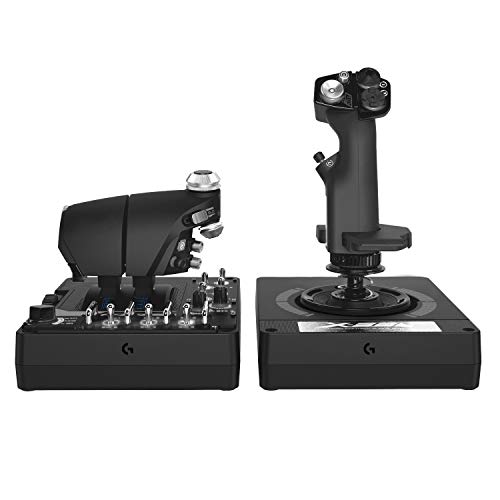
- Hall-effect sensors and adjustable stick force
- Twin throttles plus mini analog stick
- Up to 189 programmable controls
Best For: Experienced players who want a control-heavy HOTAS for combat and space sims.
Feature-Rich Universal Choice
Turtle Beach VelocityOne Flight Universal Control System
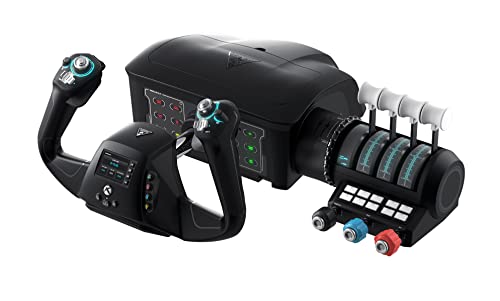
- All-in-one yoke with throttle, trim wheel, and rudder controls
- 180° rotation with hall effect sensor
- 12 analog axes plus flight management display
Best For: Xbox and PC simmers who want an all-in-one yoke system with deep built-in controls.
Versatile Stand Base
Anman Foldable Racing Flight Simulator Stand

- Supports both flight and racing setups
- Wide panels with pre-drilled mounting holes
- Foldable design saves storage space
Best For: Multi-gear sim rigs needing a stable mounting stand
Simple HOTAS Starter
Thrustmaster T-Flight Hotas X USB Stick & Throttle

- Ergonomic HOTAS layout with wide hand rest
- Detachable throttle for flexible setups
- 12 programmable buttons and 5 axes
Best For: PC sim pilots who want an easy, configurable stick-and-throttle controller
Realistic Yoke Bundle
Logitech G PRO Flight Yoke System
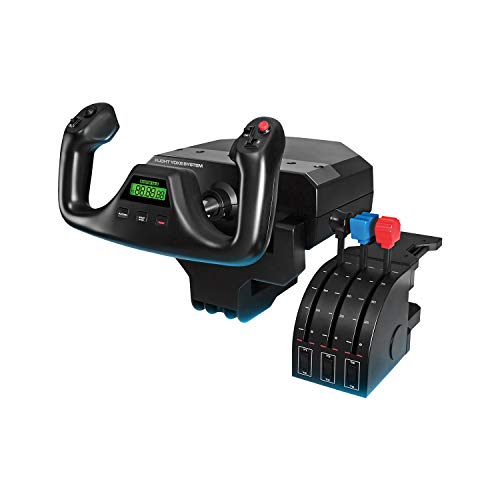
- Realistic yoke helps build muscle memory
- Includes throttle quadrant and desk clamps
- Up to 54 programmable controls
Best For: Experienced sim pilots wanting a realistic yoke with deep control mapping
Xbox-Ready Full Kit
Thrustmaster T-Flight HOTAS + Pedals

- Includes rudder pedals with smooth S.M.A.R.T slide rails.
- Official Xbox integration for easier console navigation.
- 5 axes, 14 buttons, trigger, and hat switch for control variety.
Best For: Xbox and PC sim players who want an all-in-one HOTAS bundle
Pro Yoke Setup
Logitech G PRO Flight Yoke System

- Stainless steel yoke shaft for smooth, accurate control.
- Separate throttle quadrant with configurable knobs.
- Up to 75 programmable controls for advanced mapping.
Best For: PC flight sim users who want a traditional yoke cockpit layout
Renewed Pro Yoke Value
Logitech G PRO Flight Yoke System (Renewed)

- Renewed version of a realistic PC yoke setup.
- Stainless steel shaft with separate throttle quadrant.
- At least 54 programmable controls via hat, buttons, and mode switch.
Best For: PC sim gamers who want a lower-cost yoke setup
Boeing-Style Precision Pick – Thrustmaster TCA Yoke & Quadrant Boeing Edition
If you want flight simulator yokes for experienced gamers that feel more like an airliner cockpit than a generic game controller, this Boeing-licensed Thrustmaster pack is built for that kind of setup. The 1:1 Boeing 787-inspired yoke, pendular motion, and matching throttle quadrant make it a strong fit for sim pilots who care about realism and precise control.
Best For: Experienced simmers who want a Boeing-inspired yoke setup with realistic motion and lots of controls.
Pros:
- Officially licensed Boeing design with 1:1 scale inspiration from the 787 cockpit.
- PENDUL_R mechanism delivers smooth pendular movement and an 8.3-inch range.
- Adjustable spring tension and 100% metal internal structure add precision and durability.
- Includes throttle quadrant with extra axes and 35 action buttons for complex control mapping.
Cons:
- Rudder pedals are not included and must be bought separately.
- Best suited to airliner-style flying rather than combat or stick-focused sims.
This is a serious cockpit-style bundle for players who want Boeing authenticity and fine control. If your priority is realism in Microsoft Flight Simulator or similar PC/Xbox sims, it stands out as a premium all-in-one yoke-and-quadrant option.
All-in-One Starter Upgrade – Logitech G Pro Flight Yoke + Rudder Bundle
For flight simulator yokes for experienced gamers who want a more complete desktop setup, this Logitech bundle combines a yoke system with matching rudder pedals. It focuses on realistic control inputs, so it works well when you want better muscle memory, cleaner runway handling, and enough buttons to manage common sim tasks without moving to a HOTAS layout.
Best For: Simmers who want a bundled yoke-and-rudder setup with practical control coverage.
Pros:
- Includes both the yoke system and rudder pedals in one bundle.
- 54 programmable controls from the yoke’s buttons, POV hat, and mode switch.
- Self-centering rudder pedals with differential toe brakes for runway control.
- Adjustable foot rests and non-slip materials improve comfort for different users.
Cons:
- Less specialized than premium cockpit-style or airliner-licensed systems.
- Not as button-dense as a full combat HOTAS rig.
This bundle makes sense if you want a straightforward path into more realistic flying without piecing together separate components. It offers a balanced mix of yoke control and pedal handling, which is especially useful for simmers refining their setup.
Combat Sim Power Pick – Logitech G X56 HOTAS Throttle and Joystick
If your version of flight simulator yokes for experienced gamers leans more toward space, combat, or high-control flying than airliner realism, the Logitech G X56 is built for that style. It swaps the yoke format for a fully featured HOTAS layout with dual throttles, a precision stick, and a huge programmable control count for players who want lots of inputs within reach.
Best For: Experienced players who want a control-heavy HOTAS for combat and space sims.
Pros:
- Military-grade precision focus with hall-effect sensors on the main axes.
- 4 spring options and adjustable stick force let you tune the feel.
- Twin throttles and a mini analog stick expand control flexibility.
- Up to 189 programmable controls for complex mapping in demanding sims.
Cons:
- Not a yoke system, so it is less suitable for traditional airliner-style flying.
- Requires two USB 2.0 ports and is limited to PC use.
This is the pick for gamers who want depth, customization, and a cockpit-like command layout more than classic yoke handling. For combat and space sim veterans, the X56 offers an exceptionally high ceiling for control assignment and fine input tuning.
Feature-Rich Universal Choice – Turtle Beach VelocityOne Flight Universal Control System
Among flight simulator yokes for experienced gamers, the Turtle Beach VelocityOne Flight stands out as a broad-coverage system with yoke, throttle, trim, and rudder controls in one unit. It is aimed at players who want a practical, all-in-one control base with plenty of axes and built-in configuration tools for Microsoft Flight Simulator on Xbox or PC.
Best For: Xbox and PC simmers who want an all-in-one yoke system with lots of built-in controls.
Pros:
- All-in-one design includes yoke, throttle quadrant, trim wheel, and rudder controls.
- 180° yoke rotation with a non-contact hall effect sensor for realistic input.
- 12 analog axes plus multiple POV and HAT switches provide deep control coverage.
- Full-color flight management display and status panel help with setup and learning.
Cons:
- Large, 10-pound unit needs significant desk space.
- More complex than a basic yoke if you only need simple control inputs.
This is a strong option if you want a feature-packed cockpit centerpiece rather than a stripped-down peripheral. Its mix of on-device displays, integrated controls, and secure clamping makes it especially appealing for dedicated sim setups.
Versatile Stand Base – Anman Foldable Racing Flight Simulator Stand
If you want flight simulator yokes for experienced gamers but also play racing titles, this foldable stand is built for mixed rig setups. It offers wide, pre-drilled panels, strong stability, and support for a broad range of flight and racing accessories, making it a practical base for a more customized cockpit.
Best For: Experienced sim racers and flight sim players who want one stable, space-saving stand for multiple control layouts.
Pros:
- Wide, pre-drilled panels support varied flight and racing accessories.
- X-shape design with double triangle mechanics is made for strong stability.
- Compatible with Logitech G29/G920/G923, Thrustmaster T16000, Airbus Rocker & Throttle, A10C, and more.
- 80% pre-installed and folds down for easier storage.
Cons:
- It is a stand, not a yoke or stick, so controllers are sold separately.
- Best suited to users who already own multiple peripherals to mount.
If your goal is to build a flexible sim cockpit around existing gear, this stand is strong on compatibility and adjustability. It is less about the controller itself and more about giving advanced players a solid, adaptable mounting foundation.
Simple HOTAS Starter – Thrustmaster T-Flight Hotas X USB Stick & Throttle
For flight simulator yokes for experienced gamers who prefer a stick-and-throttle layout, this HOTAS is a straightforward PC option with plenty of control for the price-minded buyer. Its ergonomic grip, detachable throttle, and programmable buttons make it easy to tailor to different flying styles without a complicated setup.
Best For: PC players who want an ergonomic, easy-to-use HOTAS with configurable controls and quick setup.
Pros:
- Ergonomic design with a wide hand rest for longer sessions.
- Detachable throttle supports both compact desktop and split-cockpit layouts.
- 12 programmable buttons and 5 axes allow flexible customization.
- Plug-and-play setup with built-in memory and preset switching.
Cons:
- It is a joystick/throttle combo, not a yoke-based system.
- Compatibility is focused on PC, with no broad multi-platform support listed.
This is a good pick if you want responsive flight controls without jumping into a full pro-style yoke setup. It offers useful flexibility and comfort, but it is still the more compact, simpler end of the flight sim market.
Realistic Yoke Bundle – Logitech G PRO Flight Yoke System
Among flight simulator yokes for experienced gamers, this Logitech G PRO system is the most directly aimed at a realistic yoke-and-quadrant cockpit feel. It combines a smooth yoke, throttle quadrant, and lots of programmable controls, so seasoned sim pilots can build muscle memory and keep more functions close at hand.
Best For: Experienced flight sim players who want a realistic yoke system with extensive control mapping.
Pros:
- Realistic yoke controls are designed to help build muscle memory.
- Includes a throttle quadrant plus 54 programmable controls.
- Stainless steel yoke shaft is described as robust, smooth, and accurate.
- Desk clamps add secure mounting flexibility for different setups.
Cons:
- Requires Windows compatibility and optional software for several sim titles.
- It is a more specialized setup, so it may be more than casual flyers need.
If you want a true yoke-based setup rather than a joystick alternative, this is the strongest fit in the group. It is built around realism, control density, and stable desktop mounting, which makes it especially appealing to experienced sim users.
Xbox-Ready Full Kit – Thrustmaster T-Flight HOTAS + Pedals
If you want flight simulator yokes for experienced gamers to feel more immersive without building a full cockpit, this Thrustmaster full kit is a strong all-in-one option. It pairs a hands-on throttle and stick setup with included rudder pedals, giving you coordinated control for space combat, civil aviation, and landing approaches on Xbox and PC.
Best For: Xbox and PC sim fans who want a complete HOTAS setup with pedals included.
Pros:
- Includes TFRP rudder pedals with smooth S.M.A.R.T slide rail steering.
- Full HOTAS layout with large detachable throttle, 5 axes, 14 programmable buttons, trigger, and hat switch.
- Official Xbox integration makes menu navigation and switching easier without a separate controller.
- Ergonomic full-foot pedal design with removable heel rests for longer sessions.
Cons:
- It uses a HOTAS stick setup, not a traditional yoke.
- More focused on versatility than a pure airliner-style cockpit feel.
This is a practical pick if you want a ready-to-fly setup that covers the basics well and adds pedals from day one. For experienced gamers, the combination of controls and console support makes it easy to jump into a wide range of flight sims.
Pro Yoke Setup – Logitech G PRO Flight Yoke System
For flight simulator yokes for experienced gamers, this Logitech G PRO system is built around a realistic yoke, separate throttle quadrant, and a large control set. The stainless steel shaft, 3-position mode switch, and 75 programmable controls make it a solid choice when you want a more traditional PC cockpit layout.
Best For: PC sim pilots who want a feature-rich yoke and throttle system with plenty of programmable control.
Pros:
- Stainless steel yoke shaft for smooth, accurate virtual aircraft control.
- Separate three-axis lever throttle with configurable knobs.
- 75 programmable controls, including a POV hat, 14 button controls, and a 3-position mode switch.
- Includes 2 desk clamps and a USB 2.0 hub for practical desktop use.
Cons:
- PC-only compatibility limits use to Windows systems.
- It is sold without rudder pedals, so some setups may need an extra purchase.
This is the more simulator-focused option for players who want a classic yoke feel and lots of programmable inputs. It suits experienced gamers who care more about control depth and desk-mounted stability than console support.
Renewed Pro Yoke Value – Logitech G PRO Flight Yoke System (Renewed)
If you’re shopping for flight simulator yokes for experienced gamers and want the same core control style at a lower entry point, this renewed Logitech G PRO system is worth a look. It keeps the stainless steel yoke shaft, separate throttle quadrant, and programmable controls that make the original system appealing for serious PC sim sessions.
Best For: Budget-minded PC sim players who still want a realistic yoke and throttle setup.
Pros:
- Realistic yoke controls aimed at improving the feel of virtual aircraft handling.
- Stainless steel yoke shaft for robust, smooth, and accurate control.
- POV hat, 14 button controls, and a 3-position mode switch provide at least 54 programmable controls.
- 2-position desk clamp adds flexible mounting for different desk setups.
Cons:
- Renewed condition may not suit buyers who want brand-new gear.
- PC-only support keeps it out of console-friendly setups.
This renewed model is a practical way to get into a serious yoke setup without changing the core experience. For experienced gamers, it offers the same style of control depth and desk mounting approach that matters most in a home sim rig.
How We Picked the Best Flight Simulator Yokes for Experienced Gamers
We focused on Flight Simulator Yokes for Experienced Gamers by prioritizing build quality, control fidelity, input flexibility, and platform support. We also looked at whether each option includes the right ecosystem pieces, such as a throttle quadrant, rudder pedals, or a sturdy mounting solution, because those extras can matter as much as the yoke itself.
Quick Comparison
The best choice depends on how you fly. Yoke-and-quadrant bundles suit traditional civil aviation and more immersive cockpit setups. HOTAS-style controllers can be better if you also play space, combat, or general flight titles. Standalone yokes are ideal for buyers who already own pedals and throttles, while bundles offer a simpler path for upgrading an entire rig at once.
Key Buying Factors for Flight Simulator Yokes for Experienced Gamers
Control Feel and Precision
Look for smooth pitch and roll movement, dependable centering, and enough resistance to prevent overcorrection. Experienced users usually notice the difference between a toy-like controller and a yoke that delivers consistent, predictable input.
Programmability and Axis Count
More buttons, switches, and assignable axes mean fewer compromises in the cockpit. If you fly complex aircraft, extra inputs can reduce reliance on keyboard shortcuts and make critical functions easier to reach in turbulence or during approach.
Pedals and Throttle Integration
A yoke alone is only part of the picture. Rudder pedals improve ground handling and coordinated turns, while a matching throttle quadrant helps with climb, descent, and engine management. Bundles can be the most efficient way to build a complete control stack.
Compatibility and Setup
Check whether the system is optimized for Xbox, PC, or both, and confirm support for your preferred sim before buying. Also consider desk mounting, chair stability, and whether you need a dedicated stand for a more permanent setup.
Who Should Buy Which Flight Simulator Yokes for Experienced Gamers?
If you want the most authentic general-aviation feel, choose a yoke-and-quadrant bundle with pedals. If you already own accessories, a standalone professional yoke may be the better value. If you split time between flight sims and other genres, a HOTAS system may fit your library better than a traditional yoke. For Flight Simulator Yokes for Experienced Gamers, the best purchase is the one that matches your aircraft type, platform, and upgrade path—not just the one with the most features on paper.