
Choosing the right flight simulator pedals can make taxiing, crosswind landings, and coordinated turns feel far more precise and natural. The best sets balance smooth travel, sturdy build quality, and compatibility with your sim setup.
Below, we’ve focused on options for beginners, serious hobbyists, and advanced sim pilots, so you can quickly narrow down the best match for your budget and platform.
Best 10 Flight Simulator Pedals Picks for 2026
Editor Pick
Logitech G Pro Flight Rudder Pedals

- Self-centering rudder axis
- Adjustable tension dial
- Differential toe brakes
Best For: Windows sim pilots who want adjustable pedal feel
Performance Choice
Thrustmaster TPR Rudder Pedals

- PENDUL_R suspended mechanism
- H.E.A.R.T. HallEffect sensing
- Metal base with adjustable positions
Best For: Pilots who want precision and stable, adjustable pedals
Xbox Ready
Turtle Beach VelocityOne Rudder Pedals
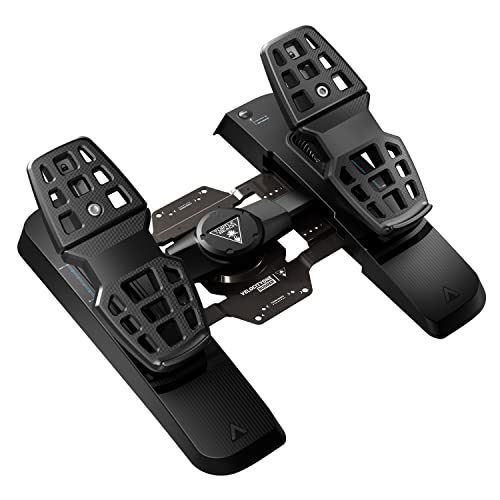
- PC and Xbox compatibility
- Adjustable pedal width and brakes
- Hall Effect sensors in all axes
Best For: PC and Xbox users who want flexible, adjustable pedals
Bundle Value
Logitech G Pro Yoke + Rudder Pedals Bundle

- Includes yoke system and rudder pedals
- Self-centering pedals with toe brakes
- 14-button yoke with mode switch
Best For: Windows users building a fuller cockpit-style setup
Xbox-Ready Full Kit
Thrustmaster T-Flight Full Kit HOTAS with Rudder Pedals

- Includes smooth TFRP rudder pedals with S.M.A.R.T slide rails.
- Official Xbox integration plus PC support for flexible use.
- Full HOTAS layout with detachable throttle and 14 buttons.
Best For: Xbox and PC sim pilots who want an all-in-one HOTAS plus rudder pedal package.
Pro-Grade Precision Pedals
Thrustmaster TPR Rudder Pedals

- Pendular suspended mechanism for smooth, realistic rudder motion.
- H.E.A.R.T HallEffect sensors for accurate, wear-resistant input.
- Adjustable spring resistance to tune the pedal feel.
Best For: Serious PC flight sim enthusiasts who want high-end rudder precision and adjustability.
Complete Combat Sim Bundle
Logitech G X56 HOTAS + Rudder Pedals

- Bundles X56 HOTAS with Pro Flight Rudder Pedals
- Pedals include adjustable tension and differential toe brakes
- HOTAS adds customizable controls and mini analog sticks
Best For: Flight and space sim players who want a full control bundle with pedals included
Editor Pick – Logitech G Pro Flight Rudder Pedals
If you want flight simulator pedals that focus on smooth control and easy tuning, the Logitech G Pro Flight Rudder Pedals are a solid PC-friendly choice. They pair a self-centering rudder axis with an adjustable tension dial, so you can match the feel to lighter aircraft or heavier jet-style flying.
Best For: Sim pilots on Windows who want adjustable pedal feel and reliable toe brakes.
Pros:
- Smooth, self-centering rudder action for realistic control
- Adjustable tension dial to fine-tune pedal resistance
- Differential toe brakes for runway handling and taxiing
- PC-compatible over USB with Windows 7, 8, 8.1, and 10 support
Cons:
- Windows-only compatibility limits cross-platform use
- Toe brake axis is listed at 7-bit, which is less detailed than the rudder axis
Overall, this model is a practical pick if you want a straightforward set of flight simulator pedals with adjustable feel and essential braking control. It’s geared toward Windows users who value realism without extra platform complexity.
Performance Choice – Thrustmaster TPR Rudder Pedals
For flight simulator pedals that prioritize precision and a stable feel, the Thrustmaster TFRP is built around a suspended mechanism and HallEffect sensing. That combination is aimed at smooth, fluid input with frictionless action that is designed not to change over time.
Best For: Sim pilots who want a precise, adjustable rudder pedal set with a stable metal base.
Pros:
- PENDUL_R suspended mechanism for smooth, fluid movement
- H.E.A.R.T. HallEffect technology for ultra-precise, frictionless action
- Adjustable spring positions to tune resistance
- Five pedal positions and a metal base for stable setup options
Cons:
- Compatibility details are limited in the supplied notes
- Heavier, metal-based design may be less convenient for quick repositioning
This is a strong option if you care most about precise pedal input and the ability to adjust resistance and positioning. The stable base also makes it appealing for cockpit-style setups or desk use where movement needs to be minimized.
Xbox Ready – Turtle Beach VelocityOne Rudder Pedals
If you need flight simulator pedals that work across PC and Xbox, the Turtle Beach VelocityOne Universal Rudder Pedals are built around broad platform support and easy adjustment. The design includes a smooth rudder axis, adjustable brakes, pedal width adjustment, and hall effect sensors in all axes.
Best For: PC and Xbox flight sim users who want adjustable pedals and broad compatibility.
Pros:
- Compatible with Windows 10/11 and Xbox One, Series S, and Series X
- Ultra-smooth rudder axis with swappable springs
- Adjustable pedal width and differential brakes
- Non-contact Hall Effect sensor in all axes plus a stable, non-slip base
Cons:
- Xbox use requires the VelocityOne Flight Control System
- Heavier setup may be more than some casual desk users need
This model stands out for flexibility, especially if you move between PC and Xbox and want a pedal set that can adapt to your setup. The adjustable hardware and Hall Effect sensing make it a strong fit for users who want configurability without giving up stability.
Bundle Value – Logitech G Pro Yoke + Rudder Pedals Bundle
This Logitech bundle is a practical way to buy flight simulator pedals and a yoke together, especially if you want a more complete desktop cockpit setup. The included rudder pedals add self-centering control and differential toe brakes, while the yoke system adds a realistic control layout with plenty of programmable inputs.
Best For: Buyers who want a combined yoke-and-pedals setup for Windows flight simulation.
Pros:
- Includes both a PRO Flight Yoke System and PRO Flight Rudder Pedals
- Pedals offer self-centering control and differential toe brakes
- Foot rests adjust for a wide range of sizes and include non-slip materials
- Yoke includes a POV hat, 14 buttons, and a 3-position mode switch
Cons:
- Windows-only compatibility limits platform flexibility
- Bundle is more than a basic pedals-only purchase
If you’re building a more complete sim setup, this bundle is a convenient shortcut to getting both core controls in one purchase. It makes the most sense for Windows users who want a cockpit-like experience and don’t mind buying beyond just pedals.
Xbox-Ready Full Kit – Thrustmaster T-Flight Full Kit HOTAS with Rudder Pedals
If you want flight simulator pedals bundled into a full control setup, this Thrustmaster kit is aimed at players who want to fly on both Xbox Series X|S and PC without piecing together separate gear. The included TFRP rudder pedals use a S.M.A.R.T slide rail system for smooth yaw control, while the HOTAS stick and throttle add a more complete cockpit feel for different flight sim styles.
Best For: Xbox and PC sim pilots who want an all-in-one HOTAS plus rudder pedal package.
Pros:
- Includes rudder pedals with smooth slide-rail steering for coordinated turns and taxiing.
- Official Xbox integration with dedicated console buttons for easier navigation.
- Complete HOTAS layout with detachable throttle, 5 axes, and 14 programmable buttons.
- Ergonomic full-foot pedal design with removable heel rests for longer sessions.
Cons:
- Best suited to users who want a full HOTAS kit, not pedals only.
- Designed around Xbox and PC compatibility rather than broader platform support.
This is a practical pick if you want rudder control built into a broader flight sim setup and prefer a package that covers stick, throttle, and pedals in one box.
Desktop Rudder Bundle – Logitech Pro Flight Rudder Pedals & Pro Flight Switch Panel
For flight simulator pedals focused on basic rudder handling and a cleaner desktop cockpit setup, this Logitech bundle pairs Pro Flight Rudder Pedals with a Switch Panel. The pedals offer self-centering action, adjustable tension, and differential toe brakes, while the included panel adds landing gear and engine-start controls for a more complete sim workflow.
Best For: PC sim users who want rudder pedals plus a useful cockpit control panel.
Pros:
- Self-centering pedals with adjustable tension for lighter or heavier control feel.
- Differential toe brakes add runway and taxi control.
- Included switch panel provides landing gear status and engine/cockpit functions.
- Compatible with major sim software and Windows systems.
Cons:
- Windows-only compatibility limits cross-platform use.
- Bundle may be more than needed if you only want pedals.
This bundle makes sense if you want rudder pedals as part of a desktop flight sim rig and like the idea of adding extra cockpit controls at the same time.
Pro-Grade Precision Pedals – Thrustmaster TPR Rudder Pedals
If your search for flight simulator pedals is really about precision and a more realistic mechanical feel, the Thrustmaster TPR is built for serious PC sim use. Its suspended pendular mechanism is designed for fluid motion, and the H.E.A.R.T HallEffect magnetic sensors are meant to keep input accurate over time without mechanical wear.
Best For: Serious PC flight sim enthusiasts who want high-end rudder precision and adjustability.
Pros:
- Pendular suspended mechanism delivers smooth, natural rudder motion.
- H.E.A.R.T magnetic sensors provide frictionless, long-term accuracy.
- Adjustable spring system lets you tune resistance to your flying style.
- Built for subtle yaw corrections and demanding simulation sessions.
Cons:
- PC only, so it is not for console setups.
- Heavier, more specialized hardware may be more than casual users need.
This is the strongest fit if you want a dedicated rudder pedal set that prioritizes realism, precision, and custom feel over simplicity.
Premium Rudder Pedals + Throttle Control – Logitech Pro Flight Rudder Pedals & Flight Throttle Quadrant
If you’re building out a serious flight simulator pedals setup, this Logitech bundle gives you both rudder control and a throttle quadrant in one package. The pedals offer smooth self-centering action, adjustable tension, and differential toe brakes, while the quadrant adds three axis levers and extra rocker switches for more hands-on control.
Best For: Sim pilots who want a combined rudder pedal and throttle solution with flexible desk mounting.
Pros:
- Self-centering pedals with adjustable tension for lighter or heavier control feel
- Differential toe brakes for more precise runway and ground handling
- Throttle quadrant includes 3 axis levers and 3 two-way rocker switches
- Quadrant can mount on top of or in front of your desk on either side
Cons:
- More suited to a full desktop sim setup than a minimal controller layout
- Best value depends on whether you need both pedals and throttle controls
This is a practical pick if you want a more complete cockpit feel without piecing together separate controls. The adjustable pedal response and configurable quadrant make it adaptable to different aircraft styles and sim preferences.
Metal-Built Precision Pedals – MOZA MRP Rudder Pedals for PC
For buyers comparing flight simulator pedals, the MOZA MRP stands out for its metal frame construction and contactless sensing. It uses an aluminum alloy frame with steel swing arms and pedal plates, plus Hall effect sensors on both the rudder and brake axes for smooth, durable input on PC.
Best For: PC flight sim users who want a durable, adjustable pedal set with precise sensor input.
Pros:
- Aluminum alloy frame with high-strength steel swing arms and pedal plates
- Hall effect sensors on both rudder and brake axes for contactless precision
- Swing-arm mechanism provides up to 15 cm of travel with adjustable end stops
- Stepless pedal angle adjustment within a ±25° range
Cons:
- Designed for PC flight sim use, so platform flexibility is limited
- Connectivity options are geared toward MOZA bases or USB rather than broader console support
Overall, this is a strong choice if you want a sturdier, more tunable pedal platform than entry-level models typically offer. The adjustable motion and dual connectivity make it especially appealing for sim users who value precision and compatibility on PC.
Complete Combat Sim Bundle – Logitech G X56 HOTAS + Rudder Pedals
If you want flight simulator pedals as part of a larger control setup, this Logitech bundle pairs the X56 HOTAS with Pro Flight Rudder Pedals. The pedals bring smooth self-centering control, adjustable tension, and differential toe brakes, while the HOTAS adds a large control layout with customizable options and mini analog sticks for broader simulation use.
Best For: Flight and space sim players who want a full control bundle with pedals included.
Pros:
- Includes rudder pedals alongside a full X56 H.O.T.A.S. setup
- Pedals feature self-centering action, adjustable tension, and toe brakes
- HOTAS offers customizable controls and mini analog stick surfaces
- Ideal for VR use thanks to controls designed to be under your fingers
Cons:
- Large bundle may be more than needed if you only want pedals
- Best suited to users building a more advanced desktop sim rig
This bundle makes sense if you’re setting up for combat or space sims and want everything in one purchase. The included pedals are the same style as Logitech’s standalone option, so you get familiar rudder control plus a much broader command layout.
How We Picked These Flight Simulator Pedals
We prioritized realistic axis response, durable construction, and broad compatibility across PC and console ecosystems. We also looked at adjustability, brake control feel, desk or floor stability, and whether a set makes sense as a standalone upgrade or as part of a larger cockpit setup.
Quick Comparison
Some Flight Simulator Pedals are simple, plug-and-play choices for casual flying, while others are built for higher precision and heavier use. Entry-level models usually emphasize value and easy setup, while premium pedals tend to offer stronger materials, finer control, and more tuning options.
Key Buying Factors for Flight Simulator Pedals
Compatibility
Check whether the pedals work with your platform before anything else. Many Flight Simulator Pedals are PC-first, while a few support Xbox or are bundled with compatible yokes and HOTAS systems. Make sure the USB connection and game support match your sim environment.
Precision and Feel
Rudder control should feel smooth and predictable. Look for pedals with good center detent behavior, low unwanted play, and enough resistance to make small corrections easy without feeling stiff.
Toe Brakes and Controls
If you fly general aviation, bush planes, or airliners, toe brakes can be a major advantage for taxiing and ground handling. Not every set includes them, so verify the control layout if that matters to your flying style.
Build Quality and Stability
Because pedals are pushed with your feet, a stable base matters. Rubber feet, a wide footprint, and solid materials all help prevent shifting during aggressive rudder inputs.
Who Should Buy Which Flight Simulator Pedals?
New sim pilots usually do well with affordable, straightforward pedals that are easy to install and integrate with common starter setups. PC-focused enthusiasts should look at midrange and premium models if they want smoother input and better long-term durability. If you fly across multiple devices, choose Flight Simulator Pedals with the broadest compatibility and a layout that fits your existing yoke or HOTAS ecosystem.
If you are building a more serious cockpit, it often makes sense to buy pedals as part of a coordinated bundle. That can simplify setup and ensure your controls feel consistent across rudder, throttle, and primary flight inputs.