
Choosing the right desktop computers for video editing can make a major difference in timeline smoothness, export times, and overall workflow efficiency. The best systems balance CPU power, GPU capability, memory, and fast storage for the kind of footage you edit most.
In this roundup, we focused on desktops that offer the performance and upgrade headroom video editors need, from capable creator PCs to workstation-ready towers built for demanding projects.
Best 10 Desktop Computers for Video Editing Picks for 2026
Creator Tower
Dell Ultra 7 RTX 5060 Editing Desktop

- Intel Core Ultra 7 265F with RTX 5060 graphics
- 32GB DDR5 RAM and 1TB PCIe NVMe SSD
- SD card reader, Wi-Fi 6, and dual 4K monitor support
Best For: Video editing and creator workflows with GPU acceleration
Balanced Creator PC
HP OmniDesk Ryzen 7 Editing Desktop

- Ryzen 7 8700G with Radeon 780M integrated graphics
- 32GB DDR5 memory and 1TB Gen4 NVMe SSD
- Wi-Fi 6, Bluetooth 5.4, keyboard, and mouse included
Best For: Light-to-moderate video editing and everyday productivity
High-Power Edit Rig
HP Envy i9 64GB 2TB Editing Desktop

- Intel Core i9-14900K with boost up to 6.00GHz
- 64GB RAM and 2TB SSD for large projects
- RTX 3050 8GB dedicated graphics with Windows 11 Pro
Best For: Heavy editing workloads and large media projects
Compact Pro Mini
HP Pro Mini i7 Compact Editing PC

- Core i7-12700T with 12 cores and 20 threads
- 32GB RAM and 1TB PCIe NVMe SSD
- Dual DisplayPort 1.4 plus HDMI 2.1 in a tiny chassis
Best For: Space-saving editing setups and dual-monitor workstations
Premium Editing Tower

- 20-core Intel Ultra 7 CPU
- RTX 5060 8GB GDDR7 graphics
- 32GB DDR5 and 1TB NVMe SSD
Best For: Creators needing a modern, fast tower for editing and multitasking
Budget Workstation Pick

- Intel Core i5 with 32GB DDR4
- Quadro K1200 4GB for creative apps
- 1TB SSD plus 4TB HDD storage
Best For: Renewed-workstation shoppers who need storage and editing support
Balanced Creator Tower

- Core Ultra 7 265F processor
- RTX 5060 8GB GDDR7 graphics
- 32GB DDR5 with 1TB NVMe SSD
Best For: Editors wanting a versatile, modern tower for creative and everyday use
Renewed Value Tower
Dell Optiplex 7070 for Video Editing

- 9th Gen i7 with 32GB DDR4 RAM
- 1TB SSD for fast loading and boot times
- Wi‑Fi 6 adapter and multiple modern ports
Best For: Budget-minded editors who want a renewed tower for everyday creative work
AI-Ready Workhorse
Dell Pro Tower Plus with Core Ultra 7
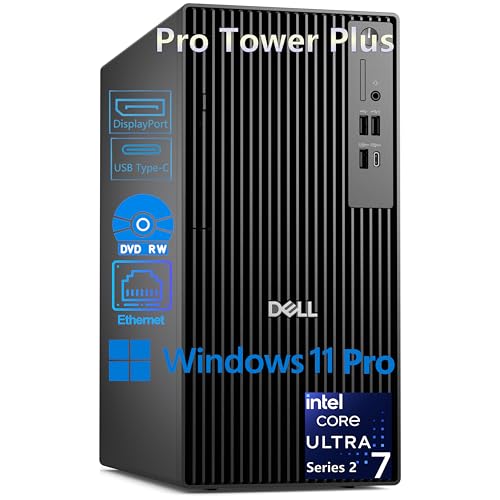
- Core Ultra 7 265 with AI Boost NPU
- Triple 4K DisplayPort support for multi-monitor editing
- 1TB NVMe SSD and Windows 11 Pro
Best For: Professionals who want a newer business desktop for editing and multitasking
Better-Memory Creator Tower
Dell Pro Tower Plus with 32GB DDR5

- 32GB DDR5 RAM for smoother multitasking
- Core Ultra 7 265 with 1TB NVMe SSD
- Triple 4K DisplayPort output support
Best For: Editors who want extra memory for bigger multitasking loads
Creator Tower – Dell Ultra 7 RTX 5060 Editing Desktop
If you’re shopping for desktop computers for video editing, this Dell tower is built to handle demanding timelines, faster exports, and multitasking with room to grow. Its Intel Core Ultra 7 processor, RTX 5060 graphics, and DDR5 memory make it a strong fit for creators who want performance without jumping into a full workstation.
Best For: Video editors, 3D designers, and creators who need strong GPU acceleration and fast everyday responsiveness.
Pros:
- Intel Core Ultra 7 265F and NVIDIA GeForce RTX 5060 are suited for rendering and real-time ray tracing.
- 32GB DDR5 RAM and 1TB PCIe NVMe SSD support smooth editing workflows and quick file access.
- Includes SD card reader, Wi-Fi 6, Bluetooth 5.4, and dual 4K monitor support.
- Upgradeable up to 64GB RAM and 4TB SSD for future workflow needs.
Cons:
- 1TB SSD may feel limited for large 4K media libraries.
- Graphics card has 8GB VRAM, which may be modest for the heaviest effects work.
This is a practical creator-focused desktop that balances speed, connectivity, and expansion. For editing, content creation, and other mixed workloads, it offers a strong mix of modern hardware and useful ports.
Balanced Creator PC – HP OmniDesk Ryzen 7 Editing Desktop
For buyers comparing desktop computers for video editing, this HP OmniDesk focuses on balanced performance and everyday usability. The Ryzen 7 8700G, 32GB of DDR5 memory, and 1TB NVMe SSD give it the basics needed for editing projects, media management, and general creative work.
Best For: Editors who want a well-rounded desktop for lighter-to-moderate video work and general productivity.
Pros:
- AMD Ryzen 7 8700G processor brings strong general-purpose performance.
- 32GB DDR5-5200 memory and 1TB PCIe Gen4 NVMe SSD help with smooth multitasking and fast storage.
- Wi-Fi 6, Bluetooth 5.4, and included keyboard and mouse make setup easy.
- Integrated Radeon 780M graphics can handle everyday creative tasks and light editing use.
Cons:
- Integrated graphics are less capable than dedicated GPUs for heavier effects or faster exports.
- Windows 11 Home may be less ideal than Pro for some business-focused users.
This is a sensible all-around desktop if you want solid core specs without paying for a high-end graphics card. It works best as a practical editing PC for modest projects and everyday content tasks.
High-Power Edit Rig – HP Envy i9 64GB 2TB Editing Desktop
If you need desktop computers for video editing with plenty of headroom, this HP Envy leans into high-capacity memory and storage. The Intel Core i9-14900K, 64GB RAM, and 2TB SSD make it a compelling choice for large projects, while the RTX 3050 adds dedicated graphics support.
Best For: Creators handling large media files, heavy multitasking, and demanding editing projects.
Pros:
- Intel Core i9-14900K boosts up to 6.00GHz for strong CPU-heavy workloads.
- 64GB RAM and 2TB SSD provide generous capacity for editing projects and media storage.
- NVIDIA GeForce RTX 3050 8GB dedicated graphics support acceleration for creative apps.
- Windows 11 Pro plus Wi-Fi 6, Bluetooth 5.3, Ethernet, and multiple USB ports add versatility.
Cons:
- RTX 3050 is solid, but not as powerful as newer high-end creator GPUs.
- Design is described as a business computer, so it may be more utilitarian than creator-focused rigs.
This HP Envy stands out for memory, storage, and CPU strength, which are especially helpful in editing workflows with big files. It is a strong pick when project size and multitasking matter more than flashy extras.
Compact Pro Mini – HP Pro Mini i7 Compact Editing PC
Not every setup for desktop computers for video editing needs a full tower, and this HP Pro Mini is aimed at users who value space-saving design. With a 12th Gen Intel Core i7, 32GB RAM, and a 1TB NVMe SSD, it offers a capable base for editing tasks in a very compact footprint.
Best For: Editors and professionals who need a small desktop with strong everyday performance and dual-monitor support.
Pros:
- Intel Core i7-12700T with 12 cores and 20 threads supports multitasking and content creation.
- 32GB DDR4 RAM and 1TB PCIe NVMe SSD provide fast boot times and responsive storage.
- Dual DisplayPort 1.4 plus HDMI 2.1 make multi-monitor setups easy.
- Ultra-compact chassis with VESA mount support helps save desk space.
Cons:
- Integrated graphics are not as strong as a dedicated GPU for heavy video effects.
- DDR4 memory is older than DDR5 used in some competing desktops.
This mini PC is best when space matters as much as performance. It is a practical choice for lighter editing workflows, office use, and clean dual-monitor workstations.
Premium Editing Tower – Dell Tower Plus EBT2250
If you want desktop computers for video editing with modern speed and plenty of headroom, this Dell Tower Plus is built around a 20-core Intel Ultra 7 processor and GeForce RTX 5060 graphics. The 32GB DDR5 memory and 1TB PCIe NVMe SSD help with smoother multitasking, fast project loading, and responsive editing workflows.
Best For: Creators who want a strong all-around tower for editing, multitasking, and fast storage access.
Pros:
- Intel Ultra 7-265 processor with up to 5.3GHz boost for demanding workloads
- RTX 5060 8GB GDDR7 graphics for GPU-accelerated creative tasks
- 32GB DDR5 memory supports smooth multitasking
- 1TB PCIe NVMe SSD plus Thunderbolt 4, HDMI, DisplayPort, and USB-C connectivity
Cons:
- Uses a compact 1TB SSD, so large media libraries may need extra storage later
- Included peripherals are basic keyboard and mouse only
This is a practical pick for editors who want newer components, solid port selection, and Windows 11 Pro in a ready-to-use tower. It looks especially appealing if you value speed and flexibility more than workstation certification.
Budget Workstation Pick – HP Workstation PC Desktop
For desktop computers for video editing on a more practical budget, this renewed HP workstation focuses on core creative essentials rather than cutting-edge parts. It pairs an Intel 8th Gen Core i5, 32GB of DDR4 RAM, and NVIDIA Quadro K1200 graphics with a 1TB SSD plus 4TB HDD, which is a helpful setup for editing projects and storing larger media files.
Best For: Buyers who want a renewed workstation with lots of storage and dependable creative software support.
Pros:
- 32GB DDR4 RAM helps with multitasking in creative apps
- 1TB SSD boot drive plus 4TB HDD for extra project storage
- Quadro K1200 4GB graphics is aimed at editing and design software
- Wi-Fi 5G, Bluetooth, and Windows 11 Pro are included
Cons:
- Older Intel Core i5 platform is not as fast as newer desktop CPUs
- Quadro K1200 is a modest GPU by current standards
- Renewed condition and 90-day extended warranty may matter to some buyers
This HP makes sense if storage capacity and workstation-style compatibility matter more than raw speed. It is best viewed as a capable, older-generation editing machine for lighter to moderate projects.
Balanced Creator Tower – Dell Tower Desktop RTX 5060
This Dell Tower Desktop is a strong match for desktop computers for video editing when you want modern hardware in a compact tower. With an Intel Core Ultra 7 265F, RTX 5060 8GB GDDR7 graphics, 32GB DDR5 memory, and a 1TB PCIe NVMe SSD, it is designed to handle demanding creative workloads and quick switching between tasks.
Best For: Editors and creators who want a versatile tower for video work, business tasks, and everyday use.
Pros:
- Core Ultra 7 265F 20-core processor for demanding workloads
- RTX 5060 8GB GDDR7 supports content creation acceleration
- 32GB DDR5 5600MT/s memory helps with multitasking
- Wi-Fi 6, Bluetooth 5.4, and Gigabit Ethernet offer flexible connectivity
Cons:
- 1TB SSD is fast but may fill up quickly with large video libraries
- Compact tower design may limit internal upgrade room compared with larger cases
Overall, this Dell is the most rounded option here if you want current-gen performance for editing without moving into a full workstation build. It should suit creators who need speed, reliability, and a clean desktop footprint.
Renewed Value Tower – Dell Optiplex 7070 for Video Editing
If you want desktop computers for video editing without paying for a brand-new workstation, the Dell Optiplex 7070 Tower is a practical pick. Its 9th Gen Intel Core i7, 32GB of DDR4 RAM, and 1TB SSD give you the core speed and storage needed for editing timelines, managing media, and moving through everyday creative tasks efficiently.
Best For: Editors who want a renewed tower with strong multitasking headroom and fast SSD-based responsiveness.
Pros:
- 9th Gen Intel Core i7 and 32GB DDR4 RAM support multitasking and media work.
- 1TB SSD helps with fast boot times and quick program loading.
- Includes Wi-Fi 6 adapter plus a wide mix of modern ports, including USB-C and dual DisplayPort outputs.
- Notes mention support for photo and video editing with Intel HD 630 graphics.
Cons:
- Renewed system, so condition may vary versus a new desktop.
- Integrated graphics are fine for lighter editing, but not a dedicated GPU setup.
- No explicit Thunderbolt or high-end creator I/O listed.
Overall, this Optiplex is a sensible budget-conscious choice for editing workflows that value RAM, SSD speed, and broad productivity compatibility over premium expandability. It fits best when you need dependable performance for common creative software and general business use.
AI-Ready Workhorse – Dell Pro Tower Plus with Core Ultra 7
For desktop computers for video editing in a more modern business-class package, the Dell Pro Tower Plus stands out with its Intel Core Ultra 7 265 processor, AI Boost NPU, and support for three 4K displays. The combination of 16GB DDR5 memory and a 1TB PCIe NVMe SSD makes it a capable option for editing, multitasking, and moving quickly between large files and applications.
Best For: Professionals who want a newer CPU platform, triple 4K monitor support, and fast SSD performance for creative workloads.
Pros:
- Core Ultra 7 265 with a 13 TOPS NPU is built for demanding multitasking and AI-accelerated workflows.
- Triple 4K DisplayPort support is useful for editing timelines and multi-window work.
- 1TB PCIe NVMe SSD delivers fast boot and app launch performance.
- Business-friendly extras include Windows 11 Pro, BitLocker, Remote Desktop, and Hyper-V support.
Cons:
- Only 16GB RAM, which may feel limiting for heavier editing projects.
- No built-in Wi-Fi; wired Ethernet or a separate adapter is needed.
- No HDMI port, so DisplayPort-compatible monitors are required.
This model is a strong fit if you value a newer Intel platform and display flexibility over out-of-box creator features. It looks especially appealing for editors who also need a secure, business-ready desktop for everyday productivity.
Better-Memory Creator Tower – Dell Pro Tower Plus with 32GB DDR5
If you’re comparing desktop computers for video editing and want more memory than the base model, this Dell Pro Tower Plus is the more comfortable choice. It keeps the same Core Ultra 7 platform and triple 4K DisplayPort support, but steps up to 32GB of DDR5 RAM, which can make multitasking with editing apps, browser tabs, and other tools feel smoother.
Best For: Editors who want the same Core Ultra platform as the 16GB model, but with more RAM for heavier multitasking.
Pros:
- 32GB DDR5 RAM offers more headroom for multitasking and editing workflows.
- Core Ultra 7 265 and 1TB PCIe NVMe SSD provide modern processing and fast storage.
- Supports three 4K monitors through 3x DisplayPort 1.4a outputs.
- Windows 11 Pro includes Copilot, BitLocker, Remote Desktop, and Hyper-V support.
Cons:
- No built-in Wi-Fi, so you’ll need Ethernet or an adapter.
- No HDMI port; monitor connections rely on DisplayPort.
- Integrated graphics mean it is not listed as a discrete-GPU editing system.
Compared with the 16GB version, this configuration is easier to recommend for editors who keep several apps open at once or want more memory cushion for larger projects. It remains a practical office-to-creative desktop rather than a specialized content-creation rig.
How We Picked These Desktop Computers for Video Editing
We prioritized systems with strong multi-core processors, at least 32GB of RAM where possible, SSD storage for fast project access, and graphics hardware that can accelerate effects, playback, and exports. We also looked at thermals, expansion options, and the kind of value each desktop brings to different editing workloads.
Quick Comparison
For heavy 4K editing, motion graphics, and multitasking, the strongest options are typically the higher-end towers with newer Intel Core Ultra or Core i9 CPUs and discrete NVIDIA graphics. For lighter-to-moderate editing, integrated-graphics systems or older workstation towers can still work well if your projects are less demanding and your workflow is storage- and RAM-friendly.
Key Buying Factors for Desktop Computers for Video Editing
CPU Performance
Video editing benefits from both strong single-core speed and multi-core performance. A faster CPU helps with scrubbing, encoding, and applying effects, while more cores can improve rendering and background tasks.
GPU Capability
A dedicated GPU can speed up playback, color effects, AI-enhanced tools, and certain export workflows. If you use modern editing software or work with high-resolution footage, a discrete graphics card is a major advantage.
Memory and Storage
At least 32GB of RAM is a smart target for most editors, especially for 4K timelines and multitasking. Fast NVMe SSD storage improves loading times and reduces delays when opening projects or working with media caches.
Upgrade Room and Connectivity
Look for extra RAM slots, additional drive bays, and enough USB ports for drives, interfaces, and peripherals. Reliable wireless connectivity is useful, but wired networking is still ideal for large file transfers and shared storage.
Who Should Buy Which Desktop Computers for Video Editing?
Creators working on professional 4K or heavier projects should lean toward the strongest tower desktops with modern CPUs, 32GB to 64GB of RAM, and discrete graphics. If you edit occasionally or work on shorter projects, a midrange tower with solid-state storage and a capable processor may be the better value. For users who want a compact office-friendly system, mini PCs can handle lighter editing while saving desk space.
Ultimately, the best choice depends on your footage, software, and how often you export under deadline. Match the machine to your workload, and you’ll get a desktop that feels responsive now and stays useful as your projects grow.