
Searching for nas enclosures with m2 cache can feel overwhelming fast, especially when every model highlights speed, bays, and network ports. The right choice depends on whether you want better file serving, media streaming, virtualization, or mixed home-and-office use.
This roundup focuses on practical performance and upgrade value, with an eye toward cache design, network connectivity, and how well each enclosure fits real-world workflows in 2026.
Best 10 Nas Enclosures with M2 Cache Picks for 2026
High-Speed Gaming NAS
Asustor AS5402T 2-Bay with 4x M.2 NVMe

- 4x M.2 NVMe slots for cache or flash storage
- Dual 2.5GbE ports for fast transfers
- Intel N5105 CPU with HDMI 2.0b and USB 3.2 Gen2
Best For: Home users, gamers, and streamers who want a compact NVMe-ready NAS
UniFi Storage NAS
Ubiquiti 4-Bay with Dual M.2 Cache
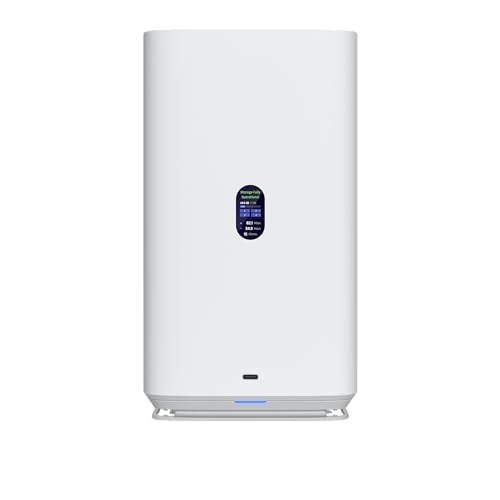
- 4 HDD bays for 2.5-inch or 3.5-inch drives
- Dual M.2 NVMe cache slots
- 2.5GbE plus USB-C connectivity
Best For: Ubiquiti users who want a simple 4-bay NAS with cache support
Flexible 2-Bay NAS
TerraMaster F2-425 Plus with Triple M.2

- Triple M.2 support for cache or storage pools
- Dual 5GbE ports up to 1020 MB/s
- Intel N150 CPU with 8GB DDR5 RAM
Best For: Power users and small offices that want fast 2-bay storage with extra M.2 flexibility
Creator-Focused 4-Bay NAS
UGREEN DXP4800 GT with M.2 Expansion

- Dual 10GbE networking for fast transfers
- Supports two M.2 SSDs and up to two U.2 bays
- Ryzen Embedded CPU with expandable RAM
Best For: Creators and office teams needing fast networking and flexible SSD expansion
ORICO Hybrid NAS Enclosure
2-Bay NAS with Dual M.2 and 2.5GbE

- 2 HDD bays plus 2 M.2 NVMe slots
- Dual 2.5GbE and HDMI connectivity
- Supports media, Docker, and VM use
Best For: Feature-heavy home users who want flexible storage and built-in media, backup, and app tools
QNAP Cache-Ready NAS
TS-464 4-Bay NAS with Dual M.2 Cache

- Dual M.2 NVMe slots for cache or SSD pools
- Dual 2.5GbE ports for faster sharing
- 8GB DDR4 and Intel Celeron platform
Best For: Families and small teams that want a dependable 4-bay NAS with SSD cache support
UGREEN Pro NAS
4-Bay NAS with 10GbE and M.2 Cache

- Intel Core i3-1315U with DDR5 RAM
- 10GbE + 2.5GbE networking
- Dual M.2 PCIe 4.0 slots for cache or storage
Best For: Power users and small offices that need high-speed networking and flexible SSD cache support
High-Speed 8-Bay Upgrade

- 8-bay chassis with M.2 NVMe SSD support
- Dual 10GbE plus dual 2.5GbE networking
- Intel Atom quad-core CPU with 8GB DDR4
Best For: Capacity-focused buyers who want fast networking and NVMe-ready storage
Compact Hybrid NVMe NAS

- 4 M.2 NVMe slots plus 2 SATA bays
- Built-in 10GbE and Intel N100 CPU
- Includes 16GB LPDDR5 and Unraid starter license
Best For: DIY users who want compact NVMe-heavy storage with flexible software
Creator Cache NAS
Asustor Lockerstor 6 Gen2+ AS6706T v2

- 4 M.2 NVMe slots for cache or acceleration
- Dual 5GbE networking with link aggregation
- Hybrid 6-bay design for HDD and SSD mixes
Best For: Creators and small teams needing fast cache support for media workflows
High-Speed Gaming NAS – Asustor AS5402T 2-Bay with 4x M.2 NVMe
If you want nas enclosures with m2 cache that can also handle gaming, media, and everyday backups, the Asustor AS5402T is a strong compact pick. Its Intel N5105 quad-core CPU, dual 2.5GbE ports, and four M.2 NVMe slots give it a very fast-feeling platform for responsive file access and low-latency workloads.
Best For: Home users, gamers, and streamers who want a small 2-bay NAS with serious NVMe flexibility.
Pros:
- Four M.2 NVMe slots can be used for caching or full flash storage.
- Dual 2.5GbE ports support fast transfers and link aggregation.
- Intel quad-core CPU is built for multitasking, file storage, streaming, and virtualization.
- HDMI 2.0b and USB 3.2 Gen2 add useful direct-connect expansion.
Cons:
- Only 4GB of RAM is included, so heavier workloads may need an upgrade.
- Diskless design means you still need to buy your own drives.
Overall, the AS5402T stands out if NVMe speed is a priority in a compact enclosure. It offers more M.2 flexibility than many 2-bay models, making it a practical choice for users who want responsive storage without moving to a larger chassis.
UniFi Storage NAS – Ubiquiti 4-Bay with Dual M.2 Cache
Ubiquiti 4-Bay NAS with 2.5/3.5" HDD Slots & 2 M.2 NVMe SSD Cache Slots by Ubiquiti
Check Price On AmazonFor buyers comparing nas enclosures with m2 cache, the Ubiquiti UniFi NAS is a straightforward 4-bay option with dual M.2 NVMe SSD cache slots and 2.5GbE networking. It is designed around mechanical HDD bays, with USB-C connectivity and a compact white chassis that fits into a simple storage setup.
Best For: Ubiquiti-focused users who want a 4-bay HDD NAS with NVMe cache support.
Pros:
- Four HDD bays support both 2.5-inch and 3.5-inch drives.
- Dual M.2 NVMe SSD cache slots add acceleration potential.
- 2.5GbE networking is faster than standard gigabit.
- USB-C connectivity adds a flexible direct connection option.
Cons:
- Cache slots are limited to two M.2 drives, not full storage emphasis.
- The listing is lighter on performance details than some competing NAS models.
This model makes the most sense if you want a clean 4-bay UniFi storage box with NVMe cache support rather than a feature-heavy media or creator NAS. It is best viewed as a practical network storage enclosure with a simple upgrade path for faster responsiveness.
Flexible 2-Bay NAS – TerraMaster F2-425 Plus with Triple M.2
The TerraMaster F2-425 Plus is a strong fit if you are shopping for nas enclosures with m2 cache and want extra flexibility in a compact 2-bay design. Its Intel N150 CPU, 8GB DDR5 memory, dual 5GbE ports, and triple M.2 SSD support make it geared toward fast file access, backups, and mixed workloads.
Best For: Power users, small offices, and media-focused homes that want speed and M.2 expansion in a 2-bay chassis.
Pros:
- Triple M.2 support can be used for cache or independent storage pools.
- Dual 5GbE LAN ports deliver up to 1020 MB/s sequential speeds.
- 8GB DDR5 memory and Intel N150 CPU support demanding everyday tasks.
- Direct Data Drive Mounting helps preserve existing data when adding drives.
Cons:
- Only two main HDD bays, so total drive count is limited versus larger NAS units.
- Diskless model means storage drives must be purchased separately.
In practice, the F2-425 Plus offers a balanced mix of speed, expansion, and convenience for users who want more than a basic home NAS. Its combination of 5GbE and multiple M.2 slots makes it especially appealing when low-latency storage and responsive transfers matter.
Creator-Focused 4-Bay NAS – UGREEN DXP4800 GT with M.2 Expansion
The UGREEN DXP4800 GT is a creator-friendly option for buyers comparing nas enclosures with m2 cache and higher-end networking. It combines an AMD Ryzen Embedded R2514 processor, dual 10GbE, and support for two M.2 SSDs plus up to two U.2-compatible bays, giving it a strong mix of speed and storage flexibility for demanding workflows.
Best For: Creators, office teams, and advanced home users who want fast networking and broad SSD expansion options.
Pros:
- Dual 10GbE networking supports very fast transfers and link aggregation.
- Supports two M.2 SSDs plus up to two U.2 NVMe-compatible bays.
- AMD Ryzen Embedded CPU and expandable RAM fit multitasking workloads.
- Built-in SD card slot and USB 10Gbps ports simplify media imports and backups.
Cons:
- Feature set is broad, so casual users may not need this much hardware.
- Diskless design means additional drive purchases are required.
This NAS is best suited to users who need more than basic file storage, especially when faster networking and SSD expansion are part of the plan. Its combination of creator-oriented features and strong security tools makes it a versatile premium enclosure for local storage workflows.
ORICO Hybrid NAS Enclosure – 2-Bay NAS with Dual M.2 and 2.5GbE
If you’re comparing nas enclosures with m2 cache and want a compact system with broad features, the ORICO MetaBox stands out for pairing two HDD bays with two M.2 NVMe slots, dual 2.5GbE, and app-driven remote access. It is built to handle private cloud storage, 4K media playback, AI photo organization, Docker, and even quick virtual machine setup.
Best For: Users who want a feature-heavy diskless NAS enclosure for media, backups, and lightweight virtualization.
Pros:
- Supports 2 HDDs plus 2 M.2 NVMe SSDs for mixed storage and cache use.
- Dual 2.5GbE ports, plus USB-A, USB-C, and HDMI connectivity.
- Includes support for Windows 11, Ubuntu 24, Debian 12, and TrueNAS-style quick setup options.
- Built-in features cover Plex playback, AI Albums, Time Machine, Docker, and remote sharing.
Cons:
- Diskless design means you still need to buy your own drives.
- Feature-rich software may be more than casual users need.
- Its broad app and VM support may be overkill if you only want simple file storage.
As a hybrid NAS, the ORICO model is best viewed as an all-in-one platform rather than a basic enclosure. It makes sense if you want multiple drive types, fast networking, and extras like AI photo tools and media-library automation in one box.
QNAP Cache-Ready NAS – TS-464 4-Bay NAS with Dual M.2 Cache
The QNAP TS-464 is one of the more practical nas enclosures with m2 cache if you want a balanced 4-bay desktop NAS with strong everyday performance. Its dual 2.5GbE ports, Intel Celeron CPU, and two M.2 PCIe Gen3x2 NVMe slots make it well suited for faster file sharing, cache acceleration, or SSD storage pools.
Best For: Families, small teams, and home users who want a reliable 4-bay NAS with SSD cache support.
Pros:
- Dual M.2 PCIe Gen3x2 NVMe slots support cache acceleration or SSD pools.
- Dual 2.5GbE ports help speed up file transfers across devices.
- Intel Celeron quad-core processor with 8GB DDR4 RAM for general NAS tasks.
- Multiple USB 3.2 Gen 2 ports support faster external drive transfers.
Cons:
- It is a 4-bay model, so storage expansion is more limited than larger units.
- Cache-focused benefits depend on how you configure the NVMe slots.
- Hardware is practical rather than high-end compared with newer pro-class NAS systems.
Overall, the TS-464 is a straightforward choice if you want a proven desktop NAS with built-in M.2 flexibility. It fits buyers who care more about dependable file access and cache-ready performance than flashy extras.
UGREEN Pro NAS – 4-Bay NAS with 10GbE and M.2 Cache
If you’re shopping for nas enclosures with m2 cache and need more than basic file storage, the UGREEN DXP4800 Pro is aimed at demanding workflows. It combines a 13th Gen Intel Core i3 processor, dual network ports including 10GbE, and two M.2 PCIe 4.0 SSD slots that can act as cache or a storage pool, making it a strong fit for heavy multitasking.
Best For: Power users, developers, editors, and small offices that need fast networking and flexible SSD cache options.
Pros:
- Intel Core i3-1315U and DDR5 RAM provide strong multitasking headroom.
- 10GbE plus 2.5GbE networking supports very fast transfers.
- Dual M.2 PCIe 4.0 slots can be used as cache or storage pool.
- Supports Docker, virtual machines, AI photo recognition, and RAID options.
Cons:
- Higher-performance hardware may be more than casual home users need.
- Advanced features like VMs and Docker can add setup complexity.
- Premium specs usually mean a higher overall system cost once drives are added.
The DXP4800 Pro is the most performance-oriented pick in this group, especially if your work involves containers, virtualization, or large transfers. For buyers who want cache-capable M.2 slots plus serious networking, it offers a very capable all-in-one NAS platform.
High-Speed 8-Bay Upgrade – Asustor Lockerstor 8 AS6508T
If you’re comparing nas enclosures with m2 cache for a larger home lab or small office, the Asustor Lockerstor 8 stands out with its 8-bay design, dual 10GbE, and support for M.2 NVMe SSDs. It pairs a quad-core Intel Atom processor with 8GB of DDR4 memory, giving you a solid base for mixed storage and fast networking.
Best For: Users who want an 8-bay NAS with fast networking and built-in M.2 NVMe support for high-capacity storage.
Pros:
- 8 x 3.5-inch SATA drive bays for large-capacity storage arrays
- Two 10GbE ports with up to 20Gbps via link aggregation
- Two 2.5GbE ports with up to 5Gbps via link aggregation
- Intel Atom C3538 quad-core CPU with 8GB DDR4 memory
Cons:
- M.2 NVMe support is mentioned, but cache configuration details are limited in the supplied notes
- Diskless enclosure means drives must be purchased separately
This is a strong fit if your priority is capacity first, with enough network speed to keep multi-user transfers moving. It looks especially practical for buyers who want a traditional 8-bay NAS architecture plus M.2-based acceleration support in the same chassis.
Compact Hybrid NVMe NAS – LincStation N2 6-Bay Server
Among nas enclosures with m2 cache, the LincStation N2 takes a very different approach by combining 2 SATA bays with 4 M.2 NVMe slots in a compact metal design. With an Intel N100 processor, 16GB of LPDDR5 memory, and a built-in 10GbE port, it’s aimed at users who want fast storage and flexible drive mixing for apps, media, and private cloud use.
Best For: DIY NAS builders who want a compact 6-bay system with four M.2 NVMe slots and 10GbE.
Pros:
- 4 x M.2 NVMe slots plus 2 SATA bays for flexible hybrid storage
- Built-in 10GbE port for fast transfers
- Intel N100 processor with 16GB LPDDR5 memory
- Includes Unraid OS Starter License
Cons:
- Only 2 bays are for 2.5-inch HDDs, so bulk hard-drive capacity is limited
- Diskless configuration means storage must be added separately
This model makes the most sense if you want a space-saving NAS that leans heavily on NVMe performance and software flexibility. The included Unraid starter license adds immediate value for buyers building a media server, Docker host, or private cloud.
Creator Cache NAS – Asustor Lockerstor 6 Gen2+ AS6706T v2
If you’re shopping nas enclosures with m2 cache for creative workflows, the Asustor Lockerstor 6 Gen2+ is built around that use case. It combines a quad-core Intel Celeron N5105, 8GB of DDR4 memory, dual 5GbE ports, and four M.2 NVMe SSD slots for caching or high-speed acceleration, making it a practical option for media and collaboration tasks.
Best For: Video creators and small teams that want 4 M.2 NVMe slots for cache or acceleration.
Pros:
- 4 x M.2 NVMe SSD slots for caching or high-speed storage acceleration
- Dual 5GbE ports with link aggregation support
- Intel Celeron N5105 quad-core processor with 8GB DDR4 RAM
- Hybrid 6-bay design for combining HDD and SSD storage
Cons:
- Diskless model, so drives are not included
- 10GbE requires an upgrade path rather than being built in
This is a well-rounded pick for buyers who want cache-driven responsiveness without giving up a hybrid bay layout. The 4K media and creator-focused positioning makes it especially appealing if you need a NAS that can support editing, sharing, and backup workflows.
How We Picked the Best Nas Enclosures with M2 Cache
We prioritized enclosures that balance storage expansion with meaningful SSD cache support, plus the connectivity needed to benefit from it. That means looking at drive bay count, M.2 slot count, Ethernet speed, CPU class, memory options, and whether the design makes sense for home users, creators, or small teams.
We also favored models with current-generation hardware and features that help cache matter in daily use, such as 2.5GbE, 5GbE, or 10GbE networking, stronger multitasking CPUs, and enough RAM for apps, indexing, and background services.
Quick Comparison: What the Different Models Prioritize
Among Nas Enclosures with M2 Cache, some focus on compact 2-bay simplicity, while others give you 4, 6, or 8 bays for long-term growth. Smaller units are easier to manage and often cost less, while larger enclosures offer more raw capacity and better room for RAID flexibility.
For cache, the key difference is not just having an M.2 slot, but having enough network and CPU headroom to actually use it well. Faster Ethernet matters most when you move large files, host shared media, or run multiple users at once.
What Cache Helps Most with
M.2 cache is most useful for frequent access to metadata-heavy files, shared project folders, thumbnails, databases, and repeated reads of hot data. It is less important if you mainly store cold archives that rarely change.
Key Buying Factors for NAS Enclosures with M.2 Cache
- Bay count: Choose 2-bay for entry-level or personal use, 4-bay for balanced home/small office storage, and 6- to 8-bay for growth or RAID flexibility.
- M.2 support: Check whether the slots are for cache only, storage only, or both. More slots can help, but implementation matters more than sheer count.
- Network speed: 2.5GbE is a strong baseline; 5GbE and 10GbE make SSD cache more worthwhile for power users.
- Processor and RAM: Better CPUs and more memory improve app performance, container use, indexing, and multitasking.
- Use case: Media streaming, backups, office sharing, and virtualization all stress a NAS differently, so buy for your heaviest workload.
Who Should Buy Which Nas Enclosures with M2 Cache?
If you want a simple personal NAS, a 2-bay system with cache support is usually enough. If you are a creator, developer, or small team, a 4-bay enclosure often offers the best mix of capacity and speed.
Buy a 6- or 8-bay model if you expect your storage needs to grow, want more RAID options, or plan to run several services at once. In short, the best Nas Enclosures with M2 Cache are the ones that match your workload today while leaving room for tomorrow.