
If you need to copy CDs, DVDs, or even Blu-ray discs without paying enterprise prices, the right tower duplicator can make the job fast and simple. This roundup focuses on practical options that stay under budget while still offering useful features like multiple target bays, standalone operation, and M-Disc support.
Below, you’ll find a focused selection of optical disc duplicators under 500 for offices, creators, libraries, and anyone who needs dependable disc duplication without unnecessary complexity.
Best 10 Optical Disc Duplicators Under 500 Picks for 2026
Premium Standalone Archival Duplicator
24X 1 to 1 CD/DVD M-Disc Tower with Copy Protection

- Standalone operation with no PC required
- Up to 24x DVD and 52x CD-R speeds
- Supports M-Disc and free copy protection
Best For: standalone archival copying and basic protected DVD video duplication
Multi-Target Value Burner
1 to 3 DVD/CD Duplicator with Built-In Burners

- Copies one master to three discs
- Supports DVD and CD format variety
- Includes verify, compare, and password protection
Best For: small offices needing controlled multi-disc duplication
Native SATA Workhorse
ACARD 1 to 1 Standalone 24X CD/DVD Duplicator

- Standalone 1-to-1 operation
- Native SATA channel acceleration
- Supports single- and dual-layer DVDs
Best For: fast standalone single-disc duplication with native SATA support
Copy-Protection 1-to-3 Tower
24X M-Disc DVD/CD Duplicator with 3 Target Bays

- Copies one disc to three targets
- Supports M-Disc and free copy protection
- Standalone operation with up to 24x DVD speed
Best For: archiving and multi-disc DVD video duplication
Standalone Multi-Format Tower
1 to 7 SATA Blu-ray/DVD/CD Duplicator

- Standalone operation with no PC required
- Duplicates Blu-ray, DVD, and CD formats
- Hard drive partitioning supports multiple projects
Best For: Buyers who want a standalone multi-format tower for repeat disc projects
Fast DVD/CD Archival Tower
1 to 5 M-Disc Supported Duplicator

- Standalone 1-to-5 DVD/CD duplication
- Up to 24x DVD and 52x CD-R speeds
- Supports M-Disc media and free DVD video copy protection
Best For: Small teams needing fast DVD/CD duplication with M-Disc support
Compact Standalone Copier
1 to 3 SATA Standalone Duplicator
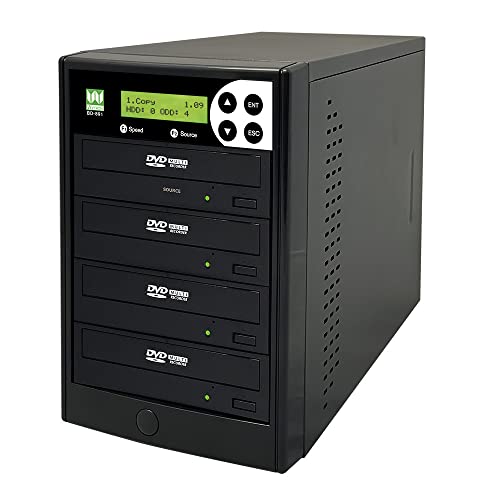
- Standalone DVD/CD duplication with no PC required
- Up to 24x DVD and 52x CD-R speeds
- Supports M-Disc and audio CD compilation
Best For: People who need a smaller standalone duplicator for light DVD/CD work
Standalone 1-to-1
Vinpower Digital 24x DVD/CD Duplicator Tower

- No PC required for operation
- Up to 24x DVD and 52x CD-R speeds
- Supports M-Disc and common CD formats
Best For: Simple disc-to-disc copying with standalone operation
Hybrid 11-Target
Vinpower SharkCopier 24X DVD/CD Duplicator

- 11-target standalone tower design
- Includes 2 TB hard drive and USB 3.0
- True audio compare for CD audio jobs
Best For: Higher-volume copying with storage and recall features
Five-Target Standalone
Vinpower Digital 1-to-5 DVD/CD Duplicator

- Standalone copying with no PC required
- 1-to-5 layout for multi-disc runs
- Up to 24x DVD and 52x CD-R speeds
Best For: Making several copies from one master disc
Premium Standalone Archival Duplicator – 24X 1 to 1 CD/DVD M-Disc Tower with Copy Protection
PlexCopier 24X 1 to 1 CD DVD M-Disc Supported Duplicator Copier Tower with Free Copy Protection
Check Price On AmazonIf you want optical disc duplicators under 500 that can work without a computer, this 1 to 1 tower is built for straightforward standalone copying. It supports fast DVD and CD write speeds, adds M-Disc recording, and includes free copy protection features for compatible DVD video workflows.
Best For: Users who want a standalone duplicator for archival DVD/CD copying and basic protected video duplication.
Pros:
- Complete standalone operation with no PC required.
- Supports up to 24x DVD and 52x CD-R write speeds.
- Compatible with M-Disc DVD media for archival storage.
- Includes free copy protection feature for OptoDisc MID media.
Cons:
- Will not copy encrypted discs.
- Limited to a 1-to-1 duplication setup.
This is a practical pick if you value simplicity, archival support, and basic copy-protection tools in a standalone tower. Its feature set is focused rather than flashy, but that can be a strength for routine disc duplication.
Multi-Target Value Burner – 1 to 3 DVD/CD Duplicator with Built-In Burners
Among optical disc duplicators under 500, this 1 to 3 unit stands out for users who need more output without moving to a larger tower. It supports a wide range of DVD and CD formats, offers several verification tools, and includes password protection for controlled use.
Best For: Small offices or users who want to duplicate one master to three discs with built-in burner drives.
Pros:
- Copies one source disc to up to three targets.
- Supports DVD+/-R, DVD+/-RW, dual-layer DVD, CD-R, and CD-RW.
- Includes Copy, Test, Verify, and Compare functions.
- Password protection and self-diagnostics add control and stability.
Cons:
- Slower DVD write speed than 24x towers, topping out at 16x.
- Built-in burner design is less compact than a simple standalone single-drive setup.
This model is a strong middle-ground option when you need more capacity than a 1-to-1 unit but still want a straightforward duplicator. Its format support and verification tools make it especially useful for repeatable everyday jobs.
Native SATA Workhorse – ACARD 1 to 1 Standalone 24X CD/DVD Duplicator
If you’re comparing optical disc duplicators under 500 and want a no-PC unit with modern internal connectivity, this ACARD tower is a focused 1 to 1 copier. It delivers fast DVD and CD speeds, supports common single- and dual-layer DVD formats, and keeps the operation simple.
Best For: Users who want a fast standalone 1-to-1 duplicator with native SATA channels.
Pros:
- Complete standalone operation with no PC required.
- Native SATA channel design for direct data acceleration.
- Supports up to 24x DVD and 52x CD-R write speeds.
- Handles single-layer and dual-layer DVD formats.
Cons:
- Cannot copy protected or encrypted discs.
- Only duplicates one disc at a time.
This is a clean, task-focused choice if you want speed and simple standalone operation more than extra features. Its dual-layer support gives it useful flexibility for standard DVD workloads.
Copy-Protection 1-to-3 Tower – 24X M-Disc DVD/CD Duplicator with 3 Target Bays
PlexCopier 24X 1 to 3 CD DVD M-Disc Supported Duplicator Copier Tower with Free Copy Protection
Check Price On AmazonFor buyers shopping optical disc duplicators under 500, this 1 to 3 tower is built for users who need more output and archival features in one machine. It offers standalone operation, M-Disc support, and a free copy-protection option for compatible DVD video projects.
Best For: Users who want a 1-to-3 duplicator for archiving and DVD video copying workflows.
Pros:
- Copies one master to three target discs.
- Supports up to 24x DVD and 52x CD-R write speeds.
- Records to M-Disc media for long-term archiving.
- Includes free copy protection for OptoDisc MID media.
Cons:
- Will not copy encrypted discs.
- More specialized than a basic duplicator without archival or copy-protection needs.
This model makes sense if you need multi-target duplication but also want archival media support built in. It is more feature-rich than a basic burner tower, while still keeping the workflow self-contained.
Standalone Multi-Format Tower – 1 to 7 SATA Blu-ray/DVD/CD Duplicator
Vinpower Digital 1 to 7 SATA Blu-ray/DVD/Cd Duplicator Manual Tower Controller
Check Price On AmazonIf you want optical disc duplicators under 500 that can handle more than basic DVD jobs, this Vinpower Digital tower is built for standalone duplication across Blu-ray, DVD, and CD formats. It also supports faster hard-drive-based workflows with improved load-and-copy behavior and flexible HDD partitioning for storing multiple projects.
Best For: Users who need a standalone tower for multi-format disc duplication and project storage flexibility.
Pros:
- Standalone operation means no PC is required.
- Supports Blu-ray, DVD, and CD duplication with upgradeable drive/media support.
- Improved load-and-copy setup is designed to speed up hard drive-based copying.
- Dynamic hard drive partitioning helps store and organize more projects.
Cons:
- The notes do not list an exact price, so staying under budget needs checking.
- Only 1-to-7 capacity is mentioned, which may be limited for very large batch runs.
This is a strong fit if you need broader format support than a basic DVD-only duplicator and value self-contained operation. Its workflow features make it especially practical for repeat projects stored on the hard drive.
Fast DVD/CD Archival Tower – 1 to 5 M-Disc Supported Duplicator
Among optical disc duplicators under 500, this 1-to-5 tower is aimed at users who need fast standalone DVD and CD duplication with support for M-Disc media. It adds a free DVD video copy-protection feature for OptoDisc MID media, but it will not copy encrypted discs.
Best For: Small businesses or office users who need standalone DVD/CD copying with M-Disc support.
Pros:
- Standalone operation does not require a PC.
- Supports up to 24x DVD and 52x CD-R write speeds.
- Can record to M-Disc DVD media for archival use.
- Includes a free copy-protected DVD video copy option for supported media.
Cons:
- Will not copy encrypted discs.
- Only supports DVD and CD formats, not Blu-ray.
- Capacity is limited to a 1-to-5 tower.
This model makes sense if your priority is fast, standalone DVD/CD duplication with archival media support. The copy-protection feature is useful for specific DVD video workflows, but format limits keep it narrower than Blu-ray-capable towers.
Compact Standalone Copier – 1 to 3 SATA Standalone Duplicator
If you are comparing optical disc duplicators under 500, this 1-to-3 standalone tower is a compact option for straightforward DVD and CD copying. It offers up to 24x DVD and 52x CD-R speeds, supports archival M-Disc media, and can compile multiple tracks into a single audio CD.
Best For: Users who want a simple standalone DVD/CD duplicator for smaller jobs and audio CD compilation.
Pros:
- Standalone operation requires no PC.
- Supports up to 24x DVD and 52x CD-R write speeds.
- Works with specialty archival media, including M-Disc.
- Can create mix compilation audio CDs from multiple sources.
Cons:
- Only duplicates up to 3 discs at a time.
- Does not copy protected discs.
- Limited to DVD and CD formats.
This is a practical pick for light-duty duplication where simplicity matters more than volume. Its smaller tower size and audio compilation feature make it useful for basic office or media tasks.
Standalone 1-to-1 – Vinpower Digital 24x DVD/CD Duplicator Tower
Vinpower Digital Standard 1 to 1 Target 24x DVD CD Disc Duplicator Tower SATA Optical Drives - Black
Check Price On AmazonIf you’re comparing optical disc duplicators under 500 for simple, direct disc-to-disc copying, this standalone Vinpower unit keeps the process straightforward. It runs without a PC, supports up to 24x DVD and 52x CD-R write speeds, and includes format support for common CD media plus M-Disc recording.
Best For: Users who want a no-computer 1-to-1 duplicator for straightforward DVD and CD copying.
Pros:
- Complete standalone operation with no PC required
- Up to 24x DVD and 52x CD-R write speeds
- Supports common CD formats plus CD-TEXT, ISRC, and over-burned CD
- Supports M-Disc DVD media for archival use
Cons:
- Won’t copy encrypted discs
- 1-to-1 target count limits batch throughput
- Primary appeal is basic duplication rather than advanced workflow features
This is a solid fit if you want dependable standalone duplication with broad disc-format support. It favors simplicity and compatibility over higher-volume output or PC-driven control.
Hybrid 11-Target – Vinpower SharkCopier 24X DVD/CD Duplicator
For buyers comparing optical disc duplicators under 500, this SharkCopier stands out for combining standalone copying with a built-in 2 TB hard drive and USB 3.0 workflow. It can store master projects for quick recall, supports up to 24x DVD and 52x CD-R speeds, and adds true audio compare functionality for CD audio jobs.
Best For: Users who want a standalone duplicator with hard-drive storage, USB transfer, and audio verification.
Pros:
- 11-target standalone tower with no PC required to run copies
- Installed 2 TB hard drive for storing and recalling master projects
- USB 3.0 Multi-File CopyConnect for transferring folders from a PC
- True audio compare capability for CD audio duplication
Cons:
- Will not copy protected discs like major movies and TV shows
- More feature-rich than a basic 1-to-1 burner, which may be more than some users need
- Bulkier tower design may be unnecessary for light-duty use
This model is best if you want more workflow flexibility than a basic duplicator. The hard drive and USB transfer support make repeat jobs easier, while the 11-target layout improves output potential.
Five-Target Standalone – Vinpower Digital 1-to-5 DVD/CD Duplicator
Vinpower Digital Standard 1 to 5 Target 24x DVD CD Disc Duplicator Tower SATA Optical Drives - Black
Check Price On AmazonAmong optical disc duplicators under 500, this 1-to-5 Vinpower tower is a practical choice when you need one master copied to several discs without using a computer. It supports standalone operation, up to 24x DVD and 52x CD-R speeds, and the same broad CD-format support found in the brand’s other towers.
Best For: Small offices or users who need to make multiple copies from a single master disc.
Pros:
- Standalone operation with no PC required
- 1-to-5 target layout for making multiple copies at once
- Up to 24x DVD and 52x CD-R write speeds
- Supports common CD formats, CD-TEXT, ISRC, and over-burned CD
Cons:
- Will not copy encrypted discs
- No hard-drive workflow or USB transfer features listed
- Less flexible than models with more targets or project storage
This is the most practical pick here if your main goal is simple multi-disc output from one master. It keeps the workflow uncomplicated while giving you more simultaneous copies than a 1-to-1 unit.
How We Picked These Optical Disc Duplicators Under 500
We prioritized models that offer the best mix of value, drive count, and real-world usability. That means looking at supported formats, target capacity, standalone workflow, and features such as M-Disc compatibility, SATA drives, and copy-protection tools. We also favored towers that fit common small-business needs without adding unnecessary setup overhead.
Quick Comparison: Which Type Fits Your Workflow?
If you mainly duplicate one disc at a time, a 1-to-1 tower is usually the simplest and most affordable route. If you need to produce batches faster, 1-to-3 and 1-to-5 units can improve throughput without a huge jump in cost. For larger jobs, multi-target models like 1-to-7 or 11-target systems are better suited to higher-volume environments, though they may trade simplicity for speed and size.
Key Buying Factors for Optical Disc Duplicators Under 500
Disc Formats and Media Support
Check whether the duplicator supports CD, DVD, and Blu-ray if you need mixed-format flexibility. M-Disc support is worth considering for long-term archiving, while video copy protection features may matter for content duplication workflows.
Target Count and Throughput
More target bays usually mean fewer duplication rounds, but they also increase the unit’s footprint and cost. Choose the smallest target count that still matches your workload to keep the system efficient.
Standalone Vs. Computer-Dependent Operation
Standalone towers are ideal when you want a straightforward process without tying up a workstation. They are especially useful for offices, schools, and production rooms that need repeatable, on-device copying.
Drive Quality and Interface
SATA-based drives are common in this category and typically offer solid compatibility and easy serviceability. Pay attention to burner speed, because a faster rated drive can reduce wait time during frequent duplication runs.
Who Should Buy Which Optical Disc Duplicators Under 500?
Choose a 1-to-1 model if you want a compact, affordable duplicator for occasional copying or verification tasks. Go with 1-to-3 or 1-to-5 systems if you regularly produce short runs and want better efficiency. If you need higher-volume output, a 1-to-7 or 11-target tower makes more sense for busy teams that value batch productivity. For archival work, prioritize M-Disc support; for media workflows, look closely at Blu-ray and copy-protection features. In short, the best Optical Disc Duplicators Under 500 are the ones that match your media type, daily volume, and workflow without overbuying capacity you won’t use.