
If you’re building a serious home sim, the right flight simulator cockpit frame can make every session more comfortable, stable, and immersive.
Below, we focus on frame quality, adjustability, compatibility, and upgrade potential so you can choose a setup that fits your gear and your space.
Best 10 Flight Simulator Cockpit Frame Picks for 2026
Premium Dual-Mode Cockpit
Anman Adjustable Ergonomic Seat Cockpit

- Supports direct drive wheels up to 10Nm
- Independent flight/racing adjustments
- Includes seat and 65-inch monitor stand
Best For: Users wanting one adjustable cockpit for both flight and racing
Compact Yoke Stand
Wheel Stand Pro S for Saitek Yoke

- Made for Saitek Pro Flight Yoke System
- Quick-release clamps for fast adjustments
- Portable, stable, and steplessly adjustable
Best For: Space-saving yoke users who want a dedicated stand
Licensed Immersion Cockpit
Next Level Racing Boeing Military Edition
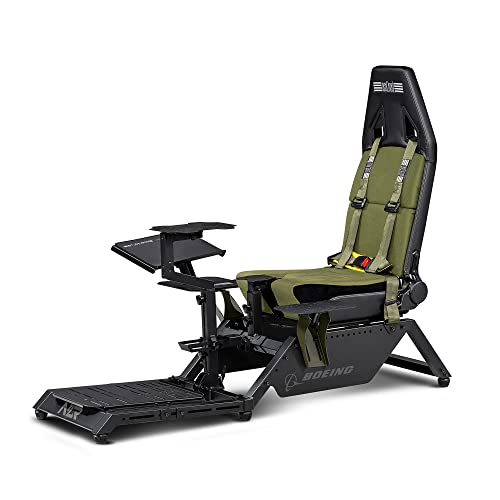
- Official Boeing-licensed flight cockpit
- Supports yokes, joysticks, rudders, and throttles
- Built for combat, GA, commercial, and space sims
Best For: Flight sim enthusiasts seeking a dedicated, branded cockpit
Flexible Dual-Sport Cockpit
Marada Universal Flight Simulation Cockpit

- Single-column frame with 40mm square tube
- Adjustable for flight and racing modes
- Broad compatibility with major brands
Best For: Budget-minded users wanting a versatile cockpit for both sim types
Commercial Desktop Cockpit Stand
A320/A350 Display Frame with HD Screen

- Includes a custom-sized HD screen
- Magnetic front panel removes without tools
- Carbon fiber reinforced 3D printed frame
Best For: Home simmers building an A320 or A350 desktop cockpit
Modular Combat Cockpit
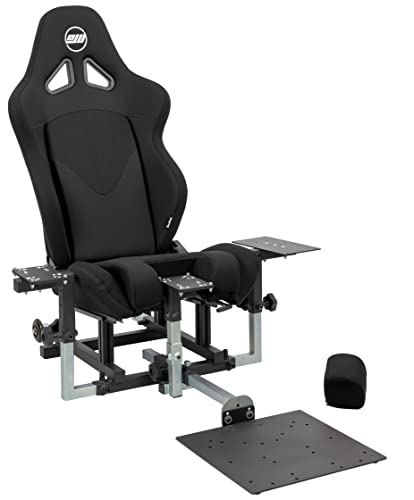
- Includes a full-size foam seat with sliders and recliner
- Supports stick, throttle, and rudder pedal mounting
- Compatible with Thrustmaster, WinWing, VirPil, and VKB
Best For: DCS and combat sim pilots who want a modular cockpit
Dual-Purpose Sim Rig
Flight and Racing Cockpit with Triple Stand
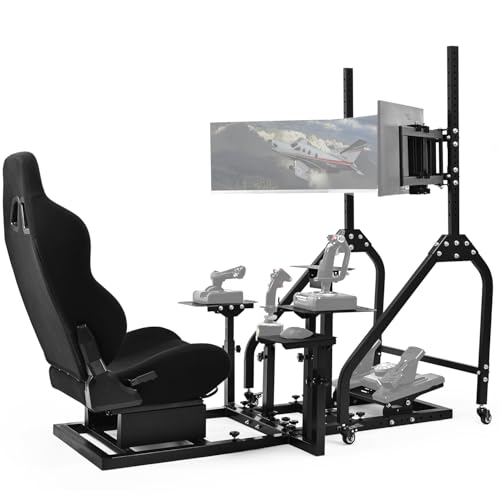
- Supports both flight and racing hardware
- 40mm steel frame handles direct drive wheels up to 10Nm
- Triple stand fits three 27-inch or 32-inch monitors
Best For: Sim racers and flight sim users who want one adjustable frame
Desktop Cockpit Panel
Pre-Cut Mounting Set for Logitech and Honeycomb Gear

- Fits Logitech yokes, panels, and Honeycomb yokes
- Integrated dimmable LED ambient lighting
- Aluminum alloy frame with desk clamps and support legs
Best For: Home sim pilots wanting a tidy desk-mounted panel
Adjustable Flight Chair Cockpit

- Integrated chair and flight stand design
- Steel frame with 300-pound load capacity
- Fits Thrustmaster and Logitech X56/X52 gear
Best For: Users wanting a seated cockpit with adjustable controls
Modular Flight Sim Stand
Adjustable Universal Cockpit Frame

- Modular frame with multiple mounting boards
- Fully adjustable for flight and racing hardware
- Supports mouse and keyboard placement
Best For: Builders who need one adaptable stand for multiple sim devices
Premium Dual-Mode Cockpit – Anman Adjustable Ergonomic Seat Cockpit
If you want a flight simulator cockpit frame that can also handle racing duties, this Anman setup is built for mixed-use flexibility. The steel-reinforced frame is rated for direct drive wheels up to 10Nm, and the cockpit lets you adjust the wheel angle, pedal tilt, and gear lever height independently for a more natural flying or driving position.
Best For: Sim racers and flight sim users who want one sturdy frame that can switch between flying and driving without major reconfiguration.
Pros:
- Steel-reinforced structure supports direct drive wheels up to 10Nm.
- Independent adjustment for wheel angle, pedal tilt, and gear lever height.
- Ergonomic seat includes high-density sponge, detachable lumbar/neck support, and 90-170° recline.
- Monitor stand supports displays up to 65 inches and 220 pounds.
Cons:
- Large monitor stand may be more than some compact setups need.
- Best suited to users who want a full cockpit rather than a minimal stand.
Overall, this is a strong pick if you want a flight simulator cockpit frame with serious adjustability and a more complete immersive setup. The combination of a stable frame, flexible seat, and dual-mode mounting makes it especially practical for users who alternate between flight and racing sims.
Compact Yoke Stand – Wheel Stand Pro S for Saitek Yoke
This flight simulator cockpit frame option is really a dedicated wheel stand rather than a full cockpit, so it makes sense if you want a compact, portable yoke solution. It is designed for the Saitek Pro Flight Yoke System, with a stable, adjustable build and quick-release clamps that make setup changes fast and simple.
Best For: Pilots who want a sturdy, space-saving yoke stand for the Saitek Pro Flight setup.
Pros:
- Stable, portable, and adjustable design.
- Quick-release clamps allow fast adjustments without knobs.
- Full and stepless adjustment range for comfort.
- Handcrafted in Europe and built for long-term use.
Cons:
- Wheel stand only; flight system not included.
- Not compatible with Honeycomb gear.
- Purpose-built for Saitek Pro Flight, so it is less universal than larger cockpits.
In practice, this stand is best when you want a focused yoke mount instead of a full flight seat frame. Its portability and simple adjustment system make it a good fit for users who value convenience and compatibility over a fully enclosed cockpit.
Licensed Immersion Cockpit – Next Level Racing Boeing Military Edition
If immersion is your priority, this flight simulator cockpit frame is designed as a dedicated flight setup with Boeing licensing and military-inspired styling. It is built for maximum simulation feel and works with flight electronics such as yokes, joysticks, rudders, and throttles from major brands.
Best For: Sim pilots who want a purpose-built cockpit with Boeing-inspired presentation and broad flight hardware support.
Pros:
- Dedicated flight cockpit for maximum simulation immersion.
- Officially licensed Boeing product.
- Compatible with yokes, joysticks, rudders, and throttles.
- Suited for combat flight, general aviation, commercial flight, and space exploration sims.
Cons:
- Heavier and more substantial than a simple stand at 108.9 pounds.
- Flight-focused design makes it less flexible for racing use.
This is a strong choice for users who want a dedicated, themed cockpit rather than a multipurpose frame. The Boeing-inspired look and broad compatibility make it especially appealing if your setup is centered on flight simulation realism.
Flexible Dual-Sport Cockpit – Marada Universal Flight Simulation Cockpit
This flight simulator cockpit frame is aimed at users who want one setup for both flying and racing without a lot of extra complexity. Its single-column design and 40mm square tube are intended to improve carrying capacity, while the adjustable layout lets you tailor the shift lever, pedals, and seat position for different control styles.
Best For: Users who want a flexible flight-and-racing cockpit with an adjustable seat and broad hardware compatibility.
Pros:
- Single-column frame with 40mm square tube for stronger load support.
- Adjustable shift lever height, angle, and position.
- Comfortable breathable seat with adjustable backrest.
- Works with many brands, including Saitek, Honeycomb, Thrustmaster, HOTAS Warthog, and Logitech.
Cons:
- Steering wheel, joystick, and pedals are not included.
- Requires space for a full cockpit-style setup.
- Seat and frame are built for versatility, not a highly specialized single-purpose rig.
As a flight simulator cockpit frame, this Marada model stands out for flexibility and wide device support. It is a sensible option if you want a capable all-rounder that can adapt between flight and racing layouts without moving to a more premium integrated rig.
Commercial Desktop Cockpit Stand – A320/A350 Display Frame with HD Screen
If you want a flight simulator cockpit frame that makes a desktop setup feel more like a commercial airliner workspace, this A320/A350 stand is built around that goal. It restores panel proportions for a focused cockpit-style layout and includes a custom-sized HD screen, so you can get started without sourcing a separate monitor.
Best For: Home simmers building an A320 or A350 desktop cockpit who want an integrated display and a compact footprint.
Pros:
- Includes a custom-sized HD screen matched to the frame
- Magnetic monitor mount makes the front panel easy to remove without tools
- Carbon fiber reinforced 3D printed frame is designed for better rigidity
- Fully assembled 80 x 20 x 50 cm desktop unit suits space-conscious setups
Cons:
- Built specifically for A320 and A350 simulator configurations
- Desktop-focused design is not meant for a full-size chassis setup
This is a practical pick if your priority is a realistic airline-style display layout rather than a highly modular rig. The included screen and reinforced frame make it especially appealing for users who want a cleaner, ready-to-use cockpit desk build.
Modular Combat Cockpit – DCS Edition Frame with Seat
This flight simulator cockpit frame is aimed at combat sim users who want a solid, configurable base for sticks, throttles, and pedals. The SimFab DCS Edition comes with a full-size seat, mounting hardware, and a chassis designed to support common combat flight control layouts.
Best For: DCS and combat sim pilots who want a modular cockpit with a seat and strong hardware support.
Pros:
- Includes a full-size foam seat with sliders and recliner
- Frame supports right-side stick, center stick/cyclic, throttle, and rudder pedals
- Compatible with many major control families, including Thrustmaster, WinWing, VirPil, and VKB
- Lifetime warranty on all metal parts
Cons:
- Optional brackets are needed for extra items like collectives and control panels
- Large 60 x 40 x 41 inch footprint needs dedicated space
For a serious combat setup, this is one of the more complete starting points because the frame and seat are bundled together. Its real strength is compatibility and expansion potential, so it works well if you plan to grow the rig over time.
Dual-Purpose Sim Rig – Flight and Racing Cockpit with Triple Stand
If you need a flight simulator cockpit frame that can also handle racing sessions, this adjustable rig is built for both. It combines reinforced mounting panels with a triple-monitor stand, making it a flexible choice for users who switch between flight controls and wheel-based sim hardware.
Best For: Sim racers and flight sim users who want one adjustable frame for both genres.
Pros:
- Dual simulation layout supports both flight and racing hardware
- Heavy-duty 40mm steel frame is rated for direct drive wheels up to 10Nm
- Adjustable cockpit length, wheel angle, pedal tilt, and shifter position
- Triple monitor stand fits three 27-inch or 32-inch displays
Cons:
- Mixing flight and racing features may be more than some users need
- Designed around broader sim use rather than a dedicated aircraft-specific layout
This rig makes sense if flexibility matters more than specialization. The strong frame, adjustable ergonomics, and triple-screen support give it a lot of utility for mixed-genre sim setups.
Desktop Cockpit Panel – Pre-Cut Mounting Set for Logitech and Honeycomb Gear
If you’re building a flight simulator cockpit frame around a desk setup, this Meza panel kit gives you a cleaner way to mount core controls without piecing together a custom frame from scratch. It is designed for Logitech yokes, throttle quadrants, and flight panels, while also supporting Honeycomb yokes and up to two throttle quadrants.
Best For: Home sim pilots who want an organized, desk-mounted cockpit panel with built-in ambient lighting.
Pros:
- Pre-cut panel with multiple mounting positions for a more organized control layout
- Integrated dimmable LED light strip for adjustable cockpit lighting
- Sturdy aluminum alloy construction with rubber-tipped clamps for 0.5″ to 2.2″ desks
- Includes supporting legs and adjustable feet for freestanding use
Cons:
- Electronic instruments, yokes, throttle quadrants, and displays are not included
- Designed as a frame/panel only, so it is not a full cockpit rig
This is a solid choice if you want a flight simulator cockpit frame component that prioritizes mounting organization, lighting, and desk compatibility over a fully enclosed rig.
Adjustable Flight Chair Cockpit – Hotas Mount with Seat
For buyers who want a more seated flight simulator cockpit frame, this Marada chair-based mount combines the control brackets and seat into one stable setup. It is made for HOTAS-style gear and supports a range of popular Thrustmaster and Logitech devices, with adjustment options that help it work as both a sim chair and a regular chair.
Best For: Sim racers and flight sim users who want an integrated chair and HOTAS mount with strong stability.
Pros:
- Integrated flight chair cockpit with adjustable backrest from 90 to 180 degrees
- High-strength steel bracket rated for up to 300 pounds
- Five locking rollers for added stability
- Compatible with several major HOTAS and joystick brands, including Thrustmaster and Logitech X56/X52
Cons:
- Gaming devices are not included
- Bulky footprint may be more than a simple desk mount setup
- Only 3 months warranty listed
This setup makes sense if you want a dedicated seated cockpit rather than a basic stand, especially when adjustability and stability matter more than minimalism.
Modular Flight Sim Stand – Adjustable Universal Cockpit Frame
If you want a flexible flight simulator cockpit frame that can grow with different hardware, this Marada universal stand is built around modular adjustability. It supports a wide range of flight and racing devices, adds mouse and keyboard placement, and uses a 40mm square-tube structure meant to stay stable while you fine-tune your layout.
Best For: Builders who want a highly adjustable, multi-device sim stand for both flight and racing setups.
Pros:
- Modular design with multiple mounting boards and DIY-friendly upgrade holes
- Fully adjustable front-to-back, up-down, and left-right positioning
- Supports a broad list of Logitech, Thrustmaster, Honeycomb, VKB, VPC, Winwing, and MOZA gear
- Includes space for mouse and keyboard placement
Cons:
- Wheels, pedals, throttles, joysticks, and yokes are not included
- Single-column structure may not suit users seeking a more enclosed cockpit feel
- Like many modular rigs, setup will take more planning than a simple fixed frame
This is a strong option for sim users who want one adaptable frame for multiple devices and future expansion instead of a narrow, single-purpose cockpit.
How We Picked the Best Flight Simulator Cockpit Frame
We looked for options that solve real setup problems: wobble under heavy controls, limited mounting points, poor seat or pedal positioning, and awkward monitor placement. Priority went to a Flight Simulator Cockpit Frame with strong adjustability, broad compatibility, and a layout that can grow with your gear.
Quick Comparison
Some frames are built for yoke-and-rudder flying, while others lean toward HOTAS, combat sim, or even hybrid racing use. A few include monitor stands or seat support, while others focus on modular mounting and accessory flexibility. The best choice depends on whether you want a compact stand, a full cockpit, or a more expandable rig.
Key Buying Factors for a Flight Simulator Cockpit Frame
Mounting Compatibility
Check that the frame supports your exact controls, whether that’s Logitech, Honeycomb, Thrustmaster, WinWing, VirPil, or another ecosystem. Look closely at yoke, throttle, joystick, pedal, and keyboard/mouse mounting options.
Rigidity and Load Support
If you use a direct-drive wheel, heavy yoke, or strong rudder setup, frame stiffness matters. A more rigid Flight Simulator Cockpit Frame reduces flex, keeps controls aligned, and improves long-session consistency.
Adjustability and Ergonomics
Seat position, pedal angle, height, and arm placement should match your flying style. Better adjustment means less fatigue and better reach to switches, screens, and secondary controls.
Display and Accessory Expansion
Monitor stands, side mounts, keyboard trays, and extra panel brackets can turn a basic frame into a full cockpit. If you plan to expand later, choose a modular design from the start.
Who Should Buy Which Flight Simulator Cockpit Frame?
Choose a compact stand if you want a smaller footprint or already have a chair you like. Pick a full cockpit frame if you want better immersion, more stability, and dedicated seat positioning. Combat sim pilots should prioritize modular HOTAS-friendly layouts, while civilian sim flyers may prefer yoke-ready frames with clean panel mounting. If you also want screen support, look for a cockpit that includes or easily accepts a monitor stand so your setup stays unified and easy to align.
In short, the best Flight Simulator Cockpit Frame is the one that matches your controls today and leaves room for the gear you plan to add next.