
If you want a more realistic home cockpit, a dedicated flight simulator autopilot panel can make a big difference. It gives you physical controls for common autopilot and avionics functions, so you can spend less time clicking through menus and more time flying.
In this roundup, we focus on the best options for desktop setups, general aviation, airliner-style cockpits, and plug-and-play USB use.
Best 10 Flight Simulator Autopilot Panel Picks for 2026
GA Desktop Pick
Digital Full-Scale Autopilot Panel

- Full-scale GA layout with tactile controls
- Auto backlighting for low-light flying
- Includes aluminum stand and USB plug-and-play
Best For: GA sim pilots building a realistic desktop or home cockpit
Wide-Body Cockpit Choice
WINCTRL Full-Size Autopilot Panel

- 1:1 panel with integrated glare shield
- 17 buttons plus 5 rotary knobs and thumbwheel
- Auto-adjusting backlight with USB module
Best For: MSFS pilots wanting a feature-rich, wide-body style control panel
Compact IFR Controller

- Compact layout with COM, NAV, FMS, and autopilot
- LED-backlit buttons and precise rotary controls
- Works with MSFS and X-Plane via USB-C
Best For: Desk setup pilots who want one compact IFR control hub
Yoke-Mount Classic
Logitech G Pro Flight Multi Panel

- Full autopilot panel with LED display
- Mounts to yoke system or home cockpit
- Simple USB setup for Windows PCs
Best For: Pilots already using a Logitech yoke-based flight sim rig
Feature-Rich Autopilot Hub

- 12 illuminated autopilot buttons
- 8 push knobs plus 5 toggle switches
- Configurable push and long-push actions
Best For: Sim pilots wanting a configurable all-in-one autopilot and EFIS panel
Dedicated Radio Control Panel

- Twin concentric dials for fast tuning
- Standby switch for quick frequency activation
- Real-time LED displays with supported sims
Best For: Pilots who want tactile radio frequency control and real-time displays
Airliner-Style FCU Controller

- Realistic A320-style mold and control angle
- Aviation aluminium build with adjustable lighting
- Push-pull knobs and plug-and-play operation
Best For: A320 sim pilots seeking a realistic FCU-style panel
Training-Grade 737 MCP
SYDYSOSO 737X Full-Scale Replica

- 1:1 scale 737-style MCP for PC sims
- Realistic button feel and calibrated displays
- USB plug-and-play with A/T disengage switch
Best For: Advanced simmers and home cockpit builders
Compact A320 EFIS Panel

- A320 EFIS with four warning-panel functions
- Angled stand improves viewing and comfort
- USB plug-and-play with synced brightness
Best For: Airbus simmers wanting a compact, realistic EFIS
Real-Logic 737 MCP
SYDYSOSO 737X Real Aircraft Replica
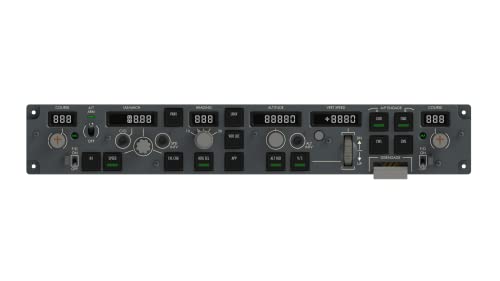
- Full-scale 1:1 737 MCP replica for PC
- 14 switches, 5 knob sets, and real A/T logic
- One-USB plug-and-play with simulator add-on support
Best For: PC simmers using supported Boeing 737 add-ons
GA Desktop Pick – Digital Full-Scale Autopilot Panel
If you want a flight simulator autopilot panel that feels closer to a real general aviation cockpit, this full-scale unit is built for that style of flying. It focuses on common IFR and autopilot functions, while the included aluminum stand and HID plug-and-play design make it practical for a home cockpit or desktop setup.
Best For: GA sim pilots who want a realistic, full-size desktop autopilot panel with easy USB setup.
Pros:
- Full-scale layout with authentic cockpit details and tactile controls
- Integrated backlighting with automatic ambient light adjustment
- HID device support for flexible button mapping across sim platforms
- Includes a premium aluminum alloy stand plus mounting holes for cockpit installs
Cons:
- Engineered exclusively for general aviation simulation
- Stable desktop placement may still need your own double-sided tape
This is a strong pick if you value realism, physical presence, and easy integration over compactness. The panel’s main strength is its authentic GA-focused control set, especially for heading, altitude hold, vertical speed, navigation, and approach workflows.
Wide-Body Cockpit Choice – WINCTRL Full-Size Autopilot Panel
This flight simulator autopilot panel is aimed at simmers who want a larger, more integrated cockpit-style control surface, especially for MSFS wide-body aircraft. It combines an autopilot section, multiple rotary controls, and a backlight system in a modular USB design that’s meant to drop into a desktop or panel setup.
Best For: MSFS users looking for a wide-body inspired autopilot panel with lots of physical controls.
Pros:
- True-to-scale 1:1 panel design with integrated glare shield
- 17 pushbuttons, 5 rotary knobs, and a vertical speed thumbwheel for precise input
- Automatic brightness adjustment plus synchronized backlighting
- USB module works with SimApp Pro and includes desktop and profile mounting brackets
Cons:
- Designed specifically around MSFS wide-body aircraft use
- Advanced A/T MAG switch behavior depends on upgrade support
For simmers who want a more elaborate control experience, this panel offers a lot of hands-on input in one unit. The combination of full-size layout, lighting automation, and modular installation makes it appealing for a polished cockpit build.
Compact IFR Controller – Octavi IFR-1 All-in-One Panel
If your priority is saving space without giving up core cockpit functions, this compact flight simulator autopilot panel is a smart all-in-one option. It combines autopilot, COM, NAV, FMS, transponder, BARO, and heading controls into a single unit, with LED-backlit buttons and precise rotary input for realistic IFR workflow.
Best For: Simmers who want a space-saving all-in-one IFR control box for MSFS or X-Plane.
Pros:
- Combines COM, NAV, FMS, autopilot, XPDR, BARO, HDG, and VOR controls in one unit
- Compact German-made design with tactile controls and LED-backlit buttons
- High-precision dual-axis rotary encoder plus multi-instrument layout
- USB-C to USB-A cable included for straightforward setup
Cons:
- Not compatible with Xbox
- Smaller format may be less immersive than a full-size panel
This is the best fit if you want a practical, multi-function panel that keeps your desk uncluttered. It is especially appealing for IFR procedures because it consolidates the most-used radios and autopilot controls into one compact device.
Yoke-Mount Classic – Logitech G Pro Flight Multi Panel
For pilots who want a proven flight simulator autopilot panel with a straightforward control layout, this Logitech unit remains a familiar choice. It provides a full autopilot panel with switches and an LED display, and it can mount to the Pro Flight Yoke System or integrate into a custom home cockpit.
Best For: Sim users who want a simple, established autopilot add-on for a yoke-based setup.
Pros:
- Full autopilot panel with associated setting controls and LED display
- Mounts to the Pro Flight Yoke System or a custom cockpit
- USB connection keeps setup simple on Windows PCs
- Compact add-on format is easy to slot into an existing rig
Cons:
- Works with older Microsoft Flight Simulator versions, not newer platform-specific features
- Requires the separate Pro Flight Yoke System for the intended mounting setup
This panel makes sense if you want a no-frills autopilot control solution that fits into an established Logitech ecosystem. It is less about advanced depth and more about giving you the essential flight sim autopilot inputs in a familiar package.
Feature-Rich Autopilot Hub – Pro-Grade Multi-Function MCP
If you want a flight simulator autopilot panel with a broad control set, this Universal Autopilot brings together MCP-style buttons, EFIS controls, and plenty of push-function knobs. It’s built for simmers who want direct access to common autopilot and EFIS actions without relying on on-screen menus.
Best For: Sim pilots who want an all-in-one autopilot and EFIS panel with configurable controls.
Pros:
- 12 illuminated buttons cover key autopilot modes like SPEED, VNAV, LEVEL CHANGE, LNAV, APPROACH, and ALT HOLD.
- Includes 8 push-action knobs plus 5 toggle switches for functions such as BARO, MINS, flight directors, and autothrottle.
- Per-button timing is configurable, and long-push actions can unlock extra functions like TOGA, TFC, and CWS inputs.
- Comes with practical extras such as a 2-meter USB cable, anti-slip neoprene feet, and a protective bag.
Cons:
- Function behavior can vary by aircraft, so setup and workflow may differ from plane to plane.
- The broad feature set may be more than casual users need.
- Best suited to sim rigs that can benefit from a dedicated hardware panel.
This is a strong pick if you value depth and configurability over simplicity. It packs a lot of cockpit-style interaction into one panel and is especially appealing for users who want to manage autopilot, EFIS, and related controls from hardware.
Dedicated Radio Control Panel – Reliable Radio Stack Add-On
For a flight simulator autopilot panel focused on radio and communication duties, the Logitech G Pro Flight Radio Panel keeps frequency tuning tactile and visible. Its physical dials, standby switch, and LED readouts are aimed at pilots who want faster radio changes without bringing up the virtual stack.
Best For: Simmers who want a dedicated radio panel for quick frequency management and cockpit immersion.
Pros:
- Twin concentric dials make incremental frequency tuning faster and easier to control.
- Standby switch lets you set standby frequencies and activate them with a button press.
- LED displays work in real time with supported simulators, reducing the need for on-screen radio menus.
- Compatible with Microsoft Flight Simulator X, X-Plane 10/11, and Prepar3D 2.2+ on Windows PCs.
Cons:
- It is a radio panel, not a full autopilot or EFIS unit.
- Support is focused on specific simulators and Windows systems.
- Older compatibility references may matter if you are using newer sim setups.
This panel is a practical add-on if your main goal is quicker, more immersive radio control. It won’t replace a full autopilot stack, but it does a focused job well and keeps essential comms functions right under your hands.
Airliner-Style FCU Controller – A320-Style FCU Console
If you’re shopping for a flight simulator autopilot panel that feels closer to a modern airliner cockpit, this MiYee Wingflex A320 FCU CUBE is designed around A320-style operation and presentation. It emphasizes realistic touch, synchronized dimmer knobs, and plug-and-play use for mainstream sim platforms.
Best For: A320 sim pilots who want a realistic FCU-style control unit with an authentic hardware feel.
Pros:
- Full mold design aims to replicate the real aircraft look, layout, and control angle.
- Housing and knobs use aviation aluminium, with adjustable screen and unit backlighting.
- Push-pull knobs and custom encoders are built to mimic real aircraft tactile feedback.
- Supports data-driven and stream-driven modes, plus plug-and-play setup and firmware upgrades.
Cons:
- It is tailored to the A320-style workflow rather than being a universal panel.
- Some advanced behavior depends on aircraft model support and sim integration.
- Its specialized design may be more than needed for general-purpose flight sim use.
This is the most cockpit-authentic option in the group if you fly Airbus-style aircraft. The realistic angle, lighting, and push-pull controls make it a strong choice for users who want their hardware to mirror the real FCU experience more closely.
Training-Grade 737 MCP – SYDYSOSO 737X Full-Scale Replica
If you want a flight simulator autopilot panel that feels built around the real Boeing 737 workflow, this SYDYSOSO MCP is aimed at serious desktop and home cockpit setups. It uses a 1:1 scale layout, authentic button feel, and calibrated digital displays to support a more immersive control experience in PC-based sim flying.
Best For: Advanced simmers and cockpit builders who want a full-scale 737-style MCP with plug-and-play USB connectivity.
Pros:
- 1:1 scale 737-style mode control panel designed to match real aircraft dimensions
- Buttons are tuned for realistic force and travel, with calibrated digital display output
- Single USB connection handles both power and data for simpler integration
- Includes an A/T switch with automatic disengagement plus automatic display brightness adjustment
Cons:
- Built for PC use, so it is not a universal console accessory
- Works best as part of a broader cockpit setup rather than as a standalone casual add-on
For simmers prioritizing scale accuracy and tactile realism, this panel delivers a focused 737-style experience without requiring DIY assembly. Its plug-and-play USB design makes it easier to add to a serious cockpit build while still aiming for authentic operation.
Compact A320 EFIS Panel – MiYee WINGFLEX A320 USB EFIS
This flight simulator autopilot panel is better suited to Airbus-style instrument workflows than a pure autopilot-only setup. The MiYee WINGFLEX A320 EFIS combines a compact display/control layout with a four-function warning panel, plug-and-play USB connectivity, and brightness synchronization for a more polished PC sim experience.
Best For: Airbus-focused simmers who want a compact A320 EFIS with warning functions and easy USB setup.
Pros:
- Includes SIDE STICK PRIORITY, CHRONO, MASTER WARN, and MASTER CAUTION functions
- Separate stand creates an inclined angle for easier viewing and interaction
- Brightness and backlighting sync with the Flight Control Unit CUBE
- USB plug-and-play design keeps setup straightforward
Cons:
- Designed specifically around the A320 EFIS layout, not a 737-style panel
- Compatibility is listed for Windows, so it is PC-focused
If your sim rig centers on Airbus procedures, this compact unit adds practical EFIS and warning-panel functions without taking up much space. The realistic font, lighting sync, and angled stand make it a strong fit for users who want an organized, aircraft-inspired control surface.
Real-Logic 737 MCP – SYDYSOSO 737X Real Aircraft Replica
For buyers shopping for a flight simulator autopilot panel with a strong emphasis on realism, this SYDYSOSO 737X MCP focuses on size accuracy, real-aircraft logic, and direct PC integration. It is a full-scale replica with custom switches, clear rotary feel, and a built-in chip for plug-and-play use in supported simulator environments.
Best For: Flight sim users who want a 1:1 Boeing 737 MCP for supported PC simulators and major add-ons.
Pros:
- 1:1 simulation of the real aircraft’s size with an engineering plastic shell
- 14 custom switches, 5 knob sets, and a real-aircraft logic A/T switch
- Built-in chip supports one-cable power and data for plug-and-play setup
- Listed compatibility with MS Flight Simulator, X-Plane, P3D, and FSX add-ons
Cons:
- Compatibility is tied to specific simulator platforms and aircraft add-ons
- Best suited to Windows-based PC setups rather than broad device support
This panel is aimed at simmers who want a cockpit-style component that mirrors the look and logic of the real 737 MCP as closely as possible. If your setup already includes supported software and you value tactile controls over general-purpose simplicity, it is a strong match.
How We Picked the Best Flight Simulator Autopilot Panel Options
We prioritized realism, control layout, build quality, software compatibility, and overall value. Since buyers use a Flight Simulator Autopilot Panel in different ways, we also considered whether the unit is better suited to general aviation, airliner procedures, or compact desktop setups.
Ease of installation mattered too. Some panels are simple USB add-ons, while others are aimed at more advanced cockpit builders and may need more space, mounting, or setup time.
Quick Comparison
In general, compact multi-function panels are best if you want a simple all-in-one upgrade, while dedicated MCP, EFIS, or radio panels are better if you want to build out a more realistic station piece by piece. Airliner pilots in the sim world will usually prefer replica-style controls, while GA flyers often benefit more from flexible autopilot and nav tools.
Key Buying Factors for a Flight Simulator Autopilot Panel
Compatibility
Check support for your simulator and operating system before buying. A panel that works smoothly with your favorite sim is worth more than one with extra features you cannot use.
Control Layout
Look for the functions you actually use most: heading, altitude, vertical speed, IAS, NAV, APR, heading sync, and altitude preselect. If you fly airliners, a mode control panel style layout may be more useful than a general aviation unit.
Display and Feedback
Clear screens, bright annunciators, and responsive knobs make a big difference during approach and descent. Good tactile feedback also helps reduce the need to look away from the screen.
Build and Mounting
Desktop users should favor compact panels with stable bases or plug-and-play mounting. Dedicated sim pit builders may want larger, full-scale hardware that matches the aircraft they fly most often.
Expansion Potential
If you plan to add more avionics later, consider whether the panel fits into a larger ecosystem of radio, EFIS, and autopilot accessories.
Who Should Buy Which Flight Simulator Autopilot Panel?
If you are new to home cockpit gear, a straightforward USB panel is often the easiest starting point. If you want a more authentic airliner experience, choose a replica-style autopilot or mode control panel that matches your aircraft type. For general aviation and mixed flying, an all-in-one Flight Simulator Autopilot Panel with broad function support is usually the most practical choice.
For the best long-term setup, buy the panel that matches your flying style first, then expand around it as your cockpit grows.