
A good flight simulator switch panel can make a desktop setup feel far more like a real cockpit. Instead of hunting for keys and menus, you get faster access to the controls you use most.
Below, we focus on practical options for different budgets and cockpit styles, from simple switch modules to more advanced panels with displays, lighting, and autopilot functions.
Best 10 Flight Simulator Switch Panel Picks for 2026
Classic Cockpit Pick
Logitech G Pro Flight Switch Panel

- LED gear status indicators
- 14-button core cockpit controls
- Stacks with other Saitek panels
Best For: Sim pilots wanting a familiar, modular PC switch panel
Immersion-First Choice
SIM-PANEL FlightMate Single Mag
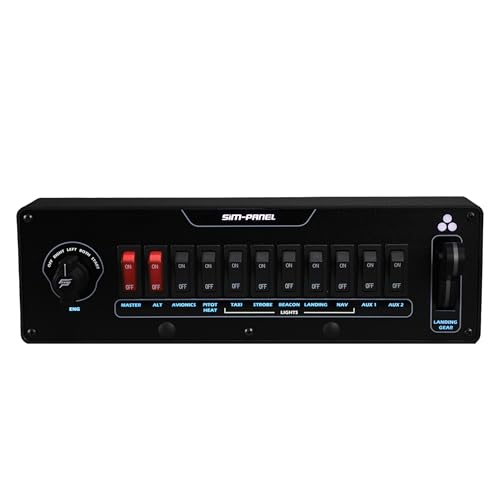
- Spring-back single magneto control
- 11 toggles with customizable backlighting
- Gear lever with LED status lights
Best For: PC pilots focused on single-engine realism and illuminated controls
Autopilot Panel Upgrade
Logitech G USB Pro Flight Multi Panel

- Dedicated autopilot controls
- LED display for flight values
- Mounts to yoke or cockpit setup
Best For: Windows simmers building out an autopilot control panel
Multi-Engine Control Pick

- Independent left/right magnetos
- 11 toggles with backlighting
- Gear lever with LED indicators
Best For: Advanced PC pilots flying twin-engine procedures
Radio Panel
Logitech G USB Pro Flight Radio Panel

- Twin concentric dials for faster tuning
- Real-time LED displays for frequencies
- Works with FSX, X-Plane, and Prepar3D
Best For: Desktop sim pilots who need dedicated radio controls
GA Switch Panel
Meza Sim-GA Flight Simulator Switch Panel

- Magneto key switch with realistic positions
- Includes master, avionics, fuel pump, and lights
- Desk clamp mount for desktop setups
Best For: General aviation simmers wanting realistic ignition and switch control
Radio + Switch Bundle
Logitech G Pro Flight Radio and Switch Panel Bundle

- Bundles radio and switch controls together
- Switch panel covers gear, lights, and engine power
- Real-time LED interaction with sim software
Best For: PC sim pilots wanting a fuller cockpit control setup
Takeoff and Landing Control
MOZA MLTP Take-Off Landing Panel

- 25 programmable inputs
- Hall sensor precision and durability
- Telemetry-driven lighting effects
Best For: Sim pilots building a modular takeoff and landing control setup
Authentic GA Utility
C172 Breaker Panel with Ignition Switch

- Authentic C172-style design
- Ignition switch included
- Multi-setup compatibility
Best For: General aviation simmers seeking a realistic breaker panel look
Desktop Autopilot Upgrade
Flight Simulator Digital Autopilot Panel

- Full-scale GA autopilot layout
- Automatic ambient backlighting
- USB plug-and-play with aluminum stand
Best For: Desktop general aviation pilots wanting IFR-style autopilot controls
Classic Cockpit Pick – Logitech G Pro Flight Switch Panel
If you want a flight simulator switch panel that adds straightforward cockpit control without overcomplicating setup, this Logitech G Pro Flight model covers the essentials well. It focuses on landing gear, engine start, and other core switch functions, while staying compatible with major PC sim software and Windows.
Best For: Sim pilots who want a simple, established switch panel for general cockpit control and gear management.
Pros:
- LED gear indicators show actual gear status in supported sims.
- Includes 14 buttons and core engine/cockpit functions.
- Modular design can stack or sit beside other Saitek panels.
- USB connection and Windows compatibility keep setup familiar.
Cons:
- 90-day warranty is shorter than some alternatives.
- Best suited to Windows PCs rather than broader platform use.
Overall, this is a practical pick for simmers who want a recognized, easy-to-place panel with useful day-to-day controls. It is not the most feature-packed option here, but it does the basics well and integrates cleanly into a larger cockpit layout.
Immersion-First Choice – SIM-PANEL FlightMate Single Mag
This flight simulator switch panel is aimed at PC users who want a more procedural, realism-focused control layout. The single magneto rotary with spring-back START, 11 toggle switches, customizable backlighting, and a gear lever with LED indicators make it a strong fit for pilots who care about startup and shutdown flow.
Best For: PC sim pilots who want a realistic single-engine ignition and switch layout with illuminated controls.
Pros:
- Authentic single-engine magneto control with spring-back START.
- 11 toggle switches with customizable backlighting.
- Landing gear lever includes responsive THREE-IN-THE-GREEN indicators.
- Built for PC-only use with a professional-grade construction focus.
Cons:
- Not compatible with consoles or non-PC platforms.
- Single-engine magneto setup may be less flexible for multi-engine needs.
For simmers who want more than basic toggles, this panel leans into realism with procedures and feedback that feel cockpit-like. It is especially appealing if you value lighting, tactile engine control, and a dedicated gear lever in a compact unit.
Autopilot Panel Upgrade – Logitech G USB Pro Flight Multi Panel
If your flight simulator switch panel priorities include autopilot control, this Logitech G Multi Panel is built around that need. It provides a full autopilot panel with setting controls, an LED display, and USB connectivity for Windows PCs, making it a useful add-on for organized cockpit setups.
Best For: Sim pilots who want a dedicated autopilot-focused panel for a Windows PC cockpit.
Pros:
- Full autopilot panel with associated setting controls.
- LED display helps surface key flight values.
- Mounts to the Pro Flight Yoke System or a custom cockpit.
- USB connection keeps integration simple on Windows PCs.
Cons:
- Works with Microsoft Flight Simulator X and 2004 per supplied notes.
- Short 90-day warranty.
This is a focused utility panel rather than a general switch box, so it makes the most sense when autopilot management is a priority. If you are building out a Logitech-based setup, it slots in neatly and expands control without crowding the desk.
Multi-Engine Control Pick – SIM-PANEL FlightMate Dual Mag
For simmers who want a flight simulator switch panel with more advanced engine-start realism, this SIM-PANEL Dual Mag edition adds independent left and right magneto control. It combines dual magnetos, 11 toggle switches, customizable backlighting, and a gear lever with LED indicators, making it well suited to multi-engine procedure practice on PC.
Best For: Advanced PC sim pilots who want twin-engine magneto control and a realistic switch layout.
Pros:
- Independent dual magnetos support multi-engine realism.
- 11 toggle switches with customizable backlighting.
- Landing gear lever includes THREE-IN-THE-GREEN lighting.
- Professional-grade build aimed at serious sim users.
Cons:
- PC-only compatibility limits platform flexibility.
- May be more panel than casual flyers need.
This model is the most procedure-oriented of the group, especially if you fly twins and want separate ignition behavior. It trades broad simplicity for deeper control, which makes it a strong fit for serious cockpit builders and experienced sim pilots.
Radio Panel – Logitech G USB Pro Flight Radio Panel
If you want a flight simulator switch panel focused on radio work, the Logitech G USB Pro Flight Radio Panel adds physical dials and real-time LED readouts for quicker frequency changes without opening on-screen stacks. It’s a practical add-on for sim pilots who spend time managing comms and navigation frequencies in supported PC sims.
Best For: Sim pilots who want dedicated radio controls and live frequency displays on a desktop PC setup.
Pros:
- Twin concentric dials make frequency adjustments faster and more precise.
- Standby switch lets you set and activate frequencies with one button.
- LED displays work in real time with compatible flight sim software.
- Supports Microsoft Flight Simulator X/2004, X-Plane 10/11, and Prepar3D 2.2+.
Cons:
- Focused on radio functions rather than broader cockpit controls.
- Compatibility is centered on Windows PC simulators.
This is a straightforward hardware upgrade if you want tactile radio management instead of relying on mouse clicks. It fits well into a desktop sim rig where quick frequency selection matters.
GA Switch Panel – Meza Sim-GA Flight Simulator Switch Panel
This flight simulator switch panel is built for general aviation style control, combining ignition, master, avionics, fuel pump, lighting, and pitot heat functions in one desktop-friendly unit. The Meza Sim-GA is a solid choice if you want a more realistic startup and shutdown flow on a PC sim setup.
Best For: General aviation simmers who want a compact switch panel with a realistic ignition key.
Pros:
- Includes a magneto key switch with OFF, RIGHT, LEFT, BOTH, and START positions.
- Combines key aircraft systems into one control panel.
- Desk clamp mount makes it suitable for desktop simulator stations.
- USB-powered and compatible with Windows PC flight sim setups.
Cons:
- Illuminated push buttons are decorative rather than simulator-mapped controls.
- Designed for PC use, so it is not a broad cross-platform option.
For pilots who care about start-up procedure and tactile aircraft-style controls, this panel delivers a focused GA experience. It’s especially appealing for desktop setups that need a secure clamp-on mount.
Radio + Switch Bundle – Logitech G Pro Flight Radio and Switch Panel Bundle
If you want a broader flight simulator switch panel setup, this Logitech G bundle pairs radio control with a dedicated switch panel for landing gear, lights, engine power, and more. It’s a practical way to cover both communication and core cockpit actions with hardware instead of on-screen menus.
Best For: PC sim pilots who want both radio tuning and general cockpit switches in one bundle.
Pros:
- Includes both the Radio Panel and the Switch Panel in one package.
- Radio Panel offers twin concentric dials and a standby switch for faster tuning.
- Switch Panel adds controls for landing gear, lights, engine power, and more.
- LED displays work in real time with compatible flight sim software.
Cons:
- Built around Windows PC simulator compatibility.
- More specialized than an all-in-one cockpit solution.
This bundle is the most complete of the three if you want to expand a desktop cockpit with both comms and switch controls. It’s a sensible pick for simmers who want immediate tactile access to everyday flight functions.
Takeoff and Landing Control – MOZA MLTP Take-Off Landing Panel
If you want a flight simulator switch panel that focuses on takeoff and landing workflow, the MOZA MLTP is built around programmable inputs, a realistic brake lever, and lighting effects tied to telemetry. Its modular design also makes it a strong fit for users already building around the MTP Throttle Panel.
Best For: Sim pilots who want a programmable, hardware-heavy takeoff and landing panel with modular expansion.
Pros:
- 25 programmable inputs for flexible cockpit mapping
- Hall sensor technology for durability and precision
- Realistic aluminum brake lever adds tactile control
- Telemetry-driven panel lighting improves immersion
Cons:
- Designed for PC flight simulation only
- Modular setup may suit system builders more than casual users
This is a strong choice if you want a dedicated control panel that emphasizes physical feedback and customizable inputs over simplicity. It is especially appealing for simmers who value realism and expandability in a desktop cockpit.
Authentic GA Utility – C172 Breaker Panel with Ignition Switch
This flight simulator switch panel is aimed at pilots who want an authentic C172-style cockpit look with breaker-style controls and an ignition switch. It is focused on realism and multi-setup compatibility rather than flashy extras, making it a practical fit for general aviation sim desks.
Best For: General aviation simmers who want an authentic-looking breaker panel with ignition control.
Pros:
- Authentic design modeled for a C172-style setup
- Includes an ignition switch for cockpit-style operation
- Premium build quality for a more solid feel
- Multi-setup compatibility broadens installation options
Cons:
- Non-functional breakers may limit realism for some users
- Less feature-rich than programmable multi-input panels
If your priority is a clean, aircraft-inspired interface for general aviation simulation, this panel keeps the focus on authenticity. It makes the most sense for users who want the look and basic feel of a real breaker panel without extra complexity.
Desktop Autopilot Upgrade – Flight Simulator Digital Autopilot Panel
For pilots who want a more specialized flight simulator switch panel, this digital autopilot unit focuses on IFR-style control and a full-scale general aviation layout. It adds backlighting, plug-and-play USB connectivity, and an included aluminum stand, making it a strong desktop option for home cockpit use.
Best For: General aviation simmers who want a desktop autopilot panel with IFR controls and easy setup.
Pros:
- Full-scale layout with authentic cockpit details
- IFR functions cover heading, altitude, vertical speed, nav, and approach controls
- Automatic ambient backlighting helps in low-light flying
- Plug-and-play USB setup with standard HID support
Cons:
- Engineered exclusively for general aviation simulation
- Base stability may require your own double-sided tape
This panel stands out if you want a dedicated autopilot interface instead of a general-purpose button box. The included stand and straightforward USB operation make it especially practical for desktop simmers who want a polished, cockpit-like add-on.
How We Picked the Best Flight Simulator Switch Panel
We focused on Flight Simulator Switch Panel options that offer a useful mix of realism, build quality, control coverage, and compatibility with common PC flight sim setups. We also looked at whether each panel adds real day-to-day value, not just extra buttons.
Priority went to products that are easier to integrate into a home cockpit, provide clear labeling or tactile controls, and suit different flying styles such as general aviation, airliner-style workflows, and training-focused setups.
Quick Comparison
Some panels are best as simple add-ons for essential aircraft functions, while others combine switches, radios, autopilot controls, or programmable inputs for a more complete dashboard. If you want the fastest setup, choose a straightforward switch panel. If you want fewer keyboard shortcuts, look for a multi-function panel or a bundle.
Key Buying Factors for a Flight Simulator Switch Panel
Control Type
Decide whether you need basic toggles and ignition controls, a radio stack, autopilot functions, or a more advanced programmable layout. The right choice depends on what you fly most often.
Realism and Layout
A good layout should match the aircraft category you simulate. GA-focused flyers often benefit from ignition, lights, fuel, and avionics controls, while more advanced builders may want panels with status displays and extra inputs.
Compatibility and Setup
Check PC support, driver requirements, and whether the panel works cleanly with your preferred sim software. A great Flight Simulator Switch Panel is only useful if setup is stable and button mapping is straightforward.
Build, Mounting, and Space
Consider desk space, clamp options, and whether the unit feels sturdy during repeated use. Compact panels are better for small desks, while larger modules make sense in dedicated rigs.
Expandability
If you plan to build a full cockpit over time, modular products and bundles can save effort later. Programmable inputs and multi-panel ecosystems are especially useful for users who want to grow their setup gradually.
Who Should Buy Which Flight Simulator Switch Panel?
Choose a basic switch panel if you want to reduce keyboard use and add realism without much complexity. Pick a multi-panel or radio-and-switch bundle if you fly regularly and want a more complete control center. Go for advanced programmable or digital panels if you are building a dedicated home cockpit and want greater flexibility.
For general aviation fans, a Flight Simulator Switch Panel with ignition, lights, and avionics controls often delivers the best day-to-day experience. For mixed flying, a setup with displays and programmable inputs gives the most versatility.