
Need more SATA connections for SSDs, HDDs, or a boot drive? A good PCIe SATA controller card makes it easy to expand desktop storage without replacing your motherboard.
Below, we focus on practical options for everyday upgrades, multi-drive builds, and budget-friendly expansion, so you can choose the right card with confidence.
Best 10 PCIe SATA Controller Card Picks for 2026
Four-Port Starter Pick

- Adds 4 SATA 3.0 ports at 6Gb/s
- Includes 4 SATA cables and low-profile bracket
- Bootable in non-RAID setups
Best For: Users who want a simple 4-port expansion card with cables included
Best Compact Two-Port Option
2-Port PCIe SATA Card with JMB582

- Adds 2 SATA 3.0 ports up to 6 Gbit/s
- Includes 2 SATA cables and a heatsink
- Supports hot swap and plug-and-play setup
Best For: Small upgrades where two SATA connections are enough
Best All-In-One Four-Port Pick
4-Port SATA Card with Cables and Brackets

- Adds 4 SATA III 6Gbps ports
- Includes 4 cables and both bracket sizes
- Bootable in non-RAID setups
Best For: Users wanting a complete 4-port kit for desktop or workstation storage
Best High-Capacity Expansion
6-Port PCIe X4 SATA III Expansion Card
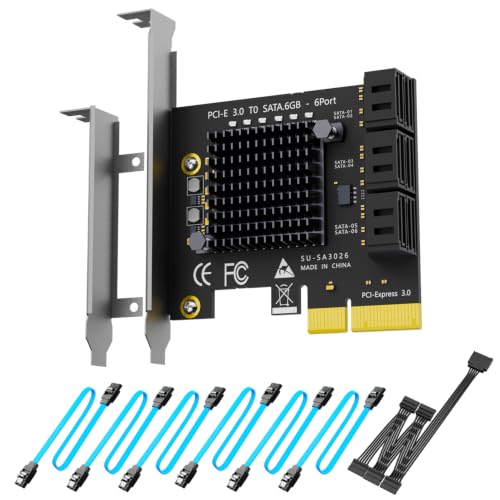
- Adds 6 SATA III ports for big storage builds
- Supports software RAID, not hardware RAID
- Includes 6 cables, splitter, and both brackets
Best For: Large storage setups that need six SATA connections
Budget 4-Port Expansion
4-Port PCIe SATA 3.0 Controller Card

- Adds 4 SATA III 6Gbps ports
- Includes 4 cables and power splitter
- Marvell 88SE9215 chipset with heatsink
Best For: Desktop users adding a few extra drives with included accessories
High-Capacity 8-Port Kit
PCIe 8-Port SATA Controller Card

- 8 SATA ports for larger storage builds
- Includes 8 cables and a low-profile bracket
- Supports Windows, Mac, and Linux
Best For: Users connecting many drives and wanting a complete kit
Reliable 6-Port Upgrade
10Gtek 6-Port SATA 3.0 PCIe Expansion Card

- 6 SATA 3.0 ports with ASM1166 chipset
- Plug-and-play with no driver installation
- Includes 6 cables and both bracket sizes
Best For: DIY NAS or desktop upgrades needing stable 6-port expansion
Best with Extra Features
Ubit SA3014 4-Port SATA Controller

- Adds 4 SATA 3.0 ports at up to 6Gbps
- Marvell 9215 chip with hot-plug/hot-swap support
- Includes cables and low-profile bracket
Best For: desktop or NAS upgrades needing four SATA ports
High-Capacity 6-Port Pick
YBBOTT ASM1166 6-Port SATA Card

- Adds 6 SATA 3.0 ports at 6Gbps
- ASMedia ASM1166 chipset for stability
- Includes 6 SATA cables and low-profile bracket
Best For: users who want the most SATA ports in one card
Reliable 4-Port Bootable Option
Moonqkuses 4-Port SATA 3.0 Card

- Adds 4 SATA 3.0 ports at 6Gbps
- Marvell 88SE9215 chipset with port multiplier support
- Supports booting a system disk
Best For: desktop users needing a bootable 4-port SATA adapter
Four-Port Starter Pick – 4-Port SATA 3.0 with 4 Cables
If you need a PCIe SATA controller card that can add four SATA 3.0 connections in one shot, this 4-port model is built for straightforward desktop storage expansion. It supports 6Gb/s SATA devices, includes four SATA cables, and is designed to boot as a system disk in non-RAID use.
Best For: Desktop users who want four extra SATA ports with included cables and bootable support.
Pros:
- Adds 4 SATA 3.0 devices at up to 6Gb/s.
- Includes 4 SATA cables and a low-profile bracket.
- Supports booting as a system disk in non-RAID setups.
- Uses the Asmedia1064 chip for stability and compatibility.
Cons:
- Non-RAID operation only for booting from the card.
- Compatibility can vary by motherboard environment.
- Not the simplest pick if you only need one or two ports.
Overall, this is a practical all-in-one expansion card for users who want four SATA ports, bundled cables, and broad OS support without building a RAID setup around it.
Best Compact Two-Port Option – 2-Port PCIe SATA Card with JMB582
This PCIe SATA controller card is a compact option for adding two SATA 3.0 ports to a PC or server. It uses the JMicron JMB582 chipset, supports hot swap, and comes with two SATA cables for a clean, no-frills installation.
Best For: Users who only need two SATA ports and want a simple plug-and-play upgrade.
Pros:
- Provides 2 SATA 3.0 ports with up to 6 Gbit/s transfer speed.
- Includes 2 SATA cables for immediate setup.
- Supports hot swap and plug-and-play installation.
- Has a heatsink for better high-temperature resistance.
Cons:
- Only offers two ports, so expansion capacity is limited.
- Compatibility depends on supported PCIe slot types and system setup.
- No mention of bootable system-disk support in the supplied notes.
For a small storage upgrade, this card keeps things simple: two fast SATA ports, broad slot compatibility, and a design aimed at easy installation rather than maximum expansion.
Best All-In-One Four-Port Pick – 4-Port SATA Card with Cables and Brackets
If you want a PCIe SATA controller card with four ports, boot support, and a fully bundled install kit, this Marvell-based model is designed for easy desktop expansion. It adds four SATA III 6Gbps ports through a PCIe x1 slot and is aimed at users who need extra drives without extra accessories.
Best For: Desktop and workstation builds that need four bootable SATA ports with cables included.
Pros:
- Adds 4 SATA 3.0 ports at 6Gbps through PCIe x1.
- Supports booting as a system disk in non-RAID use.
- Includes 4 SATA cables plus full-height and low-profile brackets.
- Fanless design keeps operation quiet.
Cons:
- Non-RAID only for booting as a system disk.
- May not suit users who need more than four SATA devices.
- Compatibility still depends on the host system and OS environment.
This is a strong all-around choice if you want a ready-to-install SATA expansion card with the cables and brackets already in the box, plus broad OS support and quiet operation.
Best High-Capacity Expansion – 6-Port PCIe X4 SATA III Expansion Card
For bigger storage builds, this PCIe SATA controller card stands out by adding six SATA drives to a system at once. It uses the ASM1166 controller, supports software RAID setups in Windows, Mac OS, and Linux, and comes with the cables and brackets needed for a full installation.
Best For: Users who need six SATA ports and want a complete expansion kit for large storage arrays.
Pros:
- Adds 6 SATA III ports for large storage expansion.
- Supports software RAID in Windows, Mac OS, and Linux.
- Includes 6 SATA cables, a SATA power splitter, and both bracket sizes.
- Built-in LEDs help monitor drive activity and status.
Cons:
- No hardware RAID support.
- Uses a PCIe x4 card design, so slot fit matters.
- May be more card than you need for a small upgrade.
If your priority is maximum SATA expansion with a ready-to-go accessory bundle, this six-port card is the most capable option in the group and is especially practical for larger storage pools.
Budget 4-Port Expansion – 4-Port PCIe SATA 3.0 Controller Card
If you need a straightforward PCIe SATA controller card for adding a few extra drives, this 4-port ACTIMED model keeps the setup simple. It supports SATA III 6Gbps, works in a wide range of PCIe slots, and includes the cables and bracket pieces you’d want for a practical desktop upgrade.
Best For: Desktop users who want a compact 4-drive storage expansion with bundled accessories.
Pros:
- 4 SATA III ports with support for SSDs and HDDs
- Marvell 88SE9215 chipset and included heatsink for better stability and temperature control
- Works with PCIe x1/x4/x8/x16 slots and includes SATA cables, power cable, low-profile bracket, and screws
- Plug-and-play installation with hot-swappable support
Cons:
- Performance depends on the PCIe version available on your motherboard
- Best suited to basic expansion rather than higher-capacity multi-drive builds
This is a good fit if you want a simple, all-in-one PCIe SATA controller card for everyday storage expansion without needing extra accessory purchases.
High-Capacity 8-Port Kit – PCIe 8-Port SATA Controller Card
This PCIe SATA controller card is aimed at users who want a bigger storage jump, with eight 6Gbps SATA ports and a full accessory bundle. It supports common 2.5-inch SSDs and 3.5-inch HDDs, making it a flexible choice for larger desktop storage builds.
Best For: Users who want to connect many drives at once with a ready-to-use accessory kit.
Pros:
- 8 SATA ports with support for up to 128TB of storage
- ASM1064 and JB575 chipset combo plus aluminum heatsink for improved stability and cooling
- Compatible with x1/x4/x8/x16 slots and Windows, Mac, and Linux
- Includes 8 SATA cables, low-profile bracket, power splitter, and driver CD
Cons:
- Requires a separate power connection for drive setup
- Bundle is geared more toward expansion than advanced storage features
If your priority is port count and convenience, this 8-port card stands out as a practical way to build a larger multi-drive system.
Reliable 6-Port Upgrade – 10Gtek 6-Port SATA 3.0 PCIe Expansion Card
For a balanced PCIe SATA controller card, this 10Gtek 6-port model offers a clean mix of expandability and compatibility. It turns one x4, x8, or x16 slot into six SATA 3.0 ports and is built around the ASM1166 chipset for stable storage expansion on desktops and home servers.
Best For: DIY NAS, home server, or desktop users who want 6-port SATA expansion with no driver setup.
Pros:
- 6 SATA 3.0 ports at 6Gbps for SSDs and HDDs
- Plug-and-play with no driver installation required
- ASM1166 chipset with Port Multiplier Command-Based Switching for reliable multi-drive operation
- Includes full-height and low-profile brackets plus 6 SATA cables
Cons:
- RAID is not supported
- Hot-swapping is not supported, so drives should be connected only when the system is powered off
This card is a strong choice when you want dependable, no-fuss expansion with enough ports for a serious storage upgrade, but without RAID or hot-swap features.
Best with Extra Features – Ubit SA3014 4-Port SATA Controller
If you need a PCIe SATA controller card for basic drive expansion, this 4-port Ubit card is a straightforward option. It adds four SATA 3.0 ports at up to 6Gbps, supports HDDs, SSDs, optical drives, and Blu-ray drives, and includes the cables and low-profile bracket needed for a compact desktop or server build.
Best For: Desktop users, NAS builds, and small storage upgrades that need four SATA ports without hardware RAID.
Pros:
- Four SATA 3.0 ports with backward compatibility to SATA II/I
- Marvell 9215 chipset with hot-plug and hot-swap support
- Supports booting from SATA drives in AHCI mode
- Includes 4 SATA cables, low-profile bracket, screwdriver, and screws
Cons:
- Does not support booting from a RAID drive
- Uses PCIe 2.0 x1 bandwidth, so total throughput is shared across ports
- Hardware RAID is not supported
This is a practical pick if you want a complete, easy-to-install adapter for adding more SATA devices. It stands out for the accessory bundle and broad OS compatibility, but buyers who need true hardware RAID will need a different card.
High-Capacity 6-Port Pick – YBBOTT ASM1166 6-Port SATA Card
This PCIe SATA controller card is built for users who need more bays at once, adding six SATA 3.0 ports at 6Gbps. It uses the ASMedia ASM1166 chipset for stability and compatibility, supports common SATA hard drives, SSDs, and optical drives, and comes with six SATA cables plus a low-profile bracket.
Best For: Builders who want the most ports in a simple plug-and-play SATA expansion card.
Pros:
- Six SATA 3.0 ports with 6Gbps support
- ASMedia ASM1166 chipset for stability and compatibility
- Includes 6 SATA cables and a low-profile bracket
- Plug-and-play recognition for supported systems
Cons:
- Does not support hardware RAID
- Software RAID support is limited to specific Windows 8.1 64-bit systems, per the notes
- OS support listed is narrower than some competing cards
If port count is your priority, this card offers the most expansion in this roundup. It is best suited to straightforward storage expansion rather than RAID-heavy builds, especially where the included cables simplify installation.
Reliable 4-Port Bootable Option – Moonqkuses 4-Port SATA 3.0 Card
If you want a PCIe SATA controller card for a dependable desktop storage upgrade, this 4-port model keeps the setup simple while still offering useful flexibility. It provides four SATA 3.0 6Gbps ports, uses the Marvell 88SE9215 chipset, supports booting a system disk, and includes the cables and low-profile bracket for a clean install.
Best For: Desktop PC owners who want a bootable 4-port SATA adapter with broad compatibility.
Pros:
- Four SATA 3.0 ports at 6Gbps
- Marvell 88SE9215 chipset with port multiplier support
- Supports booting a system disk
- Includes 4 SATA cables and a low-profile bracket
Cons:
- Does not support hardware RAID
- Only four ports, so it is not ideal for larger drive arrays
- Best suited to desktops rather than high-density storage builds
This card is a solid choice when you want a simple, bootable SATA expansion board with no extra complexity. It balances compatibility and a useful accessory bundle, but buyers needing more than four ports should look elsewhere.
How We Picked the Best PCIe SATA Controller Card
We focused on PCIe SATA Controller Card options that offer the best mix of port count, chipset reputation, interface compatibility, and useful extras like low-profile brackets and included SATA cables. We also prioritized cards that support common desktop operating systems and practical use cases such as SSD or HDD expansion, bootable drives, and non-RAID setups.
Quick Comparison
For simple upgrades, 2-port and 4-port cards are usually the best value. If you are building a larger storage array, 6-port and 8-port models provide more flexibility and can reduce the need for multiple expansion cards. Chipset-based cards with ASM1166 or JMicron controllers are often favored for steadier compatibility, while x1, x4, and broader slot support helps match the card to your available motherboard lanes.
Key Buying Factors for a PCIe SATA Controller Card
Port Count
Choose based on current needs plus a little headroom. A 4-port card suits most desktop upgrades, while 6-port and 8-port models are better for media libraries, backup systems, or multiple SATA SSDs.
Interface and Slot Fit
Make sure the card matches your PCIe slot size and lane availability. Many cards work in x1, x4, x8, or x16 slots, but performance and boot behavior can vary by motherboard.
Chipset and Compatibility
The controller chipset matters more than marketing claims. Look for well-known chipsets and confirm support for your OS, especially if you use Windows, macOS, or Linux.
Boot and RAID Needs
If you plan to boot from the card, verify that boot support is explicitly listed. If you do not need hardware RAID, a non-RAID card is usually simpler and easier to manage.
Included Accessories
Bundled SATA cables and a low-profile bracket add value, especially for compact cases and clean installs.
Who Should Buy Which PCIe SATA Controller Card?
If you only need a couple of extra drives, a 2-port PCIe SATA Controller Card keeps cost and complexity low. For most home users, a 4-port model offers the best balance of price, expandability, and installation simplicity. Power users, NAS-style desktop builders, and media editors should lean toward 6-port or 8-port cards for more storage flexibility and fewer future upgrades.
In short, buy for your present drive count, leave room for growth, and confirm chipset and boot support before ordering.