
Need a cleaner, more productive three-screen setup? The right adapter can turn a single USB-C, HDMI, or DisplayPort connection into a flexible multi-monitor workspace.
Below, we focus on practical options for different devices and budgets, from simple MST splitters to feature-rich docking stations.
Best 10 Display Adapter for Triple Monitors Picks for 2026
Triple-Display USB-C Docking Hub

- Triple display support on Windows
- 2 HDMI + 1 DisplayPort plus Ethernet
- 100W PD, USB 3.0, and USB-C expansion
Best For: Windows laptop users wanting an all-in-one triple-monitor dock
GPU-Based 3-Monitor DP Splitter

- One DP 1.4 input to three HDMI outputs
- Windows MST extend mode supported
- External power required for stable use
Best For: Desktop users with a compatible DP 1.4 GPU and three HDMI monitors
Universal USB-C Triple Display Dock

- Up to three HDMI displays with DisplayLink
- 100W charging plus Gigabit Ethernet
- Works with Windows, macOS, and ChromeOS
Best For: Hybrid workers and IT deployments needing one dock for many laptops
DP-to-Dual-Display Plus HDMI Splitter

- 2 DP outputs plus 1 HDMI output
- Mirror or extend on supported Windows PCs
- Requires USB power and compatible DP source
Best For: Desktop PC users with a DP graphics card and mixed monitor types
Dual-Screen Productivity Pick
WAVLINK USB-C to Dual HDMI Adapter

- Dual extended or mirror display support
- Works with Windows, macOS, Chrome OS, and Android OTG
- Driver install required; not for gaming or HDCP streaming
Best For: Everyday office multitasking with a compact dual-monitor adapter
Feature-Packed Docking Choice
Selore Triple-Monitor USB-C Dock

- Dual HDMI plus DisplayPort and VGA outputs
- Up to 100W USB-C charging and extra USB ports
- Mac support is mirror-only for multiple screens
Best For: Windows users who want a multiport dock with display expansion and charging
Three-Screen Extended Display Pick
USB-C to 3 HDMI Adapter with PD

- Three HDMI outputs from one USB-C source
- Up to 4K@60Hz with HDR and 100W PD charging
- Windows supports full MST; macOS is mirror/single-screen only
Best For: Thunderbolt 3+ Windows laptops needing a direct triple-monitor adapter
Windows Triple-Display USB-C Hub
USB-C to 3 HDMI adapter with 100W PD and MST

- Windows MST supports three independent displays
- Up to 4K@60Hz with HDR support
- 100W PD passthrough keeps the laptop powered
Best For: Windows laptop users building a triple-monitor desk setup
Desktop DP Triple-Monitor Splitter
DisplayPort to 3 HDMI MST splitter for 4K setups
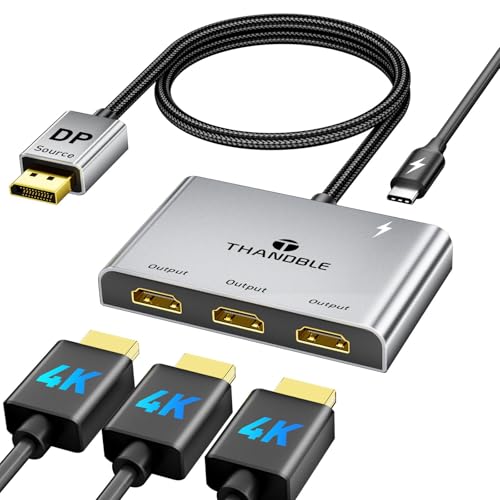
- Splits one DisplayPort source to three HDMI displays
- Up to 4K@60Hz with multi-screen support
- Needs external 5V/1A power and direct DP output
Best For: Desktop PC owners with a compatible DP GPU and three HDMI monitors
USB-C Triple Monitor Docking Adapter
5-in-1 USB-C hub with 3 HDMI ports and PD charging

- Three HDMI ports plus USB 3.0 and 100W PD
- Windows MST can extend three displays on supported systems
- Up to 4K@60Hz on compatible USB-C laptops
Best For: USB-C laptop users who want a triple-monitor dock with charging and data
Triple-Display USB-C Docking Hub – Selore 8-Port USB-C Dock
If you want a display adapter for triple monitors that also replaces a desk full of dongles, this Selore USB-C docking station is built for that job. It supports triple-display setups on Windows with 2 HDMI ports and 1 DisplayPort, while also adding Ethernet, USB ports, and up to 100W PD charging in one compact unit.
Best For: Windows users who need a triple-monitor dock with charging and wired networking
Pros:
- Supports triple 4K display output on Windows with 2 HDMI and 1 DisplayPort
- Adds 1Gbps Ethernet and multiple USB 3.0 ports for a fuller workstation setup
- Includes 100W PD charging support, with up to 85W output noted for safety
- Works with USB-C, Thunderbolt 3/4/5, and USB4 full-featured ports
Cons:
- macOS is limited to mirror mode for external displays and cannot extend to multiple different screens
- Only compatible with full-featured USB-C, Thunderbolt, or USB4 ports
- Power delivery output is capped at 85W for safety reasons
This is a strong all-in-one option if you need a desk dock rather than a simple video adapter. The tradeoff is that its full triple-display flexibility is mainly a Windows feature, so Mac users should look elsewhere if they need extended multi-monitor support.
GPU-Based 3-Monitor DP Splitter – 4K60 DP to 3 HDMI MST Hub
This display adapter for triple monitors is a one-way DisplayPort-to-HDMI solution made for desktops and graphics cards with a native DP 1.4 source. It splits one DP output into three HDMI displays, with support for 4K@60Hz output and MST extend mode on Windows when the system and cabling are compatible.
Best For: Desktop PC users with a DP 1.4 graphics card who want three HDMI monitors from one output
Pros:
- Converts one DisplayPort 1.4 source into three HDMI outputs
- Supports triple-monitor extended display on Windows with MST
- Delivers up to 4K@60Hz on supported setups
- Includes USB-C power input and a built-in cable for easier placement
Cons:
- Does not work with docking stations, KVM switches, or reverse signal flow
- Requires external power to function properly
- Must be used with a native DP 1.4 source, ideally from a dedicated GPU
For the right desktop setup, this is a straightforward way to drive three HDMI monitors from a single DisplayPort output. Just make sure your PC, GPU, and monitors all meet the DP 1.4 and 4K@60Hz requirements before buying.
Universal USB-C Triple Display Dock – Plugable 12-in-1 Triple Dock
If you need a display adapter for triple monitors that works like a full docking station, this Plugable model is a practical choice. It supports up to three HDMI displays and adds charging, wired networking, and multiple USB ports, making it a solid hub for mixed laptop fleets and hybrid workstations.
Best For: Hybrid workers and IT teams needing a broadly compatible triple-monitor USB-C dock
Pros:
- Supports up to three extended HDMI displays through DisplayLink and native USB-C video
- Provides 100W USB-C Power Delivery for laptop charging
- Includes Gigabit Ethernet and six USB 5Gbps ports for peripherals
- Compatible with Windows, macOS, and ChromeOS on supported USB-C systems
Cons:
- One display is 4K 30Hz and the other two are limited to 1080p 60Hz
- macOS requires driver installation for full functionality
- Not compatible with Linux, and HDCP is not supported
This dock is less about raw display specs and more about dependable multi-monitor productivity across many laptop types. If you want a single docking station that can handle triple displays plus peripherals and charging, it is an easy one to shortlist.
DP-to-Dual-Display Plus HDMI Splitter – 3-Monitor DP MST Hub
This display adapter for triple monitors is aimed at desktop systems that can output DisplayPort directly from the graphics card. It can mirror or extend one DP signal to two DisplayPort monitors and one HDMI monitor, with 4K60Hz support on compatible hardware and a plug-and-play setup.
Best For: PC users who want one DP input feeding two DP displays and one HDMI display
Pros:
- Supports 2 DisplayPort outputs plus 1 HDMI output from a single DP source
- Can mirror or extend displays on supported Windows systems
- Offers up to 4K60Hz with compatible DP1.4 equipment
- Plug-and-play operation with no driver installation required
Cons:
- Not compatible with laptops as the signal source
- macOS does not support MST extended display mode for this product
- Requires USB 5V power and a compatible DP1.2+ graphics card
For a desktop tower or GPU-based workstation, this is a flexible mixed-output splitter that covers both DP and HDMI screens. The main limitation is that it is not a universal adapter, so checking source-device compatibility is essential before purchase.
Dual-Screen Productivity Pick – WAVLINK USB-C to Dual HDMI Adapter
If you want a display adapter for triple monitors without a full dock, this WAVLINK adapter is aimed at simple dual-screen expansion from a single USB connection. It supports extend or mirror modes, works with Windows and macOS, and is best suited to productivity tasks like documents, spreadsheets, and web-based work rather than gaming or heavy creative apps.
Best For: Office users and travelers who need a compact USB-C to dual HDMI solution for everyday multitasking.
Pros:
- Supports dual-monitor extended or mirrored setups over one USB 3.0 connection.
- Works with USB-C, USB4, Thunderbolt 3/4, and USB 3.0 hosts.
- Compatible with Windows, macOS, Chrome OS, and Android OTG devices.
- Compact design with lifetime technical support and a 24-month warranty.
Cons:
- Driver installation is required, so it is not true plug-and-play.
- Not recommended for gaming, design work, or HDCP-protected streaming.
- Linux and iPad OS are not supported.
For buyers focused on basic workstation expansion, this is a practical adapter for adding two external displays from one port. Just keep expectations aligned with its productivity-first feature set and its limitations around protected video and high-performance workloads.
Feature-Packed Docking Choice – Selore Triple-Monitor USB-C Dock
This display adapter for triple monitors is more of a compact docking station, giving you dual HDMI, DisplayPort, and VGA outputs from a USB-C connection. It is designed for Windows multi-monitor use and also adds 100W PD charging plus extra USB ports, making it a strong desk-friendly option when you want display expansion and cable reduction in one unit.
Best For: Users who want a small USB-C dock with multiple display outputs and charging support for a busy workstation.
Pros:
- Offers dual HDMI, one DisplayPort, and one VGA for flexible monitor setups.
- Supports up to 4K video across the display outputs, with dual HDMI at 4K/60Hz and 4K/30Hz.
- Includes up to 100W PD charging and extra USB 2.0 plus USB-C ports.
- Works with Thunderbolt 3/4 and full-featured USB-C laptops from major brands.
Cons:
- Windows-focused; MacBooks are limited to mirroring rather than extended screens.
- Using VGA with a Mac can limit all connected screens to 1080p at 60Hz.
- Requires a USB-C port that supports video transmission and, for charging, Power Delivery.
If you need more than a basic adapter, this model stands out for adding both display flexibility and practical laptop charging. It is especially appealing for Windows users who want a single hub for monitors, peripherals, and power.
Three-Screen Extended Display Pick – USB-C to 3 HDMI Adapter with PD
For a display adapter for triple monitors built around true three-screen output, this USB-C to 3 HDMI adapter is designed to drive three separate HDMI displays from one USB-C source. It supports up to 4K at 60Hz, adds 100W PD charging, and is aimed at users who want a straightforward extended or mirrored workspace without relying on driver installation.
Best For: Windows users with Thunderbolt 3 or higher who want a direct 3-HDMI monitor setup with charging.
Pros:
- Drives three HDMI monitors from one USB-C input for multitasking.
- Supports up to 4K@60Hz and includes HDR for vivid image output.
- Built-in 100W PD charging helps free up laptop power ports.
- No drivers needed, with aluminum housing and gold-plated ports for durability.
Cons:
- Only Windows supports full 3-screen MST extended display.
- macOS does not support MST mode and is limited to mirror/single-screen expansion behavior.
- Requires a USB-C source with DP Alt Mode and does not work through hubs, docks, or KVMs.
This is the most direct triple-monitor option in the group if you need three HDMI outputs from one port. The trade-off is stricter compatibility, so it makes the most sense for laptops that clearly support the required video output standards.
Windows Triple-Display USB-C Hub – USB-C to 3 HDMI adapter with 100W PD and MST
If you need a display adapter for triple monitors on a Windows laptop, this UANTIN USB-C to 3 HDMI adapter is built for true triple-screen expansion. It uses MST to extend three independent displays on Windows, supports up to 4K@60Hz, and adds 100W PD passthrough so you can keep your laptop charged while using all three outputs.
Best For: Windows users who want a plug-and-play triple-monitor setup with charging passthrough.
Pros:
- Supports triple independent display on Windows via MST.
- Up to 4K@60Hz output with HDR support.
- 100W PD charging helps avoid using up a laptop port.
- All-aluminum shell and braided cable design for durability.
Cons:
- macOS is limited to mirroring or single-screen expansion.
- Requires a USB-C port with DP Alt Mode.
- Best results depend on using HDMI 2.0-capable monitors.
This is a strong pick if your priority is a straightforward three-monitor workspace on Windows. It focuses on stable video output, charging convenience, and driver-free setup rather than broad cross-platform flexibility.
Desktop DP Triple-Monitor Splitter – DisplayPort to 3 HDMI MST splitter for 4K setups
This display adapter for triple monitors is aimed at desktops and DP-equipped systems that need three HDMI outputs from one DisplayPort source. THANDBLE’s MST hub supports mirror and extended modes on compatible Windows setups, delivers up to 4K@60Hz, and includes the extra USB-C power lead required for operation.
Best For: Desktop users with a compatible DisplayPort GPU who want three HDMI monitors from one source.
Pros:
- Connects one DP source to up to three HDMI monitors.
- Supports up to 4K@60Hz and is backward compatible with lower resolutions.
- Works with desktop GPUs from AMD and NVIDIA that support multi-screen output.
- Aluminum shell, braided cable, and gold-plated ports for durability and signal stability.
Cons:
- Not compatible with macOS for extended MST display.
- Integrated GPUs and many laptop DP ports may only mirror or extend one display.
- Requires external 5V/1A power and is not for use with hubs, docks, or KVMs.
This is the right choice when your PC already has the right DisplayPort hardware and you want a compact way to feed three HDMI monitors. The tradeoff is that compatibility depends heavily on GPU bandwidth and direct DP support.
USB-C Triple Monitor Docking Adapter – 5-in-1 USB-C hub with 3 HDMI ports and PD charging
If you want a display adapter for triple monitors with extra dock features, this 5-in-1 USB-C hub combines three HDMI outputs, USB 3.0 data, and 100W PD charging. It supports up to 4K@60Hz on the HDMI ports and is built for USB-C laptops that support DisplayPort Alt Mode and DisplayPort 1.4.
Best For: USB-C laptop users who want a triple-monitor dock with charging and a USB data port.
Pros:
- Three HDMI 2.0 ports for a triple-monitor workstation.
- Includes USB 3.0 plus 100W PD charging support.
- Windows MST mode can extend three independent displays when compatible.
- Aluminum housing and shielding help with heat and signal stability.
Cons:
- Triple-display support requires USB-C video output plus DisplayPort 1.4.
- On macOS, external monitors mirror due to system limitations.
- Some devices with DP 1.2 are limited to two external monitors.
This adapter makes sense if you want more than just video outputs and prefer an all-in-one travel or desk dock. Its strongest advantage is combining triple display support with charging and a USB port in a single compact unit.
How We Picked These Display Adapter for Triple Monitors Options
We prioritized real-world compatibility, supported output modes, power delivery, and port variety. For a Display Adapter for Triple Monitors, the biggest question is not just whether it can output three screens, but whether it can do so at the resolution and refresh rate you actually need.
We also favored products with clear specs, broader device support, and useful extras like Ethernet, USB ports, and charging pass-through for laptop users.
Quick Comparison: Which Type Fits Your Setup?
There are two main paths: docking stations with multiple video outputs, and MST-style splitters that turn one video signal into several extended displays. Docks are usually better if you want more connectivity and laptop charging. Splitters are often simpler if your goal is focused on display expansion only.
If you need the most stable desktop-style experience, a dock is often the easiest choice. If you mainly want to drive three monitors from one port, a compact adapter or hub may be enough.
Key Buying Factors for a Display Adapter for Triple Monitors
Connection Type
Check whether your computer has USB-C with DisplayPort Alt Mode, Thunderbolt, HDMI, or native DisplayPort. The wrong host connection is the most common reason triple-monitor setups fail.
Resolution and Refresh Rate
Not all “4K” claims mean the same thing across three displays. Many adapters can only deliver full 4K on one output, while the others may drop to 1080p. If you work with spreadsheets, code, or media timelines, confirm the exact output limits.
Operating System Support
Windows typically offers the broadest support for extended displays. macOS and ChromeOS can be more limited depending on the chipset and whether the adapter uses MST or DisplayLink-style technology.
Power Delivery and Expansion
If you use a laptop, look for pass-through charging so one cable handles both displays and power. Extra USB ports, Ethernet, and audio can make a dock much more useful than a basic splitter.
Who Should Buy Which Display Adapter for Triple Monitors?
Choose a full docking station if you want an all-in-one desk setup with charging and peripherals. Choose an MST splitter if your main priority is adding three displays from a compatible Windows or USB-C system. Choose a simpler adapter if you only need basic monitor expansion and want to keep your setup compact.
For anyone shopping for a Display Adapter for Triple Monitors, the best pick is the one that matches your computer’s video output standard, your operating system, and your target resolution on all three screens.