
If you want cleaner PC audio, stronger headphone output, and better positional sound, a dedicated sound card with headphone amplifier can make a noticeable difference.
This roundup focuses on models that balance sound quality, power, features, and compatibility for gamers, creators, and everyday listeners.
Best 10 Sound Card with Headphone Amplifier Picks for 2026
Immersive Gaming Upgrade

- 7.1 surround output for gaming
- Works with PC, Mac, PS4, Xbox
- Up to 192 kHz sample rate
Best For: Gamers wanting external surround audio and headphone amp support
Compact Desktop DAC Amp

- USB, optical, and coax inputs
- Drives 16Ω to 200Ω headphones
- Bass and treble tone controls
Best For: Entry-level desktop audio and simple headphone amplification
USB Surround for Headphones

- 7.1 and 5.1 surround support
- Mic and line-in included
- Up to 384 kHz headphone output
Best For: Compact USB surround audio for laptop and PC headphone users
High-Res Dual Input Amp

- Dual USB-C inputs for mixing
- 32-bit/384 kHz high-res playback
- Xamp discrete bi-amplifier
Best For: High-performance desktop audio with dual-device USB flexibility
Internal Hi-Res Gaming Upgrade
Creative AE-5 Plus PCIe Sound Card

- Xamp discrete headphone amp for up to 600Ω headphones
- SABRE32 DAC with 32-bit/384 kHz playback
- Dolby Digital Live, DTS, and 7.1 virtual surround
Best For: PC gamers who want an internal sound card with a strong headphone amp and hi-res DAC
Compact External DAC/Amp
Fosi Audio K5 Pro DAC Headphone Amp

- External sound card-style DAC amp for PS5, PC, and Mac
- Drives 16Ω to 300Ω headphones with mic support
- USB-C, optical, coaxial, RCA, and 3.5 mm connections
Best For: Users who want a compact external DAC amp with microphone support and flexible connections
Versatile External Audio Hub
Creative Sound Blaster X4 USB DAC Amp
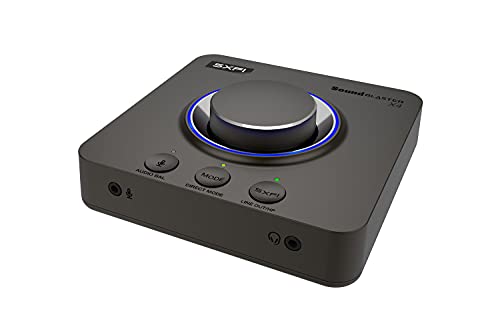
- External USB DAC and headphone amp with 600Ω support
- 7.1 surround, Super X-Fi, and Dolby Digital Live
- Optical-in, USB-C, and SmartComms/CrystalVoice features
Best For: PC, Mac, and console users who want one external hub for headphones, speakers, and voice chat
Portable Gaming DAC/Amp

- USB DAC with discrete Xamp headphone amp
- 130dB DNR, 32-bit/384kHz playback
- 7.1 virtual surround, Dolby Digital, Scout Mode
Best For: Multi-platform gamers who want portable high-res headphone audio
Internal PC Sound Card

- PCIe sound card with ESS 9018 DAC
- Xamp bi-amp powers headphones up to 600Ω
- Audio Control Module adds knob and I/O
Best For: Desktop PC users who want internal hi-res audio and strong headphone drive
External USB DAC/Amp

- USB-C DAC amp with 7.1 surround rendering
- Adjustable sidetone and EQ presets
- Switches between headphone and speaker output
Best For: Users who want a simple external desktop DAC/amp with gaming controls
Immersive Gaming Upgrade – Creative Sound BlasterX G5
If you want a sound card with headphone amplifier for gaming, the Creative Sound BlasterX G5 is built around immersive PC, Mac, and console audio. Its 7.1 output mode, 192 kHz support, and 120 dB signal-to-noise ratio make it a practical pick for players who want external audio processing and cleaner headphone output.
Best For: Gamers who want a multi-platform external sound card with headphone amplification and surround sound support.
Pros:
- 7.1 surround output for immersive PC gaming audio
- Compatible with PC, Mac, PS4, and Xbox One
- Supports up to 192 kHz sample rate
- Includes Sound Blaster Acoustic Engine Pro features
Cons:
- Designed mainly for headphone and gaming use rather than speaker setups
- Requires USB-based external connection
This is a strong choice if your priority is surround-style gaming audio with a dedicated headphone amp in a compact external unit. It is especially appealing when you want one device that can work across several platforms.
Compact Desktop DAC Amp – Fosi Audio Q4
The Fosi Audio Q4 is a straightforward sound card with headphone amplifier for desktop listening, especially if you want a simple USB, optical, or coaxial DAC for headphones and powered speakers. It offers plug-and-play setup, bass and treble controls, and 24-bit/192 kHz support in a compact metal enclosure.
Best For: Entry-level listeners who want an easy DAC and headphone amp for computers, TVs, and small stereo setups.
Pros:
- USB, optical, and coaxial inputs for flexible connections
- Drives headphones from 16Ω to 200Ω
- Bass and treble knobs for quick sound tuning
- Compact metal shell with 24-bit/192 kHz support
Cons:
- No microphone input
- Stereo output only, not surround audio
If you want a budget-friendly desktop audio upgrade, the Q4 focuses on the essentials without extra complexity. It makes sense for users who need headphone amplification and clean DAC performance more than gaming features.
USB Surround for Headphones – Cubilux 7.1 USB Sound Card
This sound card with headphone amplifier is aimed at laptop and PC users who want 7.1 or 5.1 surround audio without adding a large external box. The Cubilux USB model supports headphone output, line-in, and mic input, and its aluminum alloy case is designed to reduce interference and static noise.
Best For: Laptop and PC users who want a compact USB surround sound adapter for headphones with mic and line-in support.
Pros:
- 7.1 and 5.1 surround sound support
- Headphone, line-in, and mic input support
- Up to 384 kHz headphone sampling rate
- Full aluminum alloy housing for interference isolation
Cons:
- Not compatible with Windows XP, 7, or 8
- Limited to USB-connected laptop and PC use
For users who want a small external audio adapter rather than a desktop DAC box, this model covers the basics well. Its main appeal is surround support plus headset connectivity in a very compact design.
High-Res Dual Input Amp – Sound Blaster G8
The Sound Blaster G8 is a premium sound card with headphone amplifier for users who want high-resolution desktop audio and flexible connectivity. It features dual USB-C inputs, playback up to 32-bit/384 kHz, and Creative’s Xamp discrete bi-amplifier for individually driven left and right headphone channels.
Best For: Users who want a high-performance external DAC and headphone amp with dual-device USB input and high-resolution playback.
Pros:
- Dual USB-C inputs for mixing two USB devices
- Up to 32-bit/384 kHz playback support
- Xamp discrete bi-amplifier for separate left/right channels
- 130 dB dynamic range and Sound Blaster Acoustic Engine
Cons:
- More feature-heavy than a basic audio adapter
- Surround support is listed as 5.1 rather than full 7.1
This is the most advanced option in the group if you care about resolution, amplification quality, and device flexibility. It suits buyers who want a serious desktop audio upgrade rather than a simple plug-in accessory.
Internal Hi-Res Gaming Upgrade – Creative AE-5 Plus PCIe Sound Card
If you want a sound card with headphone amplifier built for PC gaming and hi-res playback, the Creative Sound BlasterX AE-5 Plus is a strong internal option. It combines a SABRE32-class PCIe DAC with Creative’s Xamp discrete headphone amp, plus Dolby Digital Live, DTS Encoding, and 7.1 virtual surround for a feature-packed desktop upgrade.
Best For: PC gamers and headphone users who want an internal PCIe sound card with hi-res DAC performance and a powerful amp for demanding headphones.
Pros:
- Xamp discrete headphone amp with bi-amplification and support for headphones up to 600Ω
- SABRE32 DAC with up to 32-bit/384 kHz playback and 122 dB SNR
- Dolby Digital Live, DTS Encoding, and 5.1 discrete / 7.1 virtual surround support
- Customizable RGB lighting plus included RGB LED strip
Cons:
- Requires a PCIe x4 slot and a Windows PC
- Best suited to users who want an internal add-in card rather than a USB unit
This is the most feature-rich pick here if you want internal installation, strong headphone drive, and gaming-focused audio processing in one card. It leans heavily into PC gaming while still offering hi-res audio specs for music and movies.
Compact External DAC/Amp – Fosi Audio K5 Pro DAC Headphone Amp
The Fosi Audio K5 Pro is a practical sound card with headphone amplifier if you want a compact external DAC/amp for gaming and desktop audio. It works over USB Type-C, optical, or coaxial, and outputs to RCA or 3.5 mm, with microphone support and enough power to drive headphones from 16Ω to 300Ω.
Best For: Gamers and desktop users who want an affordable external DAC amp with mic support, simple controls, and flexible inputs/outputs.
Pros:
- Works as an external sound card for PS5, PC, Mac, and computers
- Drives 16Ω to 300Ω headphones and includes a microphone interface
- USB Type-C, optical, and coaxial inputs with RCA and 3.5 mm outputs
- Master volume, bass, treble, and input mode controls on the unit
Cons:
- USB Type-C mode is limited to up to 24-bit/96 kHz
- Less emphasis on surround-processing features than gaming-focused cards
The K5 Pro is a straightforward choice when you want external flexibility more than software-heavy effects. Its clean, compact design and broad compatibility make it a useful desktop hub for headphones and speakers.
Versatile External Audio Hub – Creative Sound Blaster X4 USB DAC Amp
The Sound Blaster X4 is a strong sound card with headphone amplifier for users who want external USB audio, surround features, and easy device switching. It adds 7.1 discrete surround, Super X-Fi, Dolby Digital Live, optical-in, and a headphone amp that can drive studio-grade headphones up to 600Ω.
Best For: PC, Mac, and console users who want an external USB DAC/amp with surround sound, optical input, and strong headphone drive.
Pros:
- Headphone amp supports studio-grade headphones up to 600Ω
- 7.1 discrete surround with Super X-Fi and Dolby Digital Live
- Optical-in plus USB-C makes it easy to connect multiple devices
- Includes SmartComms Kit and CrystalVoice for clearer communication
Cons:
- More feature-rich than a basic DAC/amp, so setup may be more involved
- Best value will depend on whether you use the surround and communication features
This is the most versatile external pick in the group if you need one box for headphones, speakers, and comms. It balances high audio clarity with practical control options for gaming, music, and calls.
Portable Gaming DAC/Amp – Sound BlasterX G6
If you want a sound card with headphone amplifier that works across PC and consoles, the Sound BlasterX G6 is built for exactly that kind of upgrade. It combines a USB DAC, discrete Xamp amplification, and gaming-focused audio processing in a compact unit designed to improve clarity, spatial cues, and headphone drive power.
Best For: Gamers on PS4, Xbox One, Nintendo Switch, or PC who want portable high-res audio and strong headphone amplification.
Pros:
- Discrete Xamp headphone amplifier with 1Ω output impedance for sensitive IEMs and up to 600Ω headphones
- 130dB DNR and 32-bit/384kHz DAC for detailed playback
- 7.1 virtual surround, Dolby Digital decoding, and Scout Mode for gaming cues
- USB connectivity and console support make it easy to move between systems
Cons:
- Audio output mode is stereo, with surround handled through virtualization
- Best fit is for headphone use rather than speaker-focused setups
For buyers who want a portable DAC/amp with serious gaming features, the G6 is a strong all-around pick. Its mix of high-resolution decoding, headphone amp power, and console compatibility makes it especially practical for players who want one device for multiple platforms.
Internal PC Sound Card – Creative Sound Blaster AE-7
The Creative Sound Blaster AE-7 is a sound card with headphone amplifier for desktop PC users who want an internal upgrade with strong audio processing and a dedicated control module. It pairs a PCIe DAC with Xamp headphone amplification, making it a good fit when you want clean playback, surround support, and convenient physical controls on the desk.
Best For: PC gamers and desktop listeners who want an internal PCIe sound card with a powerful headphone amp and desktop control module.
Pros:
- ESS SABRE-class 9018 DAC with 127dB DNR and 32-bit/384kHz playback
- Xamp discrete headphone bi-amp drives headphones up to 600Ω with 1Ω output impedance
- Audio Control Module adds a volume knob plus 1/4-inch and 1/8-inch mic/headphone I/O
- Supports discrete 5.1 speakers and up to 7.1 virtual surround
Cons:
- Requires a PCI Express x4 slot and is designed for PC use only
- Less portable than external USB options
If you want an internal card instead of a USB box, the AE-7 delivers a more permanent desktop setup. Its headphone amplification, hardware audio processing, and handy control module make it especially appealing for users who value both sound quality and tactile control.
External USB DAC/Amp – EPOS GSX 1000 2nd Edition
The EPOS GSX 1000 2nd Edition is a sound card with headphone amplifier aimed at users who want an external USB solution with easy controls and built-in gaming features. It offers 7.1 surround rendering, sidetone adjustment, and EQ presets, making it a practical desktop companion for Windows and Mac setups.
Best For: Gamers and desktop users who want an easy-to-use external USB DAC/amp with sidetone and quick switching.
Pros:
- External USB-C DAC amp with 7.1 surround sound rendering
- Adjustable sidetone lets you hear your voice in real time
- Dedicated EQ presets and an aluminum volume wheel for quick control
- Can switch between headphone and speaker output without unplugging cables
Cons:
- 48kHz maximum sample rate is lower than some hi-res competitors
- Designed around stereo headphones with virtual surround rather than discrete multichannel output
For buyers who want a simple external unit instead of an internal card, the GSX 1000 2nd Edition keeps the experience straightforward. Its mix of sidetone, surround processing, and physical controls makes it a useful everyday option for gaming and general desktop audio.
How We Picked the Best Sound Card with Headphone Amplifier
We prioritized sound quality, headphone-driving power, connection options, surround processing, platform support, and overall value. For a Sound Card with Headphone Amplifier, the best choice is not just the one with the most features; it is the one that matches your headphones, your source device, and how you actually listen.
Quick Comparison
External USB models are usually the easiest to set up and are ideal for laptops, consoles, and desktops that need simple plug-and-play audio upgrades. PCIe cards are better for permanent desktop setups and can offer cleaner integration, stronger software control, and more stable performance. DAC/amp hybrids tend to deliver the most flexible everyday use, especially if you switch between headphones, speakers, and multiple devices.
Key Buying Factors for a Sound Card with Headphone Amplifier
Headphone Power and Impedance Match
Check whether the amp can properly drive your headphones. Low-impedance gaming headsets are easy to power, but higher-impedance studio or audiophile headphones often need more output to sound full and detailed.
Analog Sound Quality and DAC Performance
Look for a clean DAC section, low noise, and good dynamic range. If you hear hiss, distortion, or weak volume from your onboard audio, a better DAC section may be the biggest upgrade.
Surround, EQ, and Gaming Features
Virtual surround, scout-style mode, EQ presets, mic monitoring, and sidetone can be helpful for gaming. For music-first listeners, simpler signal paths and higher-quality stereo playback may matter more than extra software features.
Connections and Compatibility
Make sure the unit works with your PC, Mac, PlayStation, or other source devices. USB models are typically the most versatile, while PCIe options are best suited to desktop towers with open expansion slots.
Speaker Support and Outputs
If you use both headphones and powered speakers, choose a model with the right line-out, optical, or coaxial connections so you can switch setups without extra adapters.
Who Should Buy Which Sound Card with Headphone Amplifier?
Gamers who want easier footsteps, clearer chat, and surround processing should look at feature-rich external USB options. Music listeners and home desktop users may prefer a simpler DAC/amp focused on low-noise stereo output. If you want the most integrated desktop solution, a PCIe Sound Card with Headphone Amplifier is usually the best fit. Choose based on your headphones first, then match the feature set to your desk setup and listening habits.